Copy trading delay is the time between the wallet you copy making a trade and your copy landing on chain, and on Solana it is the main reason copied trades get a worse price. You cannot remove the delay completely, but a fast bot with the right slippage and priority fee settings can shrink it to a fraction of a second.
This guide is about execution: why the gap exists, what it costs you and how to set up Thor so your copies land as close to the original as possible. If you are new to copy trading, start with how to copy trade Solana wallets. If you need wallets to follow, read how to find Solana whale wallets to copy.
Why Copy Trades Get a Worse Price
A copy trade is a reaction. Your bot watches a target wallet, sees it trade, then sends your own trade for the same token. Every copy goes through the same steps:
- The wallet you copy sends its trade and it lands on chain.
- Your copy bot detects the trade.
- The bot builds and signs your copy with your settings.
- The copy is sent to the network and waits to be included.
- Your copy lands.
Steps 2 to 5 are your copy trading delay. During that time, three things push the price against you:
- Their trade moved the price. On a small memecoin, the copied wallet's own buy pushes the price up. You buy after it, so you pay more.
- Other people copy the same wallet. Popular wallets are followed by many traders and bots. They all react to the same trade at the same moment, and each buy that lands before yours raises your price.
- The coin keeps moving. Fresh launches can move a lot in a second. The longer your copy takes, the further the price can drift.
That is why the docs are clear: you will not get exactly the same prices or results as the wallet you copy. The goal is not to match them. It is to keep the gap as small as possible, so the wallet's edge is still there after your costs.
Can a Copy Trade Land in the Same Block?
People often search for "copy trade same block" hoping to match the original trade exactly. It does happen: about 70% of Thor copy trades land in the same block as the trade they copy. A copy bot still reacts to a trade it has already seen, so the original is first in that block, and no copy bot can land every copy in the same block.
What you can control is everything after the trade is detected: how quickly your copy is sent, which path it takes to the network, how much priority you pay and how much price movement you accept.
How Fast Are Copy Trades in Thor?
Copy trades in Thor run on Thor's servers, around the clock, even when Telegram is closed. Each copy is built and sent as soon as the wallet's trade is seen, with the settings of that copy trade. You do not need to keep the app open or do anything at the moment of the trade.
About 70% of Thor copy trades land in the same block as the trade they copy. Thor trades usually land in under half a second in normal conditions. Read Why Thor is fast for more.
Note: Speed and price are never guaranteed. When the whole network is congested, any trade can be slower. Even in the same block, your copy comes after the original trade, so your price can still differ from theirs.
Settings That Reduce the Gap
Each copy trade in Thor has its own transaction settings, so you can tune a fast memecoin sniper differently from a slower swing trader.
 Thor Trading Bot

- Paste the wallet. Paste the address of the wallet you copy.
- Create it. The copy trade starts watching at once.
- Check the feed. Skipped and failed copies say why.
Set Up a Fast Copy Trade
- Open Account → Orders and automation → Copy trade and tap New copy trade, or type
/copytradein the bot chat. - Paste the Wallet to copy and give it a name.
- Under When they buy, choose Fixed, Same as them or A share.
- Choose what happens when they sell: Copy sells, Auto sell or No sell.
- Set slippage and priority fee for this copy trade, then tap Create copy trade.
Thor Trading Bot1234- Paste. Paste the address of the wallet you copy.
- Same as them. Spend what they spend, up to your cap.
- Market cap. A narrow market cap range skips coins too thin or too big for you.
- Create copy trade. Each copy trade keeps its own slippage and priority fee.
Priority Fee
A priority fee is an extra network fee that helps your trade land faster when the network is busy. When the wallet you copy is buying into a hot launch, many other trades compete for the same blocks. A higher priority fee helps your copy get picked sooner. Set it per copy trade: higher for wallets that snipe fresh launches, lower for wallets that trade calmer tokens.
Slippage
Slippage is how far the price may move between the copied trade and yours landing. If it moves more, the trade is cancelled instead of filling at a bad price. This is the key trade-off in copy trading:
- Too low: many copies fail on fast coins, and you miss the trades you wanted.
- Too high: copies land, but sometimes at a price far above the wallet's entry.
Pick a level that matches how fast the wallet's coins move, then check the results in the live feed. See Slippage and priority fees.
Size Your Copies
Your own buy size moves the price too. On thin coins, a big copy adds price impact on top of the delay. A share copies a share of what the wallet spends, up to a cap, and Same as them copies their amount up to your cap. Both keep a single large trade from becoming an expensive fill.
Exits
Delay hits sells too. With Copy sells, you sell the same number of tokens they sell, up to what you hold, after they have already sold. If you would rather exit on your own terms, choose Auto sell to use your own take profit and stop loss targets. Read Auto sell.
Check Your Real Results in the Live Feed
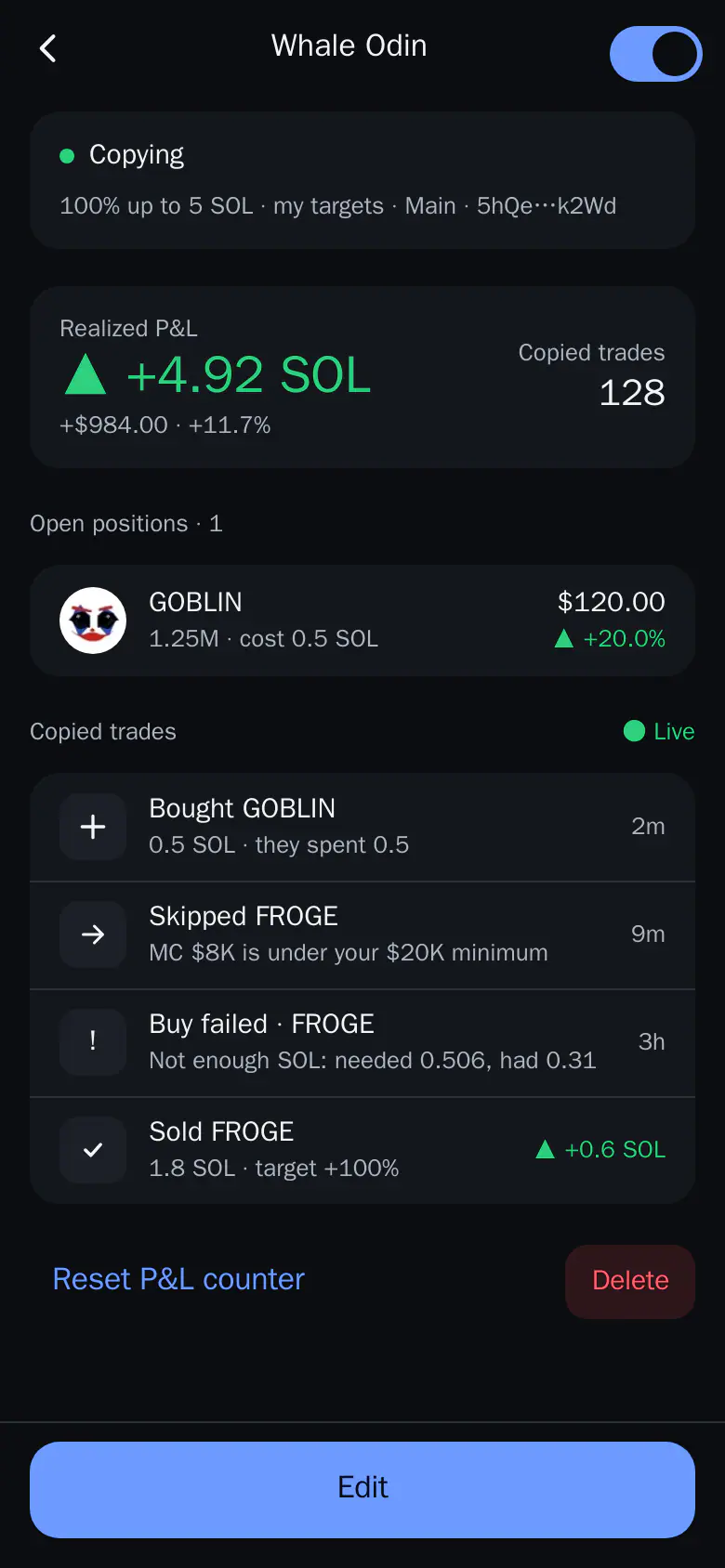
The only honest way to measure copy trading delay is to compare what you actually got. Open a copy trade to see its live feed.
Review a Copy Trade
- Open Account → Orders and automation → Copy trade and tap a copy trade.
- Check its status, P&L and open positions.
- Scroll to Copied trades to see each buy, sell, skipped buy and failed buy with its reason.
- Tap Edit to change its settings, or Reset P&L counter to start counting again.
Thor Trading Bot123- Skipped FROGE. A skipped copy says why, here because the market cap was under your minimum.
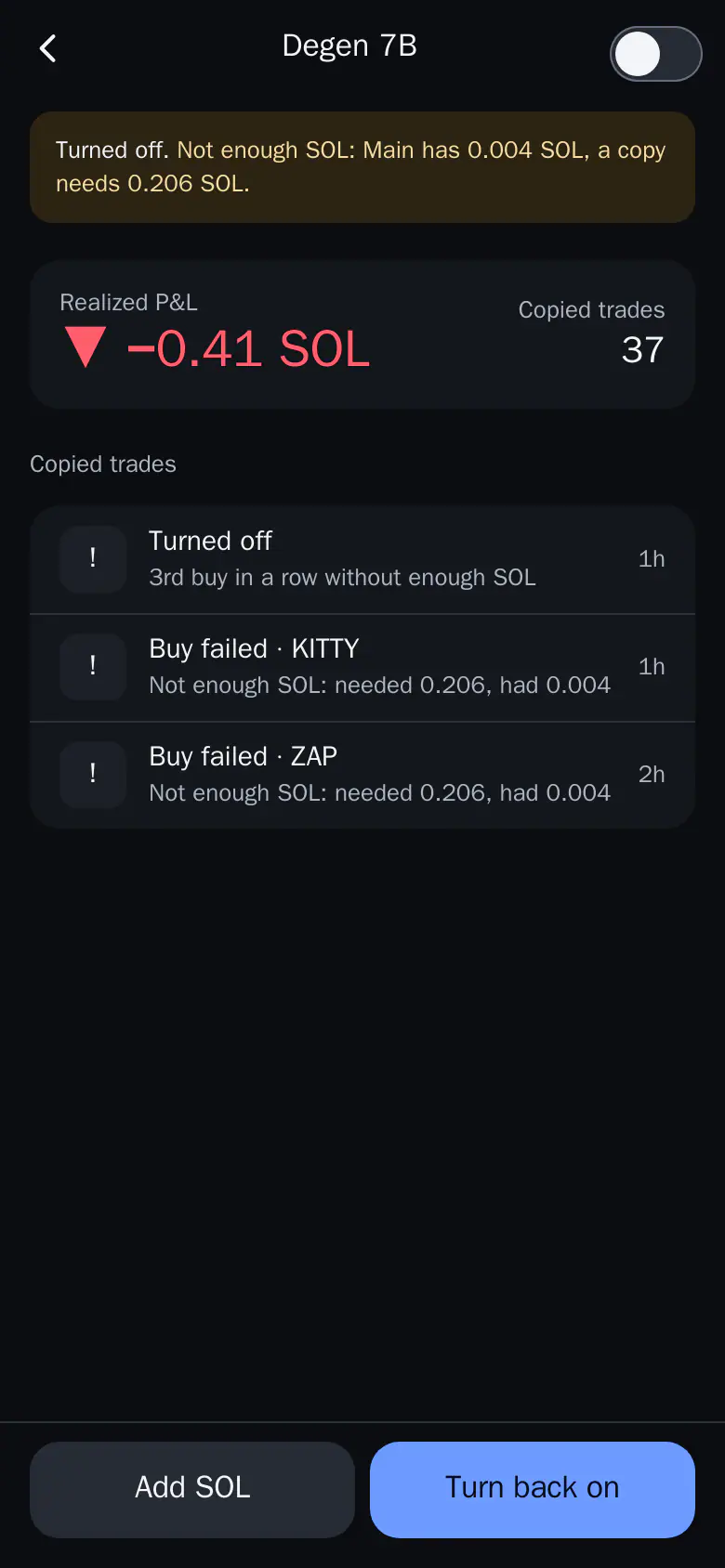
- Buy failed. A failed buy says what was missing, for example not enough SOL.
- Edit. Change the amount, filters, slippage or priority fee.
If many buys fail, look at the reason. A failed buy for lack of SOL means you need to top up. Repeated price moves past your slippage mean the coins are faster than your settings allow. Turn on trade alerts under Account → In the bot chat to get a chat message for every copy trade.
Thor Trading Bot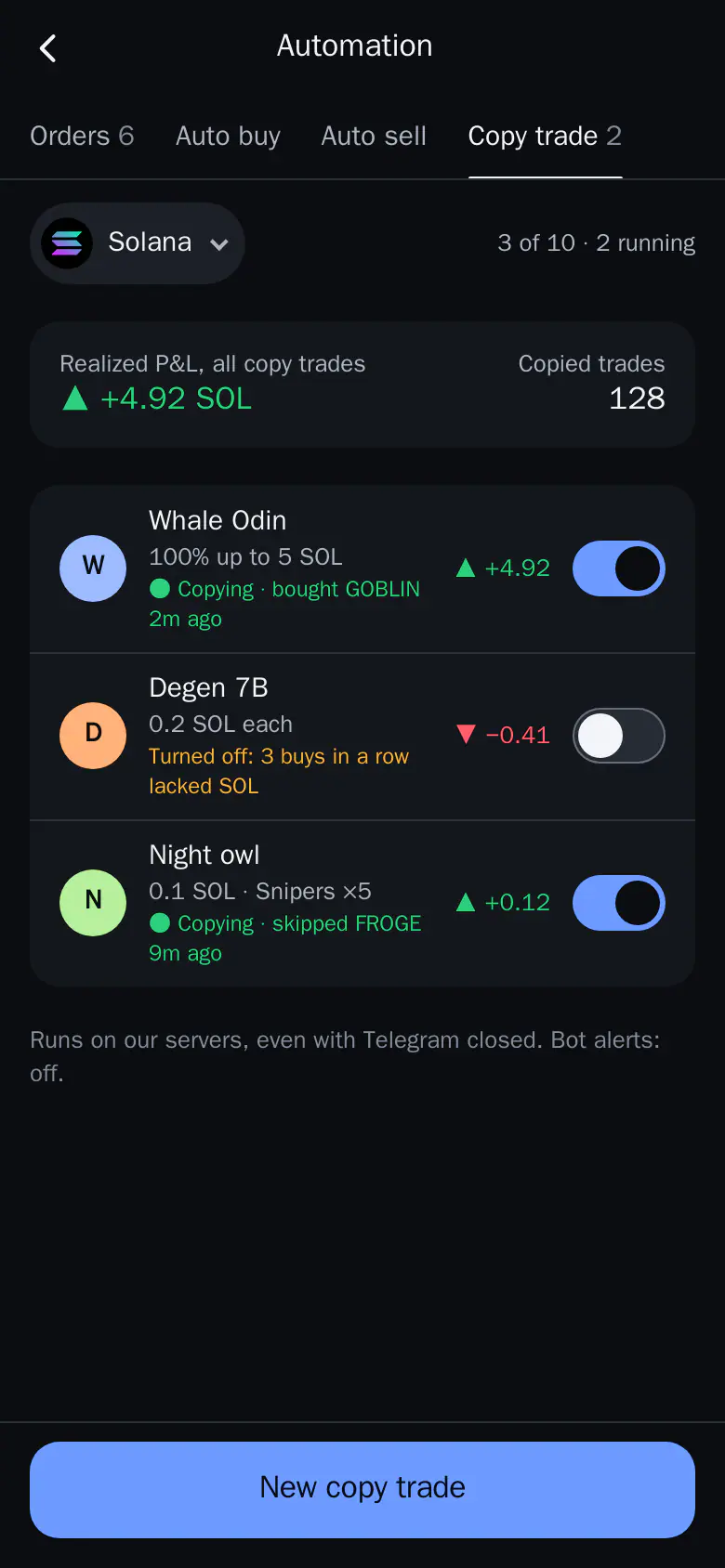 Thor Trading Bot
Fees on Copy Trades
Copied trades are normal spot trades. Thor charges a flat 0.5% per spot trade, half the 1% that many Telegram trading bots charge. Active copy trading adds up quickly, so the subscription is worth a look: $100 for 30 days cuts Thor's bot fees on spot trading and bridging to 0% on Solana and every EVM chain, and breaks even at $20,000 of spot volume in 30 days. Network and priority fees are still paid. See Fees.
Start Copy Trading Faster
Open Thor on Telegram, create a copy trade, set your slippage and priority fee, and watch the live feed for a few days before you scale up. Only copy wallets you trust, and only trade what you can afford to lose.
Frequently asked questions
Why do my copy trades get a worse price than the wallet I copy?
Your copy can only start after the wallet's own trade is visible on chain. By then their buy has already moved the price up, and other copiers may be buying too. You will not get exactly the same price or results as the wallet you copy.
Can a copy trade land in the same block as the original trade?
Yes, often. About 70% of Thor copy trades land in the same block as the trade they copy. The original trade is still first in that block, and no bot can land every copy in the same block.
How fast is copy trading with Thor on Solana?
Copy trades run on Thor's servers, even when Telegram is closed, and about 70% of them land in the same block as the trade they copy. Thor trades usually land in under half a second in normal conditions. Speed is never guaranteed when the network is congested.
What slippage should I use for copy trading?
Use enough slippage for the coins the wallet trades. Fresh memecoins move fast, so very low slippage makes many copies fail. Too much slippage can give you bad fills. Each copy trade in Thor has its own slippage and priority fee.
Why did my copy trade fail?
The most common reasons are the price moving past your slippage or not having enough SOL in your wallet. Open the copy trade to see its live feed, which shows every copied, skipped and failed trade with the reason.
Step-by-step in the Docs
- Copy trade: Follow any wallet and trade the same tokens from yours, with per-copy P&L and a live feed.
- Why Thor is fast: What to expect from trade speed in Thor, and how to follow a trade as it lands.
- Automation hub: One place for your orders, Auto buy, Auto sell and Copy trade, in Account.
- Slippage and network costs: Control how far the price may move and how fast your trade lands.
- Auto sell: Add take profit, stop loss and trailing stop to every new buy, wherever you buy.