To reclaim SOL rent from empty token accounts in Thor, open a wallet page, tap Clean wallet and choose Burn dust. Thor lists the empty token accounts it will close and the SOL you get back, usually about 0.002 SOL per account. Hold the button to confirm: no PIN is asked, and the SOL goes straight back to the wallet that held the accounts.
If you trade memecoins, you probably have dozens or even hundreds of these accounts sitting in your wallet. Each one holds a little SOL that you can get back in a few taps.
How Do I Reclaim SOL Rent From Empty Token Accounts?
Thor's Clean up screen does the whole cleanup in one flow. Burn dust closes the empty token accounts and burns near-worthless tokens so their accounts can be closed too.
 Thor Trading Bot
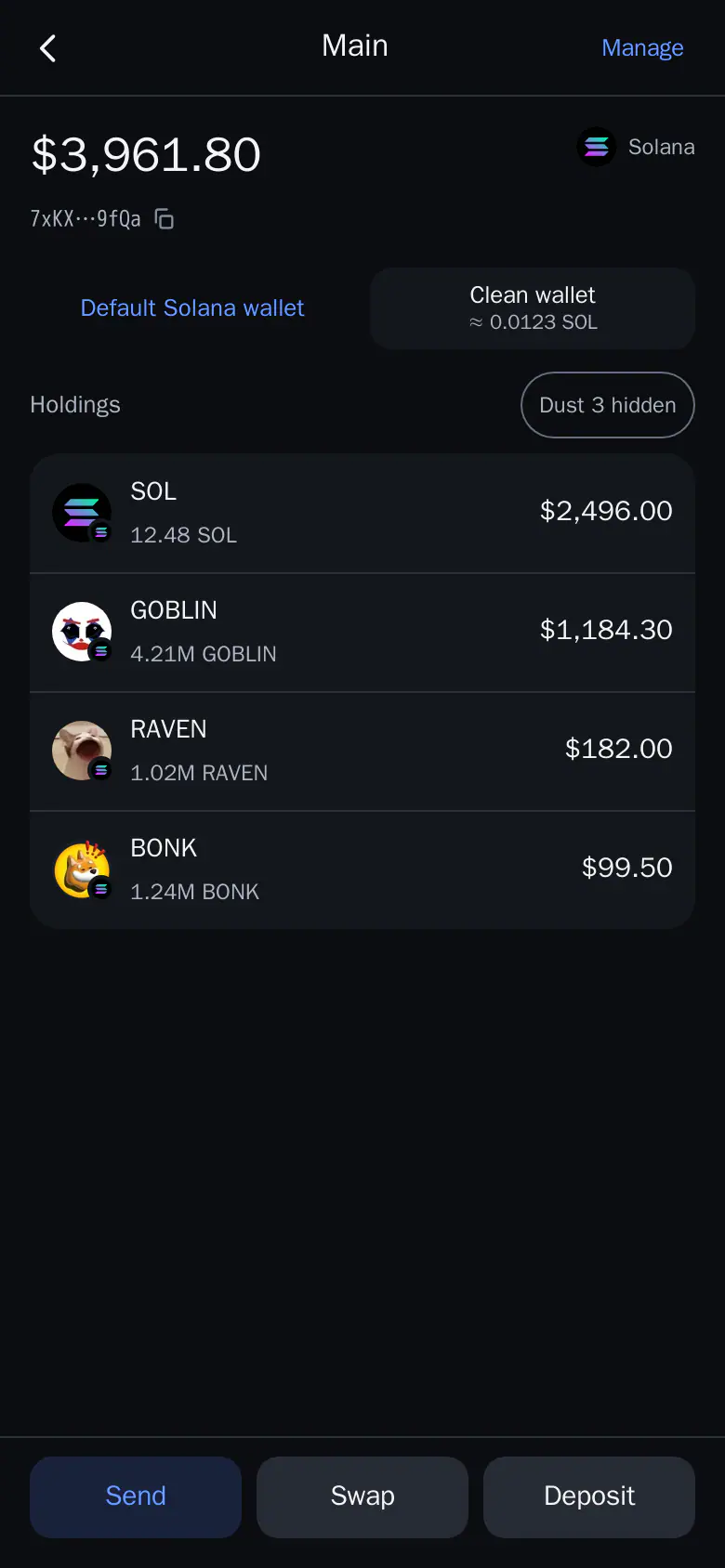
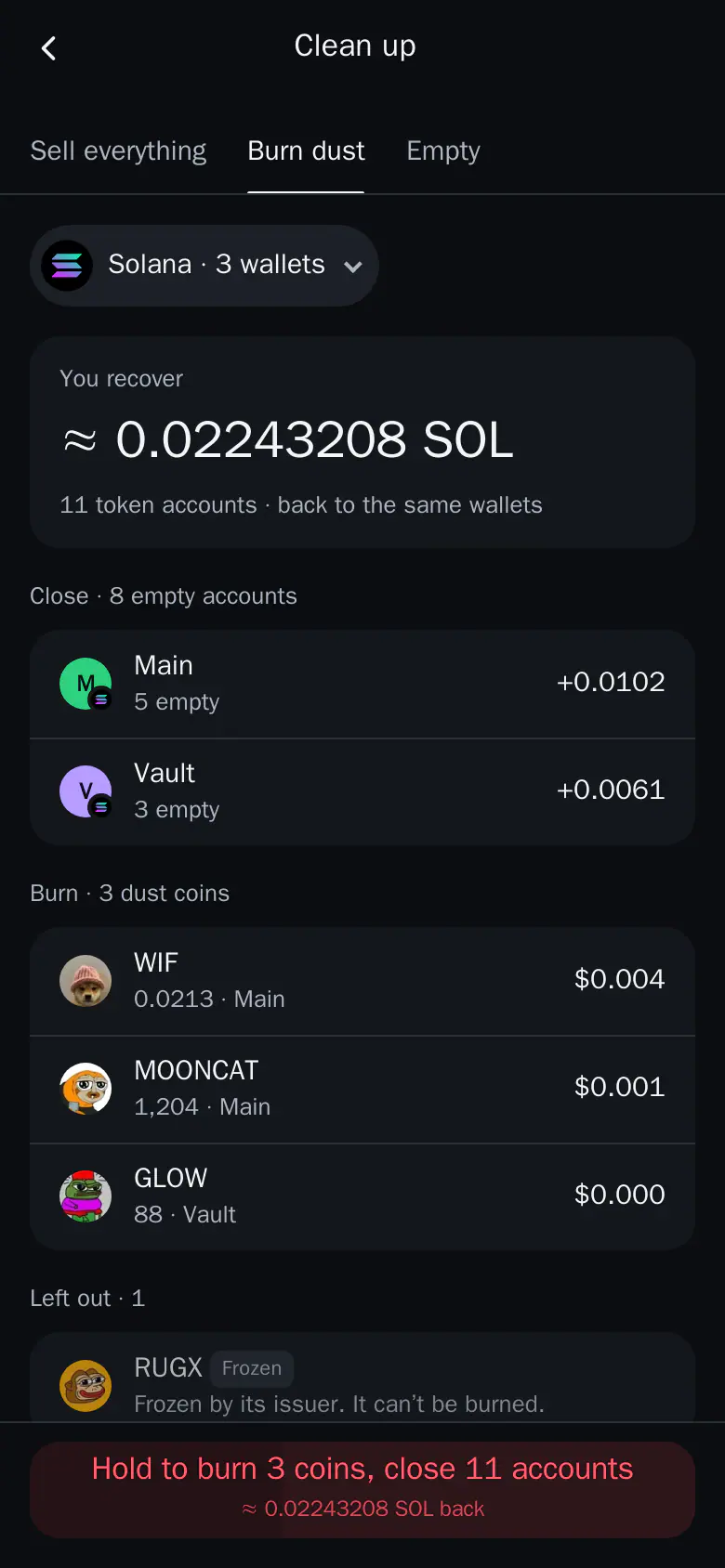
- Open Clean wallet. The button shows about how much SOL you get back.
- Hold to confirm. Burn dust closes the accounts and returns the SOL.
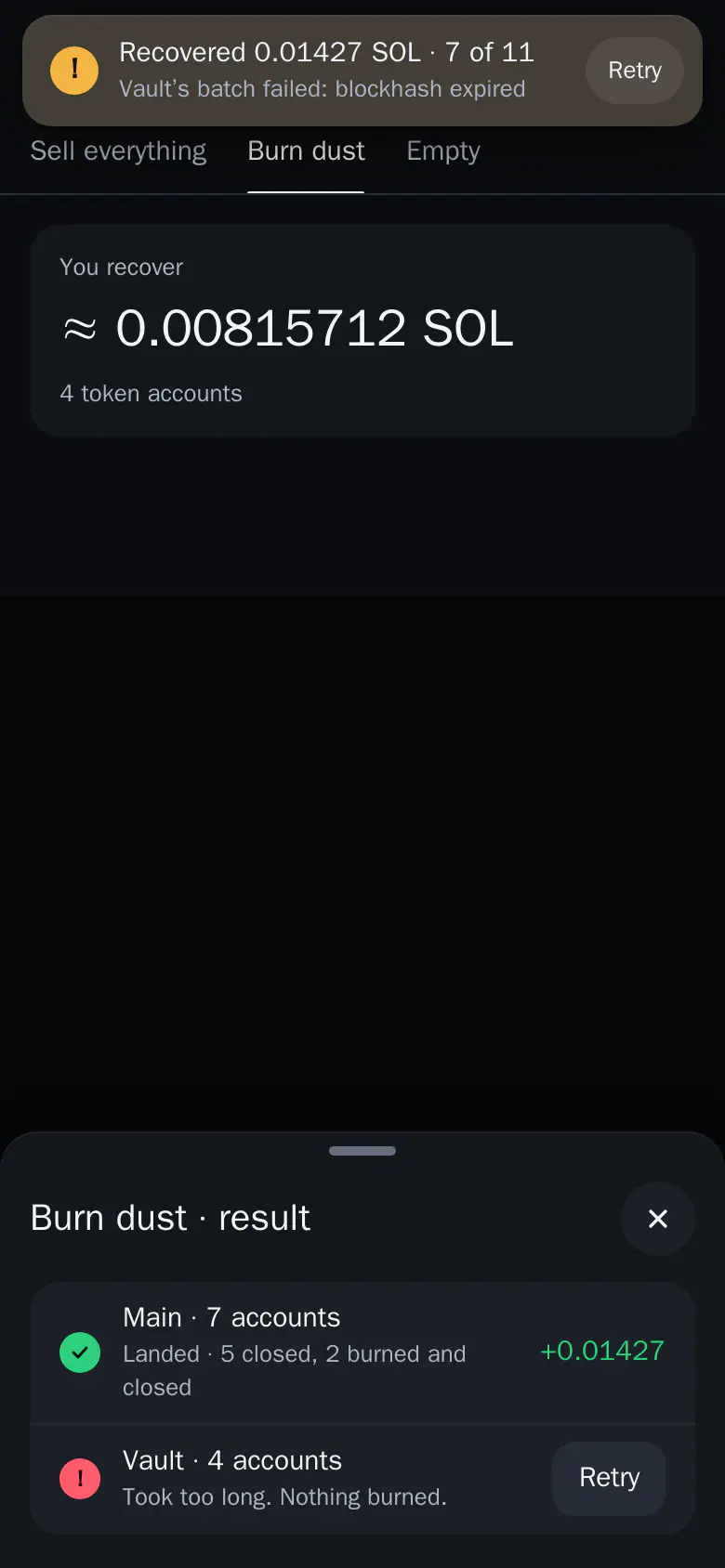
- Read the result. Each wallet shows what landed and what failed.
Close Empty Token Accounts With Burn Dust
- Open Thor on Telegram, open the Mini App and tap a Solana wallet in Home → Wallets.
- Tap Clean wallet. The Clean up screen opens on Burn dust.
- Check You recover, then the list: Close shows the empty accounts and the SOL from each wallet, Burn shows the dust coins, and Left out shows what Thor will not touch.
- Hold the button to burn the coins and close the accounts.
- Read the result. If anything failed, Retry repeats only the failed part.
Thor Trading Bot123- Burn dust. The tab that closes empty accounts and burns near-worthless coins. No PIN needed.
- Solana · 3 wallets. Pick which Solana wallets to clean in this run.
- Hold to burn. Hold to confirm. Burned dust cannot come back.
Burn dust never touches tokens worth $0.01 or more, USDC, USDT or tokens with no known price, so a cleanup can't eat a real position. A coin that is frozen by its issuer cannot be burned and is listed under Left out.
Thor Trading BotThor Trading BotThor Trading Bot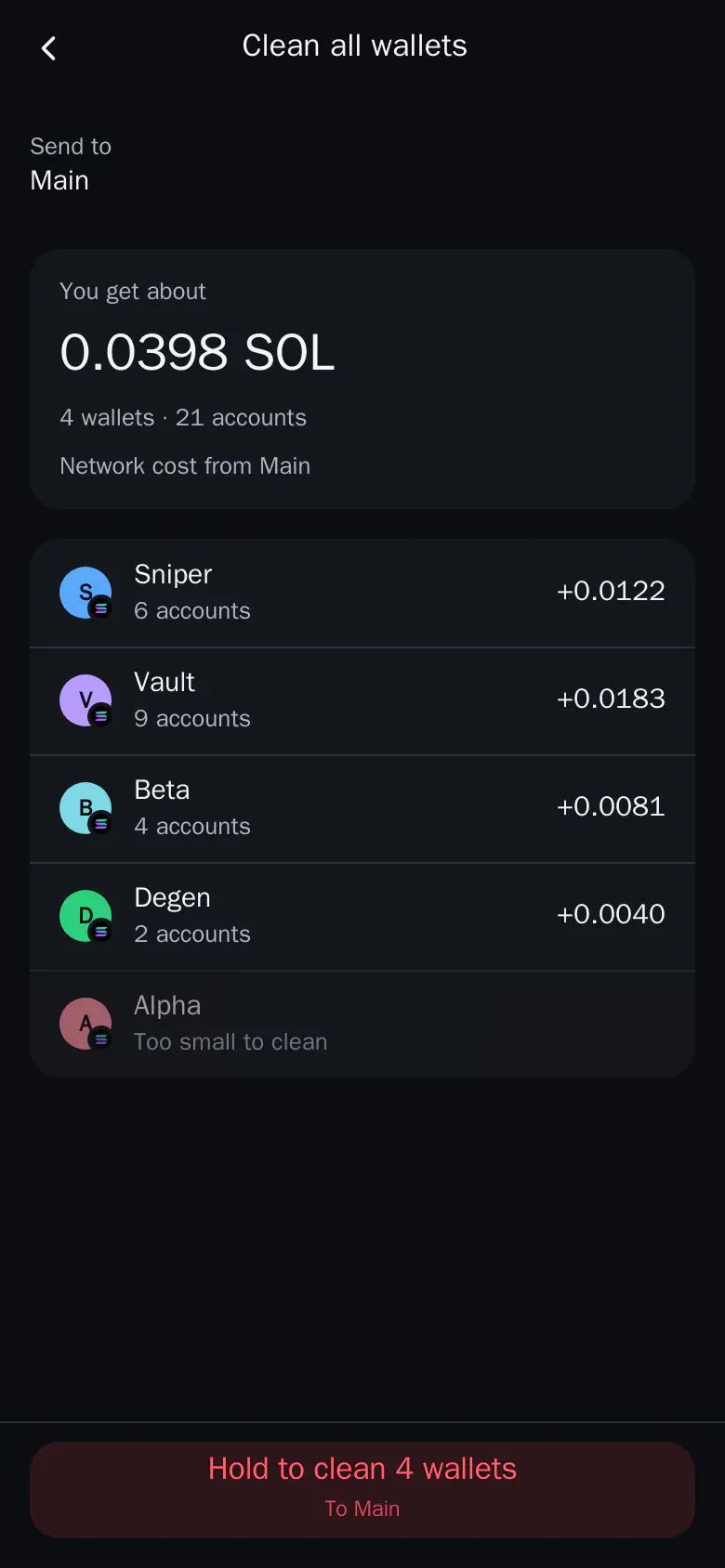
Clean Every Wallet at Once
To clean all your Solana wallets in one run, go to Account → Wallets and batches (Solana tab) and tap Clean all wallets. It closes the empty and dust accounts of every Solana wallet and sends the SOL back to one wallet you pick. Nothing is sold. Hold to confirm.
What Is SOL Rent on Token Accounts?
Solana stores every balance in an account, and every account has to hold a minimum amount of SOL to stay on the chain. This minimum is called rent, although it works more like a refundable deposit: as long as the account holds enough SOL, it is "rent exempt" and never gets charged.
Tokens work the same way. When you buy a token for the first time, your wallet gets a new token account for that token, and a small SOL deposit is paid to create it. For a standard token account, that deposit is roughly 0.002 SOL.
The catch: when you sell all of a token, the token account usually stays open with a zero balance. The deposit stays locked inside it. Do that across a few weeks of active trading and the empty accounts add up.
| Empty token accounts | Approximate SOL locked |
|---|---|
| 10 | about 0.02 SOL |
| 50 | about 0.1 SOL |
| 100 | about 0.2 SOL |
| 500 | about 1 SOL |
The figures are approximate and do not include the small network cost to close the accounts.
Why Your Wallet Fills Up With Empty Accounts and Dust
Three things leave SOL stuck in your wallet:
- Empty token accounts. You sold 100% of a token, but the account is still open.
- Dust tokens. You sold almost everything, or a token dumped, and a balance worth a fraction of a cent is left. The account cannot be closed while it still holds tokens.
- Airdropped spam. Unknown tokens sent to your wallet also create accounts. You did not pay for these, but they clutter your list.
Dust is the reason many wallets never get cleaned up. A token worth $0.0003 is not worth selling, since the network cost is more than the sale returns. Burning it is the cleaner fix: the tokens are destroyed, the balance goes to zero and the account can be closed. When a coin is worth less than its fee to sell, Thor says so on the coin and offers Hide coin and Burn for rent back.
Warning: Burning cannot be undone. Burned tokens are gone for good. Only burn tokens you are sure you do not want.
Find Your Dust First
Before you burn, it helps to see what you hold. Open Home → Positions and turn on the Dust chip: tiny, unverified and scam coins show up dimmed, and a coin with no trading pool shows "No trading pool". The Portfolio guide covers the filters and sorting.
Tip: If a token in your dust list might still run, sell it instead of burning it. Burning only makes sense for balances you have written off.
Solana Rent Refund: Burn vs Sell vs Leave It
Not every small balance should be burned. Use this as a quick rule:
| Balance | Best move |
|---|---|
| Zero tokens, account still open | Close it. Pure SOL refund. |
| Worth a fraction of a cent | Burn it. Selling costs more than it returns. |
| Worth a few dollars or more | Sell it, then the account can be closed. |
| A token you still believe in | Keep it. |
Selling a token from Thor costs a flat 0.5% Thor fee per spot trade, half the 1% many Telegram trading bots charge. Network costs are added on top. With a Subscription ($100 for 30 days), Thor's fee on spot trades and bridging drops to 0% on Solana and every EVM chain, and it pays for itself once you trade about $20,000 of spot volume in 30 days. See Fees for the full breakdown.
Is Burning Dust Tokens Safe?
Burning dust tokens is a normal wallet operation. Thor sends the transaction from your own wallet and the SOL comes back to the same wallet. A few things are worth knowing:
- It is permanent. There is no undo, so read the list before you confirm.
- It only matters on Solana. EVM chains such as Ethereum, Base and BNB Chain do not lock a deposit per token, so there is no rent to reclaim there.
- Spam tokens are a scam risk. Never interact with spam tokens on outside websites that promise "claims" or "rewards". Some ask you to sign transactions that drain your wallet. Cleaning up inside Thor avoids that trap. Read Stay safe for more.
Note: Anyone who messages you offering to "clean up" your wallet is a scammer. Thor support never messages you first and never asks for your PIN.
How Often Should You Clean Up?
There is no fixed rule. Active memecoin traders open new token accounts with almost every first buy, so a monthly cleanup is a good habit. If you snipe new launches or copy trade busy wallets, you may build up empty accounts much faster.
Good moments to run Burn dust:
- After a busy week of trading new launches.
- Before you move funds out of a wallet or retire it.
- When your Positions list gets cluttered with dead tokens.
If you trade with Auto sell or copy trade, positions close on their own, which leaves even more empty accounts behind. That is normal, and Burn dust clears them the same way.
When You Need to Exit Live Positions Instead
Burn dust is for tokens you have written off. If you want to sell positions that still have real value, use the coin sheet's Sell, or in an emergency, Clean up → Sell everything to sell every token in the wallets you pick. Read How to sell all tokens on Solana at once for that flow, and How to sell on Pump.fun for regular exits.
Get Your SOL Back
Empty token accounts and dust are SOL you already own, sitting idle. Open Thor on Telegram, open a wallet, tap Clean wallet and reclaim SOL rent in a minute. Thor also runs as a Mini App, a Chrome extension and more, see all Thor apps.
Frequently asked questions
How do I reclaim SOL rent from empty token accounts?
In the Thor Mini App, open a wallet page, tap Clean wallet and choose Burn dust. Thor lists the empty accounts it closes and the SOL you get back. Hold the button to confirm. No PIN is asked and nothing leaves your wallets. To clean every Solana wallet at once, use Clean all wallets in Account, then Wallets and batches.
How much SOL can I get back from closing a token account?
A standard Solana token account holds a deposit of roughly 0.002 SOL. You get that back when the account is closed. Ten empty accounts return about 0.02 SOL and a hundred return about 0.2 SOL, before network costs.
Why do I have SOL locked in token accounts?
Every token you have ever held on Solana needs its own token account, and each account needs a small refundable SOL deposit to exist. Selling a token to zero leaves the empty account open, so the deposit stays locked until you close it.
Is it safe to close token accounts on Solana?
Closing an empty token account is a normal Solana operation and only returns the deposit to your wallet. Burning is different: it destroys the tokens in the account and cannot be undone, so check the list before you confirm.
Can I close a token account that still holds tokens?
Not directly. The tokens have to be sold, sent or burned first so the balance is zero. Burn dust handles near-worthless leftovers by burning them and closing the account in one step.
Do I need to reclaim rent on Ethereum or Base?
No. Token rent deposits are a Solana feature. EVM chains such as Ethereum, Base and BNB Chain do not lock a deposit per token, so there is nothing to reclaim there.
Step-by-step in the Docs
- Clean up: Burn dust, Sell everything, Empty a wallet and Clean all wallets: tidy your Solana wallets in one place.
- Burn dust: Recover the SOL locked in empty and near-worthless token accounts, from Clean up.
- Wallets: See, add, rename, make default and remove your Solana and EVM wallets from Home > Wallets.
- Portfolio and positions: See every coin you hold, with P&L, across all wallets and chains, in Home > Positions.
- Bot commands: Shortcuts you can type in the chat.