A PnL card for Solana is a shareable image of one trade's profit or loss. In Thor, open the coin, tap P&L card on your position, pick a background, choose whether to show amounts in SOL, in dollars and SOL, or percent only, then share it to a chat or save the image. It takes a few seconds and works for any coin you trade with Thor.
Below: how to make the card, how to keep your size private, and how to use Thor as a Solana PnL tracker for your whole portfolio, not just your best trade.
What Is a Crypto PnL Card?
PnL stands for profit and loss. A crypto PnL card is a branded image that shows the result of a trade: the token, the return in percent and, if you want, how much you made. Traders post them in Telegram groups, on X and in Discord to show calls, track wins or just celebrate a good exit.
A good card answers three questions at a glance:
- What did you trade? The token.
- How did it go? The percentage gain or loss.
- How big was it? The profit in SOL or dollars, or hidden if you prefer.
How to Make a PnL Card on Solana in Thor
 Thor Trading Bot


- Tap P&L card. It is on your position, at the top of the coin sheet.
- Choose what to show. SOL, dollars and SOL, or percent only.
- Share it. Or tap Save image to keep the picture.
Open the Position
- Open Thor on Telegram and open the Mini App.
- Go to Home → Positions and tap the coin you want to share. Tap You hold to open your position.
- The position shows its value, the P&L, what you bought and sold, the cost with fees, and the buttons P&L card, Send and Hide. Your orders on the coin sit below.
Thor Trading Bot123- P&L card. Opens the card editor for this position.
- What this P&L counts. Shows the cost with fees, your average entry and your average exit.
- Hide. Hides the coin from your lists. It stays in your wallet.
Share Your Trading Profit
- On the position, tap P&L card (in the bot:
[PNL CARD]). - Pick a Background: Auto (profit or loss art chosen by the result), Storm, Profit or Plain.
- Choose what to show: SOL, $ and SOL, or Percent only (for example +43.5%, no amounts).
- Tap Save image, or Share to chat: the card is sent to your Thor chat so you can forward it from there.
Thor Trading Bot1234- Percent only. Shows the result without any amounts, so your size stays private.
- Storm. One of the backgrounds. Auto picks profit or loss art by the result.
- Save image. Saves the picture to your device.
- Share to chat. Sends the card to your Thor chat. Forward it from there.
The card shows the position of the wallet you picked, so a coin you hold in two wallets has one card per wallet. The QR code on every card opens the coin in Thor with your referral code, so friends who join through it count as your referrals.
Tip: Showing amounts in SOL tells other Solana traders more than dollars, since memecoin traders usually think in SOL sizes. Choose Percent only if you prefer to keep your size private.
Show Amounts or Keep Them Private
| Option | What people see | Good for |
|---|---|---|
| SOL | Percentage plus amounts in SOL | Solana trading groups |
| $ and SOL | Percentage plus amounts in dollars and SOL | Wider audiences, X posts |
| Percent only | Percentage and no amounts | Showing the result, not the size |
Percent only is the safest default when you post in public. A big number on a card can make you a target for scammers who pose as support or "recovery" services. The Thor team never messages you first and will never ask for your PIN. See Stay safe.
Which Trades Are Worth a Card?
Any position a wallet bought with Thor can become a card (if not, you see "No card yet"), including trades from the bot chat, the Mini App, the web extension and automations such as copy trade or Auto buy, since they all show up in your positions. After you sell everything, the card shows the realised P&L of that holding: what came back minus what you paid, both after fees. A few ideas:
- A clean exit. A take profit that hit right where you planned is the most satisfying card to share.
- A call you made to a group. Post the card after you sell so the group can see the result of the call.
- A lesson. A card from a stop loss that saved you from a rug tells a story too.
Thor Trading Bot Thor Trading Bot

Use Thor as Your Solana PnL Tracker
A card shows one trade. To know how you are really doing, look at all of them.
Home › Positions
Open Home to see your total value, a chart for the range you pick (1H to All) and every position with its profit or loss.
- Tabs: Positions, Wallets, Orders and Activity.
- Chips filter All, one chain, USD Cash, Perps or Predict. Tiny and unverified coins hide behind the Dust chip.
- A Sort picker, set to Value by default.
- Perps and Predict positions appear there too.
Thor Trading Bot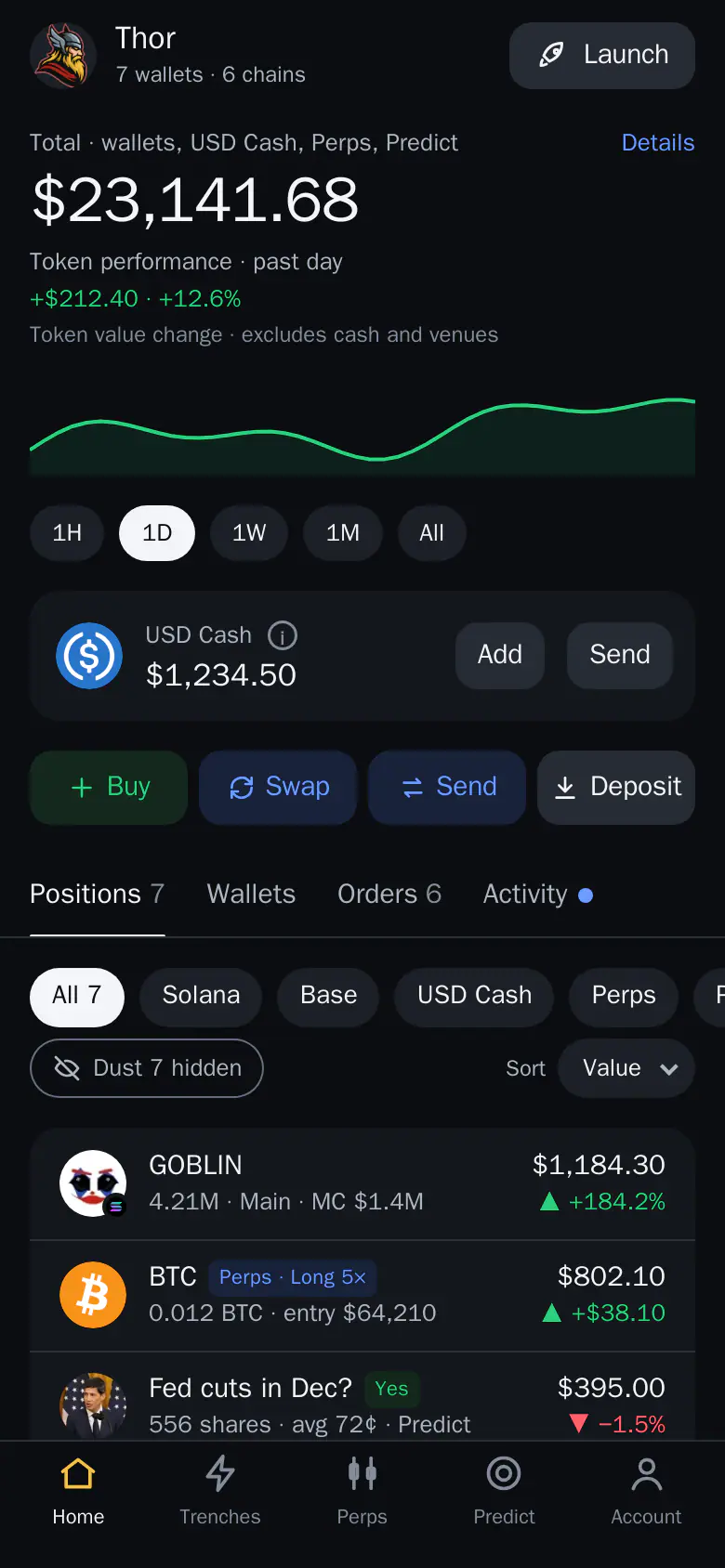 Thor Trading Bot
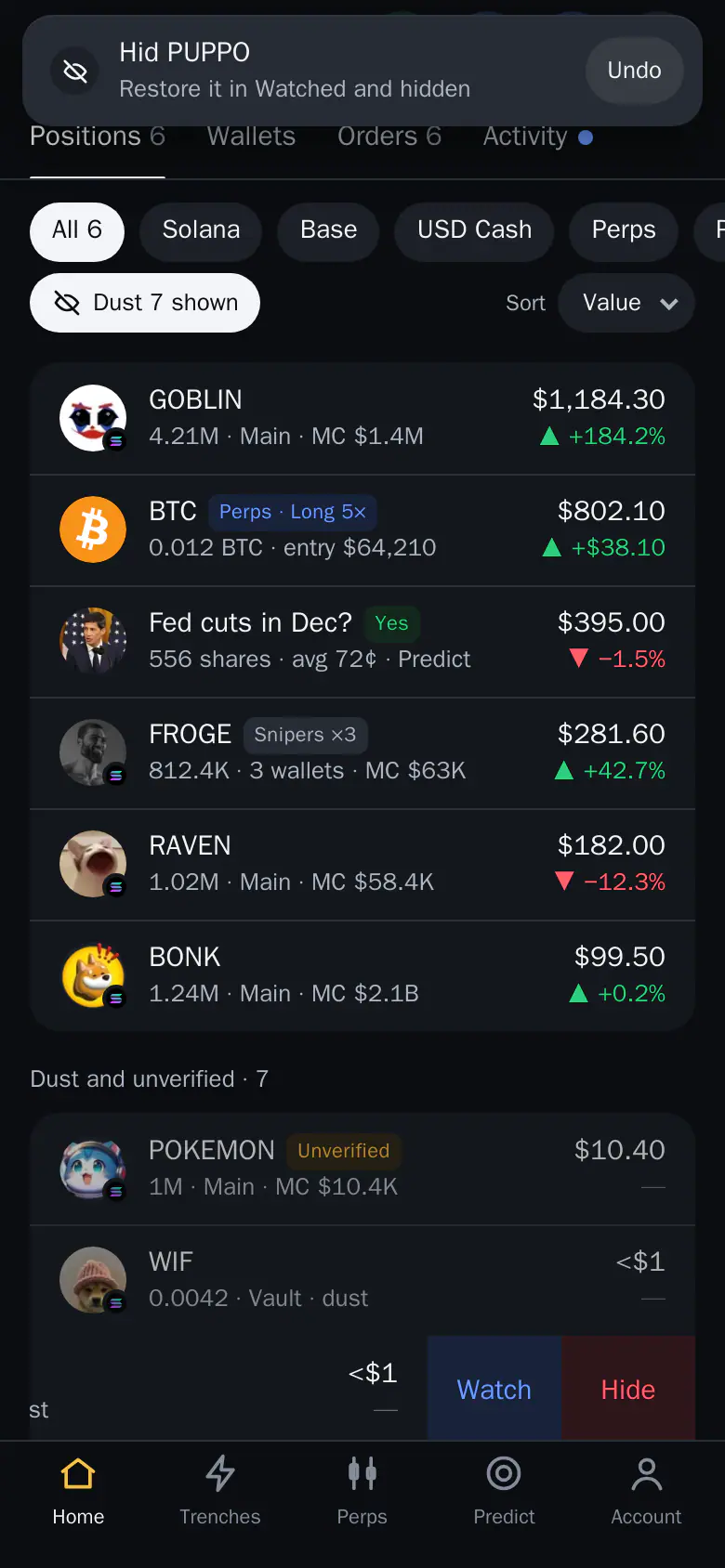
Tap any position for its chart, your entries and your profit or loss. Full details are in Portfolio and positions.
Live PnL in the Bot
In the bot chat, Live PnL shows your total profit or loss and every position, and updates automatically. It is handy when you have several positions open and want one view that keeps itself current. Tap Stop Live PnL to end it. See PnL cards and Live PnL.
Note: Thor's history and PnL views are for convenience. They are not tax records. You are responsible for your own tax reporting.
Share Trading Profit the Smart Way
PnL cards are part of trading culture, but a few habits keep them useful and safe:
- Post losses too. If you share calls with a group, a record of only wins is not a record.
- Keep amounts private in public. Percent-only cards say enough.
- Share after you exit, not before. Posting an open position can invite others to dump on you.
- Do not chase the screenshot. Holding too long for a bigger number is how 5x trades turn into round trips. Set a take profit and trailing stop and let the card follow the plan.
Your Card Can Also Earn You Rewards
If friends see your results and want to try Thor, send them your referral link. Open Account → Bonuses to copy it, or just share a card: its QR code carries your link. When people you invite trade with Thor, you earn 30% of their fees, plus smaller shares from the people they invite. You also get cashback on your own fees, starting at 10% and rising to 75% with your volume. See Rewards and referrals.
Better Results Start With Lower Costs
Every fee comes straight out of the number on your card. Thor charges a flat 0.5% per spot trade, half the 1% many Telegram trading bots charge. With a Subscription ($100 for 30 days), Thor's fees on spot trading and bridging drop to 0% on Solana and every EVM chain. It breaks even at about $20,000 of spot volume in 30 days. Network costs and third-party fees still apply, and the subscription does not cover perps or predictions. See Fees and Zero-fee Solana trading with a subscription.
Make Your First Card
Open Thor on Telegram, open a coin you hold and tap P&L card. For ideas on finding trades worth sharing, read How to snipe Solana tokens and How to copy trade Solana wallets, or see all Thor apps.
Frequently asked questions
How do I make a PnL card for a Solana trade?
Open the coin in Thor and tap P&L card on your position. Pick a background, choose to show amounts in SOL, in dollars and SOL, or percent only, then save the image or share it to a chat. It works for any coin the wallet bought with Thor.
Can I hide my amounts on a PnL card?
Yes. Choose Percent only before you share. The card then shows your result without the size, so people see how well the trade did without seeing how much you put in.
How do I track my PnL on Solana in real time?
In the Thor bot, Live PnL shows your total profit or loss and every position, and updates automatically. Tap Stop Live PnL to end it. In the Mini App, Home, then Positions shows the profit or loss of each position.
Does the PnL card include fees?
The card shows the result of your position as Thor tracks it. Thor charges a flat 0.5% per spot trade, or 0% with a subscription, and network costs are added on top, so trading costs affect what you actually keep.
Why does my PnL look different from another tracker?
Trackers count profit differently. In Thor an open position's P&L is realised plus unrealised, and a closed one shows realised only. Positions are tracked per wallet, so different starting points and prices give different numbers.
Step-by-step in the Docs
- P&L and share cards: Read your profit and loss on a position and share it as a card with your referral code.
- Your position on the coin sheet: See value, P&L, cost and orders for a coin you hold, and act on it, on the coin sheet.
- Portfolio and positions: See every coin you hold, with P&L, across all wallets and chains, in Home > Positions.
- Rewards and referrals: Cashback of 10% to 75% of your bot fees, and five levels of referral rewards.
- Slippage and network costs: Control how far the price may move and how fast your trade lands.