Find profitable Solana whale wallets on-chain, set up Thor's copy trade feature and mirror their swaps automatically, with real risk controls that keep your portfolio intact.
What Is Copy Trading on Solana?
Copy trading on Solana means automatically replicating the on-chain swaps of another wallet in real time. When the wallet you are copying buys a token, your bot immediately buys the same token for the amount you have configured. When they sell, you can sell too.
Unlike centralized copy trading on stock or forex platforms, Solana copy trading works directly on-chain. Every wallet's activity is public, and a Telegram bot like Thor watches the blockchain for the target wallet's transactions and places your mirror trade straight away.
The appeal is obvious: rather than discovering tokens yourself, you piggyback on wallets that already have a proven edge, such as early callers, insider-adjacent accounts or consistently profitable degens. The challenge is finding those wallets and managing the risk.
How to Find Profitable Solana Wallets to Copy
The quality of your copy trading results depends almost entirely on which wallets you choose. Thor does not rank wallets for you, so you research them with on-chain tools first and then paste the address into Thor. These are the most effective research methods in 2026. For a deeper walkthrough, read how to find Solana whale wallets to copy.
1. Wallet Leaderboards
Analytics sites such as Cielo Finance, Birdeye and GMGN.ai publish leaderboards of top-performing Solana wallets ranked by PnL, win rate and average gain per trade. Filter for wallets with:
- A win rate above 60%
- At least 50 trades in the last 30 days, which rules out lucky streaks
- An average hold time under 48 hours, since short holds are easier to copy profitably
- Most of their PnL realized rather than unrealized, so you know they actually take profits
2. Trace a Known Alpha Caller's On-Chain Activity
If an X influencer keeps calling good tokens, find their public Solana wallet (often shared in a bio or a pinned Telegram message) and paste it into a block explorer such as Solscan. Review their last 30 to 60 swaps. Are they buying before the public call or after? Early buyers are worth copying. Late buyers who pump their own calls are not.
3. DexScreener "Top Traders" Tab
On any token's DexScreener page, the Top Traders tab shows which wallets made the most profit on that token. Wallets that appear in the top 5 on several winning tokens in the same week are strong copy candidates. They likely have a repeatable edge, not a one-off lucky trade.
4. Pump.fun Snipers
Some of the highest returns on Solana come from buying pump.fun launches in the first seconds. Look at the earliest buyers of pump.fun tokens that went on to graduate, and note wallets that show up again and again. These wallets are often automated, but they can still be worth copying if their win rate is strong. Our Pump.fun bot strategy guide covers this approach in more detail.
Tip: Copy a wallet for 5 to 7 days with a small test amount (0.1 to 0.2 SOL per trade) before scaling up. Past performance rarely transfers perfectly, and some wallets have short alpha windows before they are widely copied and front-run.
How to Set Up Thor Copy Trading, Step by Step
Thor is a Telegram trading bot with copy trading built in. You can manage copy trades from the bot chat or the Thor Mini App. Here is how to set one up:
- Open Thor on Telegram. Search for @ThorSolana_bot, press Start and accept the Terms. Thor creates a Solana wallet for you in a few seconds. Fund it with SOL before you continue.
- Open Copy trade. Open Copy trade in the Mini App, or type
/copytradein the bot chat, and tap new. - Add the target wallet. Paste the Solana address of the wallet you want to copy into Target wallet and give it a name you will recognize.
- Choose what happens when they buy. Fixed buy buys the same amount every time, for example 0.25 SOL. Max buy copies their amount, up to your cap. Fixed ratio buys a share of what they spend, from 1% to 1000%, up to a max amount.
- Choose what happens when they sell. Copy sells sells the same number of tokens they sell, up to what you hold. Auto sell uses your own take profit and stop loss targets instead. No sell holds the tokens.
- Set slippage and priority fee, then save. For memecoins, 5% to 15% slippage is common. Higher slippage helps trades land on fast-moving tokens but can raise your average cost. A higher priority fee helps your trade land faster when the network is busy.
- Monitor it. Open the copy trade to see its live feed, pause it or edit it. Turn on Trade alerts in Telegram in Settings → Trading settings to get a chat message each time a copy trade fills.
 Thor Trading Bot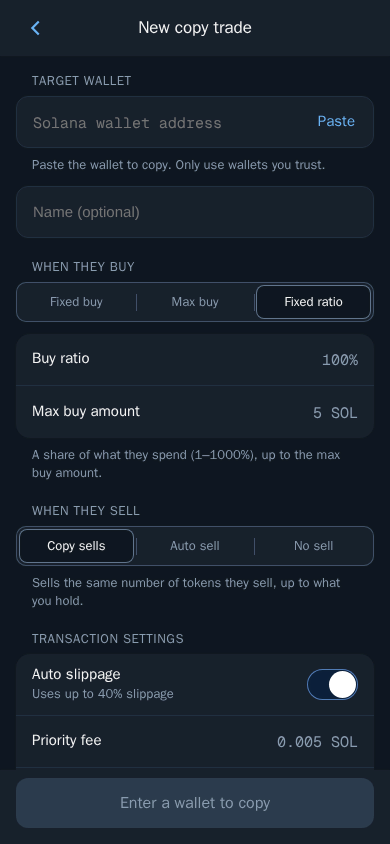
A fixed buy amount is the safest choice for beginners, because it caps your exposure per trade no matter how large the copied wallet's position is.
Thor Trading Bot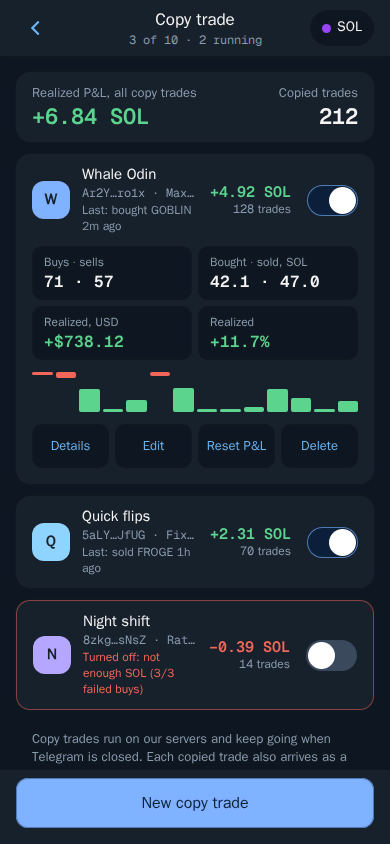 Thor Trading Bot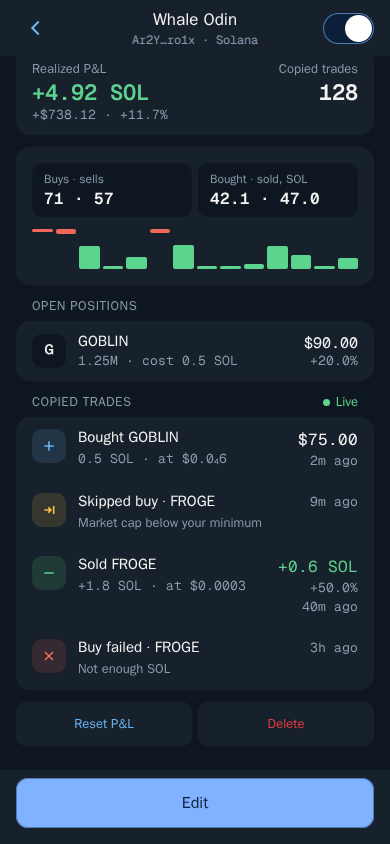
Note: Thor runs its own private Solana node and sends each trade through several fast routes at once, so trades usually land in under 0.8 seconds in normal conditions. Even so, you will not get exactly the same prices or results as the wallet you copy. Only copy wallets you trust.
Risk Management and Position Sizing
Copy trading is not passive income. It needs active risk management. Even the best wallets have losing streaks, and copying blindly during a bad run can wipe out your capital.
Cap Exposure Per Wallet
Never allocate more than 20% to 25% of your copy trading budget to a single wallet. If you have 5 SOL to allocate, keep the copy trade for any one wallet small enough that its open positions stay around 1 SOL. Fixed buy and the max amount on Max buy or Fixed ratio are the tools for this.
Use a Dedicated Copy Trading Wallet
Thor lets you hold up to 10 Solana wallets, so you can create a separate wallet in Wallets for copy trading and fund it with only what you are willing to lose. This stops a bad run of copy trades from draining the wallet you use for manual trades or long-term holds. See Wallets.
Put Exits on Autopilot
If you do not want to mirror every sell, choose Auto sell for when the copied wallet sells, and set your own targets in Settings → Auto sell, for example sell 50% at +100% and sell 100% at -30%. Every copied buy then gets take profit and stop loss orders that run on Thor's servers, even when Telegram is closed. Our guide to Pump.fun autosell, take profit and stop loss explains how to choose targets.
Review Weekly
Look at your copy trading results every week in Portfolio. If a copied wallet has had 5 or more losing trades in a row, or its win rate has dropped below 40% over the last 20 trades, pause the copy trade or remove it. Wallets go cold: market conditions change and an edge disappears.
Avoid Copying During High-Volatility Events
During macro events such as rate decisions, major crypto news or exchange outages, on-chain behavior becomes erratic. Consider pausing your copy trades during these windows and turning them back on once conditions settle.
Start Copy Trading with Thor
Copy any Solana wallet automatically from Telegram, with trades sent through Thor's own private node. Thor charges a flat 0.5% per spot trade, or you can take the $100 for 30 days subscription for 0% bot fees on spot trading. See Fees for details and cashback tiers.
Open Thor on Telegram and set up your first copy trade.
Frequently asked questions
Is copy trading on Solana legal?
Yes, copy trading is legal in most jurisdictions. You are simply mirroring public on-chain transactions with your own wallet and your own funds. Always check your local rules on crypto trading.
How much SOL do I need to start copy trading with Thor?
There is no fixed minimum. Many traders start with a small test budget, for example 0.1 to 0.2 SOL per copied trade, and scale up later. Keep a little extra SOL in the wallet to pay network and priority fees.
Can I copy multiple wallets at once?
Yes. You can run several copy trades at the same time, and each one has its own settings for what happens when the wallet buys and when it sells, plus its own slippage and priority fee.
What is the delay between a whale's trade and my copy trade?
Thor sends trades through its own private Solana node, and trades usually land in under 0.8 seconds in normal conditions. Speed is never guaranteed, and you will not get exactly the same price as the wallet you copy.
How do I stop copy trading a wallet?
Open Copy trade in Thor, or type /copytrade in the bot chat, open the copy trade and pause it. Tokens you already bought through it stay in your wallet until you sell them or your Auto sell targets are hit.
Step-by-step in the Docs
- Copy trade: Follow any wallet and copy its trades.
- Auto sell: Add take profit and stop loss to every buy.
- Slippage and priority fees: Control price tolerance and speed.
- Wallets: Create, import, export and manage your wallets.