Most traders know how to buy memecoins on Pump.fun. Almost none know how to exit them. Thor's AutoSell creates your take profit, stop loss and trailing stop orders the moment your buy lands, so you lock in gains automatically, even while you sleep.
Why Exits Are the Hardest Part of Memecoin Trading
On Pump.fun, a token can go from launch to 100x in under an hour, and then retrace 90% just as fast. The market cap moves in seconds, alpha callers rotate to the next call, and liquidity drains before most holders even notice the chart turning red. Buying the right token at the right time is only half the trade. The exit decides whether you actually keep the profit.
The core problem is emotional. When a token is up 4x, you want more. When it drops from 4x back to 2x, you tell yourself it will recover. By the time it hits break-even, fear takes over and you sell for nothing. This cycle repeats on almost every trade where a human makes the exit decision in real time.
The solution is to define your exit before you buy and let a bot execute it for you. Remove the emotion entirely. That is exactly what Thor's AutoSell is designed to do.
Tip: The golden rule of memecoin trading: you cannot control what a token does after you buy. You can only control when you exit. Set your levels before you enter, not after.
What Is Thor's AutoSell Feature?
AutoSell, called Auto sell in the app, is Thor's automated exit system. You set your targets once. From then on, every new buy automatically gets your take profit, stop loss and trailing stop orders. Thor watches the price 24 hours a day, 7 days a week, and sells the moment a target is hit.
You do not need to stay online. You do not need to watch the chart. Your orders run on Thor's servers, not on your device, so closing Telegram or turning off your computer has no effect. Your exit strategy is locked in at the moment of purchase and executes automatically at any hour.
AutoSell orders are ordinary orders. They show in Portfolio, then Orders, under the Auto sell filter, where you can edit, pause or cancel each one.
How AutoSell Works Step by Step
- Configure your targets. In Settings, then Auto sell, add your take profit, stop loss and trailing stop targets. They apply to every new buy.
- Buy the token. Buy in the Telegram bot or the Mini App, or paste a pump.fun link into the bot chat.
- Orders are created for you. As soon as your buy lands, Auto sell creates its orders. Every target is measured from your buy price.
- Thor monitors around the clock. Your orders run on Thor's servers, even when Telegram is closed.
- Target hit, sell fires. The moment the price reaches your level, Thor sells through its own private Solana node, which helps shield your trade from front-running.
Take Profit: Locking In Gains Automatically
A take-profit order sells a set share of your position when the token rises to your target. For example: sell 50% of your holdings when the token hits 3x your entry price.
The power of take profit in memecoin trading is that it removes the decision from you entirely. You do not need to be watching the chart at 3 AM when a token pumps. You do not need to fight the urge to hold for 10x while a 3x profit evaporates back to 1x. The order fires automatically, SOL lands in your wallet, and you still have exposure to further upside with whatever position remains.
Multi-Level Take Profits
Thor supports multiple take profit levels on the same position. A common strategy among experienced Pump.fun traders:
| Level | Setup | Purpose |
|---|---|---|
| TP1 | Sell 25% at 2x | Recover half your initial investment |
| TP2 | Sell 50% at 5x | Bank most of the profit |
| Remainder | 20% trailing stop | Capture any continuation |
At TP1 you are playing with house money. At TP2 you have already booked a strong return. The trailing stop on the remainder means you do not leave the table early if the token keeps running, but you also do not give back everything if momentum reverses.
What Take Profit Percentage Should You Use?
There is no universal answer. It depends on your risk tolerance and the type of token. A few general guidelines:
- Early Pump.fun launches (under $50K market cap): High volatility, high potential. First TP at 2 to 3x to recover initial capital quickly.
- Mid-stage tokens ($100K to $500K market cap): More stable. TP targets of 1.5 to 2x are realistic without overstaying.
- KOL-called tokens: Fast pumps with fast retracements. An aggressive TP at 1.5 to 2x often beats holding for larger targets.
Tip: Auto sell also accepts market cap targets instead of percentages, for example sell 50% when the coin reaches $1M. This fits Pump.fun traders who think in market cap rather than multiples.
Stop Loss: Capping Your Downside on Every Trade
A stop loss sells your position when the token price drops to a set percentage below your entry. It is your circuit breaker: the maximum loss you are willing to accept before the bot exits the position for you.
Without a stop loss, one bad trade can wipe out the gains from several good ones. On Pump.fun, where many tokens fail to hold any price action after the launch pump, stop losses are not optional. They separate traders who survive long enough to find winning tokens from those who blow up their portfolio on a single position.
How to Set a Stop Loss on Pump.fun
Pump.fun itself has no stop loss order. Thor adds one to any Pump.fun token, on the bonding curve or after it graduates:
- Open the token in Thor (paste the contract address in the bot chat or open it in the Mini App) and choose Sell, then TP/SL.
- Drag the stop loss line on the chart, or type your limit as a percentage (for example -30%) or a price.
- Choose how much to sell when it triggers, usually 100%.
- Confirm. The stop loss now runs on Thor's servers, even when Telegram is closed.
 Thor Trading Bot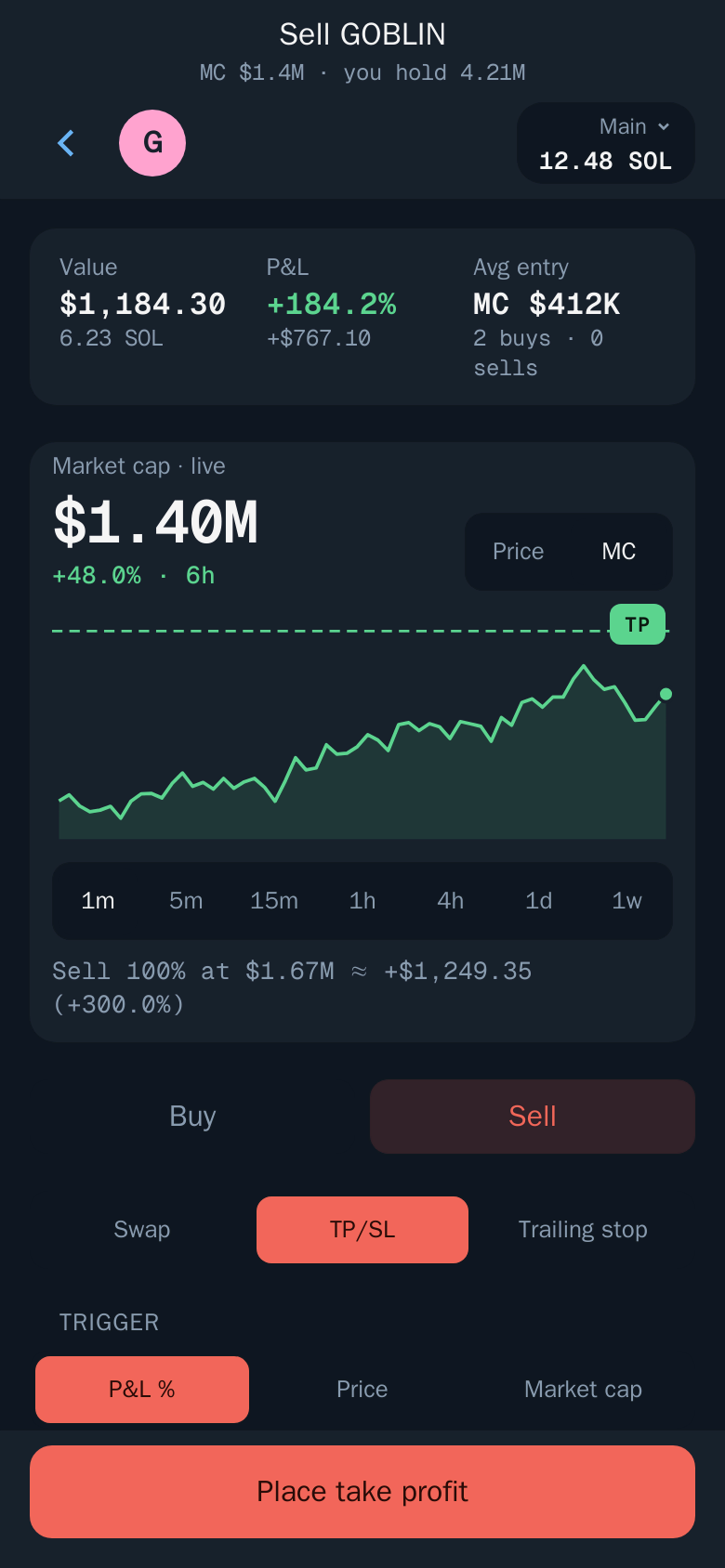
To put a stop loss on every Pump.fun buy without doing this each time, add it once in Settings → Auto sell. See Take profit and stop loss for the screens.
Choosing Your Stop Loss Level
The right stop loss depends on how much volatility you are willing to tolerate and the stage of the token:
- Tight stop (−20% to −30%): Best for tokens where you have high conviction and want to keep losses small if the thesis is wrong. Beware of being stopped out by normal volatility.
- Standard stop (−40% to −50%): Gives the token room to breathe through early price discovery while still capping maximum loss.
- Wide stop (−60% to −70%): For speculative early entries where you expect high volatility but believe in the token. Size the position smaller to match the wider stop.
Tip: Position sizing rule: your stop loss level should inform your position size. If you use a 50% stop, size the trade so that a 50% loss is an acceptable amount, not a portfolio-ending event.
Stop Loss vs. AutoSell in Practice
Without AutoSell, a stop loss means watching the chart, noticing that the price has hit your mental level, and then placing the sell by hand, all while the chart is dropping and your emotions are telling you to "wait for a bounce." Thor's AutoSell removes every one of those failure points. The sell fires as soon as the price hits your stop, with no human input.
Note: In very fast moves the sell can fill below your stop price. A stop loss limits losses, it does not guarantee an exact exit price.
Trailing Stop Loss: Let Winners Run Without Giving Back Gains
A trailing stop loss is one of the most powerful exit tools for memecoin trading. Unlike a fixed stop loss, which stays at a set price and never moves, a trailing stop follows the token price upward as it rises, and only triggers when the price drops by a set distance from its peak. It never moves down.
How Trailing Stops Work
When you set a 25% trailing stop on a token you bought at $0.001:
- The token rises to $0.003 (3x). Your trailing stop is now at $0.00225, 25% below the peak.
- The token continues to $0.005 (5x). The trailing stop moves up to $0.00375.
- The token reverses and falls to $0.00375. Thor sells automatically, locking in about a 3.75x return.
Compare this to a fixed TP at 3x: you would have exited at $0.003 and missed the move to $0.005. Compare it to holding with no exit plan: you might have held all the way back to $0.001. The trailing stop captures most of the move and exits near the top of the reversal, without you having to predict exactly where the peak will be.
Tip: Use a tighter trail (15 to 20%) for tokens with sharp, fast pumps where reversals are sudden. Use a wider trail (30 to 40%) for tokens that trend more gradually and have natural pullbacks on the way up.
Combining Trailing Stops with Take Profits
The most effective strategy is to combine fixed take profits with a trailing stop on the remaining position:
- Sell 50% at a fixed TP, for example 3x, to guarantee profit and recover your initial capital.
- Put a trailing stop, for example 25%, on the remaining 50%. If the token runs to 10x, your trail exits near 7.5x. If it reverses right after your TP, the trail stops you out with a smaller but still positive return.
This structure removes the worst outcome, giving back all your gains, while keeping upside on every token that keeps running. For worked numbers, see AutoSell vs limit orders.
How to Configure AutoSell in Thor
AutoSell is set up once in Thor's settings, in the Telegram bot or the Mini App. After that, every new buy gets your exit orders automatically, wherever the buy comes from: the bot, the Mini App, the Chrome extension, Social Sniper, copy trade, Auto buy or a filled limit buy.
Set Up Auto Sell in the Telegram Bot or Mini App
- Open Thor on Telegram and go to Settings, then Auto sell. In the bot you can type
/settings. - Add your targets:
- + Take profit: for example +100% to sell 50% at 2x.
- + Stop loss: for example −40% to sell 100%.
- + Trailing SL: for example a 25% trail from the peak to sell 100%.
- Choose the sell mode. Per buy gives each buy its own orders for its own tokens. Full balance makes each target sell a percentage of your whole balance of the token.
- Turn it on. Every new buy now gets these orders automatically, and they show in Portfolio, then Orders, as Auto sell.
Thor Trading Bot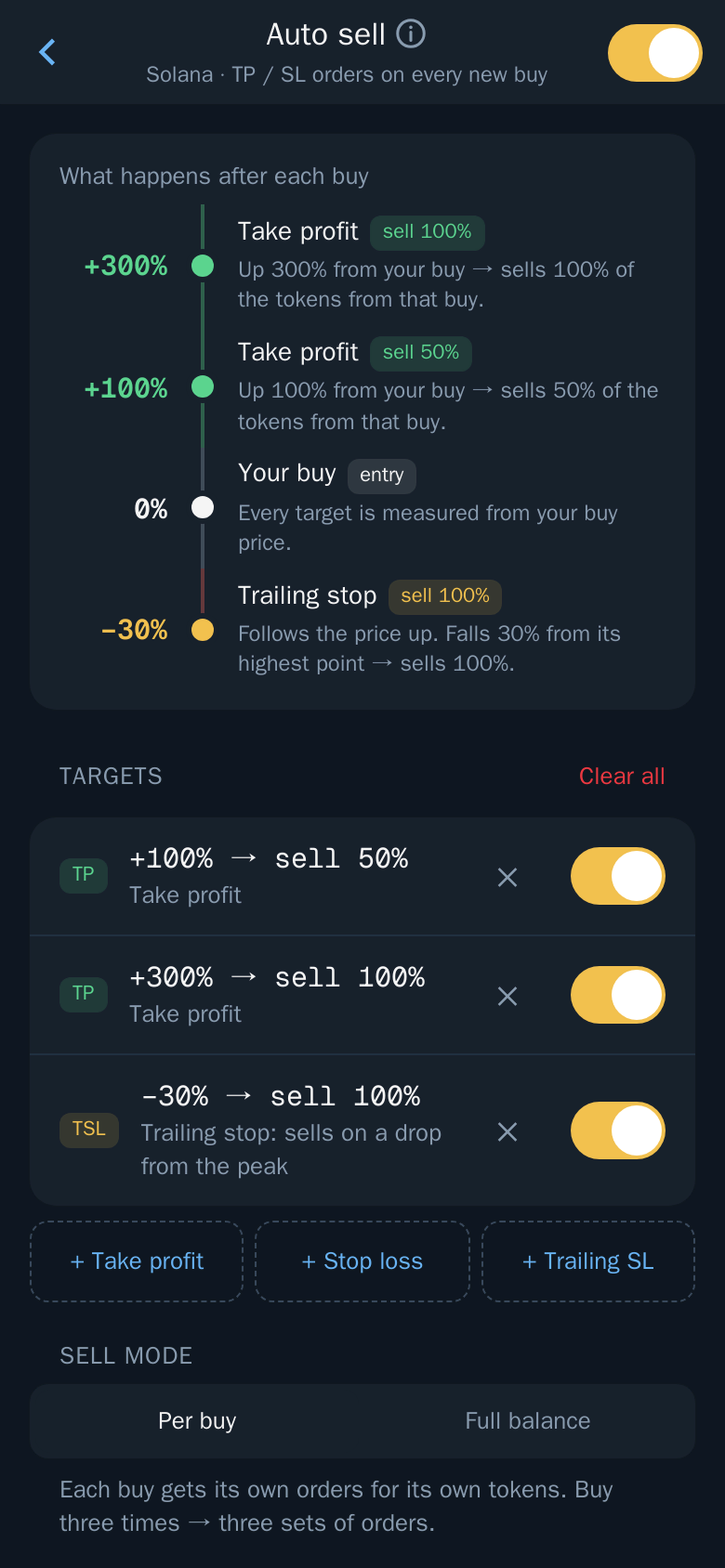
More options in the same screen:
- Arm at (trailing SL): start trailing only after the price has risen by a set amount, for example +50%.
- DCA (Solana): repeat buys adjust your orders instead of adding new ones, and triggers follow the new average entry.
- MCap strategies: use other targets for coins in a market cap range at buy time. The first range that fits wins; no match uses the targets above.
Note: Auto sell works for new buys only, not positions you already hold; orders already placed stay, and you edit them in Portfolio → Orders. Settings are per chain, and Sell mode and DCA are Solana only.
Tip: Pair Auto sell with Auto buy. With Auto buy on, sending or forwarding a token address or pump.fun link to the bot chat buys right away, and Auto sell adds your take profit and stop loss to that buy.
Set Exits on a Single Trade
Want different exits for one token? Set them by hand:
- Open the token and choose Sell, then TP/SL. Drag the lines on the chart or type your targets as a percentage or a price, choose how much to sell at each, and confirm.
- For a trailing stop, choose Sell, then Trailing stop, set the distance and the amount, and confirm.
Thor Trading Bot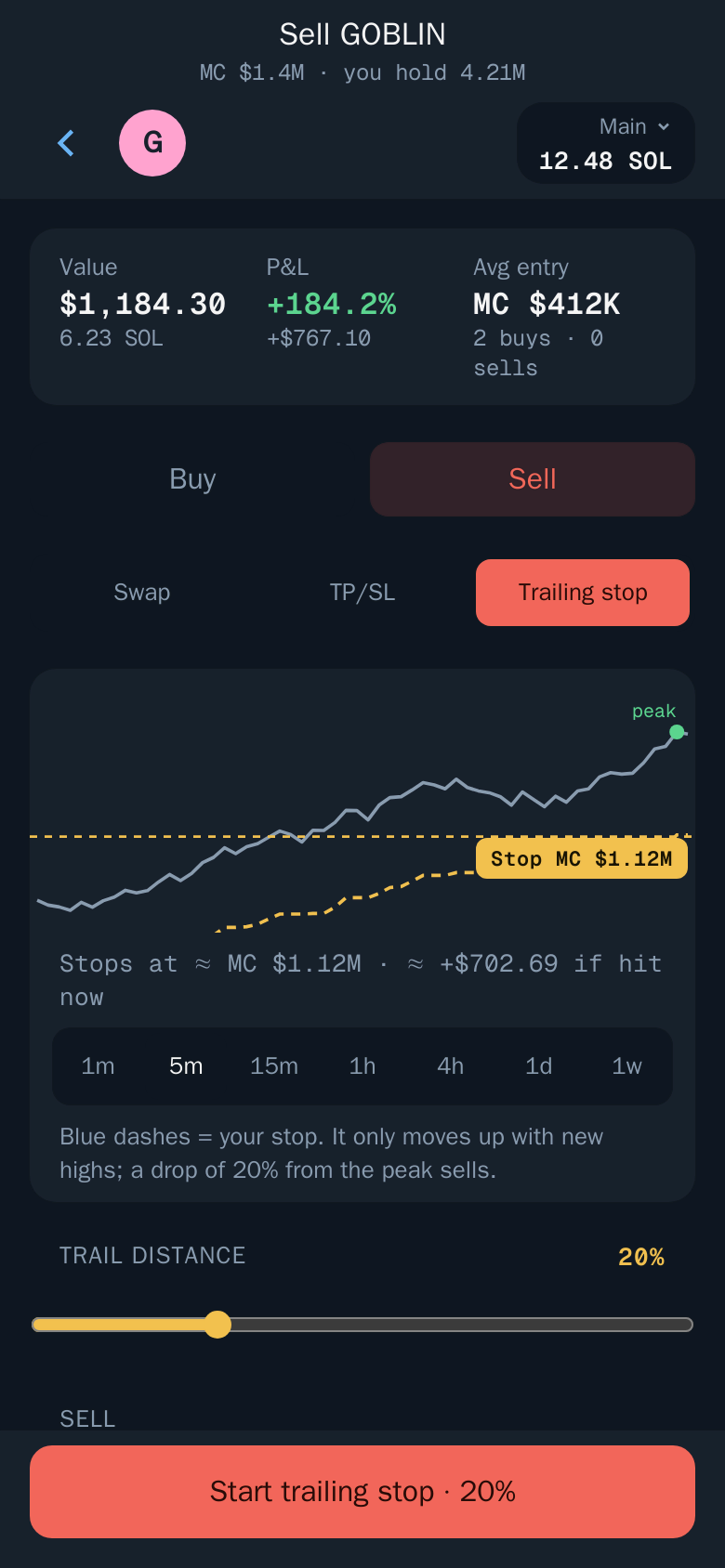
Read the Solana limit orders guide for every order type.
Social Sniper for Windows: Automated Entries
Social Sniper is a Windows app that watches WhatsApp groups and chats, X accounts, Telegram groups and channels, and Discord servers and channels, and buys as soon as a token address appears.
- Download Social Sniper for Windows and install it.
- Sign in and choose what to watch.
- Set your amount, slippage and filters.
- Leave it running. When a token address is posted, it buys straight away.
Social Sniper handles the entry, and your AutoSell targets are attached to every sniped buy, so each position gets its exit the moment it lands. To snipe calls from X, see the Twitter/X Solana sniper guide.
Warning: No exit setting catches every scam. Check liquidity, holders and socials before you buy, start small on new coins, and only trade what you can afford to lose. See Trading safely.
Never Give Back a Gain Again
Thor's AutoSell sets your take profit, stop loss and trailing stop the moment your buy lands, and runs them on Thor's servers around the clock. Set your strategy once and trade without watching the chart. Start Thor on Telegram, or see all Thor apps, including the Mini App, the Chrome Web Extension and Social Sniper. Thor charges a flat 0.5% per spot trade, or 0% on spot with a subscription; see Fees.
Frequently asked questions
How do I set a stop loss on Pump.fun?
Pump.fun has no stop loss order of its own. Open the token in Thor, choose Sell then TP/SL, set your stop as a percentage or price and confirm. To add it to every buy automatically, set it once in Settings then Auto sell.
Does AutoSell work on Pump.fun bonding curve tokens before they graduate?
Yes. Thor trades pump.fun tokens on the bonding curve and after they graduate to a regular pool such as PumpSwap or Raydium. Your take profit and stop loss orders keep working at either stage, and Thor picks the best route when a target is hit.
Can I set multiple take-profit levels on the same token?
Yes. You can add several take profit targets, for example sell 25% at 2x and another 50% at 5x, so you bank early gains while keeping exposure for a larger move. The rest can have a trailing stop to ride momentum without capping upside.
What happens to my AutoSell orders if I close Thor or my computer shuts down?
Your orders run on Thor's servers, not on your device. Closing Telegram or turning off your computer has no effect. Your take profit, stop loss and trailing stop stay active until they trigger, expire or you cancel them.
What is a trailing stop loss and how does it differ from a regular stop loss?
A regular stop loss stays at the level you set and never moves. A trailing stop follows the token price upward and sells when the price drops by a set distance from its highest point. If the token rises to 3x and then drops 25%, Thor sells around 2.25x instead of at your original stop.
Will AutoSell protect me from rug pulls and sudden liquidity removal?
A stop loss helps limit losses from a fast price drop, but it cannot fully protect against an instant rug where liquidity is removed before any sell can land. The best protection is choosing tokens carefully and keeping position sizes small relative to your total portfolio.
Step-by-step in the Docs
- Auto sell: Take profit, stop loss and trailing stop added to every new buy, wherever you buy.
- Take profit and stop loss: Orders that sell part or all of a position at your target, even when Telegram is closed.
- Trailing stop: A stop loss that follows the highest price and sells on a drop from the peak.
- Trading safely: Your first trade, safely: read the security card, the tax and the impact, start small and set a stop.