Solana Limit Orders: Automated Buy & Sell Targets for Memecoins
Market orders expose you to slippage and emotional timing. Limit orders let you define exactly where you enter and exit — then let Thor execute them automatically, 24/7, across every Solana DEX and pool.
What Are Limit Orders on Solana?
A limit order is an instruction to buy or sell a token at a specific price — not the current market price. Unlike a market order which executes immediately at whatever price is available, a limit order waits until the market reaches your target before triggering.
On Solana, where memecoin prices can move 10× in minutes and retrace just as fast, the difference between a market order and a limit order is often the difference between a profitable trade and a destructive one. Limit orders give you precision over both entry and exit without requiring you to watch the chart.
Thor monitors your open limit orders on private server infrastructure 24 hours a day. Orders stay active for up to 5 years and execute the moment the on-chain price hits your target — whether you are online or not.
Why Limit Orders Matter More on Solana Than Other Chains
Solana memecoins are more volatile than almost any other tradeable asset. A token can move from a $50K market cap to $5M in under an hour, then collapse back to $100K within the same session. In this environment, three problems make market orders dangerous:
- Slippage on entry: Buying at market during a fast pump often means filling at 15–30% above the price you saw when you decided to buy. A buy limit order ensures you only enter at a price you accepted, not the price the market decided to give you.
- Emotional exits: Selling at market when a token is down requires you to make a decision under stress. A stop-loss limit order removes that decision — it fires automatically when your floor is hit.
- Missed take-profits: Tokens often spike to their peak at 3 AM or during a window when you are not watching. A take-profit limit order captures that peak automatically.
Buy Limit Orders: Entering Positions at Your Target Price
A buy limit order executes a purchase when the token price drops to a level you specify. This is the right tool when you want exposure to a token but do not want to chase the current price — you set your target and wait for the market to come to you.
When to Use a Buy Limit
- A token you want to accumulate is currently trading above your target. You set a buy limit below the market and wait for a dip.
- A token graduates from Pump.fun to Raydium and you expect an initial dump before recovery. Set a buy limit at your target dip level rather than buying the graduation spike.
- You want to add to an existing position only on a specific pullback — without monitoring the chart manually.
Sell Limit Orders: Take-Profit and Stop-Loss
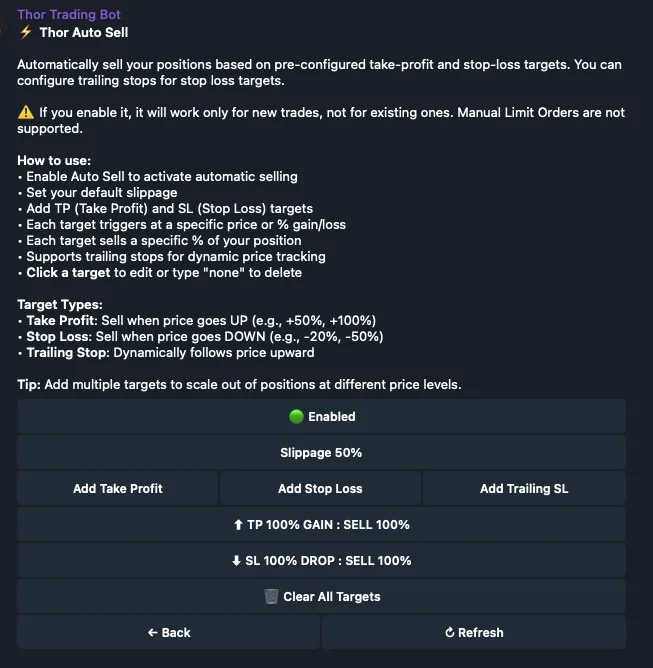
Sell limit orders cover two essential exit scenarios: locking in gains at a target (take-profit) and capping losses at a floor (stop-loss). Both are set once and execute automatically.
Take-Profit Orders
A take-profit order sells a defined percentage of your position when the price rises to a target multiplier. You can stack multiple take-profit levels on the same position:
Stop-Loss Orders
A stop-loss sells your entire position when the price drops to a floor below your entry. It is your maximum acceptable loss on any given trade. Set it before you enter, not after the trade is already going against you.
Trailing Stop Losses: Dynamic Exits That Follow the Price
A trailing stop is a sell order that adjusts upward as the price rises. When the price reverses by a defined percentage from its highest point, the trailing stop fires and sells your position.
The key advantage over a fixed stop-loss is that a trailing stop does not cap your upside. A fixed stop at −40% from entry stays there forever. A trailing stop at 25% below peak follows the price as it rises — so if the token goes to 10× and then pulls back 25%, you exit at 7.5× rather than at your original stop.
All DEXes and Pools — No Manual Routing Required
Thor's limit order engine routes across every available Solana DEX and liquidity pool. This includes Raydium (CLMM and AMM), Pump.fun (both bonding curve and post-graduation pools), Orca, Meteora, and any other active pool for the token. You do not specify a DEX — Thor finds the best available execution route automatically when the price target is hit.
This matters because token liquidity migrates. A token that launches on Pump.fun and graduates to Raydium will have different pool structures at each stage. Thor's routing handles this transparently — your limit order follows the token wherever liquidity is deepest.
How to Set Limit Orders in Thor
Via the Telegram Bot
- Open Thor on Telegram and navigate to the token you want to set orders on.
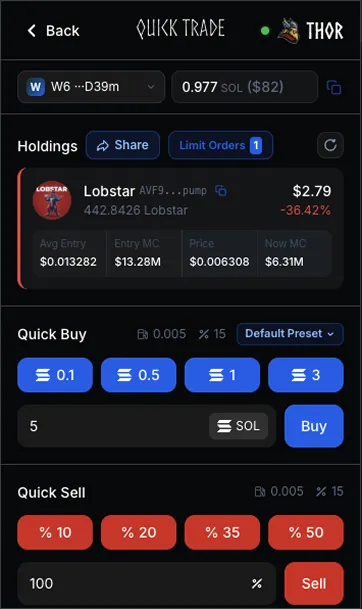
- Select Limit Orders from the token menu.
- Choose Buy Limit, Take Profit, Stop Loss, or Trailing Stop.
- Enter your target price or percentage and the amount to sell. Thor registers the order immediately on its monitoring servers.
Via the Chrome Extension
- Open the token on DexScreener, Pump.fun, Axiom, or any supported platform. Thor auto-detects the contract address.
- Open the Thor extension panel and go to the Orders tab.
- Set your buy limit, TP, SL, or trailing stop directly from the panel — without leaving the chart.
Frequently Asked Questions
When the on-chain price hits your target, Thor executes immediately using private RPC nodes. There is no polling delay — Thor streams real-time price data via Geyser WebSocket, so the trigger and execution happen within milliseconds of the price level being reached.
Thor routes limit orders across all available Solana pools and DEXes, including Raydium, Pump.fun (bonding curve and post-graduation), Orca, Meteora, and any other active liquidity source. You do not need to specify a DEX — Thor finds the best available route automatically.
Up to 5 years. Thor monitors your open orders continuously on its private server infrastructure, so orders remain active regardless of whether you are online. You can cancel any open order at any time from within the bot or extension.
Yes. You can stack multiple TP targets — for example, sell 25% at 2×, another 50% at 5×, and trail the remaining 25% with a trailing stop. Each target is registered as a separate order and executes independently.
Thor's sell protection system uses a fallback payer mechanism to ensure sells go through. If slippage on the initial attempt exceeds your configured limit, Thor retries automatically. The 50% max slippage hard cap prevents catastrophic fills from draining your position at an unacceptable price.
Set it once. Let Thor execute.
Thor's limit order engine monitors your targets 24/7 on private nodes across every Solana DEX — buy at your price, take profit automatically, and never give back gains to an unmonitored chart.