USD Cash is a single USDC wallet on Solana that trades every chain in Thor. You deposit dollars once, then buy and sell tokens on Solana, Ethereum, Base, BNB Chain, Robinhood and Arc from the same balance. Trades pay in USDC, sell back into USDC, and you never need SOL or ETH for gas.
This guide explains what USD Cash is, how to fund it, how to move your existing wallets into it, and how trading every chain from one balance works. For the step-by-step reference, see USD Cash in the docs.
Why One Dollar Wallet Instead of Six
Without USD Cash, trading on several chains means keeping a separate balance in each chain's coin: SOL on Solana, ETH on Base and Ethereum, BNB on BNB Chain. Every balance moves with its coin's price, every chain needs its own gas, and spotting a coin on the "wrong" chain means bridging first.
USD Cash removes that work:
- One balance, in dollars. Your cash sits in USDC on Solana and doesn't move with the price of SOL or ETH while you wait for a setup.
- Every chain from it. A buy on Base or BNB Chain is a cross-chain swap: Thor bridges the USDC and buys the token in one trade.
- No gas coins. The network fee is paid for you and charged back in USDC in the same trade.
- Profits come home in dollars. Selling a token, on any chain, turns it back into USDC in USD Cash.
USD Cash on Home
Where to find it
Home and Portfolio have a USD Cash | Wallets switch at the top. The USD Cash tab shows:
- Your USDC balance, with the line "Dollars on Solana · trades pay and settle in USDC".
- Deposit USDC and Move to USD Cash.
- Every position you bought from USD Cash, on every chain, with its value and profit or loss.
The Wallets tab shows all your other wallets on one arc by chain, so you can still manage SOL and EVM wallets the classic way.
 Thor Trading Bot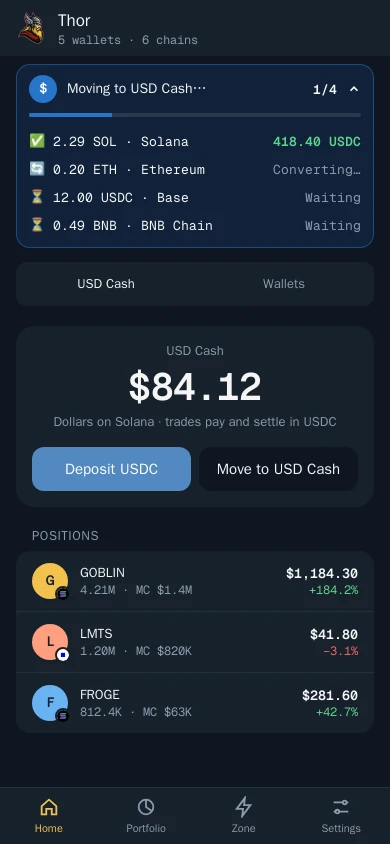
How to Deposit to USD Cash
Two addresses, any supported coin
- Open Deposit and choose USD Cash.
- Copy the Solana address or the EVM address, or show the QR code.
- Send a supported coin on the right network.
- Wait for it to arrive as USDC, usually within minutes. A progress bar shows the conversion.
Thor Trading Bot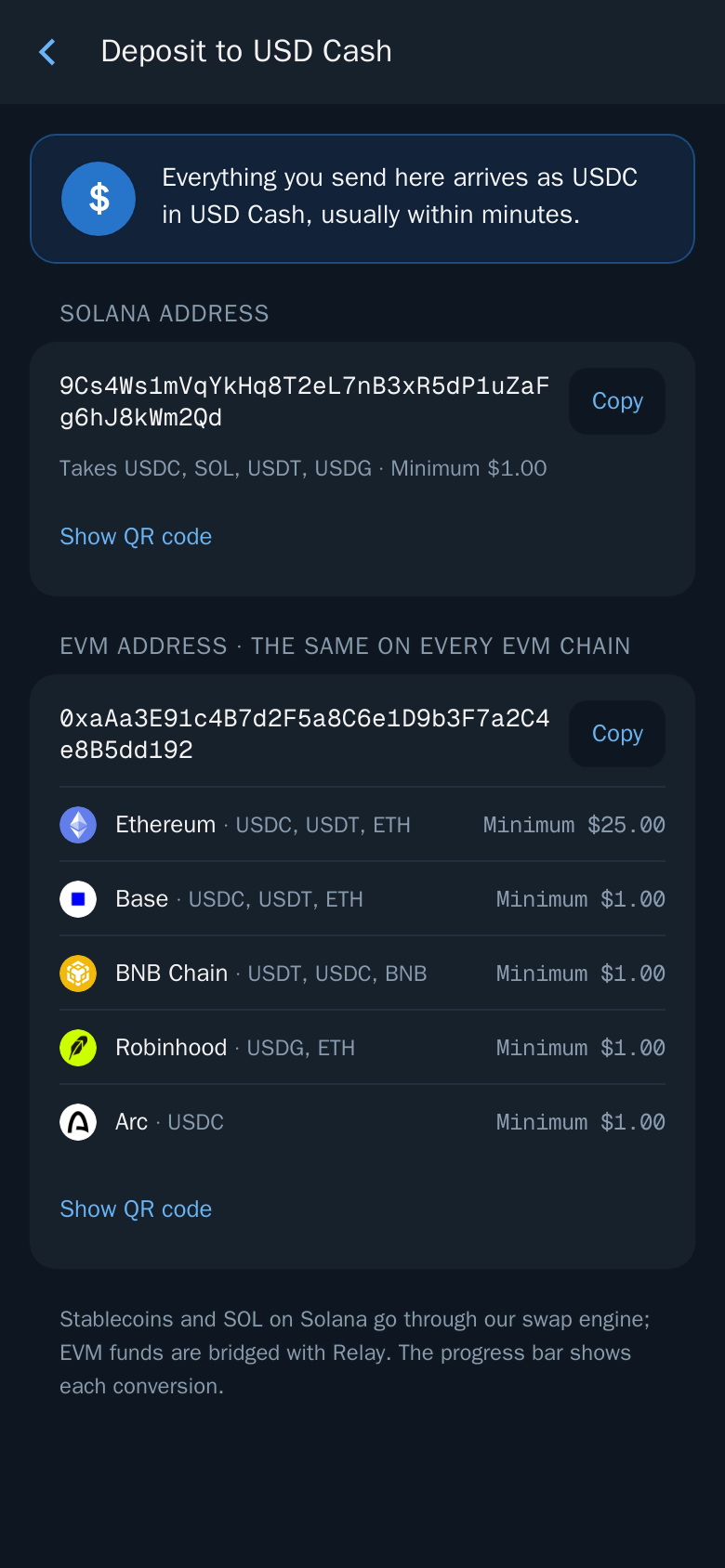
What each address accepts:
| Network | What you can send | Minimum |
|---|---|---|
| Solana | USDC, SOL, USDT, USDG | $1 |
| Ethereum | USDC, USDT, ETH | $25 |
| Base | USDC, USDT, ETH | $1 |
| BNB Chain | USDT, USDC, BNB | $1 |
| Robinhood | USDG, ETH | $1 |
| Arc | USDC | $1 |
The EVM address is the same on every EVM chain. SOL and Solana stablecoins go through Thor's swap engine; funds on EVM chains are bridged with Relay. Either way, they land as USDC on Solana.
Warning: Always send on the right network, and only the coins listed for it. Funds sent on the wrong network can be lost.
Move Your Existing Wallets Into USD Cash
Already trading with Thor? You don't have to withdraw and deposit again. Move to USD Cash collects the cash in your other wallets in one go.
Pick the wallets
- Tap Move to USD Cash on Home, in Portfolio or in Wallets.
- Tick the wallets to move. Each row shows the chain, the coin and stablecoin balance and the value in dollars. Every wallet starts unticked.
- Hold Hold to move $X until the button fills.
Thor Trading Bot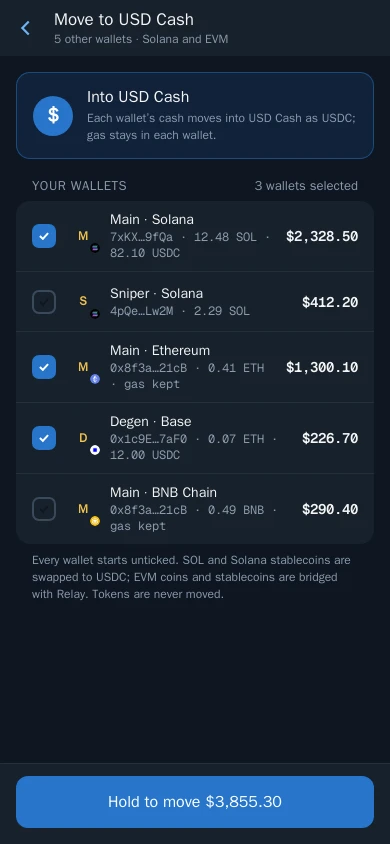
Watch it convert
A progress bar stays pinned at the top of every screen while the move runs. Each asset gets its own row: ⏳ Waiting, 🔄 Converting…, ✅ the USDC received, or ❌ Not converted. When everything is settled the bar turns green with your new balance, your balances refresh and Home opens.
Thor Trading Bot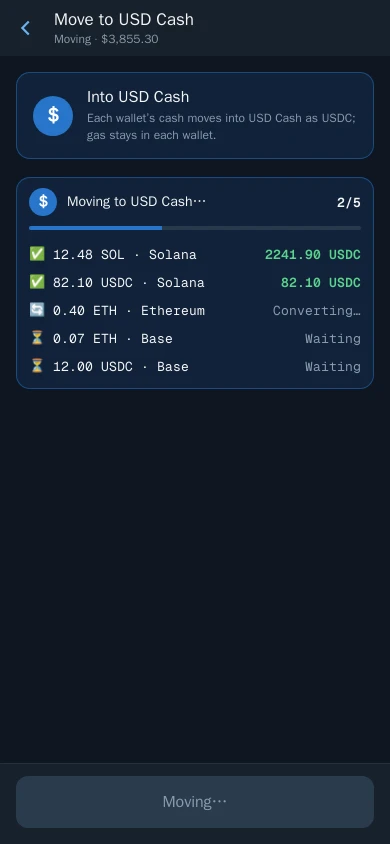
What moves and what stays:
- Solana: SOL and stablecoins are swapped to USDC.
- EVM chains: the coin and stablecoins are bridged into USDC on Solana. A gas reserve stays in each EVM wallet.
- Tokens never move. Your open positions stay in their wallets.
- If one asset can't be converted, it stays where it is and the rest carry on.
Trading From USD Cash
Make USD Cash active by picking it in any wallet picker, or with Make active on its card in Wallets. It then becomes your active wallet on Solana and on every EVM chain at once.
From there, every trade works the same way:
- Open any token, on any supported chain.
- Enter the amount in USDC. If you type SOL or ETH, Thor converts it at the market price.
- The order says it pays from USD Cash in USDC. Confirm.
On Solana the USDC buys the token directly. On an EVM chain, Thor bridges the USDC first and then buys: that is a cross-chain swap, explained in full in Cross-Chain Swaps in Telegram. Selling reverses it and puts USDC back in USD Cash. Receipts, alerts and limit-order fills show the stablecoin, not SOL.
Spot trades cost Thor's flat 0.5% per trade, or 0% with the subscription. Every fee is shown on the order before you confirm.
Speed
Thor runs its own private Solana node, so Solana trades land in under 0.8 seconds from tap to on-chain in normal conditions. Trades on EVM chains land in under 4 seconds. A buy on an EVM chain from USD Cash also includes the bridge time. See Why Thor is fast.
What USD Cash Is Not
- Not exportable. USD Cash can't be renamed, deleted or exported. Money leaves through Withdraw or Transfer.
- Not for Perps or Predictions. Hyperliquid perps and Polymarket predictions always use your own EVM wallet. See the USDC trading bot guide for how those are funded.
- Not a replacement for your other wallets. They keep working as before, in their own coins, and don't count against USD Cash. USD Cash doesn't count toward the 10-wallet limit either.
USD Cash replaces the old USDC Only Mode setting.
Is USD Cash Right for You?
USD Cash fits you if you:
- think in dollars and want profits to stay in dollars;
- trade on more than one chain and are tired of keeping gas on each;
- want to jump on a Base or BNB Chain coin without bridging by hand.
If you only trade Solana memecoins with SOL, your Solana wallet still works exactly as before, and you can switch to USD Cash any time from the wallet picker.
Thor Trading Bot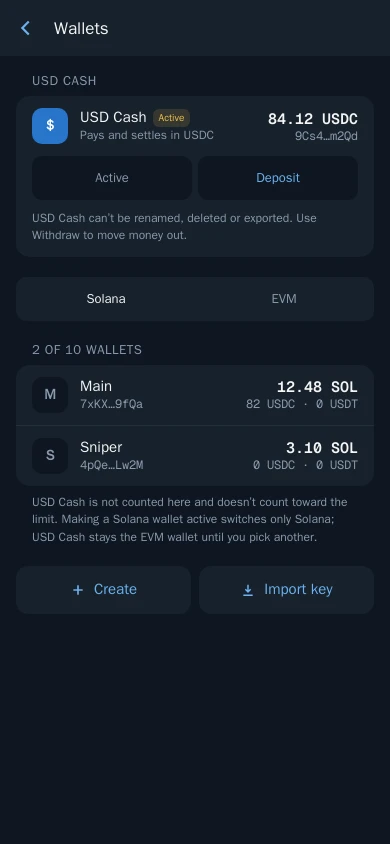
Frequently asked questions
What is USD Cash in Thor?
USD Cash is a wallet that holds USDC on Solana. You can buy and sell tokens on every chain Thor supports from it: Solana, Ethereum, Base, BNB Chain, Robinhood and Arc. Trades pay in USDC and sell back into USDC.
Do I need SOL or ETH for gas with USD Cash?
No. USD Cash holds no SOL or ETH. The network fee is paid for you and charged back in USDC in the same trade, so a USDC balance is all you need.
How do I deposit to USD Cash?
Open Deposit and choose USD Cash. Send USDC, SOL, USDT or USDG to the Solana address, or stablecoins and the chain's coin to the EVM address on Ethereum, Base, BNB Chain, Robinhood or Arc. Everything arrives as USDC, usually within minutes.
Can I move my existing SOL and ETH into USD Cash?
Yes. Move to USD Cash lists your other wallets. Tick the ones you want, hold to confirm, and Thor swaps SOL and Solana stablecoins to USDC and bridges EVM coins and stablecoins into USDC on Solana. A gas reserve stays in each EVM wallet and tokens are never moved.
Can I export the USD Cash private key?
No. USD Cash can't be renamed, deleted or exported. You move money out with Withdraw or Transfer.
Can I use USD Cash for Perps or Predictions?
Not today. Perps on Hyperliquid and Predictions on Polymarket always use your own EVM wallet, even when USD Cash is active.
How fast are trades from USD Cash?
Solana trades land in under 0.8 seconds and EVM trades in under 4 seconds in normal conditions. A buy on an EVM chain also includes the time to bridge the USDC.
Step-by-step in the Docs
- USD Cash: One USDC wallet on Solana that trades every chain.
- Move to USD Cash: Turn the cash in your other wallets into USDC in one go.
- Cross-chain swaps: Buy and sell tokens on any chain with USDC from USD Cash.
- Fund your wallet: Send SOL or another coin to your Thor wallet to start trading.