Thor is an Arc trading bot on Telegram: you deposit USDC on Arc to your Thor EVM wallet, paste a token address and buy or sell in a tap. On Arc the native coin is USDC, so the same dollar balance you trade with also pays the network fees, with no separate gas token to buy.
This guide explains what that means in practice, how to fund your wallet on Arc, how to trade, which Thor features work there and how fees work.
What Is Arc Chain?
Arc is an EVM-compatible blockchain developed by Circle, the company behind USDC. Its defining feature for traders is that USDC is the native coin. In Thor, Arc sits next to Ethereum, Base, BNB Chain and Robinhood Chain as one of the EVM chains you trade with the same wallet.
USDC Gas: Why Arc Is Different
On most chains you need two balances: the coin you trade with and the coin that pays gas. On Ethereum and Base that gas coin is ETH, and on BNB Chain it is BNB. If the gas balance runs out, you cannot sell, even if you hold tokens.
On Arc, that split goes away:
| Chain | Native coin (pays network fees) |
|---|---|
| Ethereum | ETH |
| Base | ETH |
| BNB Chain | BNB |
| Robinhood Chain | ETH |
| Arc | USDC |
You hold one USDC balance on Arc, you buy with it, and network fees come out of it too. Your portfolio value also stays easy to read, because your idle balance is in dollars. For more on trading with stablecoins across Thor, read the USDC trading bot guide.
Note: USDC on Arc is not the same balance as USDC on Ethereum, Base or Solana. Each chain keeps its own balance, even when your EVM address is the same.
What You Need to Trade on Arc
When you start Thor on Telegram, it creates a Solana wallet and an EVM wallet. Arc uses the EVM wallet.
| What | On Arc |
|---|---|
| Wallet | Your Thor EVM wallet |
| Native coin | USDC |
| Address | Same EVM address as on Ethereum, Base, BNB Chain and Robinhood Chain |
| Where trades happen | EVM venues, routed by Thor |
You can keep up to 10 EVM wallets, switch between them in Wallets under the EVM tab, or Import a wallet with its private key. See Wallets.
How to Fund Your Wallet on Arc
Deposit USDC on Arc
- Open Deposit from Home in the Mini App.
- Tap the chain pill at the top and switch to Arc.
- Copy your address or scan the QR code.
- Send USDC on the Arc network from another wallet or an exchange that supports it.
Funds usually arrive within a minute on most EVM chains. See Fund your wallet.
Warning: USDC exists on many networks. Choose Arc when you withdraw from an exchange or another wallet. Funds sent on the wrong network can be lost.
 Thor Trading Bot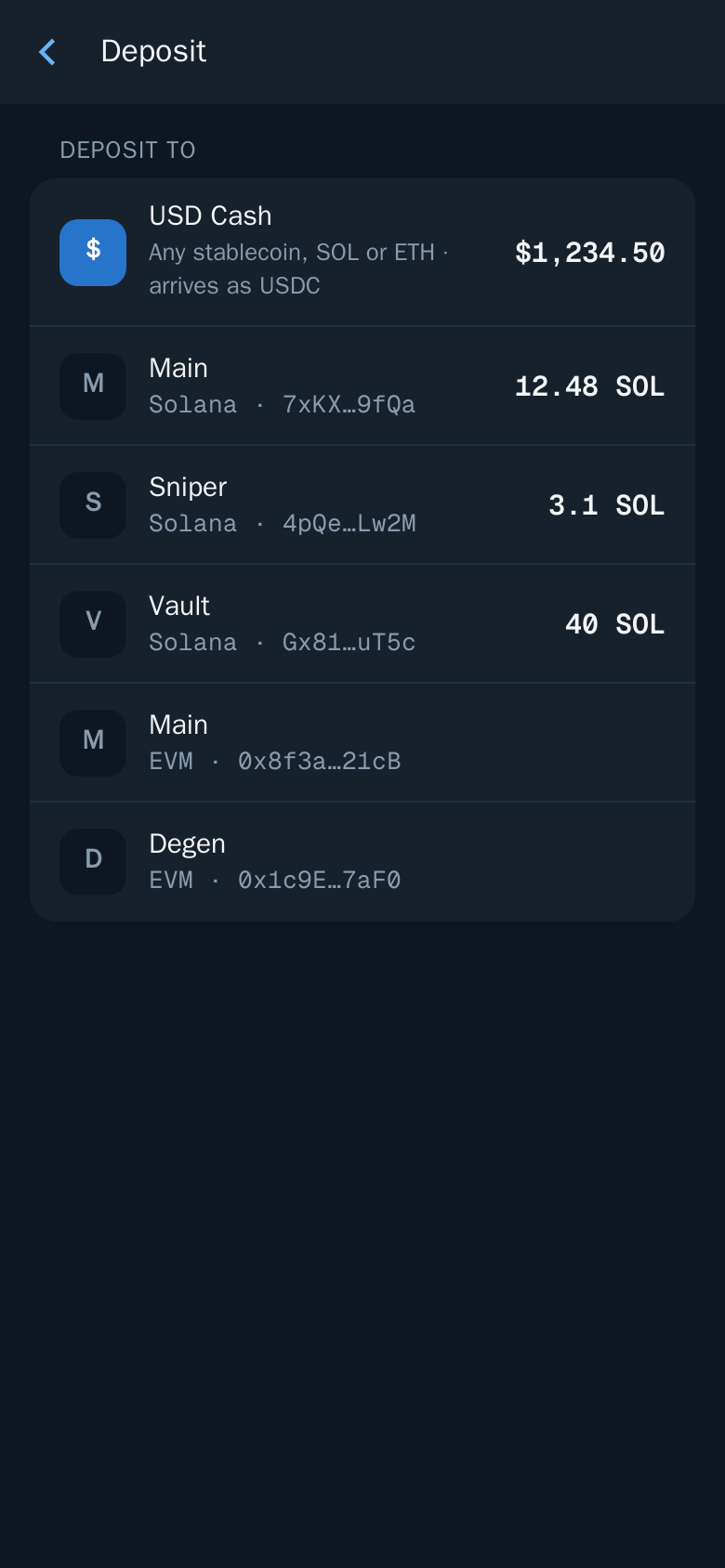
Bridge to Arc From Solana
If your funds are in your Thor Solana wallet, move them with the Bridge:
- Open Bridge.
- Choose what you send and from which chain, for example SOL on Solana.
- Choose what you receive and on which chain: USDC on Arc.
- Check the minimum you will receive, the fees and the expected time.
- Confirm and follow the progress on the status screen.
Thor Trading Bot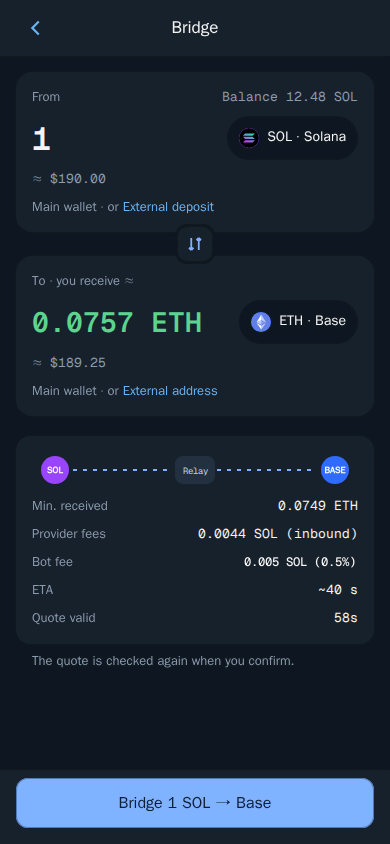
Thor compares several routes and picks the best one. If a quote expires before you confirm, Thor fetches a new one and checks it again. To go back, bridge from USDC on Arc to SOL on Solana. You can also bridge between Arc and the other EVM chains.
How to Trade on Arc Chain in Telegram
Buy With USDC
- Check the chain pill shows Arc. The bot and the Mini App always use the same chain.
- Paste the token address in the bot chat, or open Search in the Mini App. Block explorer links and names or symbols work too.
- If the token shows on several chains, pick the Arc result.
- Tap an amount or enter your own in Custom.
- Check what you receive, the price impact and the fee, then confirm.
Thor Trading Bot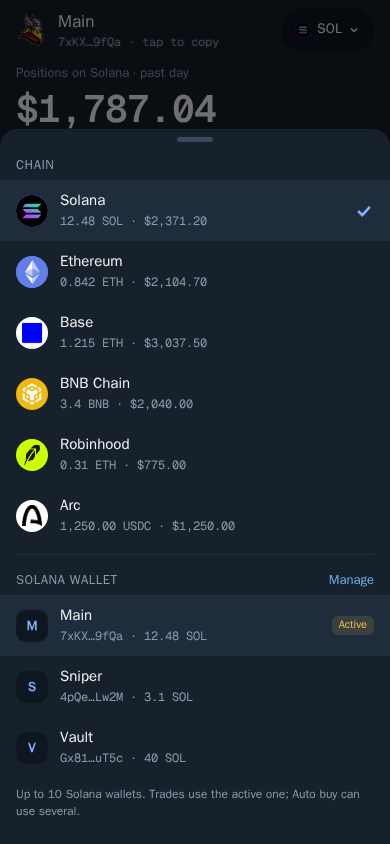
See Buy. You can change your preset amounts in Fees, buttons, display. See Buy and sell buttons.
Sell Back to USDC
- Open the token or position and choose Sell.
- Tap a percentage, for example 50% or 100%, or enter an amount.
- Confirm.
Tip: Even on Arc, keep a small USDC buffer after a big buy. That USDC pays the network fee when you sell.
Orders on Arc
Your orders run on Thor's servers, even when Telegram is closed:
- TP/SL — set several take profit and stop loss levels. See Take profit and stop loss.
- Trailing — a stop that rises with the price. See Trailing stop.
- Buy when — a limit buy by price, market cap or % from entry. See Buy when.
Find them all in Portfolio, then Orders, or type /limit_order in the bot chat.
Which Thor Features Work on Arc
| Feature | On Arc |
|---|---|
| Buy and sell | Yes |
| Take profit, stop loss, trailing stop, Buy when | Yes |
| Auto sell | Yes, on every new buy |
| Auto buy | Yes, by pasting an address or link in the bot chat |
| Token security check | Yes, as on every EVM chain |
| Bridge to and from Solana | Yes |
| Subscription paid in the chain's own coin | Yes, in USDC |
| Trenches and copy trade | Yes |
Features the docs describe with Solana in mind include the private Solana node, Sell protection, the web extension and the Solana launchpad sources in Trenches. Trenches and copy trade both work on Arc.
Auto Buy and Auto Sell on Arc
Auto buy buys as soon as you send or forward a token address or link to the bot chat. It does not run from the Mini App. Set a default amount, slippage, optional Max market cap and Min liquidity, and the wallets to buy from. With Auto sell on, every buy gets your exits straight away.
Trading Safely on Arc
On EVM chains, Thor runs a security check on each token. It tests whether the token can be sold (honeypot), shows buy and sell tax and flags risky permissions. Trades on clear scams are blocked. Check liquidity, holders, age and socials yourself as well, start small on new tokens and keep Price impact protection on. See Trading safely and Protections.
Arc Trading Bot Fees
Thor charges 0.5% per spot trade on Arc, half the 1% that many Telegram trading bots charge. The bridge costs 0.5% of the amount. Network fees, paid in USDC on Arc, and third-party fees are added on top. Every fee is shown before you confirm. See Fees.
The Subscription, Paid in USDC
The Subscription is $100 for 30 days and gives 0% Thor fees on spot trading and bridging on Solana and every EVM chain, Arc included. You can pay in SOL, the chain's own coin or a stablecoin, so on Arc you can pay straight from your USDC balance in Settings → Subscription.
- Break-even: $20,000 of spot volume in 30 days.
- Bridging in and out of Arc is also free of Thor fees while it is active.
- Not covered: Perps, Predictions, network fees and third-party fees.
- Non-refundable. Cancel any time and it runs to the end of the paid period.
Cashback on your own fees is paid in the chain's own coin, which on Arc is USDC. See Rewards and referrals.
Trade Other Chains With the Same Bot
The same EVM wallet works everywhere. Switch the chain pill and read the guide for each chain:
- Base trading bot on Telegram
- Ethereum trading bot on Telegram
- BNB Chain trading bot on Telegram
- Robinhood Chain trading bot
All chains and venues are listed in Supported chains and markets.
Start Trading Arc With USDC
Deposit USDC on Arc, or bridge from Solana, and trade with one dollar balance that also pays your gas. Open Thor on Telegram to get your wallets, or see all Thor apps.
Frequently asked questions
What is the native coin on Arc?
In Thor, the native coin on Arc is USDC. You deposit USDC on the Arc network to your Thor EVM wallet, and that same USDC balance pays for trades and network fees.
Can I pay gas fees in USDC?
On Arc, yes. Because USDC is the native coin there, network fees are paid in USDC. On other EVM chains Thor supports, gas is paid in that chain's own coin, such as ETH on Ethereum and Base or BNB on BNB Chain.
Can I send USDC from Ethereum or Solana straight to my Arc address?
No. Your EVM address is the same on every EVM chain, but USDC sent on Ethereum, Base or Solana stays on that chain. Deposit USDC on the Arc network, or use Thor's Bridge to move funds to Arc.
How do I get USDC onto Arc from Solana?
Open Bridge in Thor, choose what you send on Solana, such as SOL, and choose USDC on Arc as what you receive. Check the minimum received, fees and time, then confirm. The bridge fee is 0.5%, or 0% with the subscription.
Can I pay the Thor subscription in USDC?
Yes. The subscription can be paid in SOL, the chain's own coin or a stablecoin. On Arc, the chain's own coin is USDC, so you can pay with the USDC in your Arc balance.
Step-by-step in the Docs
- Supported chains and markets: Where you can trade with Thor.
- Fund your wallet: Send SOL or another coin to your Thor wallet to start trading.
- Bridge: Move funds between Solana and EVM chains.
- Subscription: No Thor fees on spot trading and bridging for 30 days.