Move to USD Cash
Turn the cash in your other wallets into USDC in one go.
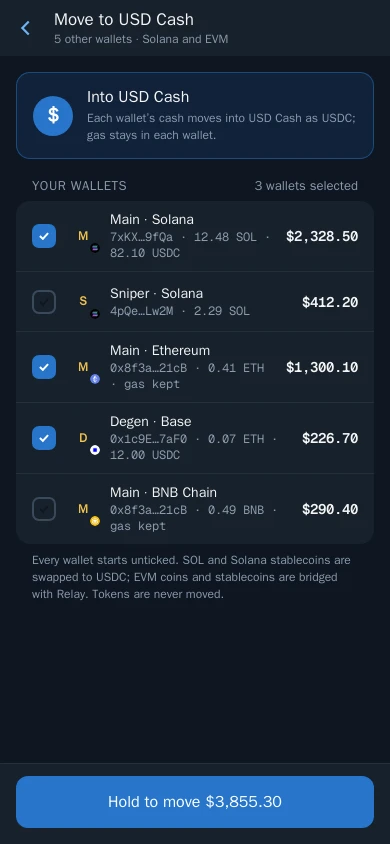
Move to USD Cash collects the coins and stablecoins in your other wallets, on Solana and every EVM chain, and turns them into USDC in USD Cash.
How to move
- Tap Move to USD Cash on Home, in Portfolio or in Wallets.
- Tick the wallets to move. Each one shows its chain, its coin and stablecoin balance and its value in dollars. Every wallet starts unticked, so nothing moves without your tap.
- Hold Hold to move $X until it fills.
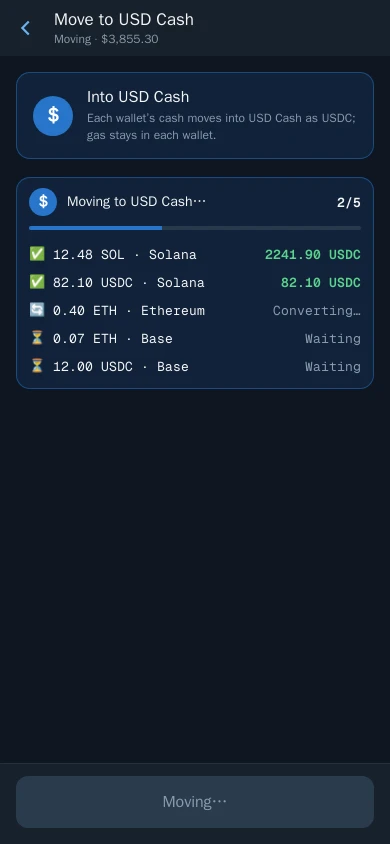
- Follow the progress bar. It shows one row per asset.
What gets moved
- Solana: SOL and stablecoins are swapped to USDC.
- EVM chains: the chain's coin and stablecoins are bridged to USDC on Solana. A little is kept in each EVM wallet for gas.
- Tokens are never moved. Your positions stay where they are.
The progress bar
The bar stays pinned at the top of every screen while the move runs:
- Checking your balances… before the steps are known.
- Moving to USD Cash… with a count such as 2/5 and one row per asset: ⏳ Waiting, 🔄 Converting…, ✅ the USDC received, or ❌ Not converted.
- Moved to USD Cash in green, with your new balance.
When it finishes, your balances refresh and Home opens. Tap the arrow on the bar to fold the rows away.
Good to know
- If one asset can't be converted, it shows Not converted and the rest carry on. It stays in its wallet.
- A deposit to USD Cash in anything other than Solana USDC uses the same progress bar while it is turned into USDC.