A USDC trading bot lets you keep your trading balance in dollars instead of a volatile coin. In Thor, USDC shows up in three places: it is the native coin on Arc, it is the margin for perps on Hyperliquid, and stablecoins are accepted to pay for the subscription.
This guide sticks to exactly where USDC and other dollar balances are used in Thor, how to move money into each one, and what each part costs, so you know what to deposit and where.
Where USDC Is Used in Thor
| Where | What you hold | How you fund it |
|---|---|---|
| Arc (spot trading) | USDC, the native coin | Deposit USDC to your EVM wallet on Arc |
| Perps on Hyperliquid | USDC margin | Perps, then Funds |
| Predictions on Polymarket | pUSD, a dollar-backed balance | Predictions, then Cash |
| Subscription | Pay in SOL, the chain's own coin or a stablecoin | Settings, then Subscription |
On every other chain Thor supports, you fund with that chain's own coin: SOL on Solana, ETH on Ethereum, Base and Robinhood Chain, and BNB on BNB Chain. See Supported chains and markets.
Note: Thor's docs describe funding with the chain's own coin on each chain. If you hold USDC and want to trade on another chain, use the Bridge to move value there first.
Trade With USDC on Telegram: Arc
Arc is an EVM chain where the native coin is USDC. That makes it the most direct way to trade with USDC in Thor: your balance on Arc is in dollars, not in a coin whose price moves while you wait for a setup.
How to deposit USDC on Arc
Your Thor EVM wallet uses the same address on every EVM chain, including Arc. To fund it (see Fund your wallet):
- Open Deposit from Home.
- Check the chain at the top. Tap the chain pill and switch to Arc.
- Copy your address or scan the QR code.
- Send USDC on the Arc network from another wallet or an exchange.
Warning: Always send on the right network. Funds sent on the wrong network can be lost. Sending USDC on a different chain to your Arc address is not the same as sending it on Arc.
Spot trades on Arc cost Thor's flat 0.5% per trade, or 0% with the subscription. For a full walkthrough of trading on Arc, read the Arc trading bot guide.
USDC for Perps: Fund Hyperliquid With USDC
Thor connects you to Hyperliquid for perps: long or short with leverage. Your perps account belongs to your Thor EVM wallet, and its balance is USDC.
How to add USDC to perps
- Open Perps, then Funds.
- Tap an amount or enter your own.
- Confirm.
If your funds are on another chain, Thor bridges them for you, and bridging into Perps has no Thor fee. See Add funds to Perps.
 Thor Trading Bot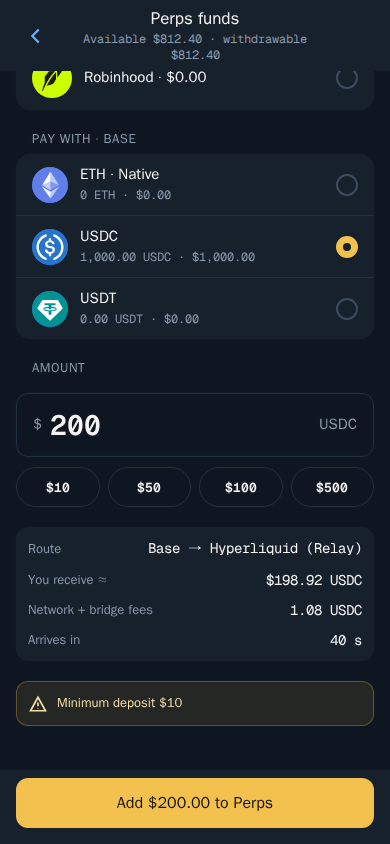
How to withdraw USDC from perps
- Open Perps, then Funds.
- Choose Withdraw and enter the amount.
- Confirm.
Your USDC moves back to your Thor wallet. Funds that back open positions cannot be withdrawn until those positions are closed. See Withdraw from Perps.
Perps carry a 0.05% builder fee per trade on top of Hyperliquid's fees, and the subscription does not cover it. Leverage makes losses bigger, and if the price reaches your liquidation price, the position is closed and its margin is lost. Read the full Hyperliquid Telegram bot guide before you open a position.
Dollar Balances for Predictions: pUSD
Predictions on Polymarket also run on a dollar balance, but it is not described as USDC. Thor holds your predictions cash as pUSD, a dollar-backed balance, in your own predictions wallet (a deposit wallet on Polygon that belongs to your Thor account).
How to add cash for predictions
- Open Predictions, then Cash.
- Choose an amount and confirm.
If your funds are on another chain, Thor moves them for you with no Thor bridge fee. To take money out, open Predictions, then Cash, choose Withdraw, enter the amount and confirm. See Add cash and Withdraw cash.
Thor Trading Bot
Thor's fee on predictions is $0 today; Polymarket's own fee applies. Learn how shares, payouts and claims work in the Polymarket Telegram bot guide.
Bridging USDC and Other Funds Between Chains
The Thor Bridge moves funds between Solana and EVM chains, including Arc. You choose what you send and from which chain, and what you receive and on which chain:
- Open Bridge.
- Choose what you send and from which chain.
- Choose what you receive and on which chain.
- Check the minimum you will receive, the fees and the expected time.
- Confirm and follow the progress on the status screen.
Thor Trading Bot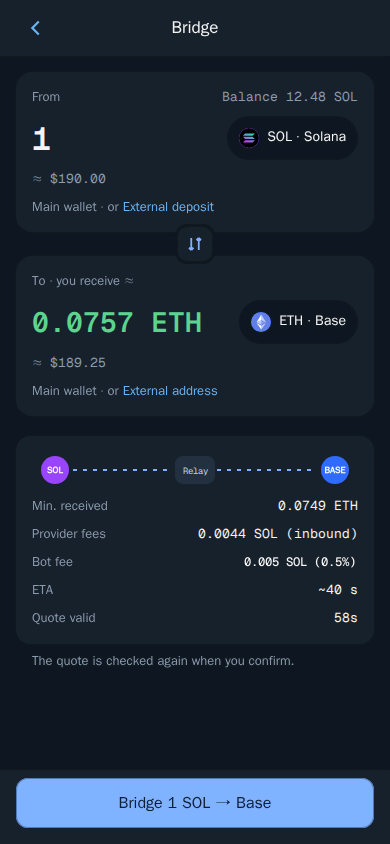
Thor compares several routes and picks the best one for you. Quotes are valid for a short time; if one expires, Thor fetches a new one and checks it again before sending. You can also deposit from an outside wallet or receive at an outside address.
Bridge fees
| Bridge type | Thor fee | With subscription |
|---|---|---|
| Between Solana and EVM chains | 0.5% of the amount | 0% |
| Funding perps or predictions | No Thor fee | No Thor fee |
Bridge providers and networks charge their own fees on top. Bridges are run by third-party providers, and a transfer can be delayed or fail on the provider side.
Tip: You do not need the Bridge screen to fund perps or predictions. Perps, then Funds, and Predictions, then Cash, move funds from another chain for you with no Thor fee.
Pay the Thor Subscription With Stablecoins
The subscription costs $100 for 30 days and cuts Thor's bot fees to 0% on spot trading and bridging on Solana and every EVM chain. To subscribe (see Subscription):
- Open Settings, then Subscription.
- Choose how to pay: SOL, the chain's own coin or a stablecoin.
- Pay the amount shown, or turn on auto renew to pay from your Thor wallet each month.
Thor Trading Bot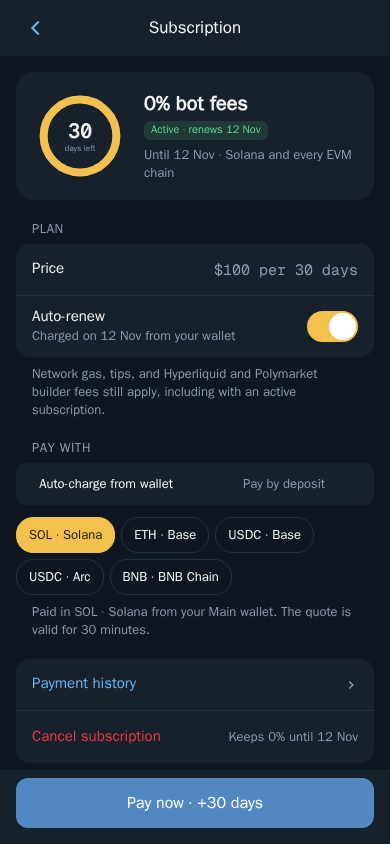
Without the subscription, Thor charges a flat 0.5% per spot trade, half the 1% many Telegram trading bots charge. Against that 0.5%, the subscription breaks even at $20,000 of spot volume in 30 days. Above that, every trade is cheaper.
What the subscription does not cover:
- Perps (the 0.05% builder fee and Hyperliquid fees).
- Predictions (Polymarket fees).
- Network fees and other third-party fees.
Subscriptions are non-refundable. If you cancel, it stays active until the end of the period you paid for. See Fees for the full fee table.
Is Thor the Right USDC Trading Bot for You?
If you want a Telegram trading bot where you can hold dollars, Thor covers it in three ways: spot trading on Arc with USDC as the native coin, USDC margin for Hyperliquid perps, and pUSD cash for Polymarket predictions, all from the same account. It is non-custodial: your funds stay in your own wallets and you can export your keys at any time.
Open Thor on Telegram to get started, check the Arc trading bot guide to trade on Arc, and see every way to use Thor on the apps page.
Frequently asked questions
Can I trade with USDC on Telegram?
Yes. In Thor, USDC is the native coin on Arc, so you fund your EVM wallet on Arc with USDC to trade there. USDC is also the margin for perps on Hyperliquid.
What is the native coin on Arc?
On Arc, the native coin is USDC. You deposit USDC to your Thor EVM wallet on the Arc network, the same way you would send ETH on Base or BNB on BNB Chain.
Do Hyperliquid perps in Thor use USDC?
Yes. You add USDC to your perps account from Perps then Funds and withdraw USDC back to your Thor wallet the same way. If your funds are on another chain, Thor bridges them in with no Thor fee.
Is my Polymarket balance in Thor held in USDC?
Thor holds your predictions cash as pUSD, a dollar-backed balance, in your own predictions wallet. If your funds are on another chain, Thor moves them for you with no Thor bridge fee.
Can I pay the Thor subscription with stablecoins?
Yes. When you subscribe in Settings then Subscription, you can pay in SOL, the chain's own coin or a stablecoin. The subscription costs $100 for 30 days and is non-refundable.
Step-by-step in the Docs
- Supported chains and markets: Where you can trade with Thor.
- Add funds to Perps: Move USDC into your perps account.
- Bridge: Move funds between Solana and EVM chains.
- Subscription: No Thor fees on spot trading and bridging for 30 days.