AutoSell vs limit orders: two tools to lock in profits and cut losses automatically. This guide explains what each does, how they differ, and how to get the most out of every trade.
- AutoSell: set once, and every buy gets take profit and stop loss automatically.
- Limit orders: manual orders with percentage, exact price or market cap triggers.
- Trailing stop: follows the pump up and sells on the pullback.
The Big Picture
Both tools create orders that Thor runs for you. The difference is when and how they are created.
| AutoSell | Limit orders | |
|---|---|---|
| Role | Your safety net, fires on every buy | Your sniper rifle, manual precision |
| Created | Automatically after each new buy | Manually, one order at a time |
| Triggers | % from your buy price, or market cap | % from entry, exact price or market cap |
| Direction | Sell only | Buy and sell |
| Best for | Every trade, with no extra effort | Specific tokens you have researched |
Tip: How they connect: AutoSell orders are ordinary orders. They show in Portfolio, then Orders, next to your manual ones, under the Auto sell filter. AutoSell just automates the setup.
Here is what happens with AutoSell turned on:
- You buy any token.
- AutoSell creates your take profit, stop loss and trailing stop orders for that buy.
- Thor watches the price on its servers, even when Telegram is closed.
- The price reaches one of your levels.
- Thor sells.
Three AutoSell Target Types
Configure once. Every new buy gets these protections automatically, whether it comes from the bot, the Mini App, the Chrome extension, Social Sniper, copy trade, Auto buy or a filled limit buy. In the app the feature is called Auto sell, and you add targets with + Take profit, + Stop loss and + Trailing SL.
| Target | What it does | Example |
|---|---|---|
| Take profit | Sells when the price rises to your target above entry | +100% = sell when the price doubles |
| Stop loss | Sells when the price drops to your floor below entry | −30% = sell if the price drops 30% |
| Trailing stop | A stop loss that moves up with the price but never moves down | Follows the pump, sells on the pullback |
You can also set targets by market cap instead of percentage, for example sell 50% when the coin reaches $1M.
How Trailing Stop Works
It stays a fixed distance below the highest price reached since the order was set. As the price pumps, the stop climbs. When the price drops by that distance from the peak, it triggers. Here is a 20% trailing stop:
| Step | Price | Trailing stop |
|---|---|---|
| You buy the token | $0.010 | $0.008 |
| Price pumps | $0.020 | moves up to $0.016 |
| Price keeps pumping | $0.050 | moves up to $0.040 |
| Price drops 20% from the peak | $0.040 | triggers and sells |
Tip: Why this beats a fixed TP: a take profit at +100% would have sold at $0.020. The trailing stop rode the pump and sold at $0.040, a 300% profit instead of 100%.
Note: In very fast moves the sell can fill below your stop price.
Sell Mode: Per Buy or Full Balance
When a target triggers, how much gets sold? AutoSell has two sell modes.
Per Buy
"Each buy has its own life." Each buy gets its own orders for its own tokens. Buy three times and you get three sets of orders, each measured from the price of the buy that created it.
| Buy | Tokens bought | TP at +100%, sell 25% |
|---|---|---|
| Buy #1 | 1,000 | sells 250 |
| Buy #2 | 1,000 | sells 250 (separate order) |
| Buy #3 | 2,000 | sells 500 (independent) |
Full Balance
"TP follows my whole bag." Each target sells a percentage of your whole balance of the token when it triggers. 100% means sell everything you hold.
| Situation | Balance | TP sell 25% sells |
|---|---|---|
| You buy 1,000 tokens | 1,000 | 250 |
| You also receive 1,000 tokens by transfer | 2,000 | 500 (25% of 2,000) |
Which Mode Should You Use?
| Per buy | Full balance | |
|---|---|---|
| How much sells | A share of the tokens from that buy | A share of your whole balance at trigger time |
| Tokens from transfers or airdrops | Not included | Included in the sell |
| Several buys of one token | One set of orders per buy | Targets act on everything you hold |
| Best when | You buy the same token several times and want each entry managed on its own | You only buy through Thor and want a simple "sell half my bag" |
Real Examples: Maximizing Profit
The best way to understand AutoSell is to see the exact same trade play out with real numbers.
Scenario: The Full Ladder, 5 TPs + 1 SL + 1 Trailing
The key principle: sell small early, sell big late. Every token is worth more at higher prices, so you want to keep the most tokens for the biggest multipliers. The trailing stop catches the peak with whatever remains.
You buy token $MOON for 1 SOL and get 10,000,000 tokens. Sell mode: Full balance, so each percentage applies to what you still hold when the target fires. Here is the setup:
| # | Type | Trigger | Sell | Why this size |
|---|---|---|---|---|
| 1 | TP | +50% (1.5x) | 15% | Small bite, first profit |
| 2 | TP | +100% (2x) | 45% | Recover your full initial |
| 3 | TP | +300% (4x) | 25% | Pure profit, everything from here is house money |
| 4 | TP | +900% (10x) | 30% | Bigger chunk at 10x |
| 5 | TP | +1900% (20x) | 40% | Heavy sell at 20x, secure the bag |
| 6 | SL | −50% | 100% | Insurance, max loss about 0.5 SOL |
| 7 | Trailing | 30% from peak | 100% | Catch the top with whatever is left |
Here is what happens as the price pumps:
| Event | Tokens sold | SOL back | Still holding |
|---|---|---|---|
| Price hits 1.5x, TP #1 fires | 15% of 10M = 1.5M | 0.225 | 8.5M |
| Price hits 2x, TP #2 fires | 45% of 8.5M = 3.825M | 0.765 | 4.675M |
| Price hits 4x, TP #3 fires | 25% of 4.675M = 1.17M | 0.47 | 3.51M |
| Price hits 10x, TP #4 fires | 30% of 3.51M = 1.05M | 1.05 | 2.45M |
| Price hits 20x, TP #5 fires | 40% of 2.45M = 0.98M | 1.96 | 1.47M |
| Price peaks at 50x, then drops 30% to 35x, trailing stop fires | all 1.47M | 5.15 | 0 |
After TP #2 you have 0.225 + 0.765 = 0.99 SOL back, so your initial is recovered. Total returned: 0.225 + 0.765 + 0.47 + 1.05 + 1.96 + 5.15 = about 9.6 SOL from 1 SOL invested. Everything after TP #2, about 8.6 SOL, is pure profit.
Note: All examples ignore Thor's 0.5% trading fee, network fees and slippage. Real fills will be slightly lower. See Fees.
Why Sell Small Early?
It is tempting to sell 50% at the first TP. But look at the math: selling 1.5M tokens at 1.5x gives you 0.225 SOL. Those same 1.5M tokens at 35x, where the trailing stop fires, would be worth 5.25 SOL. Every token you sell early is a token that cannot ride to the top.
The ladder above takes one small bite to lock in a first profit, one large sell at 2x to get your initial back, and then sells a growing share of what is left at each higher target (25%, then 30%, then 40%). The trailing stop at 100% catches whatever remains near the peak.
What If It Only Goes 2x?
Not every token goes 50x. If $MOON only reaches +100% and then dumps:
| Event | Result |
|---|---|
| TP #1 fires at 1.5x | 0.225 SOL back, 15% sold |
| TP #2 fires at 2x | 0.765 SOL back, initial recovered |
| Price reverses, trailing stop fires 30% below the 2x peak (1.4x) | Sells the remaining 4.675M for about 0.655 SOL |
| Total | About 1.645 SOL, a +64.5% profit |
Even a modest 2x pump returns about +64.5%. Your initial was already recovered at TP #2, and the trailing stop adds bonus profit on the way down. You do not need a moonshot.
What If the Price Dumps Instead?
Same setup, but the token goes the wrong way:
| Event | Result |
|---|---|
| You buy 10M $MOON for 1 SOL | Entry |
| Price drops steadily | No TP fires |
| Price hits −50%, stop loss fires and sells 100% | About 0.5 SOL back |
Your loss is limited to about 0.5 SOL. Without the stop loss you could ride it to zero. That is why you always pair TPs with an SL: the SL is your insurance. In a very fast crash the sell can fill below your stop, so size positions with that in mind.
Manual Limit Orders
Full control. Create them anytime, for any token. Manual orders can buy, with a limit buy that triggers when the token reaches your target, or sell, with take profit, stop loss and trailing stop orders just like AutoSell targets.
Ways to Set Your Trigger
| Trigger | Example | Where |
|---|---|---|
| Percentage | +50% or −30% from entry | Limit buy, TP/SL |
| Exact price | $0.0001, $0.50 | Limit buy, TP/SL |
| Market cap | $10M, $100M | Limit buy |
| Trailing distance | 10% below the peak | Trailing stop |
A limit buy can sit below the current price to buy the dip, or above it to buy a breakout only if the token keeps going.
How to Place Manual Orders
- Open the token in the bot or the Mini App.
- For a limit buy, choose Buy when, pick % from entry, Price or Market cap, set the target and amount, and tap Place limit buy.
- For take profit or stop loss, choose Sell, then TP/SL, and set each target and how much to sell.
- For a trailing stop, choose Sell, then Trailing, and set the distance and amount.
 Thor Trading Bot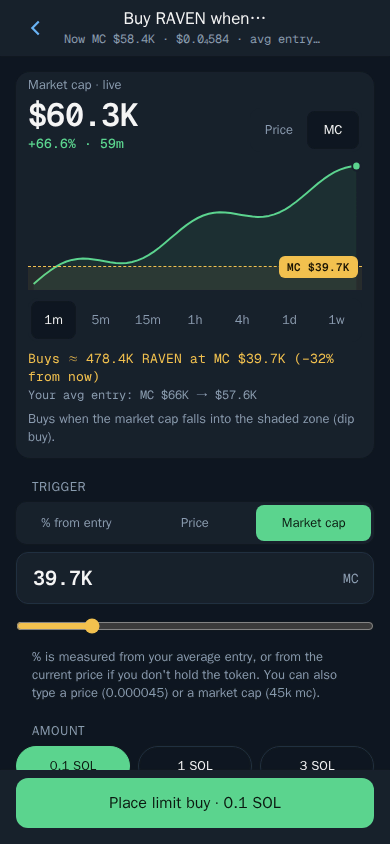
See the full Solana limit orders guide for more detail.
How to Set Up AutoSell
Turn On Auto Sell
- Open Thor on Telegram. Type
/settingsin the bot or open Settings in the Mini App. - Open Auto sell.
- Add your targets with + Take profit, + Stop loss and + Trailing SL, for example sell 50% at +100% and sell 100% at −30%.
- Choose the sell mode: Per buy or Full balance.
- Turn it on with the switch at the top.
Thor Trading Bot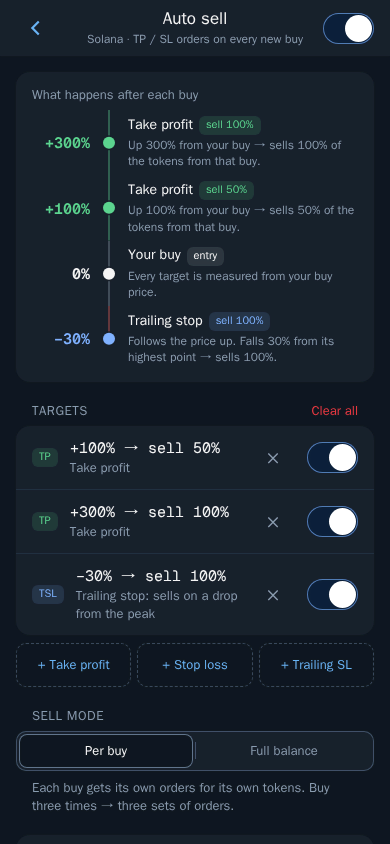
Inside Auto Sell Settings
- Main switch: turns Auto sell on or off.
- Targets: each target shows as a row such as "+100% → sell 50%". Use its switch to pause it or the X to remove it.
- + Take profit / + Stop loss / + Trailing SL: add new targets.
- Clear all: removes all targets at once.
- Sell mode: Per buy or Full balance.
Every new buy now gets these orders automatically. They show in Portfolio, then Orders, as Auto sell.
How to Cancel AutoSell Orders
- Open Portfolio, then Orders, or type
/limit_orderin the bot. - Tap the Auto sell filter at the top.
- Tap any order, then Cancel order. You can also pause it with its switch, or change its trigger, amount, slippage or expiry.
Thor Trading Bot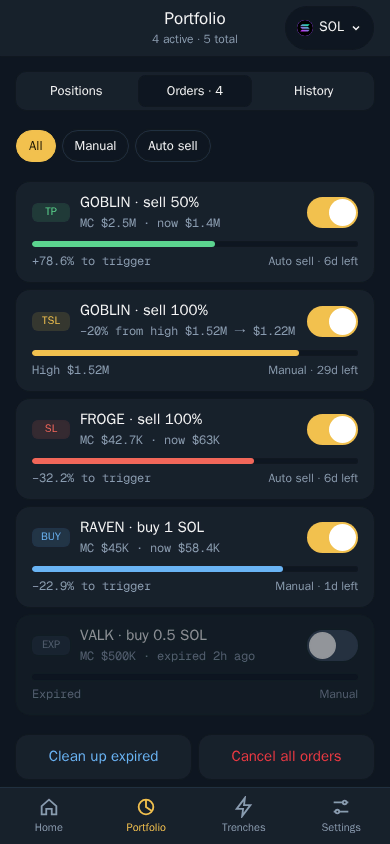
Warning: After turning Auto sell off or changing your targets, always check Portfolio, then Orders, under the Auto sell filter, and cancel any orders you no longer want.
5 Strategies to Maximize Profit
1. The Ladder: Multiple Take Profits
Do not sell everything at one price. Set multiple TP targets to lock in profits at different levels while keeping upside.
- TP #1: +100%, sell 50%. Gets your initial back (50% at 2x = 1x).
- TP #2: +200%, sell 25%. Pure profit at 3x.
- TP #3: +500%, sell 25%. Take more at 6x.
- Trailing stop: 25% from the peak, on the remainder. Let the rest ride with protection.
Tip: With Full balance mode each percentage applies to what you still hold, so 25% at TP #2 and #3 sells a quarter of the remaining bag. If the token 10x's, you still have tokens riding. If it dumps after +50%, your stop and trailing stop limit the damage.
2. The Trailing Rider: Maximum Upside Capture
Use a trailing stop as your primary exit. No ceiling means unlimited upside. It follows the price up and only sells on a real pullback.
- Stop loss: −30%, sell 100%. Hard floor if the trade is wrong.
- Trailing stop: 20%, sell 100%. No fixed TP, let it ride.
Warning: In choppy sideways markets the trailing stop can get triggered by normal volatility. This works best for strong, sustained pumps.
3. The Dip Ladder: Scale In with Limit Buys
Instead of buying your whole size at once, split it into limit buys at lower levels and let AutoSell manage each entry.
- Buy part of your size at the current price.
- Place a limit buy at −30% and another at −50% with Buy when.
- With AutoSell in Per buy mode, each buy that fills gets its own TP and SL measured from its own entry price, so the cheaper entries hit their take profit sooner on a recovery.
Tip: Add an expiry such as 2d to your limit buys so they do not fill days later when the setup is no longer valid.
4. The Sniper: Manual Limits at Key Levels
Use manual limit orders with exact price or market cap targets for tokens you have researched. Buy at support, sell at resistance.
- Limit buy at $0.0005, a known strong support level.
- Take profit at the price where you expect resistance, for example the level that matches a $50M market cap.
- Stop loss at −40%. If support breaks, cut the trade.
5. The Hybrid: AutoSell + Manual Together
AutoSell for baseline protection on every trade. Manual orders on top for tokens you are extra bullish on.
- AutoSell SL: −30%, sell 100%. Protects every trade automatically.
- AutoSell TP: +100%, sell 50%. Baseline profit at 2x.
- Manual take profit at your own target for the remaining 50%. A token-specific exit.
Tip: AutoSell handles your routine trades. Manual orders give you precise exits for the trades where you have real conviction.
Quick Reference
| AutoSell | Limit orders | |
|---|---|---|
| Created | Automatically after every new buy | Manually, whenever you want |
| Effort | Configure once | Set up per trade |
| Can buy? | No, sell orders only | Yes, buy and sell |
| Triggers | % from your buy price, or market cap | %, exact price or market cap |
| TP / SL / Trailing | All three supported | All three supported |
| Sell mode | Per buy or Full balance | Amount you choose per order |
| Expiry | Shown per order, editable in Orders | Set per order, editable in Orders |
| Where to manage | Portfolio, then Orders, Auto sell filter | Portfolio, then Orders, Manual filter |
Set It Once. Let Thor Execute.
Thor's AutoSell and limit orders run on Thor's servers around the clock, even when Telegram is closed. Open Thor on Telegram to set up Auto sell, or browse all Thor apps. For exit settings tuned to new launches, read Pump.fun AutoSell: take profit, stop loss and trailing stop.
Frequently asked questions
What is the difference between AutoSell and a manual limit order?
AutoSell is a template that automatically creates sell orders every time you buy a token, with zero effort after setup. Manual limit orders are one-off orders you create yourself at any time, and they can also buy, with triggers by percentage, exact price or market cap.
Can I use AutoSell and manual limit orders at the same time?
Yes. AutoSell handles baseline protection on every trade. You can then add manual orders on top for tokens where you want precise, token-specific exits. Both show in Portfolio, then Orders, where you can filter by Manual or Auto sell.
What is the difference between Full balance and Per buy mode?
Per buy gives each buy its own orders for the tokens from that buy, so three buys create three sets of orders. Full balance makes each target sell a percentage of your whole balance of the token, so 100% sells everything you hold.
How does a trailing stop work?
A trailing stop sells when the price drops by a set distance from its highest point since the order was set. As the price pumps, the stop moves up. It never moves down. In very fast moves the sell can fill below the stop price.
Can I set multiple take-profit levels?
Yes. You can stack several take profit, stop loss and trailing stop targets. For example sell 25% at 2x, sell 50% at 5x and trail the rest with a trailing stop. Each target is its own order and can be paused or edited on its own.
Step-by-step in the Docs
- Auto sell: Add take profit and stop loss to every buy.
- Manage your orders: All your orders in one place.
- Trailing stop: A stop loss that follows the price up.
- Buy when (limit buy): Buy automatically when a token reaches your price.