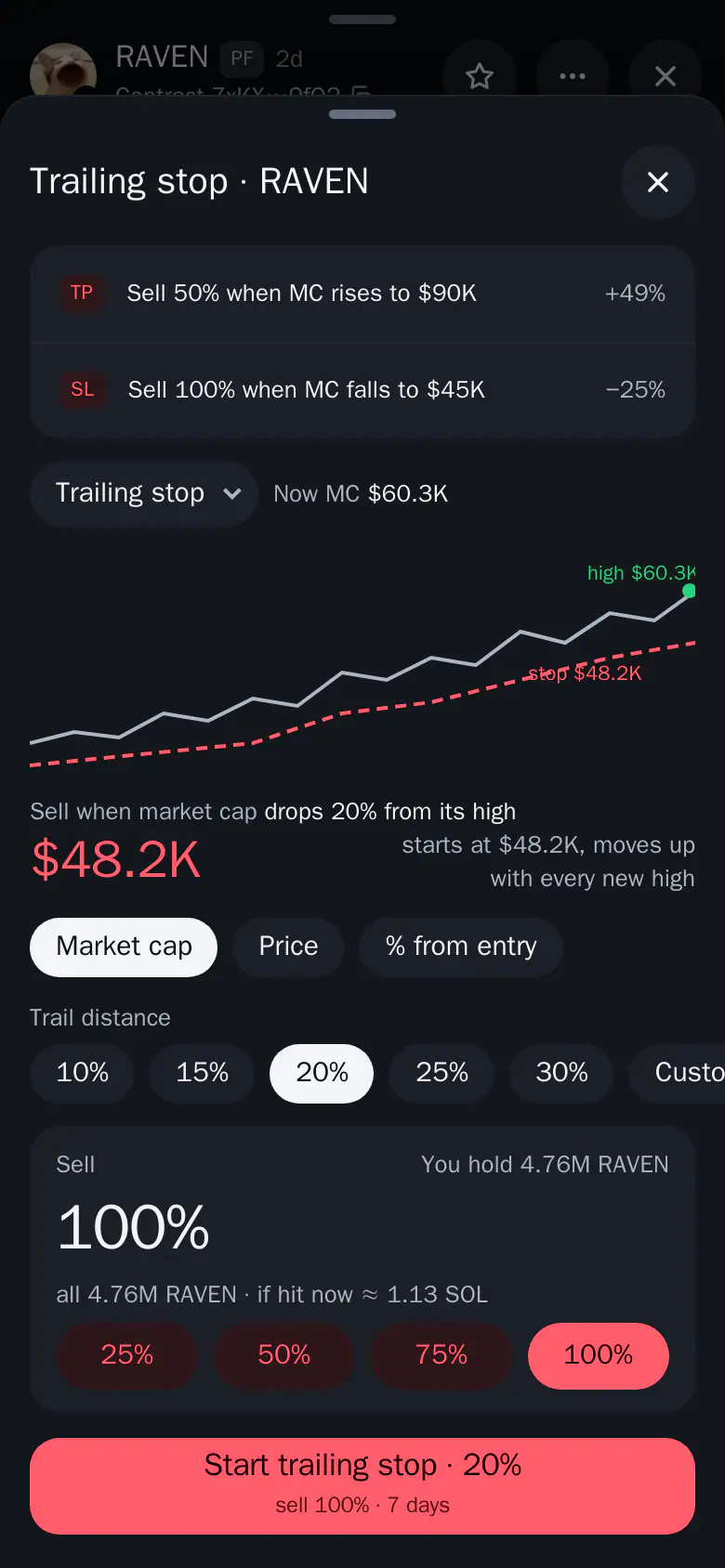
Trailing stop
A stop loss that follows the highest price and sells when the price drops by your chosen % from that high.
A trailing stop-loss follows the highest price and sells when the price drops by your % from that high. As the price rises, your stop rises with it. It never moves down.
The same order sheet also sets take profit and stop loss and limit buys. This page covers the trailing stop.
Where to find it
- Mini App: coin sheet > + Trailing.
- Bot: the sell card >
TSL.
How to set one
- Set the trail distance, for example 20%. This is how far below the high it sells.
- Choose how much to sell and when the order expires.
- Tap Start trailing stop.
On the chart, the dashed line is your stop. It only moves up with new highs. A drop of your trail distance from the peak sells.
Example
You start a 20% trailing stop when the price is $1.00.
- The price climbs to $2.00. Your stop moves up to $1.60.
- The price falls to $1.60. Thor sells.
A 20 to 30% trail suits runners: it gives the coin room to move and still locks in most of a big run.
Good to know
- In Manage your orders, trailing cards show the high so far and the current trigger.
- In very fast moves the sell can fill below your stop.
- Auto sell can add a trailing stop to every buy, with an optional Arm at rise before it starts trailing.