"Slippage exceeded" on Solana means the price moved more than your slippage setting allowed between your tap and the trade landing, so the trade was cancelled instead of filling at a bad price. The fix is usually simple: try again, or raise slippage a little in Settings → Fees, buttons, display.
That covers the most common Solana transaction failed message. Below is what slippage actually is, the other reasons a trade fails, and how to set up Thor so fewer of your trades fail in the first place.
What Slippage Exceeded Means on Solana
When you buy or sell a token, the price you see is a snapshot. By the time your transaction reaches the chain, other traders may have bought or sold, and the price has moved. Slippage is your tolerance for that movement.
- Set slippage to 10% and the trade lands as long as the price is no more than 10% worse than your quote.
- If the price moves further, the trade is cancelled. You keep your SOL or your tokens.
This is a safety feature, not a bug. Without it, a buy during a fast pump could fill at a price far above what you saw. On new memecoins, where prices can swing double digits in seconds, slippage exceeded is the most common failure you will see.
Note: A failed transaction does not move your trade amount, but network fees may still be charged. Fix the cause before retrying many times in a row.
Why Did My Trade Fail? The Common Causes
Slippage is the top reason, but not the only one. Here is the full list from Thor's Troubleshooting page, with the fix for each:
| Problem | What to do |
|---|---|
| Slippage exceeded | The price moved too fast. Try again, or raise slippage a little in Fees, buttons, display. |
| Not enough SOL for fees | Keep a little SOL in your wallet, or turn on Sell protection for sells. |
| Trade is slow | The network is busy. Use the Turbo priority fee. |
| Price impact warning | Your trade is large for this coin. Trade a smaller amount or confirm. |
| Order did not trigger | Check the trigger in your orders. In very fast moves, prices can skip past a trigger. |
| Token cannot be sold | It may be a honeypot. See Trading safely. |
If a trade fails, Thor tells you why and offers a fix, so you rarely have to guess.
How to Raise Slippage in Thor
Slippage is set separately for buys and sells, so you can be more aggressive on entries and stricter on exits, or the other way round.
Change Slippage and Priority Fee
- Open Thor on Telegram and go to Settings → Fees, buttons, display.
- Tap Buy slippage or Sell slippage and enter a new value.
- Pick a priority fee for buys and for sells: Turbo, Standard or Custom.
- Go back and retry the trade.
 Thor Trading Bot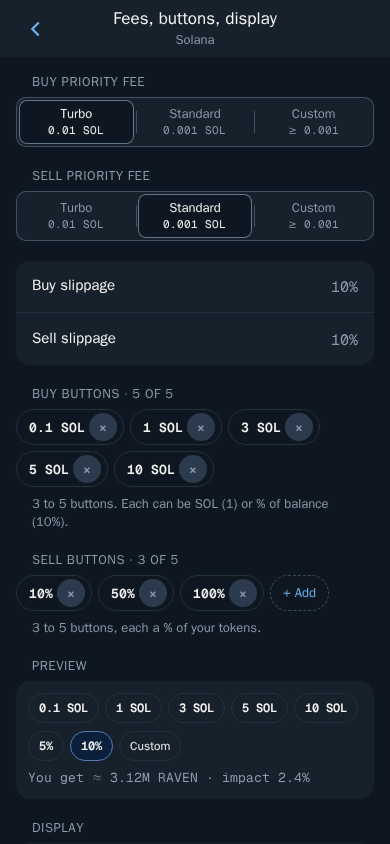
How to think about the number:
- Higher slippage helps trades land on fast-moving coins.
- Lower slippage protects you from bad fills.
Tip: Raise slippage in small steps. Jumping straight to a very high value means a trade can fill at a much worse price than you expected, which on a thin memecoin can cost more than the failed trade did.
Automations have their own slippage too. Auto buy and copy trade each carry their own slippage setting, so check those if an automated trade fails.
Slippage vs Price Impact Warning
These two get mixed up all the time.
- Slippage is about the market moving while your trade is on its way.
- Price impact is how much your own trade moves the price. On a small coin, a big buy eats through the pool and moves the price a lot, even if nobody else is trading.
Thor protects you from high price impact with a confirm step. Set the limit with the Price impact slider in Settings → Trading settings. Any trade above it asks you to confirm first. The default is 20%.
Thor Trading Bot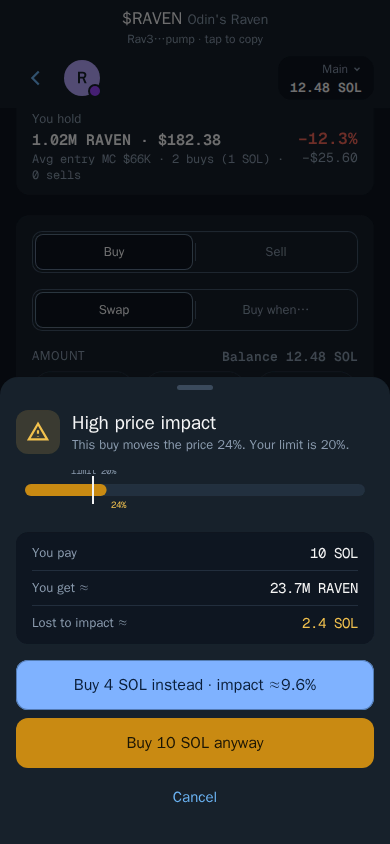 Thor Trading Bot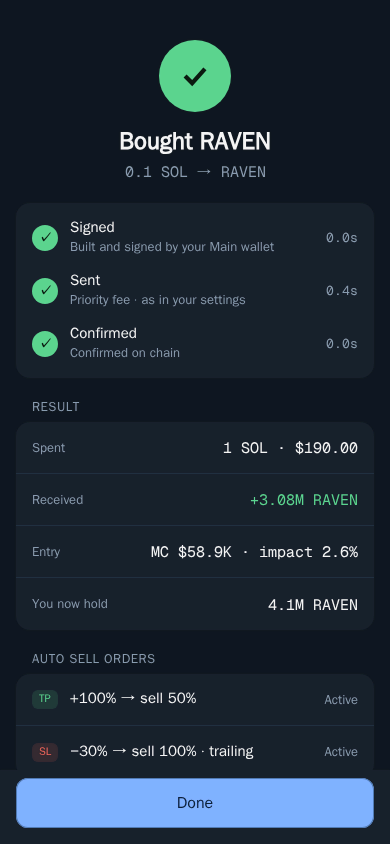
When the warning appears, it shows what you pay, what you get and how much you lose to impact, and lets you buy a smaller amount instead, go ahead anyway or cancel. If you often see this warning, your size is large for the coins you trade. Splitting the buy or choosing a coin with more liquidity is usually the better fix than raising the limit. Read more in Protections.
Other Reasons a Solana Transaction Failed
Not Enough SOL for Network Fees
Every Solana transaction pays a network fee, plus your priority fee. If you try to spend your whole balance, there is nothing left for fees. Keep a little SOL in your wallet at all times.
Thor has two safety nets for this in Settings → Trading settings:
- Buy protection buys with what you have when you are a little short, instead of failing.
- Sell protection lets you sell even when you have no SOL left for fees. Thor covers the fee and takes it back from the sale.
The Network Is Busy
When Solana is congested, transactions with low priority fees wait longer or drop. Switch your buy priority fee to Turbo for the fastest landing. Thor runs its own private Solana node and sends each trade through more than one fast route, which helps in normal conditions, but no bot can guarantee speed when the whole network is jammed. See Why Thor is fast.
The Token Cannot Be Sold
If a buy works but every sell fails, the token may be a honeypot. On EVM chains, Thor runs a security check on each token and blocks trades on clear scams. On Solana, check liquidity and holders before you buy, and start small on new coins. The Trading safely page lists what to look at.
Read the Trade Status Screen
After you confirm a trade, Thor's status screen shows each step, signed, sent and confirmed, until the trade lands on the chain, with the amount you got and the final price. If something goes wrong, this is where you see why. Turn on Trade alerts in Telegram to also get messages for order fills, copy trades and extension trades. Details are in Trade status and notifications.
A Quick Checklist Before You Retry
- Read the reason Thor shows for the failure.
- If it says slippage exceeded, retry once, then raise slippage a little.
- Check you have SOL left for fees, or turn on Sell protection.
- On a busy network, switch the priority fee to Turbo.
- If you see a price impact warning, trade a smaller amount.
- If sells keep failing on one token, treat it as a possible honeypot.
Fewer Failed Trades, Lower Fees
Failed trades cost you time and network fees, so set your slippage and priority fee once and get on with trading. Thor charges a flat 0.5% per spot trade, half the 1% many Telegram trading bots charge, and a Subscription ($100 for 30 days) cuts Thor's spot and bridge fees to 0% on Solana and every EVM chain. It breaks even at about $20,000 of spot volume in 30 days. Network and priority fees still apply. See Fees and the fee comparison.
Open Thor on Telegram to tune your settings, or see all Thor apps.
Frequently asked questions
What does slippage exceeded mean on Solana?
It means the token price moved further than your slippage setting allowed between your tap and the trade landing. Instead of filling at a worse price, the trade is cancelled. Try again or raise slippage a little.
What slippage should I use for memecoins?
There is no single right number. Fast-moving new tokens often need higher slippage to land, while calmer tokens can use a lower setting that protects you from bad fills. Raise it in small steps rather than jumping to a very high value.
Do I lose SOL when a Solana transaction fails?
Your tokens and the trade amount stay in your wallet, but network fees may still be charged for a failed transaction. That is why it pays to fix the cause before retrying many times.
Why did my trade fail with enough SOL in my wallet?
The most common reasons are slippage exceeded on a fast-moving coin, not keeping enough SOL for network fees on top of the trade amount, or a token that cannot be sold. Thor tells you why a trade failed and offers a fix.
What is the difference between slippage and price impact?
Slippage is how far the market price may move before your trade is cancelled. Price impact is how much your own trade moves the price. A large buy on a small coin can have high price impact even if the market is calm.
Why is my Solana transaction slow to confirm?
The network is busy and your priority fee is too low to get picked up quickly. Switch the priority fee to Turbo in Fees, buttons, display for faster landing.
Step-by-step in the Docs
- Troubleshooting: Why a trade or order did not go through, and what to do.
- Slippage and priority fees: Control price tolerance and speed.
- Protections: Safety nets that stop costly mistakes.
- Trade status and notifications: Know exactly what happened to every trade.