To trade crypto without gas in Telegram, use Thor's USD Cash: a USDC balance on Solana that buys tokens on all six of Thor's chains. Thor pays the network cost for each trade and charges it to you in USDC, so you never need SOL, ETH or BNB just to make a trade or get your money out.
Gas is the most common reason a first trade fails. You buy USDC on an exchange, send it to a wallet, find a token on Base, and then learn you need ETH on Base before you can do anything. USD Cash removes that step on every chain at once.
What "Gasless" Means in Thor
Blockchains always charge a network cost. Gasless does not make that cost disappear; it changes who handles it:
| A normal wallet | USD Cash | |
|---|---|---|
| What you hold | SOL, ETH, BNB per chain | One USDC balance on Solana |
| Who pays the network cost | You, in the chain's coin | Thor pays it and charges you in USDC |
| Buying a Base token | Hold ETH on Base first | Buy straight from USDC |
| Where sells land | The chain's coin | USDC in USD Cash |
| Gas left behind | You top it up | Nothing to top up |
Buying on an EVM chain from USD Cash is one cross-chain swap: you pay in dollars from your Solana USDC and get the token on that chain. Trades from USD Cash land in under 0.8 seconds on Solana and under 4 seconds on EVM chains in normal conditions.
Step 1: Fund USD Cash From Any Chain
 Thor Trading Bot
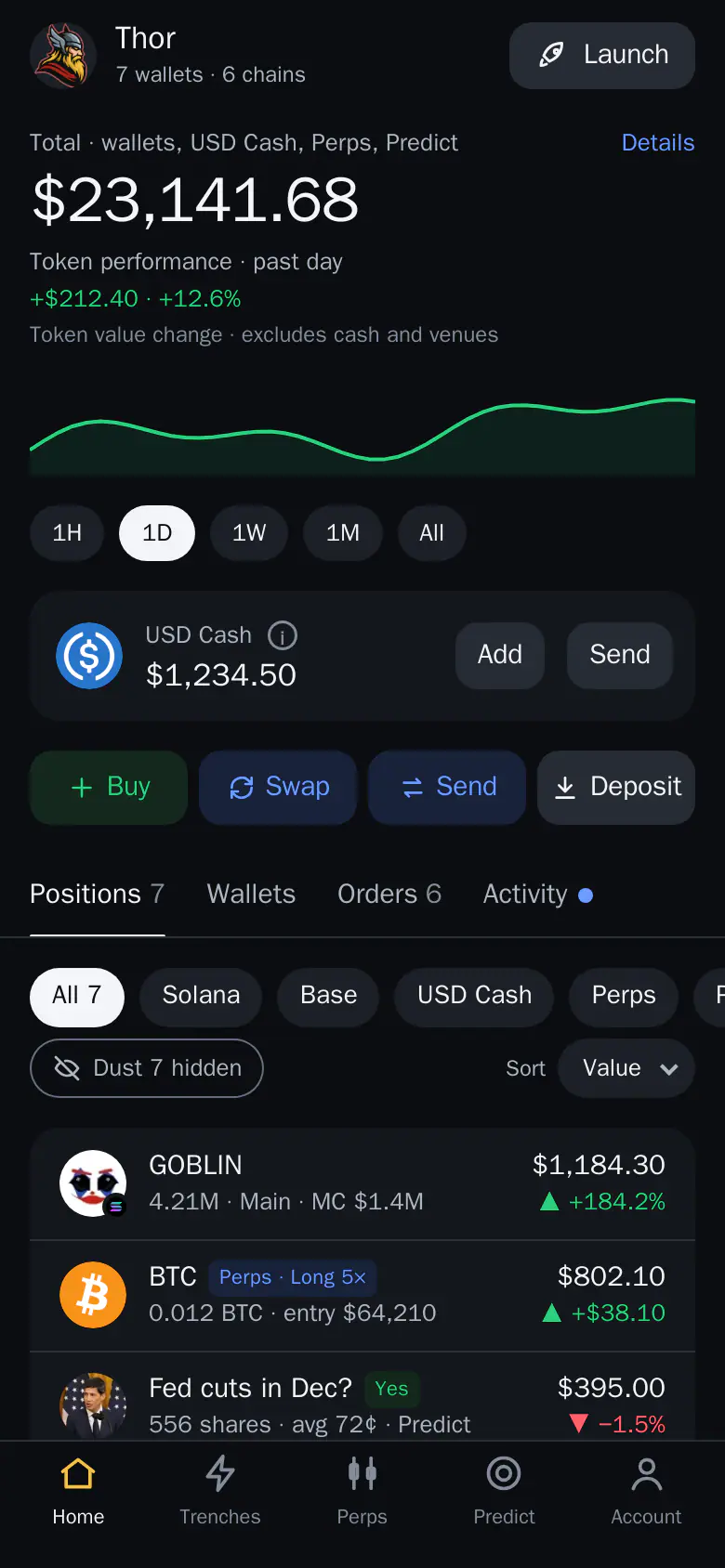

- Tap Add. It is on the USD Cash card at the top of Home.
- Add from your wallets. Tick the wallets and coins, then tap Add.
There are two ways to fill USD Cash. Deposit from outside takes money from an exchange or another wallet. From my wallets converts what your other Thor wallets already hold.
Deposit From Outside
- Open the Thor Mini App, go to Home and tap Add on the USD Cash card (in the bot:
📥 Deposit→ USD Cash). - Tap Deposit from outside and pick the network: Solana, Ethereum, Base, BNB Chain or Robinhood. The EVM address is the same on every EVM chain.
- Tap Copy, or Share, and send any accepted asset on that network. Everything arrives as USDC in USD Cash, usually within minutes.
Thor Trading Bot 123
- Deposit from outside. Shows your address for sending money from an exchange or another wallet.
- Base. Pick the network you are sending on. Sending on another network can lose the funds.
- Copy. Copies the address. Paste it into the app you are sending from.
| Network | What you can send | Minimum |
|---|---|---|
| Solana | USDC, SOL, USDT, USDG | $1 |
| Ethereum | USDC, USDT, ETH | $5 |
| Base | USDC, USDT, ETH | $1 |
| BNB Chain | USDT, USDC, BNB | $1 |
| Robinhood | USDG, ETH | $1 |
| Arc | USDC | $1 |
EVM deposits arrive less a small gas reserve. A progress bar shows each conversion.
Warning: Send only the coins listed for a network, and on that network. Funds sent on the wrong network can be lost.
Step 2: Already Have Coins in Thor? Add Them
Add From Your Own Wallets
- On Home, tap Add on the USD Cash card, then From my wallets.
- Tick the wallets, or tap Select all. Each row shows its coins and the value in dollars. A wallet below the minimum ($1, or $5 from Ethereum) cannot be picked.
- Tap the button at the bottom. If you set a PIN, enter it.
- A toast shows the progress until the dollars land in USD Cash.
Thor Trading Bot123- Select all. Ticks every wallet that can be added.
- Main. Pick which coins from this wallet to convert. SOL and USDC are listed separately.
- Add $680.93. Converts the ticked coins to USDC in USD Cash.
SOL, native coins and stablecoins become USDC. A little gas stays in each wallet, and tokens are never moved. Many wallets at once? Pick them all in the same list, or see moving funds from several wallets.
Step 3: Trade Any Chain From Dollars
Thor Trading Bot Thor Trading Bot

- Pick USD Cash in the wallet picker under the amount on any coin. USD Cash is listed first while it has dollars, and it becomes your trading wallet.
- Open any coin on any of the six chains. The card says Pays and settles in USDC.
- Enter the amount in $ (or %, a share of your USDC). If you type SOL or ETH, Thor converts it at the market price. Max is what you can spend once the network cost is covered.
- Read the quote and buy. When you sell, the money comes back to USD Cash as USDC.
Your automation can run on dollars too: limit buys, copy trades and Auto buy can all pay from USD Cash. Positions, P&L, receipts and Activity read in dollars.
Step 4: Get Money Out Without Gas
- Send from USD Cash. Pick USD Cash as the source in Send. On Solana, the network cost is paid in USDC from USD Cash with no SOL needed. On EVM chains, USDC, USDT and USDG sends are sponsored and the network cost is charged in the stablecoin you send.
- Send to your own wallet as SOL, ETH or a stablecoin, for when a wallet needs gas of its own.
Thor Trading Bot Thor Trading Bot
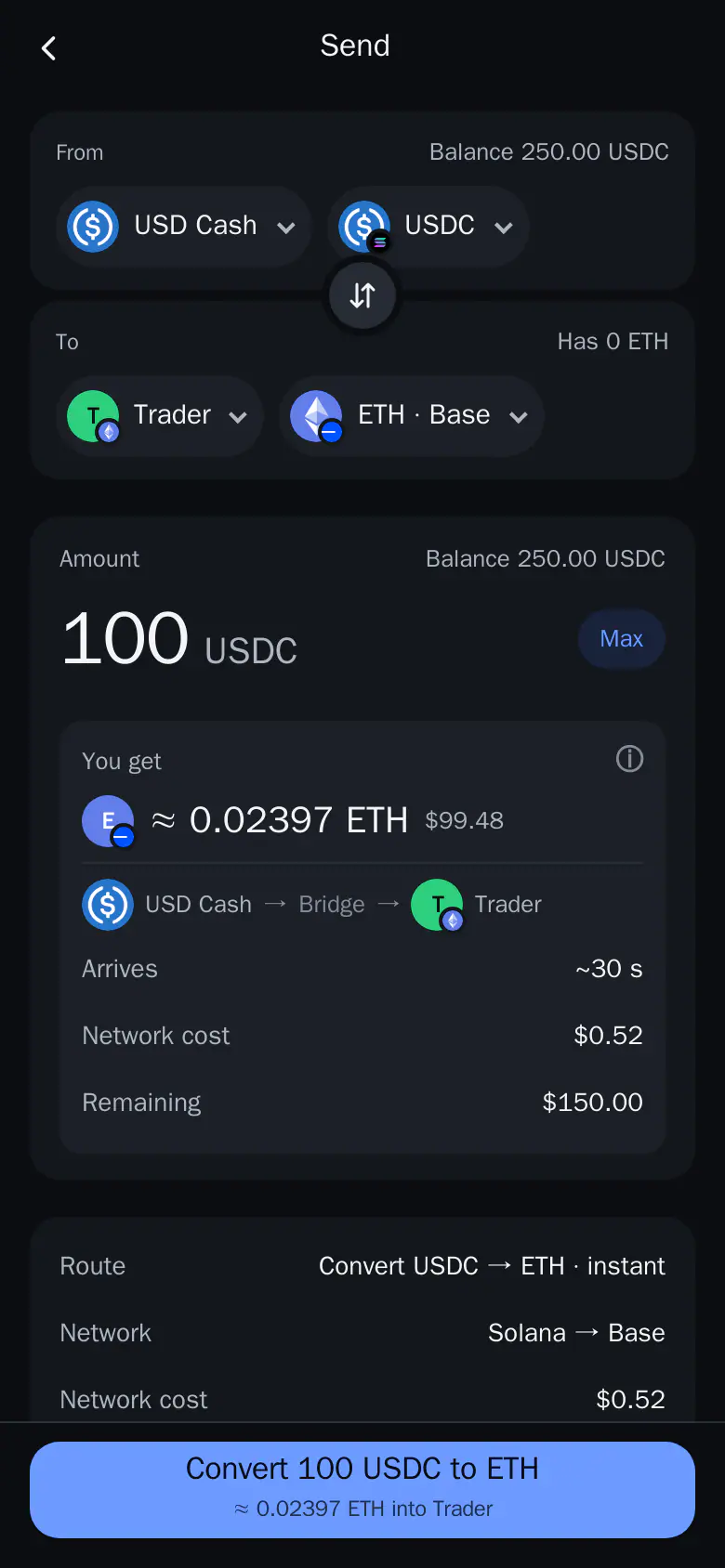
Send at least $1. The screen shows the most USD Cash can send. When it is done the toast says the funds are in the wallet.
What Else Runs Without Gas
- Sell protection lets you sell from a normal wallet even with 0 SOL or ETH for network costs. Thor pays the network cost and takes back only what the sell actually cost. Check it in Account → Trading defaults.
- Perps and Predict can be funded from USD Cash, with the network cost in USDC, and withdrawals can come back to USD Cash. See the USDC trading bot guide.
Limits to Know
- USD Cash can't be renamed or deleted; money leaves through Send.
- Buying or selling USDC itself from USD Cash is refused, with a clear reason.
- Network costs still exist: you pay them in USDC instead of a gas coin, and every quote shows them.
Fees
Spot trades from USD Cash cost Thor's flat 0.5% per trade, half the 1% many Telegram trading bots charge, or 0% with the $100 for 30 days subscription. Cashback returns 10% to 75% of your bot fees by volume tier. Your wallets, USD Cash included, are non-custodial: they are created and secured by Privy, a third-party wallet infrastructure provider. See Fees.
Open Thor on Telegram, open the Mini App and tap Add on the USD Cash card to make your first gasless trade. For the full reference, see USD Cash and USD Cash: one Solana USDC wallet.
Frequently asked questions
Can I trade crypto without holding gas?
Yes. In Thor, trade from USD Cash, a USDC balance on Solana. Thor pays the network cost for each trade and charges it to you in USDC, so you need no SOL, ETH or BNB on any of the six chains.
Which chains can I trade without gas?
All six Thor chains: Solana, Ethereum, Base, BNB Chain, Robinhood Chain and Arc. On EVM chains you pay in dollars from your Solana USDC and get the token on that chain, and sells come back to USD Cash as USDC.
How do I get money into USD Cash without gas?
On Home, tap Add on the USD Cash card. Choose From my wallets to convert coins from your other Thor wallets, or Deposit from outside to send USDC, USDT, SOL or ETH from any supported chain. It arrives as USDC, usually within minutes.
Can I send money out of USD Cash without gas?
Yes. On Solana the network cost is paid in USDC from USD Cash. On EVM chains, USDC, USDT and USDG sends are sponsored and the network cost is charged in the stablecoin you send.
Is gasless trading more expensive?
You still pay the network cost, just in USDC instead of SOL or ETH. Thor's own fee is the same flat 0.5% per spot trade, or 0% with the $100 for 30 days subscription, and every cost is shown before you confirm.
Step-by-step in the Docs
- USD Cash: Your dollar wallet: one USDC balance that trades every chain with no gas coin to manage.
- Add to USD Cash from your wallets: Collect SOL, native coins and stablecoins from your other wallets into USD Cash as USDC, in one go.
- Add to USD Cash from outside: Send stablecoins, SOL or ETH from any of 6 chains; it arrives as USDC. Minimum $1, or $5 from Ethereum.
- Cross-chain swaps: Move money to another chain from Send, or buy a coin on any chain with USD Cash and no gas coin.
- Send to an outside address: Send funds from Thor to any address: paste it, review it, enter your PIN.