To batch transfer crypto wallets in Telegram, use Batch in Thor: it moves funds out of many wallets in one flow. Pick the chains, tick the wallets, choose how much of each balance to move and where it goes, then confirm once with your SIP. Up to 40 source wallets, across Solana and the EVM chains, in a single batch.
If you trade with several wallets, a sniping wallet, a copy trade wallet per target and a vault, the slow part is never the trade. It is moving money between them afterwards. This guide shows how Batch turns twenty transfers into one.
Why Batch Instead of One Transfer at a Time
Thor lets you hold up to 20 Solana and 20 EVM wallets, plus USD Cash. That is great for keeping risk separate, and painful when you want to collect profits, top everything up or leave a chain.
| One transfer at a time | Batch | |
|---|---|---|
| Wallets per flow | One | Up to 40 |
| Chains | One | Solana and EVM in one batch |
| SIP entries | One per transfer | One for the whole batch |
| Amount | Typed per wallet | 25%, 50%, 75% or 100% of each wallet's own balance |
| Failures | Start again | Failed parts can be retried |
Four Batch Modes
Pick a Mode
Open Batch transfer on Home or Portfolio in the Mini App, then choose what the batch does:
- Transfer: into one of your wallets, or spread across several.
- Withdraw: out to a Solana address or an EVM address.
- Bridge: to one target wallet on another chain.
- USD Cash: always into USD Cash, as USDC.
 Thor Trading Bot
Transfer: Consolidate or Spread
Into lets you pick one wallet, or several to spread. "Move to one wallet" collects, for example, 12 wallets into 1. "Spread" splits the total evenly across the wallets you pick, which is handy for funding a fresh set of sniping wallets.
Withdraw: Cash Out of Many Wallets
Choose To Solana address or To EVM address and paste where it should go, such as your exchange deposit address. Check the network: funds sent on the wrong network can be lost. See Withdraw.
Bridge: Leave a Chain in One Go
Pick one target wallet on another chain. Anything going to another chain is bridged, with one route per wallet. Each route has the normal Bridge costs: the 1% bot fee, or 0% with the subscription, plus the provider's fees.
USD Cash: Turn Everything Into Dollars
The USD Cash mode sweeps the cash in your wallets into USD Cash as USDC: SOL, native coins and stablecoins. Tokens are never moved. It is the same result as Move to USD Cash, across many wallets at once. Read how to trade crypto without gas for what you can do with the balance afterwards.
How to Run a Batch
- Choose a mode.
- Select chains: tap a chain on the arc to select all its wallets, then untick any you don't want. The arc shows the total you picked and how many wallets.
- Choose 25%, 50%, 75% or 100% of each wallet's own balance.
- Choose the destination for your mode.
- Review the batch, then confirm once with your SIP.
Thor then runs every part. If one fails, the others carry on, and you can retry the failed parts from the result.
Note: Nothing is pooled. Each source wallet sends its own transaction and pays its own gas, and a wallet without enough gas is skipped. 100% ("Max") leaves the gas behind. From USD Cash, the EVM side sends its stablecoins sponsored, with the gas charged in the stablecoin.
Claim All Rewards Across Chains
Batch has a twin for rewards. Claim all bonuses on Home collects referral and cashback rewards on every chain in one go.
Claim Everything at Once
- Tap Claim all bonuses on Home.
- Check each chain's amount. A chain whose reward is smaller than the claim's gas, or below the minimum, is skipped.
- Pick the Solana wallet your Solana bonuses land in.
- Hold to claim.
Thor Trading Bot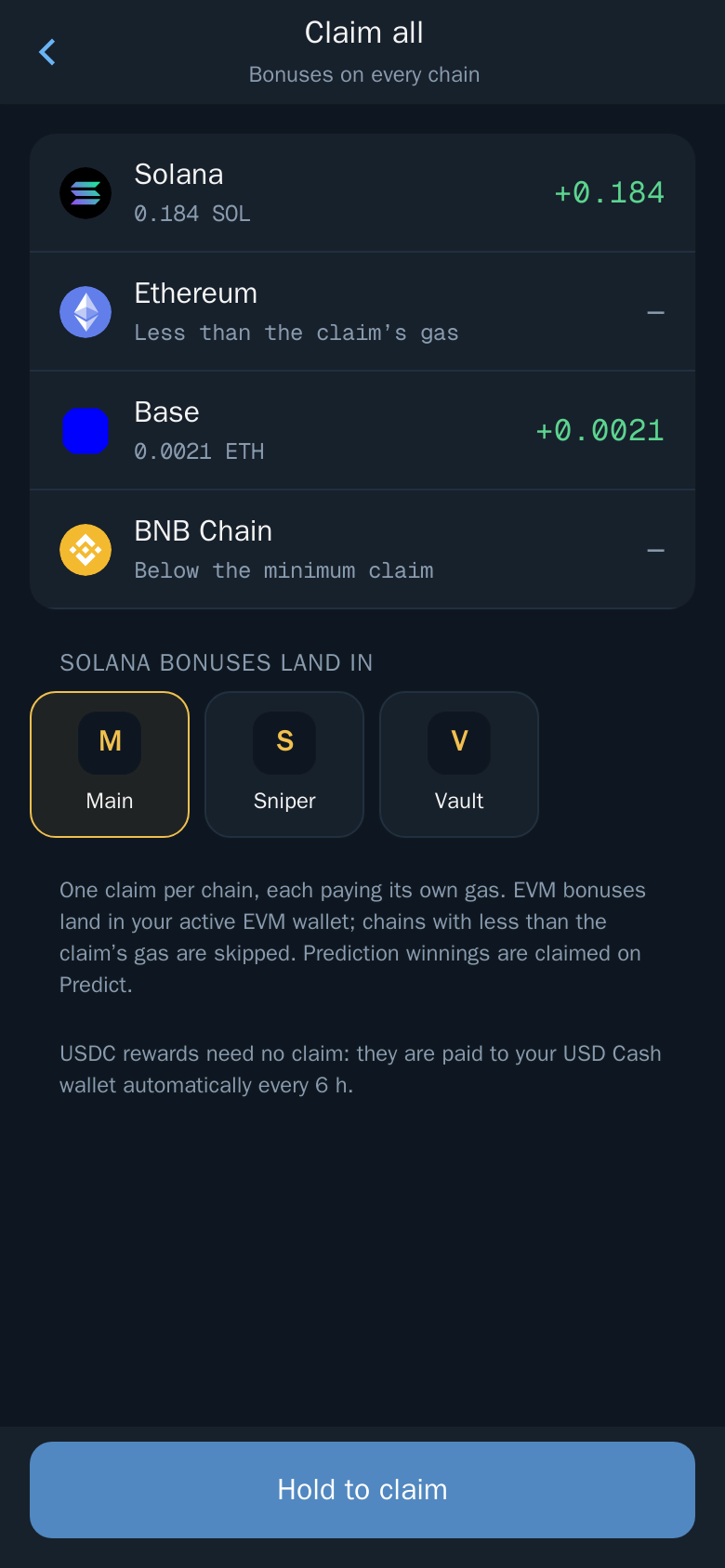
EVM bonuses land in your active EVM wallet. See Rewards and referrals and the referral and cashback guide for the tiers.
Good Multi-Wallet Habits
- Name wallets by job. Short tags such as "Snipe", "Copy1" or "Vault" make the batch list easy to read. See Wallets.
- One copy trade per wallet. It keeps each copy's P&L clean, and Batch makes collecting the profits a one-step job. Read multiple wallets for Solana trading.
- Sweep before you leave a chain. A Bridge or USD Cash batch empties the cash out of every wallet on that chain at once.
- Double-check withdraw addresses. Withdrawals and transfers can't be reversed.
Fees
Each wallet pays its own network fee. Bridge parts carry the 1% bridge bot fee, or 0% with the subscription. Your wallets are non-custodial, created and secured by Privy, a third-party wallet infrastructure provider, so every part of a batch is signed from your own wallets. See Fees.
Open Thor on Telegram, open the Mini App and tap Batch transfer on Home.
Frequently asked questions
How many wallets can I move at once?
Up to 40 source wallets per batch, across Solana and the EVM chains. You choose 25%, 50%, 75% or 100% of each wallet's own balance, and Thor asks for your SIP once for the whole batch.
Does a batch transfer pool the gas?
No. Each source wallet sends its own transaction and pays its own gas. A wallet without enough gas is skipped, and 100% leaves enough behind for the gas.
What happens if part of a batch fails?
The rest carry on, and the failed parts can be retried from the result.
Can I batch bridge to another chain?
Yes. In Bridge mode you pick one target wallet on another chain, and Thor bridges each source wallet with its own route. USD Cash can't be a bridge source; send from it with Transfer or Withdraw.
Where do I find Batch?
In the Thor Mini App, on Home or Portfolio: tap Batch transfer, or pick a Batch mode (Transfer, Withdraw, Bridge or USD Cash).
Step-by-step in the Docs
- Transfer: Send a coin, stablecoin or token to another of your wallets or to any address.
- Withdraw: Send funds from Thor to any address, with the address checked first.
- Bridge: Move funds between any of the six chains, with the best route from several providers.
- Move to USD Cash: Collect the cash from your other Thor wallets into USD Cash as USDC, in one go.
- Rewards and referrals: Cashback of up to 75% of your fees, and five levels of referral rewards.