Thor's Social Sniper is a Twitter sniper bot that watches your Twitter/X, Telegram, WhatsApp and Discord feeds from your own Windows PC and buys a Solana token the instant its contract address is posted, often before most traders have even read the message. Your social logins stay on your machine, and the buy goes through Thor's own private Solana node.
Why Socials Are the Fastest Alpha Source on Solana
In the Solana memecoin market, contract addresses drop on Twitter/X, Telegram, WhatsApp and Discord before they show up anywhere else. A single tweet or group message from a well-followed caller can move a small-cap token many times over within minutes. The traders who profit are not the ones who read the message first. They have tooling that reacts before most people have even scrolled to it.
The problem: unless you watch every platform at once, around the clock, you will be late. By the time you read a call, copy the contract address, open your trading app and confirm a swap, the first wave of snipers has already bought and the price has moved.
Thor's Social Sniper solves this by watching the sources you choose, the same feeds you would otherwise read by hand, and buying the moment a token address appears.
How Thor's Social Sniper Works
Many "Twitter sniper bots" work by polling a public API every few seconds, which is slow and rate limited and can leave you well behind the fastest buyers. Social Sniper works differently.
Local Monitoring: Your Social Logins Stay on Your Device
Social Sniper is a Windows app that runs on your own PC. When you connect your social accounts, your Telegram, Discord and WhatsApp sessions are encrypted with Windows' built-in security and stored only on your machine. They are never sent to ODIN's servers or to any third party.
Detected contract addresses, the group they came from and the message text are also kept locally. When a buy fires, only the trade details go out: your public wallet address, the token address, your amount, slippage and any order settings. The app has no mechanism to upload your social sessions or monitored groups. Read the full Social Sniper privacy policy.
Instant Detection
The app keeps a live connection to the sources you choose. The moment a new message or post arrives, it scans it for a Solana contract address and, if your settings allow it, buys straight away. There is no copy and paste and no switching apps.
Thor's Private Node for Execution
Once a token address is detected and passes your filters, the buy goes to Thor, which runs its own private Solana node. Your trade does not wait in line on shared public servers. Thor sends each trade through more than one fast route, protects it from front-running bots and compares routes so you get the most tokens back. In normal conditions, trades land in under half a second. See Why Thor is fast.
Automated Exits for Fully Automated Trades
Every snipe can have its exit planned in advance:
- Take profit: sell part of your position at the targets you set, for example 50% at +100%.
- Stop loss: sell if the token falls to your limit.
- Trailing stop: a stop that follows the price up and sells on a reversal. Add it to any position in Thor from Sell → Trailing stop, or add a + Trailing SL target with an optional Arm at rise in Auto sell.
 Thor Trading Bot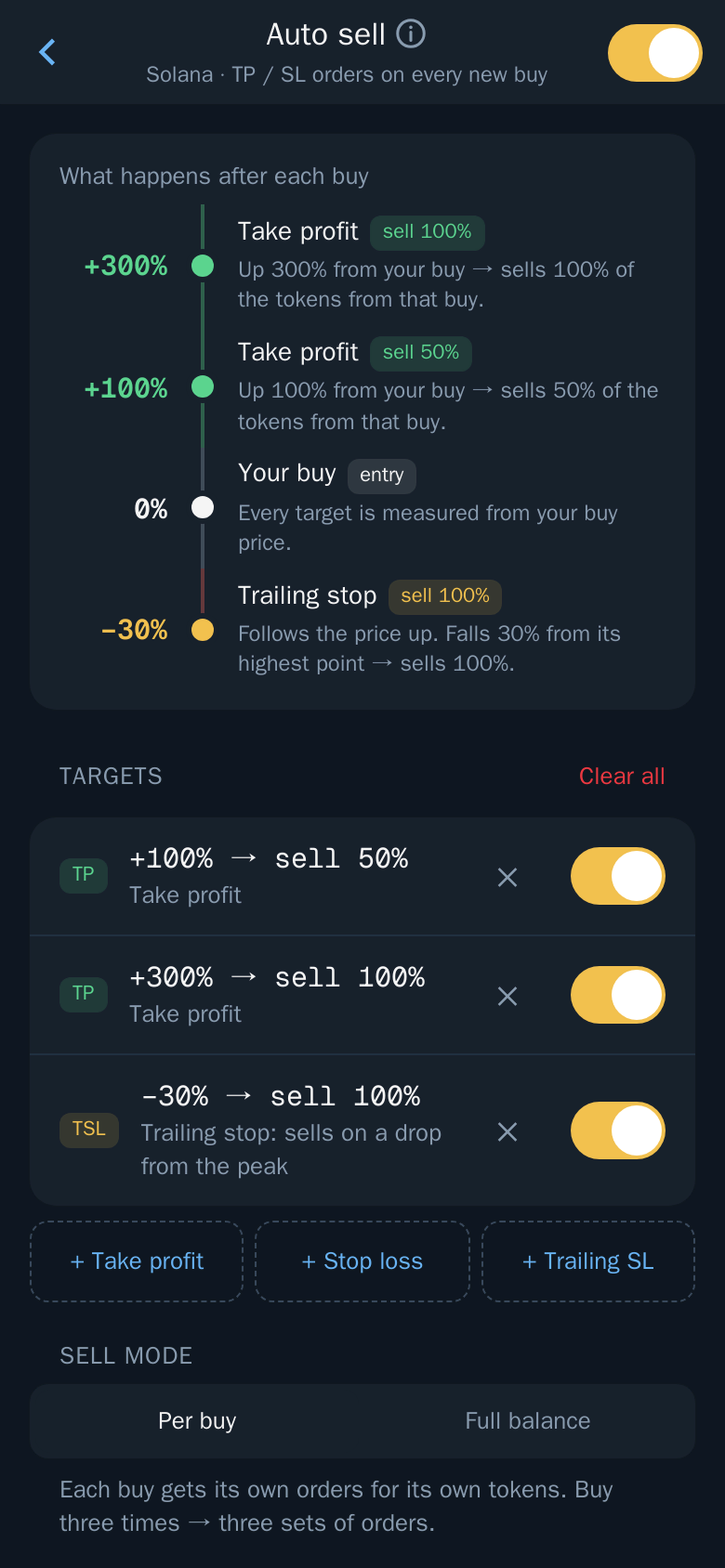
Social Sniper lets you set take profit and stop loss in its trading settings, and Thor's Auto sell attaches your targets to every new buy, sniped ones included. Once placed, orders run on Thor's servers, so the full trade, from buy on detection to scaling out and the stop loss, can run without you watching the screen. You can see, edit or pause orders in Portfolio → Orders in the Thor Mini App.
Supported Social Platforms
Social Sniper covers the four places where Solana alpha appears most:
| Platform | What it watches |
|---|---|
| X (Twitter) | The X accounts you choose |
| Telegram | Groups and channels you are a member of |
| Groups and chats | |
| Discord | Servers and channels you have access to |
Twitter / X
Watch the callers, project accounts and aggregators you trust. Social Sniper reacts the moment a token address appears in one of their posts.
Telegram
Sign in with your Telegram account and Social Sniper can watch any group or channel you are already in, including private alpha groups. If a paid group posts a call, Social Sniper sees it at the same moment you would and acts on it.
WhatsApp groups are a common channel for private Solana alpha, especially in smaller trader circles. Connect WhatsApp and Social Sniper watches your groups and chats for contract addresses.
Discord
Many projects and alpha communities run Discord servers. Connect your Discord account and Social Sniper watches the servers and channels you pick, buying the moment a CA appears.
Note: All four platforms are watched from your own PC. Your social logins, the groups you watch and the messages it reads stay on your machine. Only the resulting trade goes to Thor.
Setup Guide: Configure Thor's Social Sniper
- Create your Thor account. Open Thor on Telegram, press Start and accept the Terms. Thor creates your wallets in seconds. Fund your Solana wallet with SOL from Deposit.
- Download and install Social Sniper. Download Social Sniper for Windows and run the installer. Only download it from odin.tools.
- Sign in. Sign in to Social Sniper with your Thor account. It uses your public wallet address and never asks for wallet secrets.
- Connect your social accounts. Link the platforms you want watched: X, Telegram, WhatsApp and Discord. Your logins are stored locally on your PC.
- Choose what to watch. For X, add the accounts to follow. For Telegram, WhatsApp and Discord, pick the groups, chats, channels and servers.
- Set your amount. Choose a fixed SOL amount per snipe. This applies to every token address detected across your sources, so start small.
- Set slippage and filters. Social snipes compete with other fast bots, so new launches usually need higher slippage than established coins. Use the filters to skip coins you do not want.
- Plan your exits. Set take profit and stop loss, for example sell 50% at +100% and sell everything at -30%, so trades close without you.
- Leave it running. Turn on the sniper and leave the app open on your PC. When a token address is posted, it buys straight away. It can only catch posts while it is running.
Which Sources to Prioritise for Maximum Alpha
The strength of Social Sniper is that it watches your own access: the private groups, paid communities and X accounts you have already curated. Here is how to think about source quality.
Private Telegram Groups
The highest-signal alpha on Solana often arrives in paid or invite-only Telegram groups before it reaches X. If you are in these groups, Social Sniper lets you react at machine speed to information that was already exclusive.
Twitter/X Caller Accounts
Large Solana callers move real volume when they post a CA. Watching them covers public alpha calls. Add the accounts whose calls you trust most, since instant detection keeps you ahead of traders reading the same feed by hand.
Project Official Accounts
New launches often post their contract address on their official X account or Telegram channel when the token goes live. Adding known project accounts, especially for launches you are tracking, means you buy on the official announcement.
WhatsApp and Discord Alpha Circles
Smaller, high-trust WhatsApp groups and Discord servers often carry the earliest calls before they spread to larger audiences. With Social Sniper watching them, you get the timing edge that used to belong only to whoever was staring at the chat.
Tip: More sources means more snipes, but also more noise. Start with your highest-conviction sources and a small, fixed amount per snipe so one bad call does not hurt.
What to Avoid
- Large public Telegram channels with thousands of members. By the time a CA appears there, it is often widely known already.
- Accounts or groups known to promote tokens they hold and then sell into the buyers.
- Newly created accounts or groups with no track record, a common setup for coordinated scam promotions.
If you run your own Telegram group, Heimdall helps keep scammers and fake admins out of it.
Risk Management for Social Sniping
Small, Fixed Position Sizes
Keep each snipe small. The return profile is lopsided: a big winner on a small amount still pays well, while a small amount limits the damage from rug pulls and tokens you cannot sell.
Let Exits Do the Work
Set take profit and stop loss before you turn the sniper on. Tokens that run hard often crash just as fast. Selling half your position at +100% or more makes sure you bank profit even if the rest goes to zero. See Take profit and stop loss.
Use Your Filters
Use Social Sniper's filters to skip coins you do not want. Check the warning signs Thor shows in Trading safely when you review your snipes, and drop sources that keep calling bad tokens.
Watch Your Total Spend
Decide how much you are willing to spend on snipes in a day and fund your wallet accordingly. If the sniper fires many times on low-quality sources, fees and bad fills add up. Review your trades in Thor's Portfolio and Activity and prune noisy sources.
Warning: New tokens are risky and many are scams. No check catches every scam, so only trade what you can afford to lose.
Fees
Social Sniper buys carry a Thor fee per trade, shown before you confirm your settings. The $100 for 30 days subscription does not cover Social Sniper trades. Network and priority fees are added on top. See Fees.
Snipe Solana Tokens From Any Social Automatically
Twitter/X, Telegram, WhatsApp and Discord: Social Sniper watches them from your own PC and buys through Thor's private node the moment a contract address is posted. Download Social Sniper for Windows, or add the Thor Chrome extension to trade from the chart. Prefer to forward calls yourself? Read how to snipe Solana tokens via Telegram, or see all Thor apps.
Frequently asked questions
Does Social Sniper read or store my private messages on ODIN's servers?
No. Social Sniper runs on your own Windows PC. Your social logins are encrypted and stored only on your machine, and detected addresses and message text never leave your device. Only the trade details, such as your public wallet address, the token address and your amounts, are sent to Thor to execute the buy.
Can Social Sniper monitor private Telegram groups or WhatsApp chats I am already in?
Yes. Once you sign in, it can watch the Telegram groups and channels, WhatsApp groups and chats and Discord servers and channels you already have access to, including private alpha groups. You choose exactly which ones it watches and can add or remove them at any time.
How fast is the snipe from the moment a contract address appears?
Social Sniper buys as soon as it sees a token address in a source you watch, with no copy and paste. The trade then goes through Thor's own private Solana node, which lands trades in under half a second in normal conditions. Speed is never guaranteed when the network is congested.
Which Twitter/X accounts can I monitor?
You choose the X accounts to watch, such as the callers and project accounts you trust. Start with a short list of high-conviction accounts, since every account you add brings more snipes and more noise.
Does Social Sniper need my wallet secrets?
No. It works with your Thor account and your public wallet address. Thor is non-custodial and your wallets are secured by Privy, so your funds stay in your own wallets.
Step-by-step in the Docs
- Social Sniper: Buy the moment a token is posted.
- Auto sell: Take profit, stop loss and trailing stop added to every new buy, wherever you buy.
- Take profit and stop loss: Orders that sell part or all of a position at your target, even when Telegram is closed.
- Trading safely: Your first trade, safely: read the security card, the tax and the impact, start small and set a stop.