Yes, you can trade Hyperliquid perps from Telegram: Thor is a Hyperliquid Telegram bot that connects your account to Hyperliquid, so you can go long or short on crypto with leverage without leaving the chat. You fund your perps account with USDC, pick a market such as BTC, set size and leverage, and confirm, all inside the Thor Mini App.
This guide covers how the Hyperliquid connection works, how to fund, open and manage a position, what it costs, and the risks you need to understand before you use leverage.
What Is a Hyperliquid Telegram Bot?
Perpetual futures, or perps, let you trade the price of an asset going up (long) or down (short) without an expiry date, usually with leverage. Hyperliquid is the exchange where those trades happen. A Hyperliquid Telegram bot is a front end that lets you place and manage those trades from Telegram instead of a browser tab.
In Thor, perps sit next to everything else you already do: spot trading on Solana and EVM chains, Trenches, copy trading and Predictions on Polymarket. You open them from the Thor Mini App, the full trading app inside Telegram, under Home, then Perps.
How the Hyperliquid connection works
- Your perps account belongs to your Thor EVM wallet.
- To trade, Thor creates a Hyperliquid trading key for your account. It can place and cancel orders but cannot withdraw your funds.
- Margin, funding rates and liquidation rules are set by Hyperliquid, not by Thor.
- Your perps balance is in USDC. You add it from Perps, then Funds, and withdraw it back to your Thor wallet the same way.
Note: Perps are not available in some countries and regions. Thor checks your declared location and connection and blocks access where perps are restricted.
How to Trade Perps on Telegram: Setup
Setting up takes three steps. Full details are in Perps: get started.
- Open Thor on Telegram and open the Mini App with the menu button next to the message field.
- Go to Home, then Perps, and read and accept the risk notice.
- Add USDC to your perps account (see the next section).
 Thor Trading Bot
You also need a Thor account with an EVM wallet. If you are new, create your account first. Your EVM wallet uses the same address on every EVM chain.
How to Fund Hyperliquid Perps With USDC
Perps margin is USDC. To add funds:
- Open Perps, then Funds.
- Tap an amount or enter your own.
- Confirm.
If your funds sit on another chain, Thor bridges them for you as part of the deposit. Bridging into Perps has no Thor fee. Third-party bridge provider fees and network fees can still apply. See Add funds to Perps.
Thor Trading Bot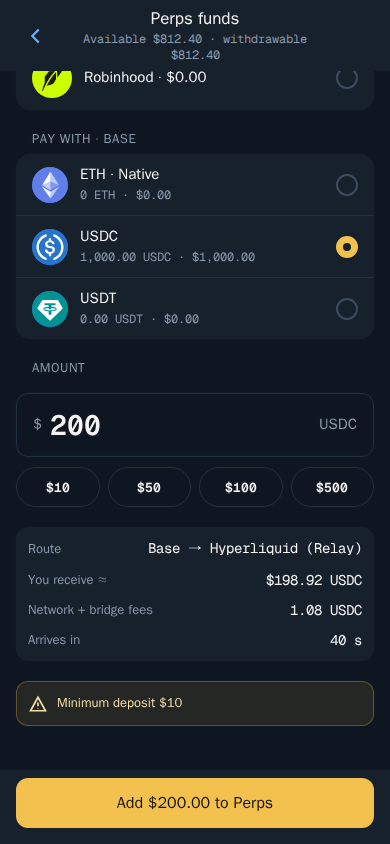
Tip: Only fund perps with money you can afford to lose. Keep your spot trading balance separate so a bad perps trade does not drain the wallet you snipe or copy trade from.
For a wider look at where USDC fits across Thor, read the USDC trading bot guide.
How to Open a Long or Short on Hyperliquid From Telegram
Once you have USDC in your perps account, opening a trade works like this (see Open a perps trade):
- Open a market, for example BTC.
- Choose Long if you think the price will rise, or Short if you think it will fall.
- Set the size with the % chips or type your own amount.
- Set the leverage with the slider or chips, up to that market's maximum.
- Choose Isolated or Cross margin.
- Turn on Auto close to add a take profit and stop loss.
- Tap Review, check everything and confirm.
Thor Trading Bot
Perps terms you need to know
| Term | What it means in Thor |
|---|---|
| Long | You profit if the price goes up |
| Short | You profit if the price goes down |
| Leverage | Multiplies your exposure, and your gains and losses |
| Isolated | Only this position's margin is at risk |
| Cross | Your whole perps balance backs the position |
| Auto close | Take profit and stop loss set as a % of your margin |
| Reduce only | The order can only shrink a position, never add to it |
| Funding | A small payment between longs and shorts, shown on the market |
Isolated vs cross margin
Isolated is the safer default for most traders. If the trade goes wrong, the loss is limited to the margin you put into that one position. Cross lets your whole perps balance support the position, which can keep it open longer in a drawdown, but it also means a single bad trade can eat into everything in your perps account.
Auto close: take profit and stop loss for perps
Auto close sets a take profit and a stop loss as a percentage of your margin. They trigger on the mark price and close at market. Because they close at market, the fill can differ from the trigger in fast moves. Setting a stop loss before you need it is one of the simplest ways to cap a loss on a leveraged position.
Tip: You can set quick buttons for Perps in the bot under Fees, buttons, display, so the sizes you use most are one tap away. See Buy and sell buttons.
Managing Positions and Liquidation Risk
Open a position to see its profit or loss, entry price, mark price and liquidation price. From there you can (see Manage perps positions):
- Close all or part of the position.
- Add margin to move the liquidation price further away.
- Edit the take profit and stop loss.
Thor Trading Bot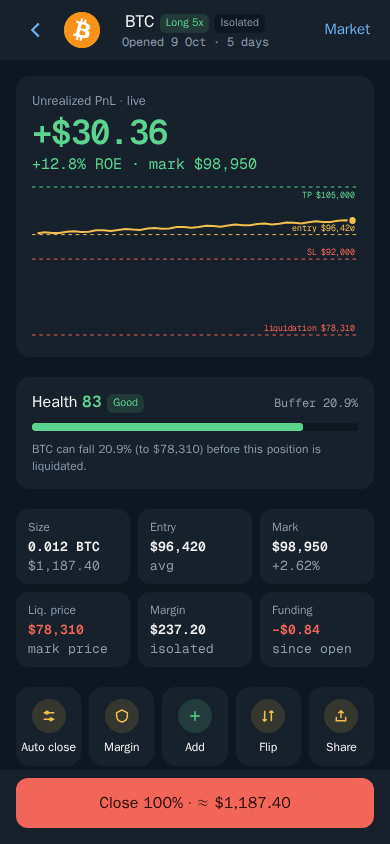
Warning: If the price reaches your liquidation price, the position is closed and its margin is lost. Leverage makes losses bigger, and you can lose all the margin in a position.
How leverage changes your risk
Leverage multiplies both sides of the trade. A price move that would be a small loss on a spot position can wipe out a highly leveraged one. The higher the leverage, the closer your liquidation price sits to your entry. A few habits help:
- Check the liquidation price on the Review screen before you confirm.
- Use lower leverage on volatile markets.
- Use Isolated margin unless you have a clear reason to use Cross.
- Turn on Auto close with a stop loss so you exit before liquidation.
- Watch funding on the market, since holding a position for a long time adds up.
How to Withdraw From Hyperliquid Perps
When you are done, move your USDC back to your Thor wallet (see Withdraw from Perps):
- Open Perps, then Funds.
- Choose Withdraw and enter the amount.
- Confirm.
Funds that back open positions cannot be withdrawn until those positions are closed.
Perps Fees: What Trading Hyperliquid on Telegram Costs
| Fee | Amount | Covered by subscription? |
|---|---|---|
| Thor builder fee | 0.05% per trade | No |
| Hyperliquid fees | Set by Hyperliquid | No |
| Bridging into Perps | No Thor fee | — |
Thor's fee on perps is a 0.05% builder fee per trade, added on top of Hyperliquid's own trading fees. It is always shown before you confirm. Perps trades do not earn cashback or referral rewards.
To be clear: the Thor subscription does not cover perps. The subscription ($100 for 30 days) cuts Thor's bot fees to 0% on spot trading and bridging on Solana and every EVM chain, but perps, predictions, network fees and third-party fees are not included. If you also trade spot, the subscription pays for itself compared with the flat 0.5% spot fee once you pass $20,000 of spot volume in 30 days. That 0.5% is already half the 1% many Telegram trading bots charge. See Fees and Subscription.
Is a Hyperliquid Telegram Bot Right for You?
Trading perps from Telegram makes sense if you already use Thor for spot and want one app for long, short, spot and predictions, with a trading key that cannot withdraw your funds. It is not a shortcut to profit. Leverage is the fastest way to lose a balance, and liquidation is final.
Start small, use isolated margin and a stop loss, and read how to stay safe before you scale up. When you are ready, open Thor on Telegram, go to Home, then Perps, and make your first deposit. You can find every way to use Thor on the apps page.
Frequently asked questions
Can you trade Hyperliquid from Telegram?
Yes. Thor connects you to Hyperliquid from inside Telegram. Open Home then Perps in the Thor Mini App, accept the risk notice, add USDC and you can open long or short positions with leverage.
What does it cost to trade perps with a Telegram bot?
Thor charges a 0.05% builder fee per perps trade, on top of Hyperliquid's own fees. The Thor subscription does not cover perps, so this fee applies even when you are subscribed.
Can Thor withdraw my Hyperliquid funds?
No. Thor creates a Hyperliquid trading key for your account that can place and cancel orders but cannot withdraw your funds. Your perps account belongs to your Thor EVM wallet.
What happens if my perps position gets liquidated?
If the price reaches your liquidation price, the position is closed and its margin is lost. You can add margin to an open position to move the liquidation price further away.
Do I need to bridge to fund perps?
No manual bridging is needed. If your funds are on another chain, Thor bridges them into Perps for you, and bridging into Perps has no Thor fee.
Are perps available in every country?
No. Perps are not available in some countries and regions. Thor checks your declared location and connection and blocks access where perps are restricted.
Step-by-step in the Docs
- Perps: get started: Trade long or short with leverage.
- Open a perps trade: Pick a market, side, size and leverage.
- Manage perps positions: Close, add margin or change your targets.
- Add funds to Perps: Move USDC into your perps account.