Yes, you can bet on Polymarket from Telegram: Thor is a Polymarket Telegram bot that connects your account to Polymarket, so you can buy Yes or No on elections, sports, crypto prices and other real-world events without leaving the chat. Thor charges no fee on predictions today; only Polymarket's own fee applies.
This guide covers how prediction markets work, how to add cash, place a market or limit prediction, sell early or claim winnings, and what to watch out for.
What Is a Polymarket Telegram Bot?
Polymarket is a prediction market. Instead of trading a token, you buy shares in the outcome of an event. A Polymarket Telegram bot lets you browse those events and trade them inside Telegram rather than on a website.
In Thor, Predictions live in the Thor Mini App, the full trading app inside Telegram, next to spot trading, Trenches and Perps on Hyperliquid. Open Home, then Predictions (the Mini App menu shows it as PolyMarket).
How prediction shares are priced
Each share pays $1 if your outcome is right and $0 if it is wrong. The price of a share, for example 62¢, is the market's view of the chance it happens.
| You buy | Price per share | If you are right | If you are wrong |
|---|---|---|---|
| Yes | 62¢ | Each share pays $1 | Each share pays $0 |
| No | 38¢ | Each share pays $1 | Each share pays $0 |
So $50 of Yes at 62¢ buys roughly 80 shares. If Yes wins, those shares pay about $80. If No wins, they pay nothing. Thor shows the exact shares, the payout if you are right and the fees on the ticket before you confirm. The prices in this table are an example, not a live market.
Where your predictions money sits
Your predictions cash is held as pUSD, a dollar-backed balance, in your own predictions wallet. Under the hood, this is a deposit wallet on Polygon that belongs to your Thor account. Thor stores encrypted access credentials for your Polymarket account so it can place your orders.
Note: Polymarket decides how markets resolve. Thor does not control or guarantee any outcome or payout.
How to Bet on Polymarket From Telegram: Setup
Full details are in Predictions: get started.
- Open Thor on Telegram and open the Mini App with the menu button next to the message field.
- Go to Home, then Predictions.
- Read and accept the risk notice.
- Add cash (see the next section).
If you are new to Thor, create your account and fund your wallet first.
Warning: Prediction markets are blocked in some countries. In others you can only close positions, withdraw and claim.
How to Add Cash for Polymarket
- Open Predictions, then Cash.
- Choose an amount and confirm.
If your funds are on another chain, Thor moves them for you with no Thor bridge fee. You do not need to bridge to Polygon yourself. Third-party and network fees can still apply. See Add cash.
 Thor Trading Bot
How to Place a Prediction on Polymarket in Telegram
Placing a prediction takes a few taps (see Place a prediction):
- Open an event and choose an outcome.
- Pick Yes or No.
- Choose Market to buy now, or Limit to set your own price.
- Tap an amount, for example $50, or enter your own.
- Check the shares, the payout if you are right and the fees.
- Confirm.
Thor Trading Bot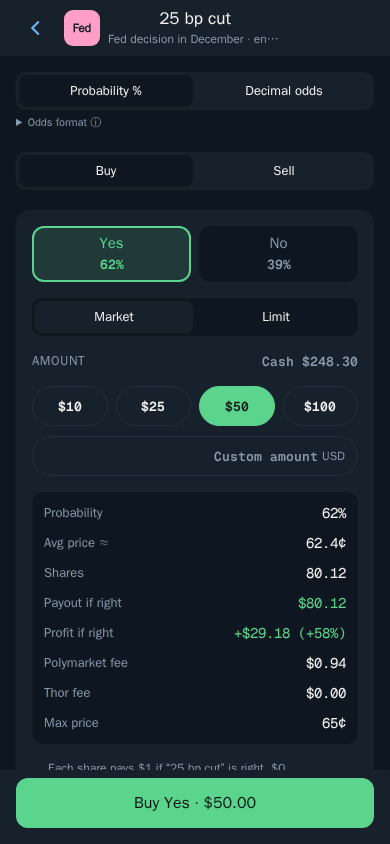
Market vs limit predictions
- Market buys right away at the current price. Use it when you want in now and the price is fair to you.
- Limit lets you set your own price. The order waits until someone will sell to you at that price. Use it when you think the market is overpricing an outcome and you are happy to wait.
Open limit orders show in My predictions, where you can cancel them.
Probability or decimal odds
At the top of the ticket you can switch between Probability % and Decimal odds. Probability shows the share price as a percentage chance, for example 62%. Decimal odds show the same price the way a sportsbook would. Pick whichever you read faster.
Tip: You can set quick buttons for Predictions in the bot under Fees, buttons, display, so your usual amounts are one tap away. See Buy and sell buttons.
Selling Early and Claiming Winnings
Open My predictions to see your positions, open orders and results (see Your predictions and winnings).
- Sell a position at any time before the market resolves. If the price has moved your way, you can take profit early instead of waiting for the result.
- Cancel open limit orders.
- Claim your winnings when a market resolves in your favour.
Thor Trading Bot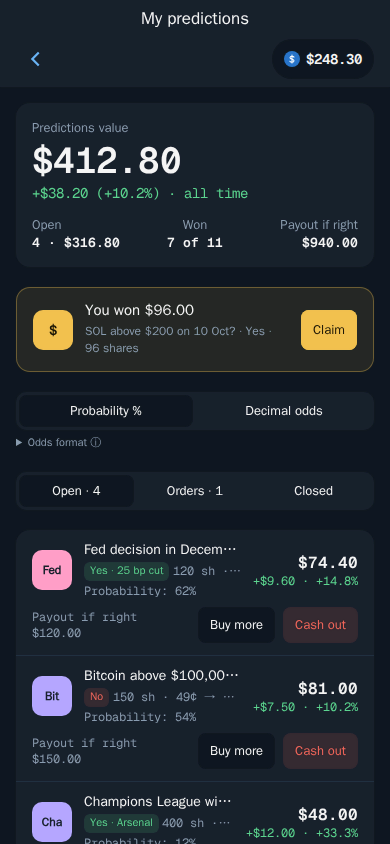
Selling early is useful when news shifts the odds. If you bought Yes at 40¢ and the market now trades at 75¢, selling locks in that gain without the risk of the event going the other way.
How to Withdraw Your Polymarket Cash
When you want your money back in your Thor wallet (see Withdraw cash):
- Open Predictions, then Cash.
- Choose Withdraw and enter the amount.
- Confirm.
Polymarket Telegram Bot Fees
| Fee | Amount |
|---|---|
| Thor fee on predictions | $0 today |
| Polymarket fees | Polymarket's own fee applies |
| Moving funds into Predictions | No Thor bridge fee |
Thor's fee on predictions is shown on the ticket and is $0 today. Polymarket's own fee applies and is shown before you confirm. Prediction trades do not earn cashback or referral rewards.
The Thor subscription does not cover predictions, and does not need to while there is no Thor fee. The subscription ($100 for 30 days) is for spot trading and bridging: it cuts Thor's 0.5% fee on spot trades and bridging to 0% on Solana and every EVM chain. Compared with paying 0.5%, it breaks even at $20,000 of spot volume in 30 days, and that 0.5% is already half the 1% many Telegram trading bots charge. See Fees and Subscription.
Tips for Betting on Polymarket From Telegram
- Read the market rules. Polymarket decides how each market resolves. Know exactly what counts as Yes before you buy.
- Think in probabilities. A 90¢ share pays only 10¢ of profit if right and loses 90¢ if wrong. Cheap shares pay more but win less often.
- Use limit orders when you have a price in mind, instead of buying whatever the market offers.
- Size small. Prediction markets can go to $0. Only use money you can afford to lose.
- Take profit early when the odds move strongly your way. You do not have to hold to resolution.
Start Predicting From Telegram
Thor puts Polymarket inside Telegram, next to spot trading and Hyperliquid perps, with no Thor fee on predictions today. Open Thor on Telegram, go to Home, then Predictions, and add cash to place your first prediction. If you want to understand how dollars move around Thor, read the USDC trading bot guide, and see every way to use Thor on the apps page.
Frequently asked questions
Is there a Telegram bot for Polymarket?
Yes. Thor connects you to Polymarket from inside Telegram. Open Home then Predictions in the Thor Mini App, accept the risk notice, add cash and you can buy Yes or No on real-world events.
How much does it cost to bet on Polymarket from Telegram with Thor?
Thor's fee on predictions is $0 today. Polymarket's own fee still applies, and the fee is shown on the ticket before you confirm.
How do Polymarket payouts work?
Each share pays $1 if your outcome is right and $0 if it is wrong. The share price, for example 62 cents, is the market's view of the chance that the outcome happens.
What currency is my Polymarket balance held in?
Your predictions cash is held as pUSD, a dollar-backed balance, in a deposit wallet on Polygon that belongs to your Thor account. If your funds are on another chain, Thor moves them for you with no Thor bridge fee.
Can I sell a Polymarket position before the event ends?
Yes. You can sell a position at any time before the market resolves from My predictions. When a market resolves in your favour, you claim your winnings there too.
Who decides how a Polymarket market resolves?
Polymarket decides how markets resolve. Thor does not control or guarantee any outcome or payout.
Step-by-step in the Docs
- Predictions: get started: Trade on real-world events.
- Place a prediction: Buy Yes or No at the market or your own price.
- Add cash: Fund your predictions balance.
- Your predictions and winnings: Sell early or claim when a market resolves.