Using multiple wallets in a Solana trading bot lets you split funds by purpose and buy from several wallets at once. Thor gives you up to 20 Solana wallets and 20 EVM wallets, groups of 2 to 20 wallets called batches that buy and sell together, and Send → From several wallets to move funds out of many wallets in one flow.
This guide covers how wallets work in Thor, how to add them, how the EVM wallet works across chains, how to buy from several wallets at once and how to move funds between them.
How Multiple Wallets Work in a Solana Trading Bot
When you create your account, Thor sets up two wallets for you: one for Solana and one EVM address for Ethereum, Base, BNB Chain, Robinhood Chain and Arc. From there you can add more.
 Thor Trading Bot
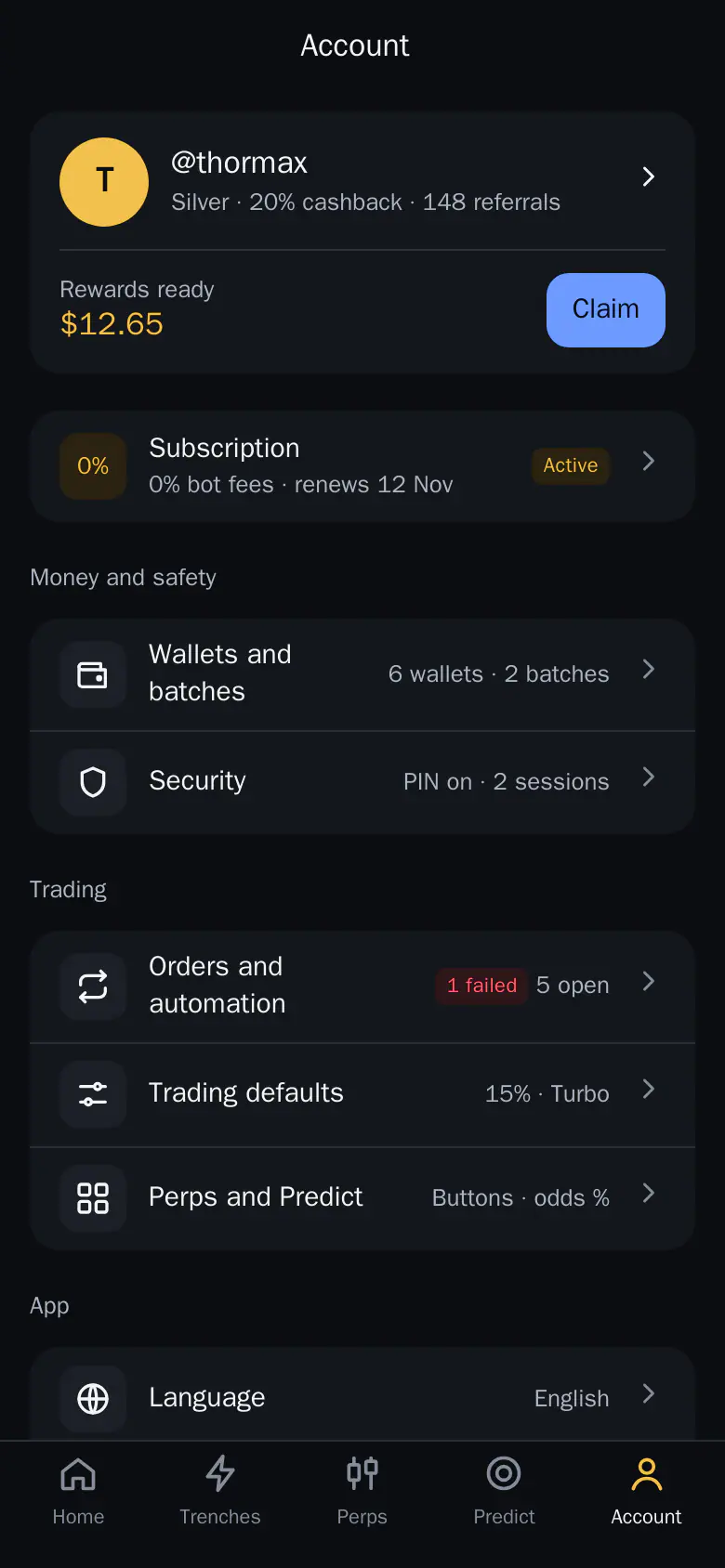

- Open Wallets and batches. Account lists every wallet and batch.
- Tap Create wallet. The new wallet is ready in a second.
Your Wallets
Open Home → Wallets in the Mini App and pick a chain, or go to Account → Wallets and batches.
- Pick a chain tab: Solana, EVM or Batches. All chains are always there, even when empty.
- Each row shows the wallet's name, value and balance. Tap a row to open the wallet page.
- Tap Create wallet to add one. It is ready in a second.
- On the wallet page, Make default turns it into the wallet your trades start from, and Manage has Rename and Hold to remove.
Thor Trading Bot1234- Create wallet. Adds a new wallet on this chain. A new Solana wallet becomes your default Solana wallet.
- USD Cash. Your dollar wallet sits on top while it holds money. It does not count toward the 20 wallets.
- Batches. Your named groups of 2 to 20 wallets, so you can buy, sell and fund them together.
- Clean all wallets. Closes the empty and dust accounts of every Solana wallet and sends the SOL back to one wallet.
The limits are simple:
| What | Solana | EVM |
|---|---|---|
| Wallets | Up to 20 | Up to 20 |
| USD Cash | Separate, does not count toward the limit | Separate, does not count toward the limit |
| Address | One address per wallet | One address per wallet, the same on every EVM chain |
| Native coin for fees | SOL | ETH, BNB, or USDC on Arc, depending on the chain |
Every wallet is non-custodial. Wallets are created and secured by Privy, a third-party wallet infrastructure provider, and ODIN Tools never holds your wallets. Thor signs the trades you ask for through a delegated signing permission via Privy that you give when you accept the Terms. Read is a Telegram trading bot safe for the details.
Tip: Set a PIN. Your 4 to 10 digit code is asked for every send, including between your own wallets, and before you remove a wallet.
Why Use a Multi-Wallet Trading Bot
There is no single right way to split funds, but traders commonly use several wallets to:
- Separate risk. Keep a small "Sniper" wallet for fresh launches and a "Vault" wallet for funds you are not trading. If a trade goes wrong, it only touches that wallet.
- Size positions by wallet. Fund each wallet with a set amount, and you always know how much you have committed to one style of trading.
- Track results cleanly. Each wallet has its own balance, positions and P&L, so it is easy to see which approach is working.
- Isolate copy trades. Give each copy trade its own wallet so its P&L and risk stay separate.
- Spread a buy. With a batch, one buy can go out from several wallets.
Tip: Name wallets by purpose, such as Main, Sniper and Vault. Renaming takes a second and makes it much harder to trade from the wrong one.
How to Add a Wallet in a Telegram Bot
- Open Thor on Telegram and open the Mini App.
- Go to Home → Wallets, or Account → Wallets and batches.
- Tap Create wallet.
- A new Solana wallet becomes your default Solana wallet. A new EVM wallet does not change your default EVM wallet; tap Make default on its page if you want to trade from it.
Note: Thor does not keep removed wallets. Move the funds out of a wallet before you remove it.
The EVM Wallet: One Address on Every Chain
Each EVM wallet has one address that works on Ethereum, Base, BNB Chain, Robinhood Chain and Arc. You do not need a separate wallet per chain. Pick an EVM chain in the chain bar and the same wallet is listed under each one.
Each chain uses its own native coin for fees: ETH on Ethereum, Base and Robinhood Chain, BNB on BNB Chain and USDC on Arc. When you fund your wallet, always check you are sending on the right network. To move value between Solana and an EVM chain, use Send and pick a wallet on the other chain.
Don't want to hold a gas coin on every chain? USD Cash is one USDC balance that buys on all six chains, with network costs paid for you and charged in USDC.
Chain guides: Base, Ethereum, BNB Chain, Robinhood Chain and Arc.
Buy From Several Wallets at Once
Multiple wallets really pay off when they trade together. A batch is a named group of 2 to 20 wallets on one family, Solana or EVM. Fund it, then buy, sell and place orders with every wallet at once from the coin sheet.
Buy From a Batch
- Create a batch: Account → Wallets and batches → New batch. Name it, then make new wallets or pick 2 to 20 wallets you already have.
- Open any coin and pick the batch in the wallet picker on the buy bar.
- Enter the total. Each row shows what that wallet will spend and get. A wallet that cannot pay is skipped, with Fund next to it.
- Choose Even or Random split, and whether to send from all wallets at once or space them out.
- Tap Buy. One toast counts the wallets as they buy.
Thor Trading Bot 123
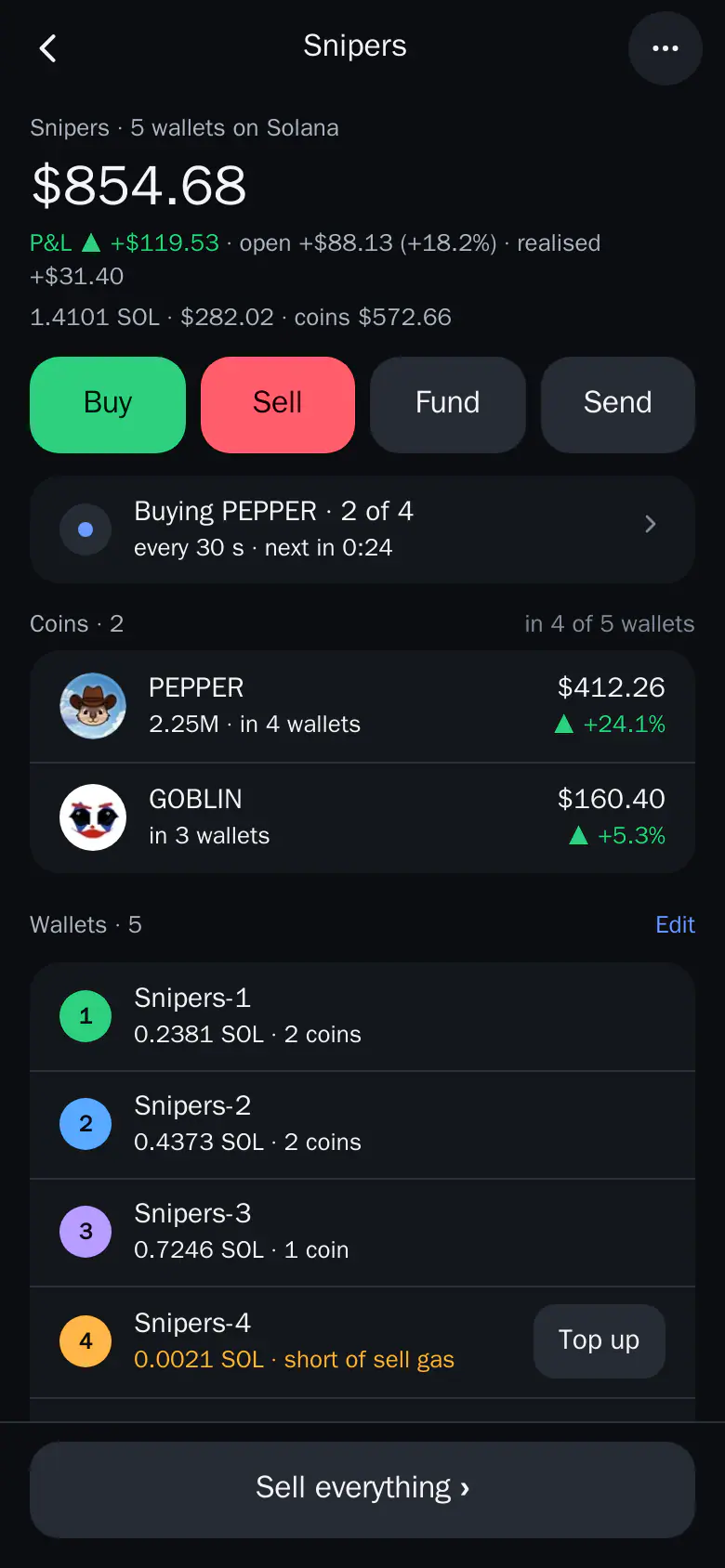
- Snipers ×5. Picks the batch to trade with. Orders and automation use the batch's current wallets.
- Max. Every wallet spends all it can and keeps the same amount for fees.
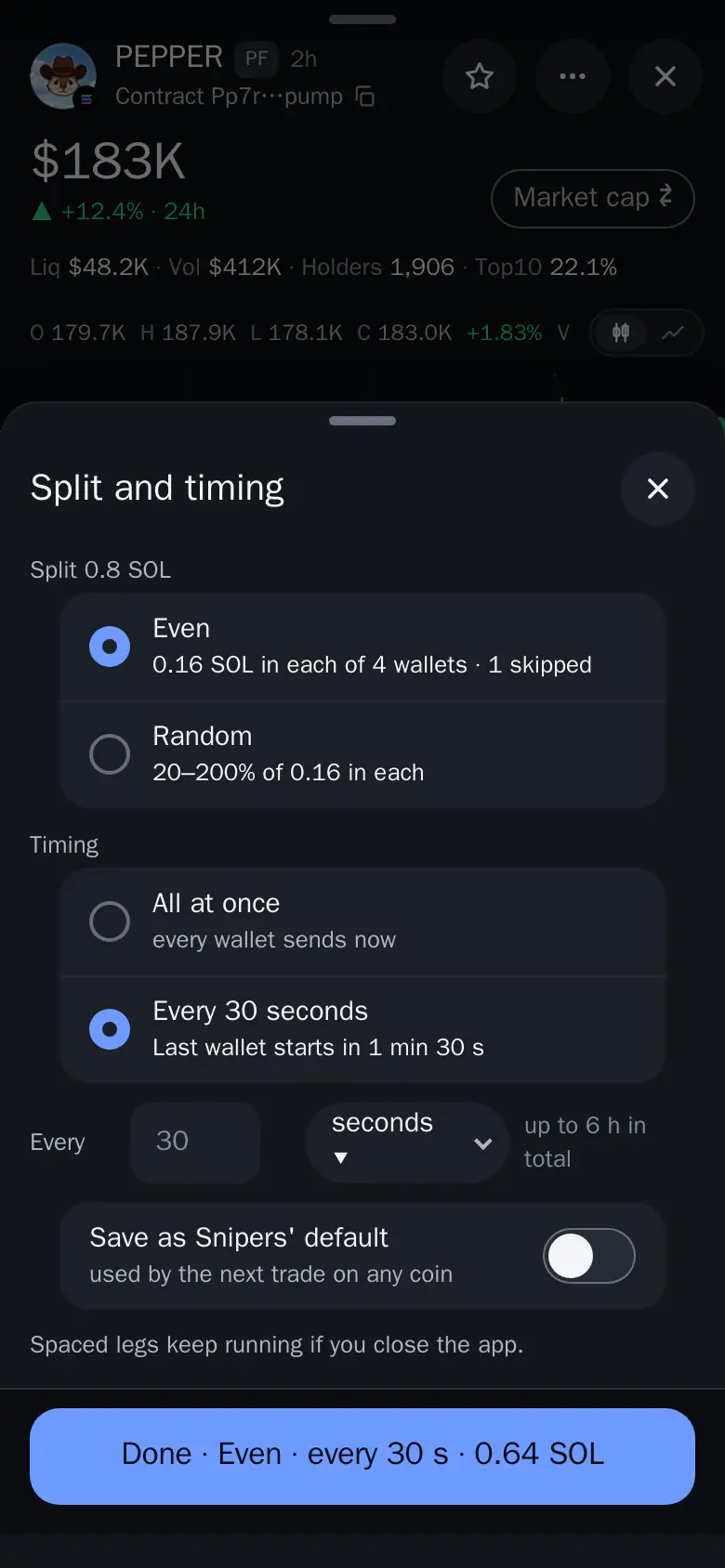
- Even · all at once. Opens split and timing: Even or Random, all at once or one wallet every few seconds.
Split Random gives each wallet 20% to 200% of the even share. Spacing wallets out runs from 1 second to 60 minutes, and the whole spread is capped at 6 hours. Selling works the same way: each wallet sells the same share of its own coins, and Sell everything is on the batch page.
Thor Trading Bot Thor Trading Bot
 Thor Trading Bot
Auto Buy From Several Wallets
Thor's Auto buy can also pay from a batch. When it is on, sending or forwarding a token address, or a pump.fun, DexScreener or explorer link, to the Thor bot chat buys the token straight away.
Set Up Multi-Wallet Auto Buy
- Open Account → Orders and automation → Auto buy and turn it on.
- Set the Amount and Slippage.
- Under Pay from, pick the batch or wallets that should buy.
- Add limits if you want: Market cap up to and Liquidity at least.
- Choose whether to buy tokens you already hold with Coins I already hold.
- Send a token address or link to the bot chat.
Thor Trading Bot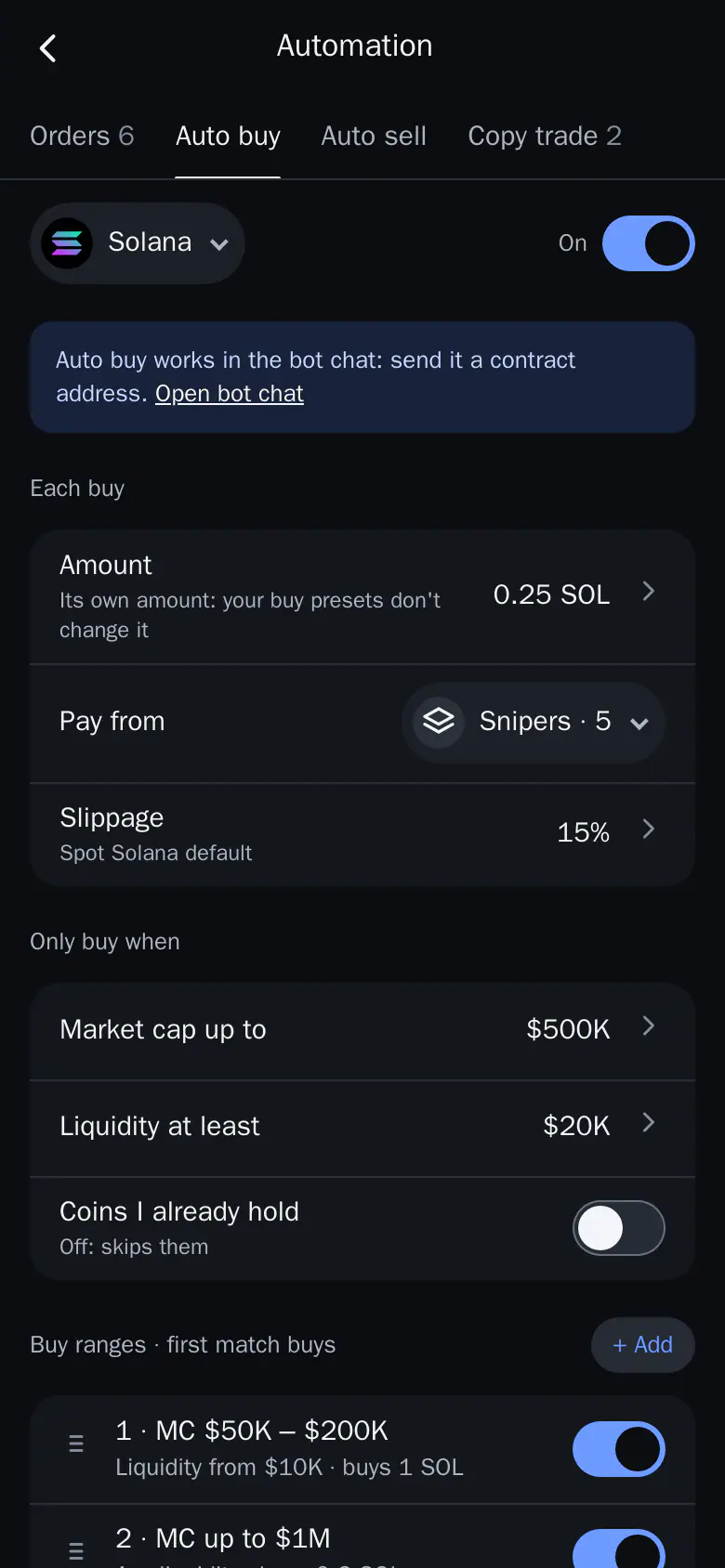 1234
- Pay from. Pick a wallet or a batch. A batch buys from every wallet in it.
- Slippage. The most the price may move against you before the buy fails.
- Coins I already hold. Off skips coins you already own.
- + Add. Adds a buy range that sets the amount by market cap and liquidity.
You get one summary message with a Sell 100% button per wallet and Sell all wallets. You can also add buy ranges to buy different amounts depending on the coin, for example 1 SOL for coins between $50K and $200K market cap. Ranges are checked top to bottom, and the default amount is used when no range matches, unless Strict ranges is on.
Note: Multi-wallet buys and buy ranges are Solana only. On EVM chains Auto buy uses one wallet, which can be USD Cash. Auto buy triggers from the bot chat, and from Mini App search when it is on.
Pair it with Auto sell so every buy, from every wallet, gets take profit and stop loss orders automatically. For a full setup, read Pump.fun AutoSell: take profit, stop loss and trailing stop and the Pump.fun sniper bot guide.
Move Funds Between Your Wallets
For one wallet, use Send:
- Open Send from Home, or from a wallet page.
- Check From: the wallet and the coin. Picking a wallet here does not change your default wallet.
- Tap My wallets under To, and pick one of your own.
- Enter an amount (25%, 50%, 75%, Max or exact), then tap the send button. If you set a PIN, enter it.
Move Many Wallets at Once
In the Mini App, Send → From several wallets moves funds out of up to 40 wallets, across chains, in one flow.
- Open Send and tap the From chip, then Several wallets….
- Tick wallets one by one, or tick a whole batch in one tap. The wallet you send to is greyed out.
- Pick the coin and the destination: one of your wallets, an outside address, a wallet on another chain, or USD Cash.
- Check each row: it says what it sends and what it keeps. A wallet too small to keep its gas to sell is skipped, with the reason.
- Tap the send button and enter your PIN once for the whole move.
Thor Trading Bot 123
- Keep gas to sell their coins. On, each wallet keeps enough to sell the coins it still holds. Off, every wallet empties.
- Max. Sends all each wallet can send.
- Send 0.49917452 SOL from 4 wallets. One tap starts every part. Failed parts can be retried.
Each source wallet sends its own transaction and pays its own network cost; nothing is pooled. Anything going to another chain is bridged, one route per wallet. Rewards from every chain can be collected in one go with Claim under Account's Bonuses. To send funds out of Thor, paste an outside address in the same Send screen. See how to withdraw from a Telegram trading bot.
In an emergency, Clean up → Sell everything sells every token in the Solana wallets you pick, in one go. It cannot be undone. Read how to sell all tokens on Solana at once.
Fees Are the Same on Every Wallet
Thor charges a flat 0.5% per spot trade, half the 1% that many Telegram trading bots charge. A batch buy places one buy per wallet, and each buy pays the normal fee on its own amount. If you trade a lot across wallets, the subscription ($100 for 30 days) cuts Thor's bot fees on spot trading to 0% on Solana and every EVM chain and removes the bridge bot fee. It breaks even at $20,000 of spot volume in 30 days and does not cover perps, predictions, network or third-party fees. Cashback returns 10% to 75% of the bot fees you do pay, by volume tier. See Fees and Subscription.
Ready to set up your wallets? Open Thor on Telegram, go to Account → Wallets and batches and create your first extra wallet.
Frequently asked questions
How many wallets can I have in a Solana trading bot?
In Thor you can have up to 20 Solana wallets and up to 20 EVM wallets. USD Cash, your dollar wallet, does not count toward the limit. Each wallet has its own balance, positions and P&L.
Can I buy a token from several wallets at once?
Yes, on Solana. Group 2 to 20 wallets into a batch, pick the batch on the coin sheet and buy: the total is split across its wallets. Auto buy can also buy from a batch or several wallets when you send a token address or link to the bot chat.
How do I add a wallet in a Telegram trading bot?
In Thor, open Account, then Wallets and batches, and tap Create wallet. The wallet is ready in a second. Wallets are created and secured by Privy, a third-party wallet infrastructure provider.
Does my EVM wallet have a different address on each chain?
No. Each Thor EVM wallet uses the same address on Ethereum, Base, BNB Chain, Robinhood Chain and Arc. Send the right coin on the right network, such as ETH on Base or BNB on BNB Chain.
Can I move funds out of many wallets at once?
Yes. In the Mini App, Send has a From several wallets option that moves funds out of many wallets in one flow, with your PIN asked once. Each wallet sends its own transaction and pays its own network cost.
Step-by-step in the Docs
- Wallets: See, add, rename, make default and remove your Solana and EVM wallets from Home > Wallets.
- Batches: A batch is a named group of 2 to 20 wallets. Fund it, then buy, sell and place orders with all of them.
- Auto buy: Buy a token the moment you send its address to the bot chat, with buy ranges and several wallets.
- Send: One screen to send a coin to your own wallets, across chains, or from several wallets at once.
- Create your account: Start the bot, accept the Terms, choose an optional PIN and your wallets are ready.