What the Thor Chrome Extension Does
The Thor Chrome extension is a lightweight trading panel that sits inside your browser and activates automatically on supported Solana trading platforms. When you open a token page on DexScreener, Pump.fun, Axiom, or any of the 15+ supported sites, the extension detects the contract address and gives you a full trading interface — without leaving the chart.
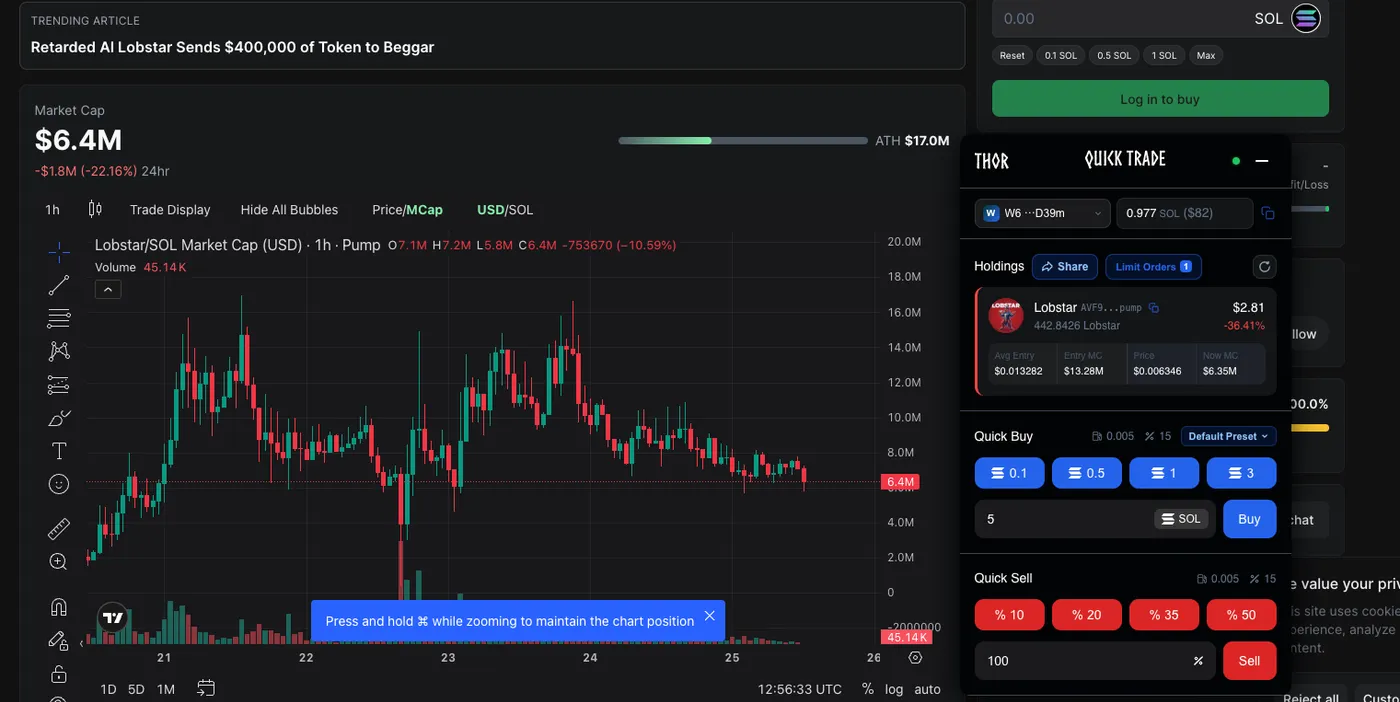
Live PnL, buy/sell presets, and position data visible directly inside DexScreener
The core value proposition is speed and context. Every second you spend copying a contract address, switching to your trading app, and pasting it is a second of price movement. With Thor pinned to your browser, the token you're already researching is already loaded — one click to buy.
Key Capabilities
- One-click buy/sell with preset SOL amounts and percentages configured once in settings
- Live PnL display showing your unrealized profit and loss on the current token, overlaid directly on the page
- Position management panel listing all open positions across your wallet
- Limit orders — take-profit, stop-loss, and trailing stop on any token
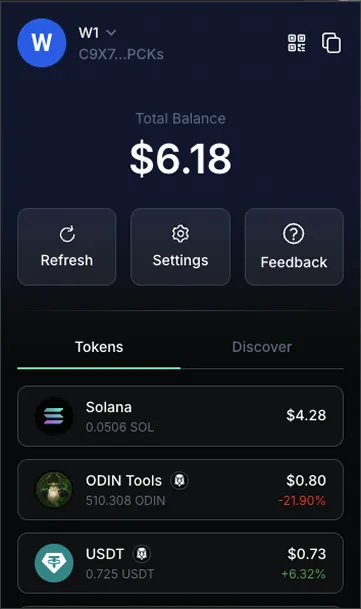
- Wallet management and balance display without leaving the DEX
- Auto CA detection — the extension reads the token from the page, no manual input
All execution happens through Thor's private Solana infrastructure — the same nodes used by the Telegram bot. Transactions are routed through a direct, low-latency connection to Solana validators, giving you sub-50ms execution that public RPC endpoints can't match.
Supported Platforms
Thor activates automatically on every major Solana trading platform. As soon as you navigate to a supported site with the extension installed, the trading panel appears with the active token pre-loaded:
The list expands with every update. Platforms like Axiom Instant and Axiom Pulse are supported with their respective interfaces, meaning Thor works across the full Axiom suite. Telegram Web support means you can trade directly from alpha group messages without switching apps.
You don't configure Thor per platform. Install once, and it detects and activates on every supported site automatically. New platform support is added via extension updates — no reinstall required.
How to Install the Thor Chrome Extension
Thor is available on the Chrome Web Store and as a direct download. The Web Store version is the easiest — installation takes under 2 minutes.
Option 1: Chrome Web Store (Recommended)
- 1Open the Thor extension page on the Chrome Web Store.
- 2Click Add to Chrome, then confirm with Add Extension in the browser popup.
- 3Pin the extension for quick access: click the puzzle icon in the Chrome toolbar, then the pin icon next to Thor. This keeps the icon always visible in your toolbar.
Option 2: Direct Download (ZIP)
If you prefer sideloading or are on a managed browser, download the extension ZIP directly from odin.tools/download/extension/Thor.zip. Unzip it, open chrome://extensions, enable Developer mode, and click Load unpacked to select the unzipped folder.
Thor works on any Chromium-based browser: Chrome, Brave, Arc, Edge, and Opera. The Web Store link and direct download both work across all of them.
Setup: Link Your Account and Configure Presets
Step 1 — Authenticate with Your Telegram Account
Thor Extension links to your existing Thor Telegram wallet. No new account needed — the same wallet you use in the bot is available in the extension.
- 1Click the Thor icon in your Chrome toolbar to open the extension, then tap Login.
- 2Open the Thor Telegram bot and generate a login code (look for the Extension Login option in the bot menu).
- 3Copy the code from Telegram, paste it into the extension, and click Verify. The extension connects to your wallet instantly.
Step 2 — Configure Buy / Sell Presets
Presets are the key to one-click execution. Set them once and every trade on every platform uses them automatically.
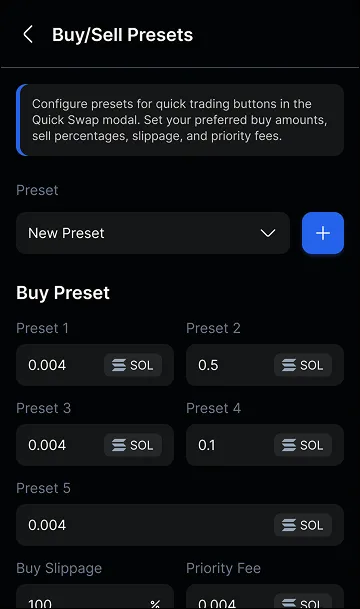
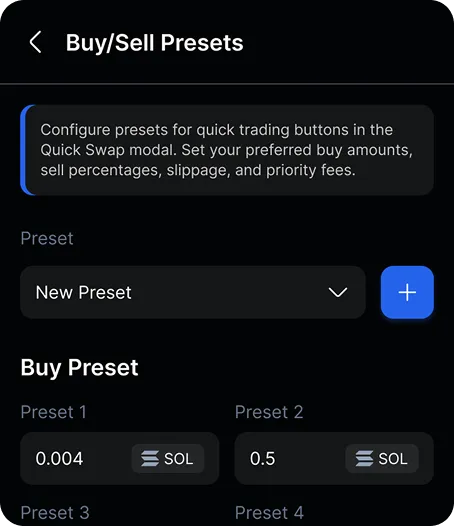
In Settings → Buy / Sell Presets:
- Buy Presets — set two SOL amounts for your quick-buy buttons (e.g., Buy 1 = 0.1 SOL, Buy 2 = 0.5 SOL)
- Sell Presets — set percentages for partial exits: 20%, 35%, 50%, 100% (or any custom values)
- Slippage — set per trade type; memecoins typically need 5–15%
- Priority fee — set to "High" or "Turbo" for fast-moving tokens
- Anti-MEV protection — toggle on to prevent sandwich attacks via Jito tips
Step 3 — Fund Your Wallet
Your wallet address is shown in the extension's wallet tab. Send SOL to it directly — it's the same address as your Thor Telegram wallet, so any funds deposited via the bot are immediately available in the extension, and vice versa.
How to Trade: Buying and Selling
Once installed and set up, trading from the extension is a sub-second workflow. Navigate to any supported platform, open a token, and the extension is ready.
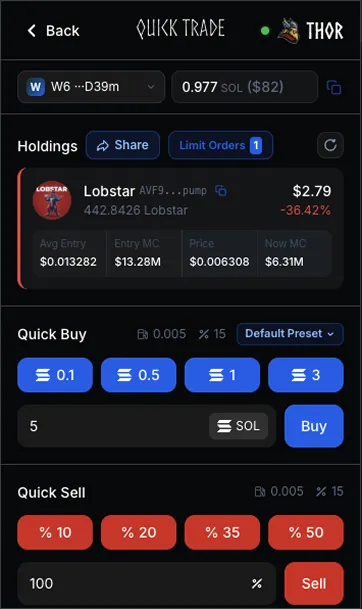
Position management panel — all open positions visible with real-time PnL
Buying a Token
- 1Navigate to a token on any supported platform (e.g., DexScreener, Pump.fun, Axiom). The extension auto-detects the contract address from the page.
- 2Open the Thor panel by clicking the icon in your toolbar (or via the in-page button on supported sites).
- 3Click Buy 1 or Buy 2 to execute your preset amounts instantly, or enter a custom SOL amount for one-off trades.
- 4The trade executes through Thor's private infrastructure. You'll see a confirmation with the tx hash and live PnL appears immediately on the chart.
Selling a Position
- 1Open the Positions tab in the extension to see all your holdings with real-time PnL.
- 2Select a position. Tap a sell preset (20%, 35%, 50%, 100%) to execute a partial or full exit instantly.
- 3Or navigate to the token's page on any supported platform — the extension detects you're on the right token and pre-selects your position for selling.
Every buy and sell routes through Thor's private Solana nodes via a tunneled connection. You're not competing with public RPC traffic. On fast-moving tokens this makes a measurable difference in fill price.
Limit Orders and Position Management
The extension isn't just for manual quick-trades. You can set automated exit strategies on any position — take-profit targets, stop-losses, and trailing stops — and Thor monitors the price 24/7 even when your browser is closed.
Take-Profit Orders
After buying a token, set one or more take-profit targets directly from the extension's position panel. For example:
- Sell 50% at 2x
- Sell 25% at 5x
- Let the remaining 25% ride with a trailing stop
When any target is hit, Thor executes the sell automatically on private nodes — no need to watch the chart. Notifications arrive via Telegram.
Stop-Loss Orders
Set a floor below which Thor automatically sells your position (e.g., sell all at -40%). Stop-losses execute 24/7 regardless of whether the extension is open, because monitoring happens server-side on Thor's infrastructure.
Trailing Stop
A trailing stop follows the price up and triggers a sell if the price drops by a configured percentage from its peak. This lets you capture extended runs without having to manually move your stop-loss as the price rises.
Combining Orders for Full Automation
The most effective strategy combines all three:
- 1Buy via one-click preset as soon as you spot the token
- 2Set a take-profit at 2x for 50% of the position (locks in the initial capital)
- 3Set a trailing stop of 25% on the remaining 50% (rides the trend, exits on reversal)
- 4Set a stop-loss at -35% as a backstop in case the token dumps before hitting any target
From this point the trade manages itself. You've capped your downside, secured half your gains at 2x, and given the rest of the position room to compound.
Limit orders are monitored server-side — not by a script running in your browser tab. You can close Chrome entirely and your take-profits and stop-losses will still execute when conditions are met.
Frequently Asked Questions
Yes. Thor is available on the Chrome Web Store and works on any Chromium-based browser — Chrome, Brave, Edge, Arc, and Opera. You can also sideload it via the direct download ZIP if you prefer not to use the store.
Yes — the extension authenticates through your Thor Telegram account. You generate a one-time login code via the Telegram bot and paste it into the extension. After that, the extension runs independently in your browser without needing Telegram open.
Thor auto-detects the active token on supported platforms. When you open a token page on DexScreener, Pump.fun, Axiom, or any other supported site, the extension reads the contract address from the page URL or DOM and pre-loads it as the trade target. No manual copying required.
Limit orders (take-profit, stop-loss, trailing stop) are fully available in the extension. Copy trading is managed from the Telegram bot, but positions opened via copy trades are visible and manageable in the extension's positions panel.
The Thor extension does not store your private keys locally. It connects to your Thor Telegram wallet via an encrypted session token. Your private key never touches the browser — all signing happens server-side on ODIN's private infrastructure, the same infrastructure used for the Telegram bot.
Install free from the Chrome Web Store. One-click trades, live PnL, and limit orders across 15+ Solana platforms.
Install Thor for Chrome →