The fastest Solana trading bot is the one that gets your signed transaction to the network before the crowd. Thor is built for exactly that: it runs its own private Solana node, sends each trade over several fast routes at once and usually lands trades in under 0.5 seconds from tap to on-chain in normal conditions.
On memecoins, a fraction of a second is the difference between buying at the price you saw and buying after everyone else pushed it up. This guide explains why some bots are slower than others, what actually happens between your tap and a confirmed trade, and which Thor settings make your trades land even faster.
Why Speed Decides the Price You Get
On Solana, every swap changes the price of the pool it trades against. When a coin is moving, dozens of traders are trying to buy the same token in the same second. Whoever lands first gets the lower price. Everyone after them pays more, because the earlier buys already moved the price.
That is why the same tap can give two traders very different fills. A slow trade does not just arrive late. It arrives at a worse price, or fails because the price moved further than its slippage allows. On a fast coin, the time between your tap and your trade landing is part of your entry price.
What Makes a Solana RPC Trading Bot Slow
Every trading bot has to send your transaction to the Solana network through a node, usually through an RPC endpoint. Many tools rely on shared or public RPC endpoints, and those come with built-in delays:
- Queues. A shared endpoint serves many apps and users at once. Your trade waits in line behind everyone else's requests.
- Rate limits. Public endpoints cap how many requests each user can send. When traffic spikes, requests are slowed down or rejected.
- Congestion. During a hot launch, shared endpoints get busiest exactly when you need them most. That is when trades start to lag or fail.
None of this is visible to you as a trader. You just see a trade that took longer than it should, or a fill well above the price on the chart.
How Thor's Private Solana Node Works
Thor runs its own private Solana node. Your trades do not wait in line with everyone else on shared public servers. They go straight from Thor to the network. On top of that, Thor adds a few things that help each trade land fast and at a good price:
| What Thor does | What it means for you |
|---|---|
| Own private node | No shared queue or public rate limits in front of your trade |
| Several fast routes at once | Each trade goes out over more than one path, so it lands even when the network is busy |
| Front-running protection | Helps shield your trades from bots that try to jump ahead of you |
| Max quote back | Before every swap, Thor compares routes and picks the one that gives you the most tokens |
The result: under 0.5 seconds from tap to on-chain in normal conditions. The same engine runs for every Solana trade you make in Thor, whether you tap in the Mini App, trade in the bot chat, or let a limit order, Auto sell target or copy trade fire while you are offline.
Note: Speed and price are never guaranteed. When the whole network is congested, any trade can be slower.
Why Trades Land First With Thor
Speed is not just one number. It is the sum of every step between your decision and a confirmed trade. Thor shows you each step on the trade status screen, so you can see exactly where the time went.
Read the Trade Status Screen
- Tap a buy amount on any token. The status screen opens straight away.
- Signed shows the trade was built and signed by your wallet.
- Sent shows the trade went out with the priority fee from your settings.
- Confirmed shows it landed on chain.
- Check the result: what you spent, what you received and your entry.
 Thor Trading Bot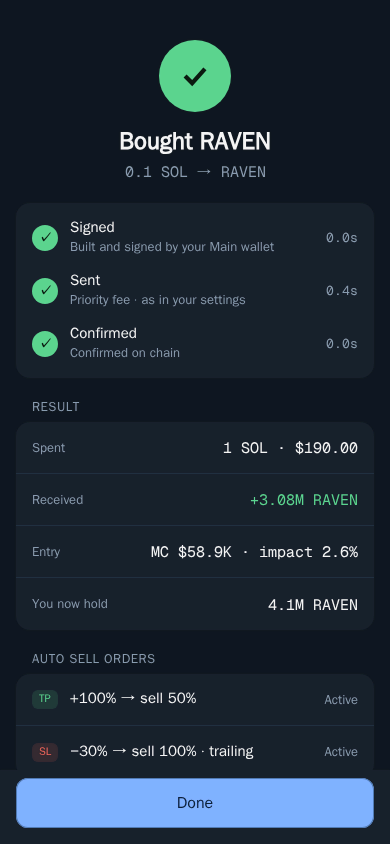
If a trade fails, Thor tells you why and offers a fix. The most common cause on fast coins is the price moving past your slippage. See Troubleshooting.
Turbo Priority Fee: Pay a Little More to Land Faster
Solana lets you add a priority fee to a transaction. It is an extra network fee that tells validators your transaction is worth including sooner. When the network is calm, a small fee is enough. When a hot launch has everyone competing for the same blocks, a higher fee helps your trade get picked first.
Thor lets you set the priority fee separately for buys and sells, so you can be aggressive on entries and save on exits:
- Turbo: fastest, a higher fee.
- Standard: a lower fee for calmer moments.
- Custom: your own amount.
Set Your Priority Fee and Slippage
- Open Settings, then Fees, buttons, display.
- Under Buy priority fee, choose Turbo.
- Under Sell priority fee, choose the level you want.
- Set Buy slippage and Sell slippage.
Thor Trading Bot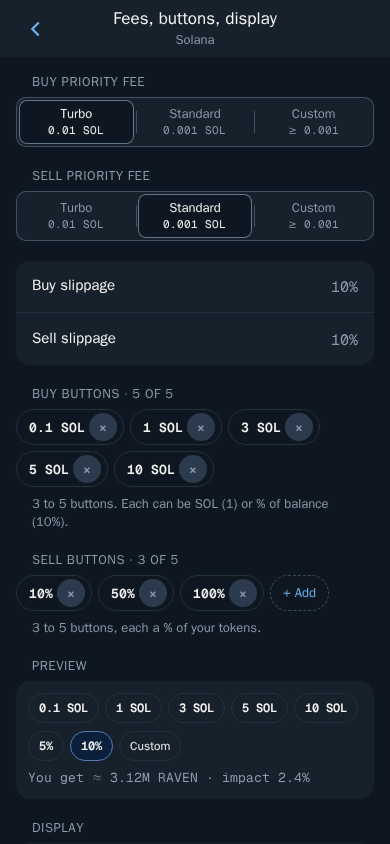
Slippage works hand in hand with speed. It is how far the price may move between your tap and the trade landing. If it moves more, the trade is cancelled instead of filling at a bad price. Higher slippage helps trades land on fast-moving coins. Lower slippage protects you from bad fills. Read Slippage and priority fees for more.
Tip: Priority fees are network fees. They go to the Solana network, not to Thor, and they are added on top of the trade.
One Tap Trading: Remove the Slowest Step
The slowest part of most trades is not the network. It is you, reading a confirm screen. One tap trading removes that step: tapping a buy amount or a sell percentage trades straight away. Limit orders and trailing stops still ask you to confirm.
Turn On One Tap Trading
- Open Settings, then Trading settings.
- Turn on One tap trading.
- Open any token and tap a buy amount. The trade goes out immediately.
Thor Trading Bot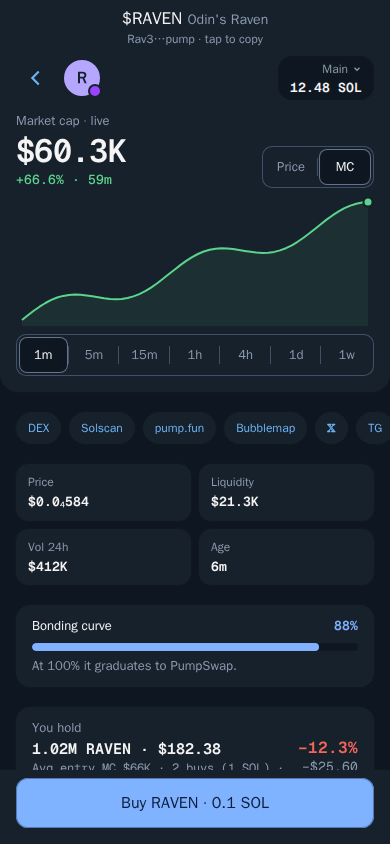
If you want buy and sell on one screen, turn on Pro Trader in the same place. It puts buy and sell buttons side by side, keeps one tap trading always on and uses one slippage setting for both. See One tap trading and Pro Trader.
Warning: With One tap trading or Pro Trader on, every tap trades immediately. Set your buy buttons to amounts you are comfortable with.
Speed Checklist for Solana Memecoins
Put it together and a fast setup in Thor looks like this:
- Fund your Solana wallet. See Fund your wallet.
- Set Turbo as your buy priority fee.
- Set slippage to match the coins you trade: higher for fresh launches, lower for established tokens.
- Turn on One tap trading.
- Set your buy buttons to the amounts you use most.
- Turn on Auto sell so every buy gets a take profit and stop loss without extra taps.
For new launches, pair this with Trenches to spot coins early, and read the Pump.fun sniper bot guide and how to snipe Solana tokens.
Fast Trades, Low Fees
Speed is only half of your entry cost. The other half is fees. Thor charges a flat 0.5% per spot trade, half the 1% that many Telegram trading bots charge. With the subscription, $100 for 30 days, Thor's bot fees on spot trading and bridging drop to 0% on Solana and every EVM chain. It breaks even at $20,000 of spot volume in 30 days. Network fees, including priority fees, are still paid. See Fees and the zero fee subscription guide.
Start Trading Faster
Open Thor on Telegram, set Turbo for buys and turn on One tap trading. You can also trade from the Chrome extension on token pages you already use. See all Thor apps, and read Why Thor is fast in the docs.
Frequently asked questions
What is the fastest Solana trading bot?
Speed depends on how a bot sends trades to the network. Thor is built to be the fastest: it runs its own private Solana node, sends each trade over several fast routes at once and usually lands trades in under half a second from tap to on-chain in normal conditions.
Why does a private Solana node make trades faster?
A private node is not shared with thousands of other users, so your trade does not wait in a queue or hit rate limits on a busy public endpoint. Thor sends trades straight from its own node to the network.
Does a higher priority fee make my Solana trade land faster?
Yes, when the network is busy. A priority fee is an extra network fee that tells validators your transaction is worth including sooner. In Thor you can pick Turbo, Standard or a custom amount, separately for buys and sells.
Is a fast trading bot guaranteed to get me the price I see?
No. Speed and price are never guaranteed. When the whole Solana network is congested any trade can be slower, and on fast coins the price can move before your trade lands. Slippage settings cancel a trade instead of filling it at a bad price.
What is one tap trading in Thor?
When One tap trading is on, tapping a buy amount or a sell percentage trades straight away with no confirm step. Limit orders and trailing stops still ask you to confirm. Turn it on in Settings, then Trading settings.
Step-by-step in the Docs
- Why Thor is fast: Thor runs its own private node, so your trades land in under half a second.
- Slippage and priority fees: Control price tolerance and speed.
- One tap trading and Pro Trader: Trade faster with fewer taps.
- Trade status and notifications: Know exactly what happened to every trade.