A Pump.fun sniper bot buys new pump.fun tokens the moment they appear, so you get in early on the bonding curve. Thor gives you three ways to snipe Pump.fun launches: Auto buy in the Telegram bot, quick buys from the Trenches New list, and Social Sniper, a Windows app that buys as soon as a token address is posted.
This page is the overview. It explains how each option works, which filters to set and the risks, and links to the in-depth guides for each part.
What Is a Pump.fun Sniper Bot?
On pump.fun, every new coin starts on a bonding curve, its launch stage, and graduates to a normal pool such as PumpSwap or Raydium when the curve fills. The earliest buyers on the curve pay the lowest prices, which is why traders try to snipe launches.
Sniping by hand is slow: you copy an address, open a DEX, connect a wallet and approve a swap. A sniper bot cuts that down to one action, or none. Three things decide whether it works:
- Speed. Thor runs its own private Solana node and sends each trade through more than one fast route. Trades usually land in under 0.5 seconds in normal conditions, though speed is never guaranteed when the network is busy.
- Rules. Filters such as max market cap and min liquidity keep the bot from buying coins you would never want.
- Exits. Snipes need a plan out. Auto sell adds take profit and stop loss to every buy.
Three Ways to Snipe Pump.fun Launches With Thor
| Auto buy (Telegram bot) | Trenches New list | Social Sniper | |
|---|---|---|---|
| Where it runs | Your chat with the Thor bot | The Thor Mini App | A Windows app on your PC |
| What starts a buy | An address or link you send or forward | You tap Buy on a coin | A token address posted in a source you watch |
| How you find coins | Calls you see in groups and channels | A live feed of new coins with scores and tags | Your chosen WhatsApp, X, Telegram and Discord sources |
| Needs you to act | Yes, send or forward | Yes, one tap | No |
| Filters | Max market cap, Min liquidity, buy ranges | Market cap, liquidity, age, holders, volume and more | Amount, slippage and filters |
Whichever you use, Auto sell applies to the buy, so every snipe gets your exits the moment it lands.
Option 1: Auto Buy From the Telegram Bot
Auto buy runs when you send or forward a token address, or a pump.fun, DexScreener or explorer link, to the Thor bot chat. It buys straight away.
- Open Thor on Telegram and go to Settings → Auto buy. Turn it on.
- Set the Default amount and Slippage.
- Add limits: Max market cap and Min liquidity.
- Choose whether to buy tokens you already hold with Buy owned tokens.
- Pick one or more Wallets. Thor buys from all of them at once.
Add buy ranges to size by market cap, for example 0.5 SOL for coins between $10K and $100K market cap. The default amount is used when no range matches.
 Thor Trading Bot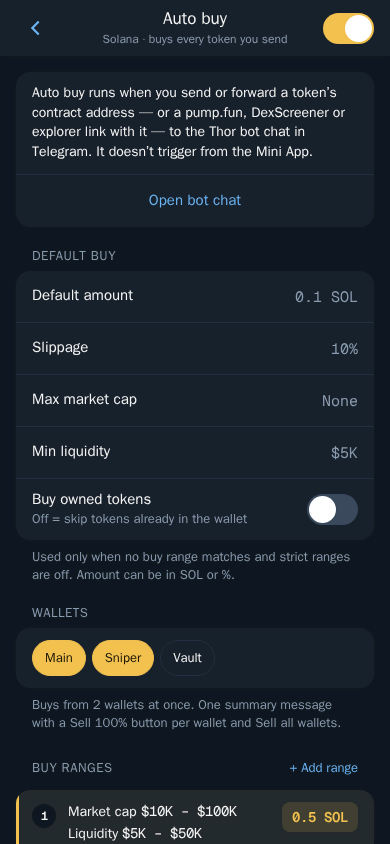
Auto buy runs from the bot chat only, not from the Mini App. For the full Telegram workflow, read How to snipe Solana tokens on Telegram.
Option 2: Snipe From the Trenches New List
Trenches is a live feed of new and trending coins in the Mini App, with a quality score, warning tags and one-tap buy. It is the closest thing in Thor to a pump.fun launch scanner.
- Open the Trenches tab and choose the New list.
- Set your quick buy amount at the top, for example 0.1 SOL.
- Tap Filters and set ranges for market cap, liquidity, age, holders and volume.
- Tap Buy on a coin, or tap the coin first to see more.
Thor Trading Bot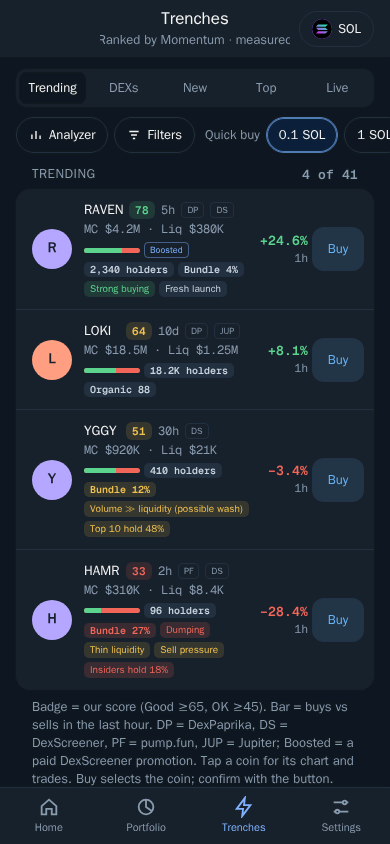
Each coin shows a Score (Good is 65 or more, OK is 45 or more), a buy and sell Bar for the last hour, the price Change and Tags such as Fresh launch, Organic, Bundle share, Dumping or Thin liquidity. Tap Analyzer to see why a coin got its score.
Every metric is explained in the Pump.fun Trenches scanner guide.
Note: Scores and tags are automatic signals, not advice.
Option 3: Social Sniper for Windows
Social Sniper watches the places where new tokens are shared and buys as soon as a token address appears. You do not need to be at your phone.
It watches:
- WhatsApp groups and chats
- X accounts
- Telegram groups and channels
- Discord servers and channels
- Download Social Sniper for Windows and install it.
- Sign in and choose what to watch.
- Set your amount, slippage and filters.
- Leave it running. When a token address is posted, it buys straight away.
To snipe calls from X accounts, read the Twitter/X Solana sniper bot guide.
Sniper Bot Settings That Matter
Set these before you snipe. See Slippage and priority fees.
- Slippage: higher slippage helps buys land on fast launches, lower protects you from bad fills. If the price moves further than allowed, the trade is cancelled.
- Priority fee: Turbo is the fastest for buys, at a higher fee.
- Max market cap and Min liquidity: skip coins that have already run, or that are too thin to exit.
- Price impact: trades above your limit ask you to confirm first. The default is 20%.
- Buy owned tokens: turn it off if you do not want to add to a coin that gets called twice.
Tip: Sniped coins get thin liquidity and fast moves. Set your sell priority fee and sell slippage too, and turn on Sell protection so you can still sell with no SOL left for fees.
Auto Sell: The Exit for Every Snipe
A snipe without an exit is a gamble. Set Auto sell once in Settings → Auto sell, for example sell 50% at +100% and 100% at -30%, and turn it on. Every new buy, from Auto buy, Trenches, Social Sniper or anywhere else, gets those orders automatically. You can also set targets by market cap, for example sell 50% at $1M.
Orders run on Thor's servers, even when Telegram is closed. See how to sell on Pump.fun for every exit type.
Risks of Pump.fun Sniping
Sniping means buying before there is much information. Be clear about the risks:
- Most launches fail. Many coins never graduate and lose most of their value.
- Scams and bundles. Some launches have a high bundle share or insiders holding a lot, and they dump on early buyers. Watch for these tags in Trenches.
- Fast moves. Stops can fill below your trigger price in very fast drops, and an instant rug can remove liquidity before any sell lands.
- Bad calls. Social Sniper and Auto buy buy whatever is posted or forwarded. A compromised or low-quality source means bad buys.
Protect yourself:
- Keep each snipe small and only trade what you can afford to lose.
- Use Max market cap and Min liquidity limits and Trenches filters.
- Always run Auto sell with a stop loss.
- Check liquidity, holders and socials when you can. See Trading safely.
For full strategies that combine sniping with copy trading and limit buys, read Pump.fun bot strategy: 3 ways to trade memecoins.
What a Pump.fun Sniper Bot Costs
Sniping means many small trades, and each buy and sell pays a bot fee. Thor charges a flat 0.5% per spot trade, half the 1% that many Telegram trading bots charge. The subscription, $100 for 30 days, cuts Thor's spot fee to 0% on Solana and every EVM chain and pays for itself at $20,000 of spot volume in a month. Network, priority and third-party fees still apply. See Fees and the zero fee trading bot guide.
Start Sniping Pump.fun Launches
Open Thor on Telegram, turn on Auto buy and Auto sell, and open the Trenches New list. New to Pump.fun? Start with how to buy on Pump.fun, or see all Thor apps.
Frequently asked questions
What is a Pump.fun sniper bot?
A Pump.fun sniper bot buys a new pump.fun token as soon as you or a source you follow spots it, usually early on the bonding curve. Thor does this with Auto buy in the Telegram bot, quick buys in the Trenches New list and the Social Sniper app for Windows.
How do I snipe Pump.fun launches on Telegram?
Turn on Auto buy in Thor under Settings then Auto buy and set your default amount and slippage. Then send or forward a token address or pump.fun link to the bot chat and Thor buys straight away.
Can a sniper bot buy a token the moment it is posted?
Yes. Social Sniper is a Windows app that watches WhatsApp, X accounts, Telegram groups and channels and Discord servers, and buys as soon as a token address appears in the sources you choose.
Is sniping Pump.fun tokens profitable?
It can be, but most new pump.fun coins fail and many are scams. Snipers buy before there is much data, so losses are common. Keep each snipe small, use filters and set a stop loss with Auto sell on every buy.
How much does a Pump.fun sniper bot cost?
Thor charges 0.5% per spot trade, or 0% on spot trades with the $100 subscription for 30 days. Network, priority and third-party fees come on top. Sniping means many trades, so the subscription often pays off for active snipers.
Step-by-step in the Docs
- Auto buy: Buy the moment you paste an address in the chat.
- Trenches: Find new and trending coins early.
- Social Sniper: Buy the moment a token is posted.
- Filters and Analyzer: Narrow Trenches down to the coins you want.