A Polymarket limit order lets you choose the most you will pay per share instead of taking whatever price the market offers right now. In Thor you open an outcome, pick Yes or No, switch to Limit, set your price and how long the order stays open, then tap Place limit; the order waits until a seller meets your price.
This guide covers the full order lifecycle from Telegram: market vs limit, setting a sensible price, cancelling open orders, claiming winnings and withdrawing your cash. For setup and the basics, read the Polymarket Telegram bot guide first. If share prices still feel unfamiliar, read Polymarket odds explained.
Polymarket Market vs Limit Order
Both order types buy the same shares. The difference is what you control: speed or price.
| Market order | Limit order | |
|---|---|---|
| When it fills | Right away | When a seller meets your price |
| Price you pay | The prices on offer now | Your limit price or better |
| Price protection | A max price shown on the ticket | Your limit price |
| Can it fill partly? | It fills against what is on offer | Yes, it can fill bit by bit |
| Risk | Paying more than you wanted | Missing the trade entirely |
Use a market order when news is moving the price and getting in now matters more than a cent or two. Use a limit order when you have a price in mind, the market is quiet, or the spread is wide. On thin markets, a market order can pay noticeably more than the headline price, which is exactly what a limit order prevents.
How to Place a Polymarket Limit Order
Placing one takes a few taps on the same ticket you use for market orders (see Place a prediction).
- Open an event and tap the outcome you want.
- Pick Yes or No.
- Switch from Market to Limit.
- Set your limit price with the minus and plus buttons or by typing it. The current bid and ask are shown next to it.
- Choose how long the order stays open: Until cancelled, 1 day or 1 week.
- Tap an amount, for example $50, or enter your own.
- Check the probability, limit price, shares and payout if right.
- Tap Place limit.
 Thor Trading Bot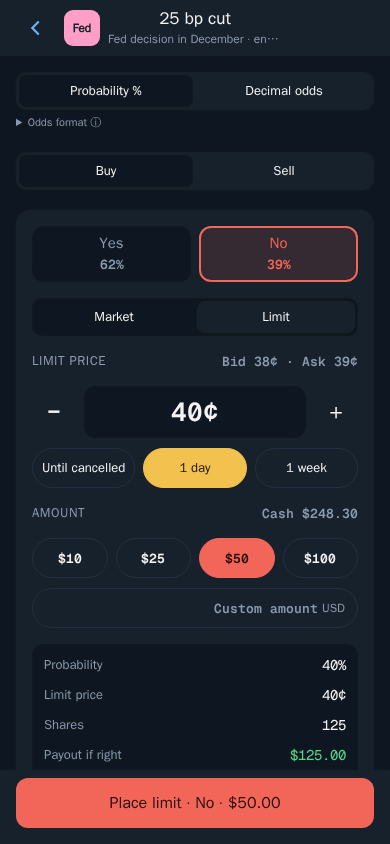
Choosing your limit price
The bid is the best price someone is currently willing to pay; the ask is the best price someone is currently willing to sell at. Where you set your limit relative to those two numbers decides how the order behaves:
- At or above the ask: there is already a seller at your price, so the order can fill straight away, much like a market order but with a hard price cap.
- Between the bid and the ask: you become the best buyer. You may get filled when someone decides to sell.
- Below the bid: you are waiting for the price to drop to you. It may never happen.
Every cent matters because of how payouts work. Each winning share pays $1, so buying at 35¢ instead of 40¢ gives you more shares for the same stake and a bigger payout if you are right. In the ticket above, $50 at 40¢ buys 125 shares that pay $125 if right.
Choosing how long the order stays open
- Until cancelled keeps the order working until it fills or you cancel it.
- 1 day suits a price you only want during today's news cycle.
- 1 week gives a slower market time to come to you.
Tip: An order left open until cancelled can fill long after you have forgotten it, even if the situation has changed. Review your open orders whenever big news hits a market you are in.
How to Cancel a Polymarket Order
Open limit orders live in My predictions (see Your predictions and winnings).
- Open My predictions from the Predictions screen.
- Tap the Orders tab.
- Check the order: side, shares, limit price, expiry and how much has filled so far.
- Tap Cancel.
Thor Trading Bot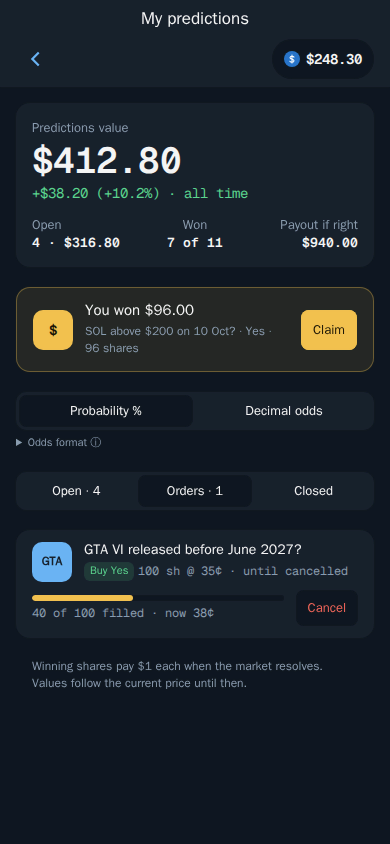
Limit orders can fill partly. In the example, 40 of 100 shares have filled at 35¢ while the market now trades at 38¢. Cancelling stops the part that has not filled; the shares you already bought stay in your positions under Open, where you can hold or sell them like any other position.
How to Claim Polymarket Winnings
When a market resolves, every winning share is worth $1. Polymarket decides how each market resolves, and Thor does not control or guarantee any outcome or payout.
- Open My predictions.
- Look for the win at the top, for example You won $96.00 with the market and the number of shares.
- Tap Claim.
Claimed winnings go to your predictions cash. You do not have to wait for resolution to take profit, though: you can sell a position at any time before the market resolves if the price has moved your way.
Note: Prediction markets are blocked in some countries. In others you can only close positions, withdraw and claim, so you can still collect winnings even where new predictions are restricted.
How to Withdraw From Polymarket
Your predictions cash is held as pUSD, a dollar-backed balance, in a deposit wallet on Polygon that belongs to your Thor account. Withdrawing moves it back to your Thor wallet (see Withdraw cash).
- Open Predictions, then Cash.
- Choose Withdraw.
- Under Send to, pick which of your wallets receives it.
- Enter the amount or tap 25%, 50%, 75% or 100%.
- Confirm.
Thor Trading Bot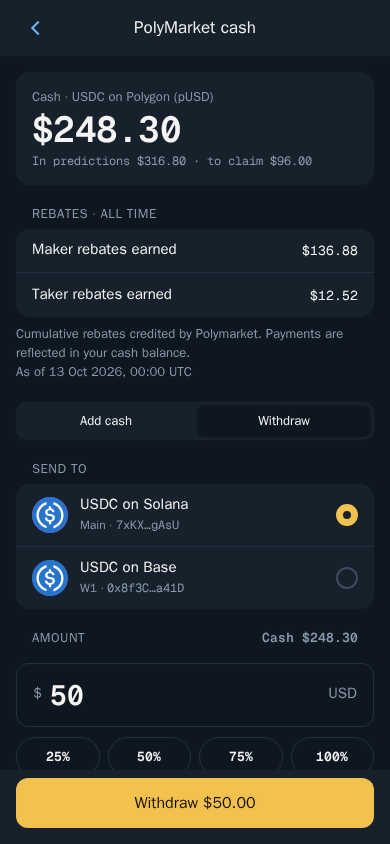
The Cash screen separates money you can withdraw from money that is still in predictions (open positions) or waiting to claim. To withdraw those too, sell the position or claim the win first so it becomes cash.
Polymarket Limit Order Fees
| Fee | Amount |
|---|---|
| Thor fee on predictions | $0 today |
| Polymarket fee | Polymarket's own fee applies |
| Moving funds into Predictions | No Thor bridge fee |
Thor charges no fee on predictions today, whether you use market or limit orders. Polymarket's own fee applies and is shown on the ticket before you confirm. Prediction trades do not earn cashback or referral rewards, and the Thor subscription does not cover predictions or Polymarket fees.
If you also trade spot, the subscription is where Thor's fees go to zero: $100 for 30 days cuts the flat 0.5% fee on spot trades and bridging to 0% on Solana and every EVM chain, breaking even at $20,000 of spot volume in 30 days. That 0.5% is already half the 1% many Telegram trading bots charge. See Fees and Subscription.
Warning: A limit order does not make a prediction safer. It only controls your entry price. Shares in a losing outcome still pay $0, and you can lose your full stake. Only use money you can afford to lose.
Start Using Limit Orders on Polymarket
Open Thor on Telegram, go to Home, then Predictions, open an event and switch the ticket to Limit. If you trade memecoins too, the same idea of setting your price in advance works on spot with Solana limit orders, and you can trade price moves with leverage through Hyperliquid perps.
Frequently asked questions
How do I place a limit order on Polymarket?
In Thor, open an event, pick Yes or No, switch from Market to Limit, set your price and how long the order should stay open, choose an amount and tap Place limit. The order waits until someone sells to you at that price.
What is the difference between a market and limit order on Polymarket?
A market order buys right away at the prices on offer now, up to a maximum price shown on the ticket. A limit order only buys at your price or better, so it may fill later, partly or not at all.
How do I cancel a Polymarket order?
Open My predictions, go to the Orders tab and tap Cancel on the order. Only the part that has not filled yet is cancelled.
How do I claim Polymarket winnings?
When a market resolves in your favour, open My predictions and tap Claim on the win. Polymarket decides how markets resolve, and you can still claim in countries where new predictions are restricted.
How do I withdraw from Polymarket in Thor?
Open Predictions, then Cash, choose Withdraw, pick where to send it, enter the amount and confirm. The money goes back to your Thor wallet.
Step-by-step in the Docs
- Place a prediction: Buy Yes or No at the market or your own price.
- Your predictions and winnings: Sell early or claim when a market resolves.
- Withdraw cash: Move your predictions cash back to your wallet.
- Add cash: Fund your predictions balance.