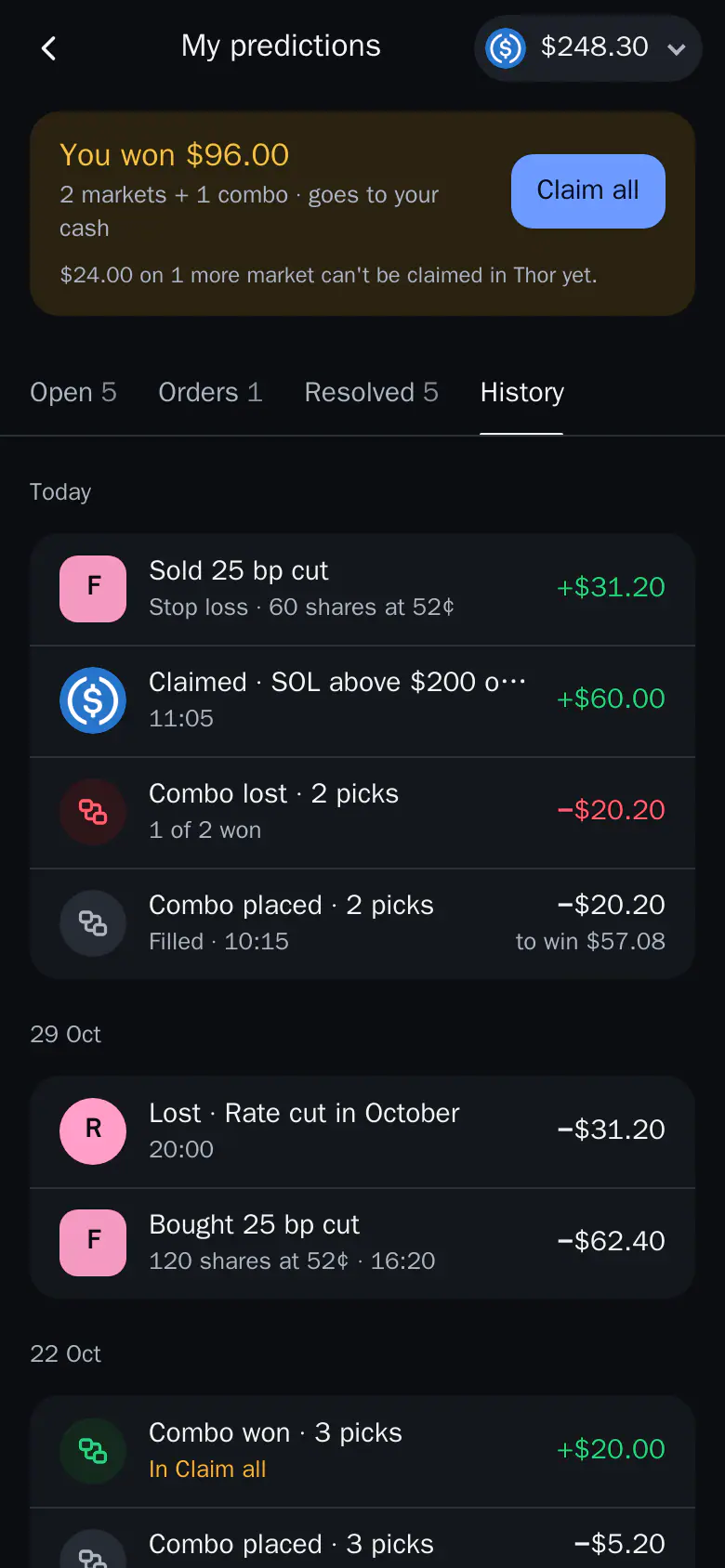
Your predictions and winnings
Track open predictions and orders, cash out early, claim winnings and see rebates.
Where do you see your Polymarket bets in Thor? In My predictions, opened from the Predict tab.
What you see
- Your predictions value and all-time P&L, your open count, wins and Rebates.
- One Claim all for markets and combos.
- Four tabs: Open, Orders, Resolved and History.
The tabs
- Open: your positions. Tap one to sell it or buy more. Running combos are cards with Sell and Details.
- Orders: waiting limit orders and take profit or stop loss orders. Each has its own Cancel (a tap, with Undo). Hold to cancel all of them at once. A toast says how many were cancelled and the cash returned.
- Resolved: markets that have ended.
- History: everything you did in Predict, by day: buys, sells (including ones your take profit or stop loss made), claims, losses, cash moves and combos. The same rows show in Home under Activity.
Claim winnings
Tap Claim all for every won market and combo. One toast tracks the claim and rows show Claiming.... A claim that confirms late stays Claim sent, confirming... and is never offered twice. The money goes to your Predict cash.
Rebates
Tap the Rebates row to see what Polymarket has paid back into your cash, split into maker and taker rebates.
Winnings and positions also show in Home, under Positions.
Note: Winning shares pay $1 each when the market resolves. Until then, values follow the current price.