Trenches is Thor's live scanner for coins. It lists Pump.fun launches and other fresh coins, flags the risks on every row, and lets you filter the list down to the coins you want. This guide explains how to read every flag and number in Trenches, how to filter out manipulated launches, and how to protect yourself once you buy.
 Thor Trading Bot

- Open Filters. The chip shows how many filters are on.
- Pick a preset. Presets are ready-made setups. Compare shows how each one did.
- Apply. The list updates and shows how many coins match.
What Is the Trenches Scanner?
Trenches is a live feed of coins inside Thor. It is built for the moment that matters most in memecoin trading: the first minutes and hours of a coin's life, when the best entries happen and most of the scams do too.
You can open it in two ways:
- The Trenches tab in the Thor Mini App
- The
/trenchescommand in the chat with @ThorSolana_bot
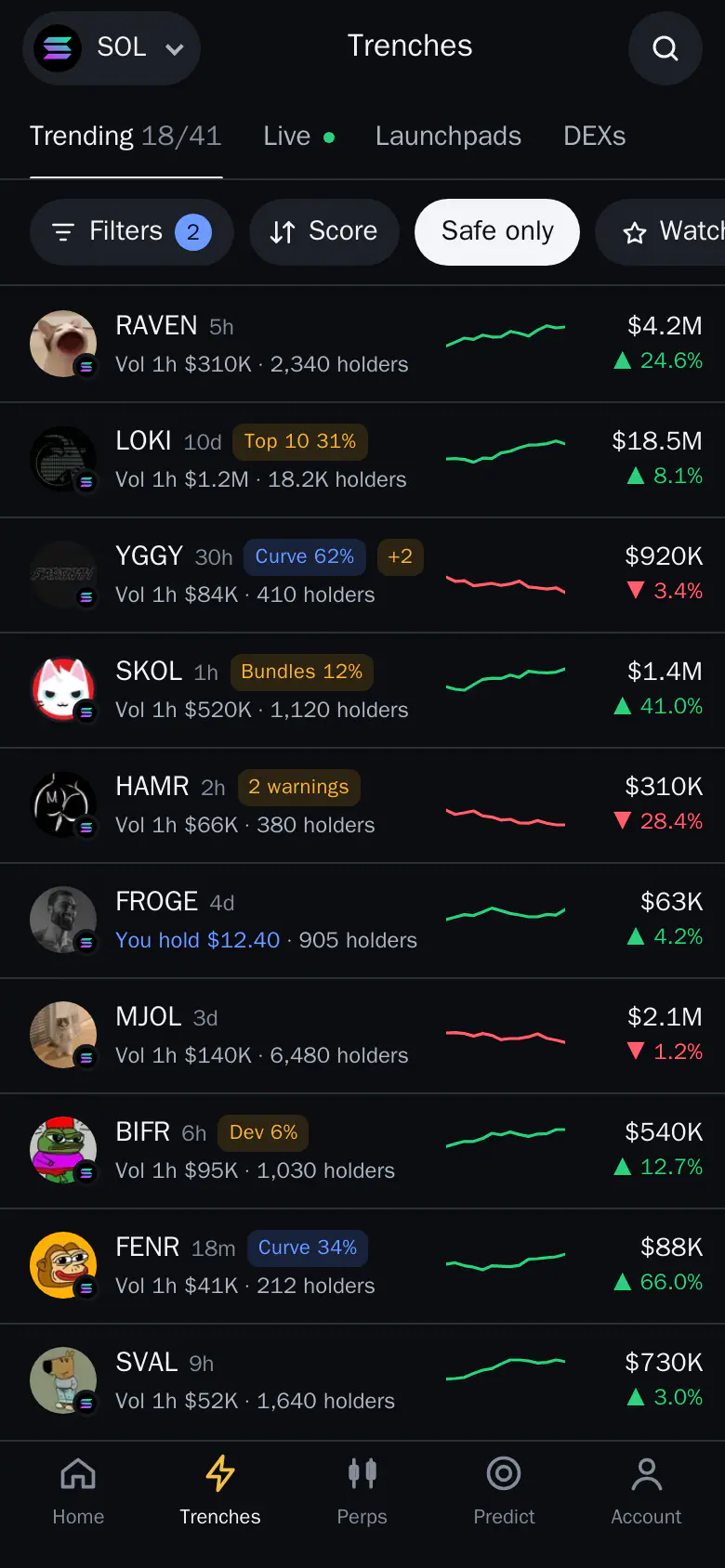
Each row shows the coin, its age, a risk flag such as Curve %, Bundles or Top 10, holders, 1 hour volume, market cap, the 1 hour change and a small chart. Lists never buy: tap a coin to open its coin sheet and buy from there.
How to Use Trenches
- Open the Trenches tab and pick the chain at the top.
- Choose a list: Trending, Live (new pump.fun launches), Launchpads (New, Graduating, Graduated) or DEXs (one source's own top list). Lists refresh every 20 seconds.
- Use the chip row: Filters, the sort, Safe only and Watching.
- Tap a coin to open its coin sheet with the chart, the Safety row, key numbers and the buy panel.
For new launchpad coins, the row shows Curve %: how close the coin is to graduating from its bonding curve.
Thor Trading Bot12345- Live. New pump.fun launches arrive at the top as they happen.
- Filters 2. Opens the Filters sheet. The number is how many filters are on.
- Score. The sort. Change it to Volume, 1h change, Newest and more.
- Safe only. A Show only chip that narrows the list. Tap it again to turn it off.
- Watching. Shows only the coins you have starred.
Score: The Quality Rating
Every coin in Trenches gets an automatic quality score. It is the fastest way to separate coins worth a closer look from the noise. Sort by Score to see the best first.
| Score | Rating |
|---|---|
| 65 or more | Good |
| 45 or more | OK |
| Below 45 | Low, treat with extra care |
The score runs from 0 to 100 and combines momentum, buy pressure, liquidity, activity, freshness, holders and safety.
Tip: A high score does not mean a coin will go up. It means the trading looks healthier than most. Use it to narrow your list, then check the chart and the flags yourself.
What Organic Buying Looks Like
Whatever the score says, it helps to know what healthy trading looks like on a fresh coin:
- Varied buy sizes. Real people buy different amounts, from tiny buys to large ones. If nearly every buy is the same size, for example exactly 0.1 SOL, it is probably bots.
- Some repeat buyers. A share of buyers coming back for more shows conviction. If a small set of wallets does most of the buying, it can be wash trading.
- Steady progress. Coins that climb at a steady pace tend to be more organic than coins that fill their bonding curve suspiciously fast.
- No early dumping. The creator and the first buyers are not selling large amounts into new buyers.
Change, Volume and Chart: Short-Term Momentum
Three things on every row show what is happening right now:
- 1 hour change is the price move in the last hour.
- Vol 1h is how much traded in that hour.
- The chart is the last hour of price, green when up and red when down.
Read them together. A strong gain with healthy volume and many holders is real momentum. A big gain on thin volume, or a coin that is far above where it was an hour ago with a risk flag next to it, often means early holders are taking profit into the pump.
Risk Flags
Flags are automatic signals that Trenches adds to coins. They are the quickest way to spot manipulation before you buy.
| Flag | What it means |
|---|---|
| Curve % | How full the bonding curve is. At 100% the coin graduates |
| Bundles | A large share of the supply was bought in bundled buys, a sign of coordinated or insider buying |
| Dev | The creator holds a large share of the supply |
| Top 10 | The 10 biggest wallets hold a large share |
| Insiders | Insiders hold a lot of the supply |
| Mint or freeze authority on | The creator can still print coins or freeze holders |
| Thin liquidity | There is little money in the pool, so prices swing hard and exits are difficult |
| Boosted | The coin paid for promotion |
A boost is an ad, not a signal. Judge boosted coins on their flags like any other. You can also see market flags such as Dumping, Sell pressure and Little organic trading where they apply.
Open the Safety Row Before You Buy
Tap Safety on the coin sheet to see every check, worst first, each with what it means and where the number comes from.
- Open a coin from the list.
- Tap the Safety row under the chart.
- Read the red and amber rows first.
Thor Trading Bot 1234
- Bundles. Bundled buys. Over 5% is a warning, over 15% is serious.
- Top 10 wallets hold. Over 25% is a warning, over 40% serious.
- Dev holds. Over 3% is a warning, over 8% serious. It also says whether the dev has sold.
- Liquidity. Under 10% of market cap is a warning. Thin pools are hard to exit.
Why Bundles Matter
A bundle is several buys that land together. Real buyers acting independently rarely do this over and over. When they do, it usually means one operator bought through many wallets at once to grab supply early and make the coin look popular. That supply can be dumped on later buyers at any moment.
Other Red Flags to Check Yourself
Not every risk shows up as a flag. Before you buy, open the coin and check:
- Dev selling. If the creator wallet has been selling, the developer is taking profit. That is not always a rug, but large dev sells often come before dumps.
- Dev sniping. If the creator bought their own coin in the very first moments, they hold an insider position at the cheapest price.
- Whale exits. Large holders selling in a short window can start a cascade as other holders rush for the exit.
- Holders. If a few wallets hold most of the supply, they can dump it. The Holders tab shows how it is spread.
- Socials. Check that the website and X account are real and active.
Bonding Curve Progress
Pump.fun coins launch on a bonding curve, where each buy raises the price and each sell lowers it. Curve % shows how full the curve is. At 100%, the coin graduates: its liquidity moves into a normal pool, such as PumpSwap, and it trades like any other token.
Most coins die early on the curve. Coins close to the end are close to graduating, and reaching graduation means a coin passed its first survival test. It does not mean the coin is safe, since many graduated coins sell off as early buyers take profit. In Launchpads, Graduating lists curves 80% full or more, closest first. Our Pump.fun bot strategy guide covers how to trade both sides of graduation.
Filters
Filters let you narrow the list to coins that match your risk tolerance. One filter sheet works on every list.
- Open Trenches and tap Filters.
- Pick a preset, or set the pieces yourself: Show only, a sort and value ranges.
- Set ranges for liquidity, top 10 holders, pool age and more. More filters adds the rest, such as market cap, holders, bundles, insiders and dev holdings.
- Tap Show (number) coins. The list updates straight away.
Thor Trading Bot12345- Compare. Shows how each preset's coins did after they were shown.
- Safe only. A Show only chip that narrows the list. Tap it again to turn it off.
- Best measured. The default sort. Ranks coins by the setup with the best recorded results.
- Show 18 coins. Applies the filters and tells you how many coins match.
- Save as preset. Saves your filters under a name for this chain or every chain.
Prefer a ready-made setup? Apply one in a tap:
| Setup | What it looks for |
|---|---|
| Fresh launches | Under a day old, real liquidity, more buys than sells |
| Momentum | Up 10%+ this hour on buy pressure |
| Steady volume | Older than 3 days, big daily volume, calm hour |
| Blue chips | MC over $50M, $1M+ liquidity, a month old |
| Dip buys | Down 5-25% this hour while buyers step in |
| Clean holders | Unbundled, few insiders, spread-out holders |
Reset clears your filters at any time. A few useful setups:
- Avoid thin pools: set a minimum liquidity so you can actually exit.
- Only early coins: set a maximum pool age and a maximum market cap.
- Skip clusters: set a maximum top 10 share so a few wallets cannot dump on you.
Compare: How Each Setup Actually Did
Thor Trading Bot
Read Compare
- Open Trenches, tap Filters, then Compare.
- Each preset shows how many coins it matches now, how often its coins hit +10% (hit ≥10%) and its median 1 hour change (med 1h).
- Tap a preset to see its detail, then Use to apply its filters to the list.
Most scanners only show you coins. Compare shows what happened to the coins each setup surfaced after they were shown. Until enough samples exist it says Not enough data yet. Best measured, the default sort, ranks coins by the setup with the best recorded 1h results.
Protect Yourself After You Buy
The scanner helps you choose better coins, but no check catches every scam. Set up your exits before you need them:
- Auto sell. Turn on Account → Orders and automation → Auto sell so every new buy gets take profit and stop loss orders automatically, for example sell 50% at +100% and sell 100% at -30%. See Auto sell and our guide to Pump.fun autosell, take profit and stop loss.
- Trailing stop. From a coin's sheet, tap + Trailing to set a stop that follows the price up and sells on a pullback.
- Price impact guard. Above your limit, 20% by default, Thor shows High price impact and offers a smaller buy. On Solana a buy over the limit is blocked, which saves you from overpaying on thin coins.
- Start small. Use a small amount on fresh launches and only trade what you can afford to lose.
Your orders keep running when Telegram is closed, and you can see them all in Home → Orders.
Note: Scores and flags are automatic signals, not advice. Always check the coin yourself before you buy.
Scan the Trenches Before You Buy
Trenches gives you a quality score, risk flags, ready-made presets and a Compare view with measured results, so you can skip the bots, avoid the cabals and find organic plays early. Thor charges a flat 0.5% per spot trade, or 0% bot fees on spot with the $100 for 30 days subscription. See Fees.
Open Thor on Telegram and type /trenches to start scanning.
Frequently asked questions
What is the Trenches score and what is a good value?
Every coin in Trenches gets an automatic quality score from 0 to 100. A score of 65 or more is rated Good and 45 or more is rated OK. It combines momentum, buy pressure, liquidity, activity, freshness, holders and safety. Sort the list by Score to see the best first.
What do the 1 hour change and the chart tell me?
Each row shows the price move in the last hour, the volume and a small 1 hour chart. Read them with the risk flag: a big gain with heavy selling often means early holders are taking profit into the pump.
How does the Bundles flag help detect manipulation?
Bundled buys are several buys that land together, usually from one operator spreading supply across many wallets. On the coin's Safety row, bundles over 5% are a warning and over 15% are serious, because a few people may control much of the supply and can dump it.
What happens when a Pump.fun coin finishes its bonding curve?
The coin graduates. Its liquidity moves from the bonding curve into a normal pool, such as PumpSwap, where it keeps trading. Most coins never get there, so graduating means a coin passed its first survival test, though it can still fail afterwards.
How do I open the Trenches scanner?
Open the Trenches tab in the Thor Mini App, or type /trenches in the chat with the Thor bot on Telegram. Pick a list, tap a coin to open its coin sheet and buy from there.
Step-by-step in the Docs
- Trenches: Live coins on your chain, scored 0 to 100 with risk flags. Tap a coin to open it and buy from its coin sheet.
- Filters and Analyzer: Narrow Trenches with one Filters sheet and ready-made presets, and compare how each preset's coins did.
- Trading safely: Your first trade, safely: read the Safety row, check tax and price impact, start small and set a stop.
- Auto sell: Add take profit, stop loss and trailing stop to every new buy, wherever you buy.