To buy memecoins on Telegram, open Thor, add funds with Deposit or Add to USD Cash, find the coin with Search or Trenches, check the Safety row and the price impact, then tap Buy. Set up Auto sell first so the coin gets a take profit and a stop loss as soon as you buy.
This guide is for first-time buyers. It starts with what you are buying and the risks, then walks through each step.
What Is a Memecoin and What Are the Risks?
A memecoin is a crypto token built around a joke, a character or a trend. It has no business behind it, so its price depends on attention and little else.
The risks are real. Most memecoins lose most of their value, many go to zero within days, and some are built to trap buyers so they cannot sell. Prices can move 50% in minutes. Thor shows checks and warnings, but no check catches every scam. Only spend what you can afford to lose, and start with small amounts.
How Do I Buy Memecoins on Telegram With Thor?
 Thor Trading Bot
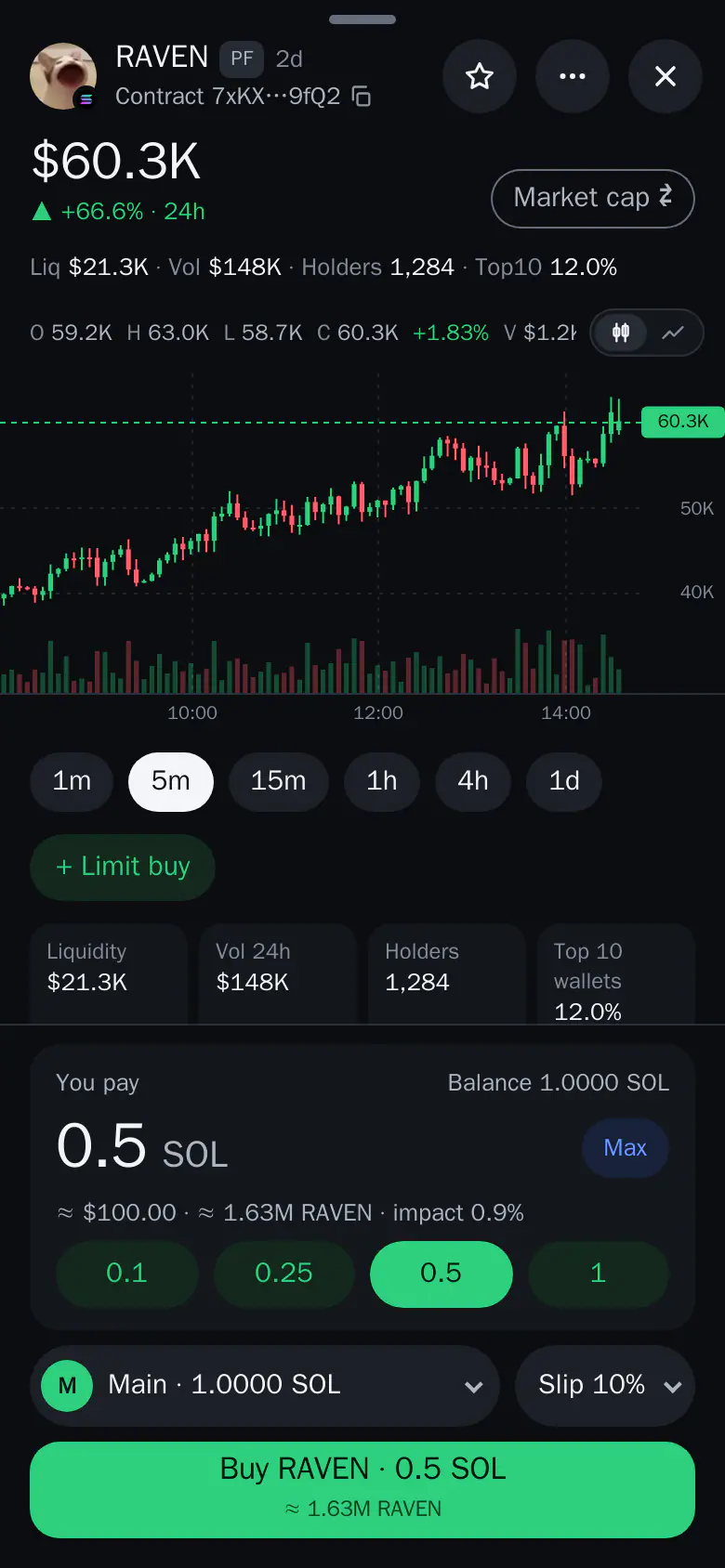
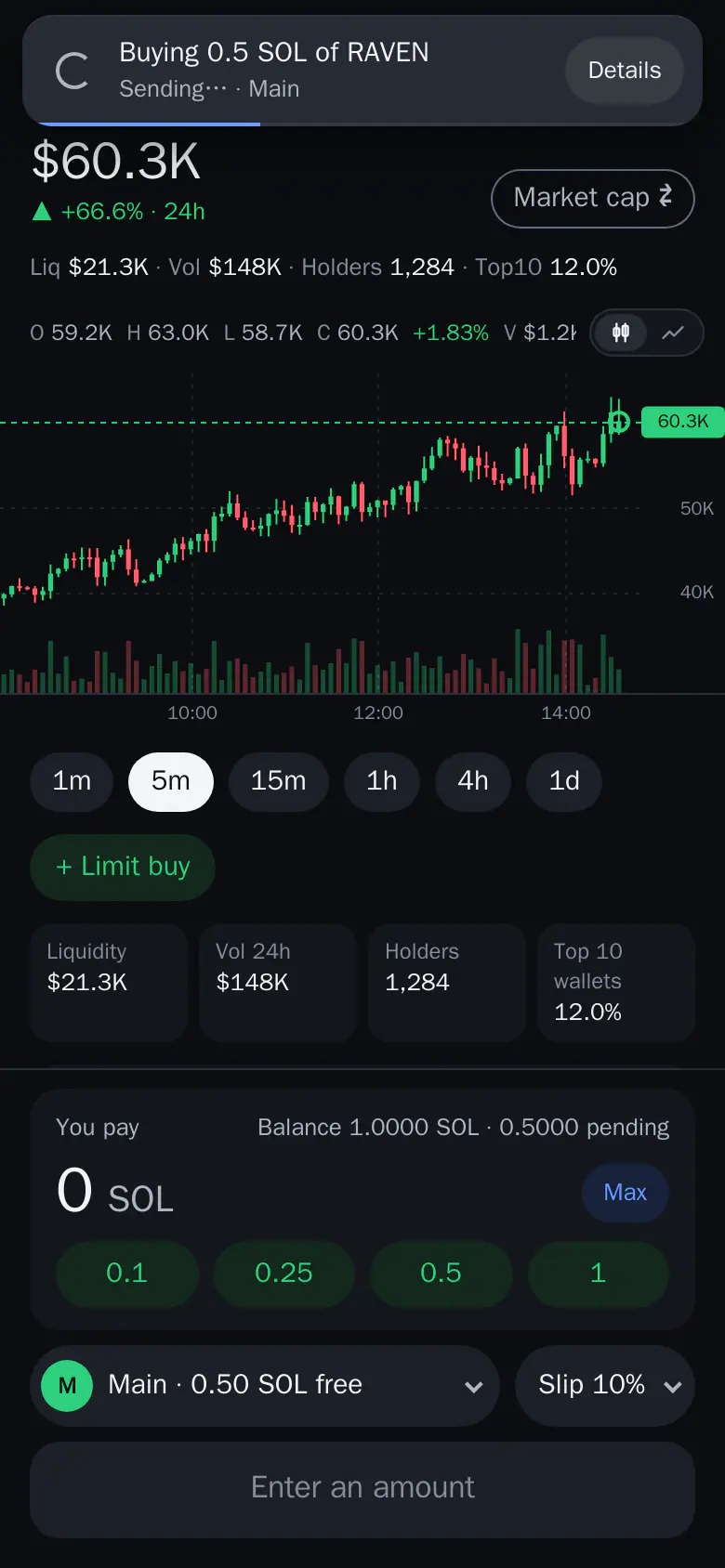
- Tap Buy. The order goes out and a toast follows it.
- See the result. Details shows what you paid and what you got.
1. Open Thor and create your wallets
Open Thor on Telegram and tap Open Thor. Accept the Terms, then set a PIN (4 to 10 digits) or skip it and set it later in Account. Your Solana wallet and your EVM wallet are ready in seconds, with Main as your default wallet.
Thor is non-custodial: wallets are created and secured by Privy, a third-party wallet infrastructure provider, and your funds stay in your own wallets. See Create your account.
2. Add funds
Pick one route:
- Easiest: on Home, tap Add on the USD Cash card. Convert coins from your other wallets, or deposit from outside on 6 networks. It lands as USD Cash, which buys any coin on any supported chain and needs no SOL or ETH for network costs. The minimum is $1, or $5 from Ethereum.
- Classic: on Home, tap Deposit, pick the wallet and the coin with its network, and send to the address shown. A toast tells you when it arrives.
Send only on the network the sheet names. See Fund your wallet.
3. Find the coin
There are two ways.
- Search. On Home tap Buy, then paste the coin's contract address or a link from pump.fun, DexScreener or Birdeye. Tap Open on the result. Several coins can share a symbol, so check the address.
- Trenches. Open the Trenches tab for live lists: Trending, Live, Launchpads and DEXs. Tap a coin to open its coin sheet. Buying always happens on the coin sheet.
See Find a token and the Trenches scanner guide.
4. Check the Safety row and the price impact
Before you buy, look at the Safety row on the coin sheet. Tap it to see every check, worst first, with what each one means. A serious finding turns the row red. Also read the market numbers: liquidity, holders and the share held by the top 10 wallets. Low liquidity means big price swings and hard exits.
Then look at the line under your amount. It shows the dollar value, the coins you get and the price impact, which is how much your own trade moves the price. If the impact is above your limit (20% by default), Thor warns you and suggests a smaller size. See Price impact and Token security.
5. Buy
- Tap a preset amount or type your own.
- Check what you get and the price impact.
- Check the wallet and the slippage.
- Tap the green Buy button.
A toast follows the order while it lands. Tap it, or open the trade in Activity, to see Details: what you paid, what you got and your entry.
Thor Trading Bot1234- 0.5. A preset amount. Tap one or type your own.
- Max. Fills the most you can spend after network costs.
- Slip 10%. The most the price may move before the trade lands. A higher value helps buys land on fast coins.
- Buy RAVEN. Places the order. A toast shows it sending, then landed.
If a buy fails, Thor says why and offers a fix, such as more slippage or a smaller amount. Only the network cost may be charged. See Buy.
6. Protect it with Auto sell
Memecoins can reverse fast, so decide your exit before you buy. In Account → Orders and automation → Auto sell, add a take profit and a stop loss, for example sell 50% at +100% and everything at -30%. After that every new buy gets those orders automatically, wherever you buy. You can also place a take profit, stop loss or trailing stop on one coin from the order buttons on its coin sheet.
See Auto sell and the guide to Pump.fun take profit and stop loss.
What Does It Cost to Buy a Memecoin on Telegram?
Thor charges 0.5% per spot trade, half the 1% many Telegram trading bots charge, or 0% with the subscription at $100 for 30 days. The fee is shown on every quote. Network costs come on top: they are what the chain charges, not Thor. If you pay from USD Cash, they are paid for you and charged in USDC.
Some coins also take their own tax on each buy or sell. Thor shows it on the quote. See Fees.
How Do I Avoid Memecoin Scams?
- Check the address you paste. Fake coins copy real names.
- Read the Safety row before every buy, not only the first time.
- Be careful with very new coins, thin liquidity and coins where a few wallets hold most of the supply.
- Start small and set a stop loss.
- Never share your PIN with anyone who messages you.
See Trading safely.
Buy Your First Memecoin
Open Thor on Telegram, add a small amount and walk through the steps above. When you are ready for more, read how to buy on Pump.fun or how to buy Base memecoins.
Frequently asked questions
How do I buy memecoins on Telegram?
Open Thor on Telegram, add funds with Deposit or Add to USD Cash, find the coin with Search or Trenches, check the Safety row and the price impact, then tap Buy. Set Auto sell first so every buy gets a take profit and stop loss.
How much money do I need to buy a memecoin?
There is no fixed minimum for the coin itself. You need the amount you want to spend plus a little extra for network costs, unless you pay from USD Cash, which needs no SOL or ETH for network costs. Start small, because most memecoins fail.
Can I lose all my money on a memecoin?
Yes. Memecoins can fall to zero quickly, and some are scams you cannot sell. No check catches every scam. Only spend what you can afford to lose.
What does Thor charge to buy a memecoin?
Thor charges 0.5% per spot trade, or 0% with the $100 for 30 days subscription. Network costs come on top. The fee and the price impact are shown before you tap Buy.
Is my money safe in Thor?
Thor is non-custodial: wallets are created and secured by Privy, a third-party wallet infrastructure provider, and your funds stay in your own wallets. That protects against Thor holding your funds, not against a bad coin.
Step-by-step in the Docs
- Buy: Buy any coin on any chain from the coin sheet, with the amount, price impact and fees shown first.
- Find a token: Paste an address, a pool, a link or a $symbol to open any token on any chain.
- Auto sell: Add take profit, stop loss and trailing stop to every new buy, wherever you buy.