To trade crypto on Telegram, open Thor, fund your wallet from Home, tap Buy, pick a coin, check its Safety row and the price impact, and tap the Buy button. A toast follows the trade until it lands, and the coin appears in Positions on Home.
This guide shows the two ways to use Thor in Telegram, your first trade in five steps, what you can trade and where fees apply.
Should I Use the Bot Chat or the Mini App?
Thor has two faces inside Telegram, and they share the same account, wallets and settings. A change in one also applies in the other.
- The bot chat. Paste a contract address, a symbol or a link and the bot replies with a trade card and one-tap amount buttons. Fills, alerts and copy-trade messages arrive here too.
- The Mini App. A full app inside Telegram with five tabs: Home, Trenches, Perps, Predict and Account. It has the coin sheet with chart, Safety row and order tools, plus Positions, Orders and Activity in one place.
Use the chat when you already have an address to paste. Use the Mini App to browse, manage positions and set up automation. See the Mini App.
How Do I Make My First Trade on Telegram?
 Thor Trading Bot
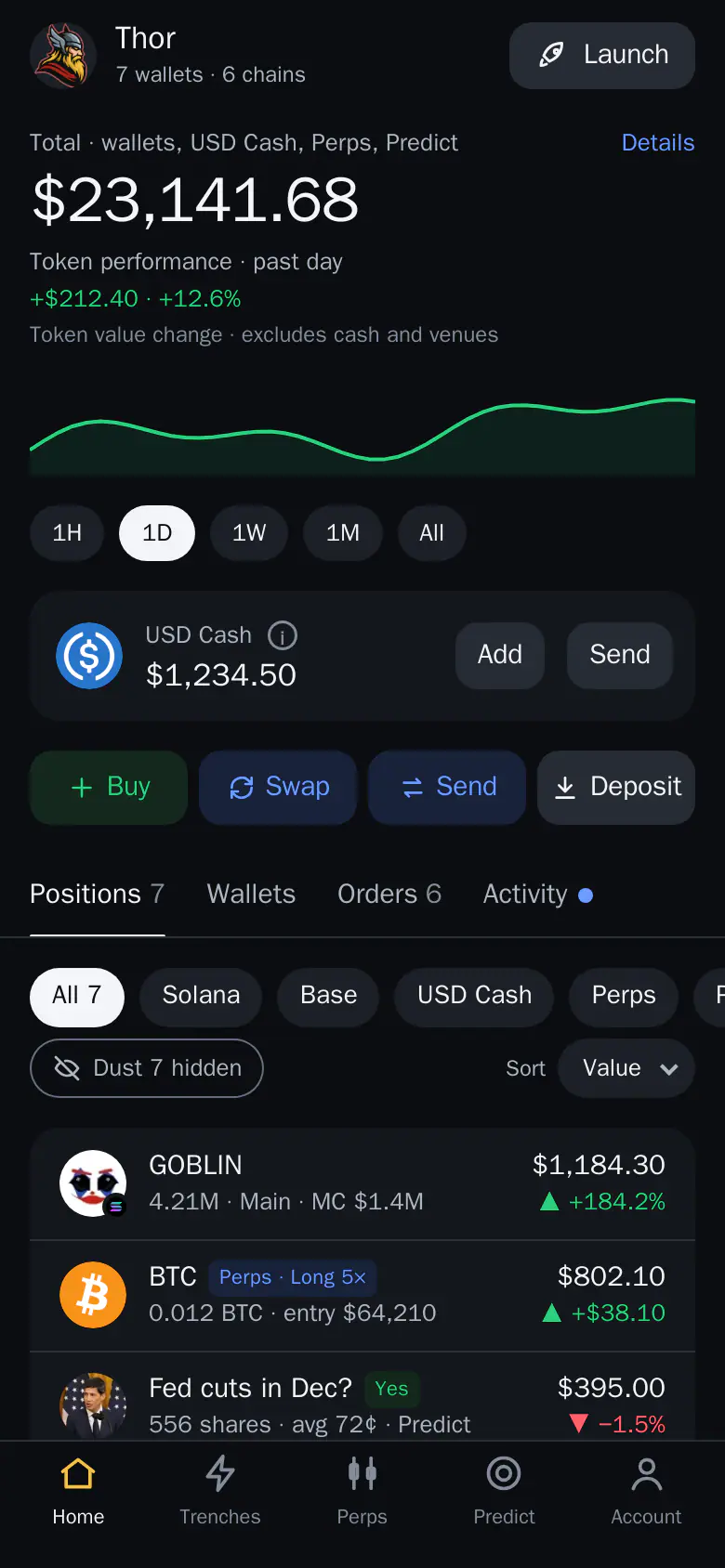
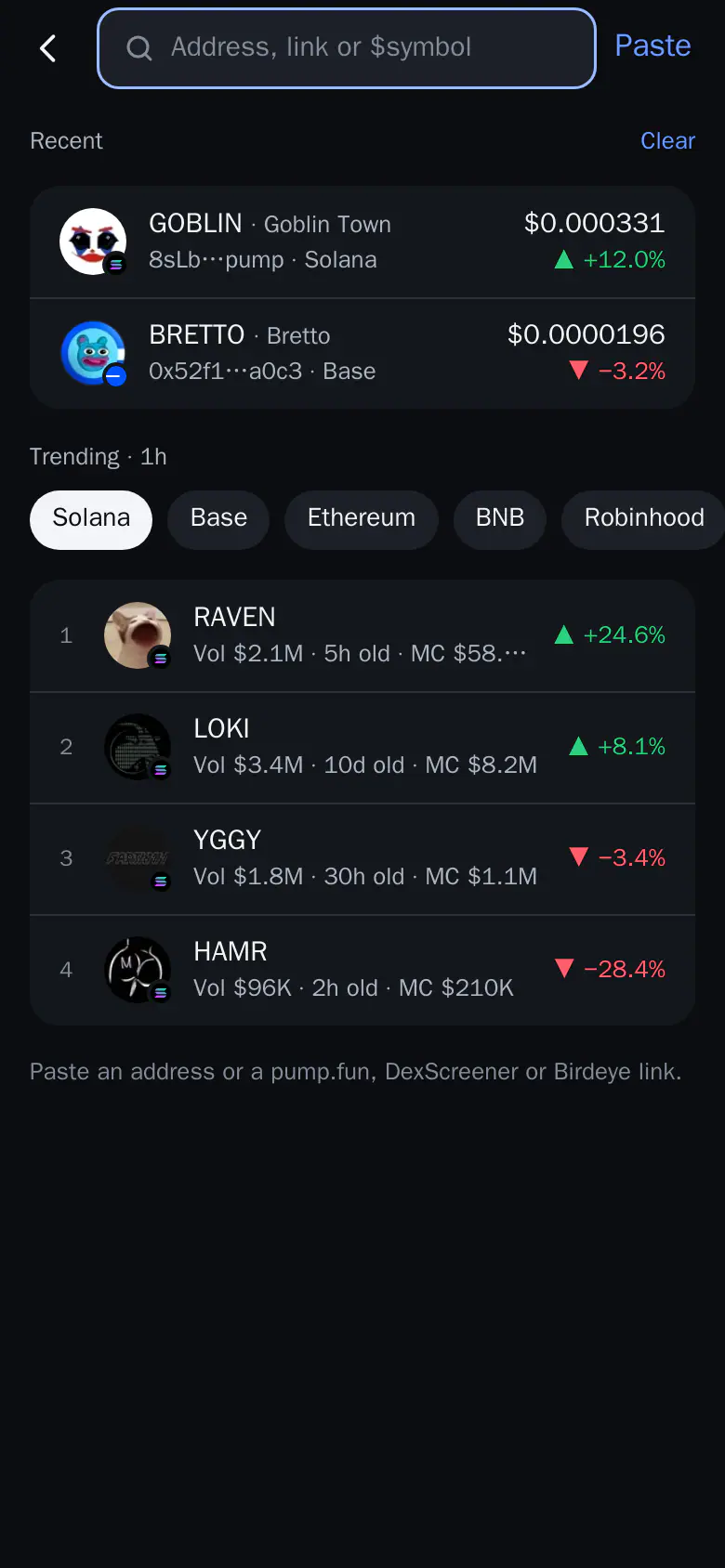
- Tap Buy on Home. Buy opens Search.
- Pick a coin. Paste an address or tap a trending coin.
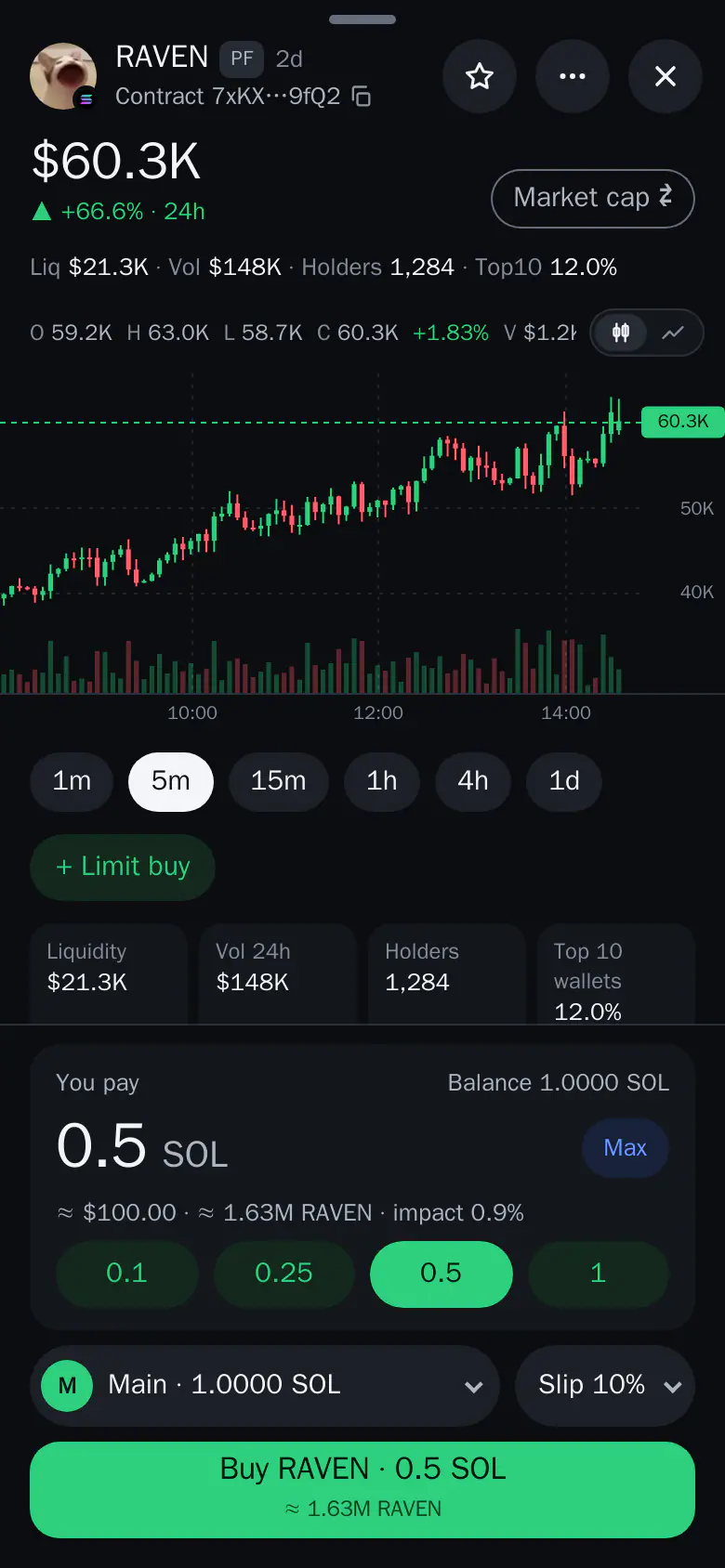
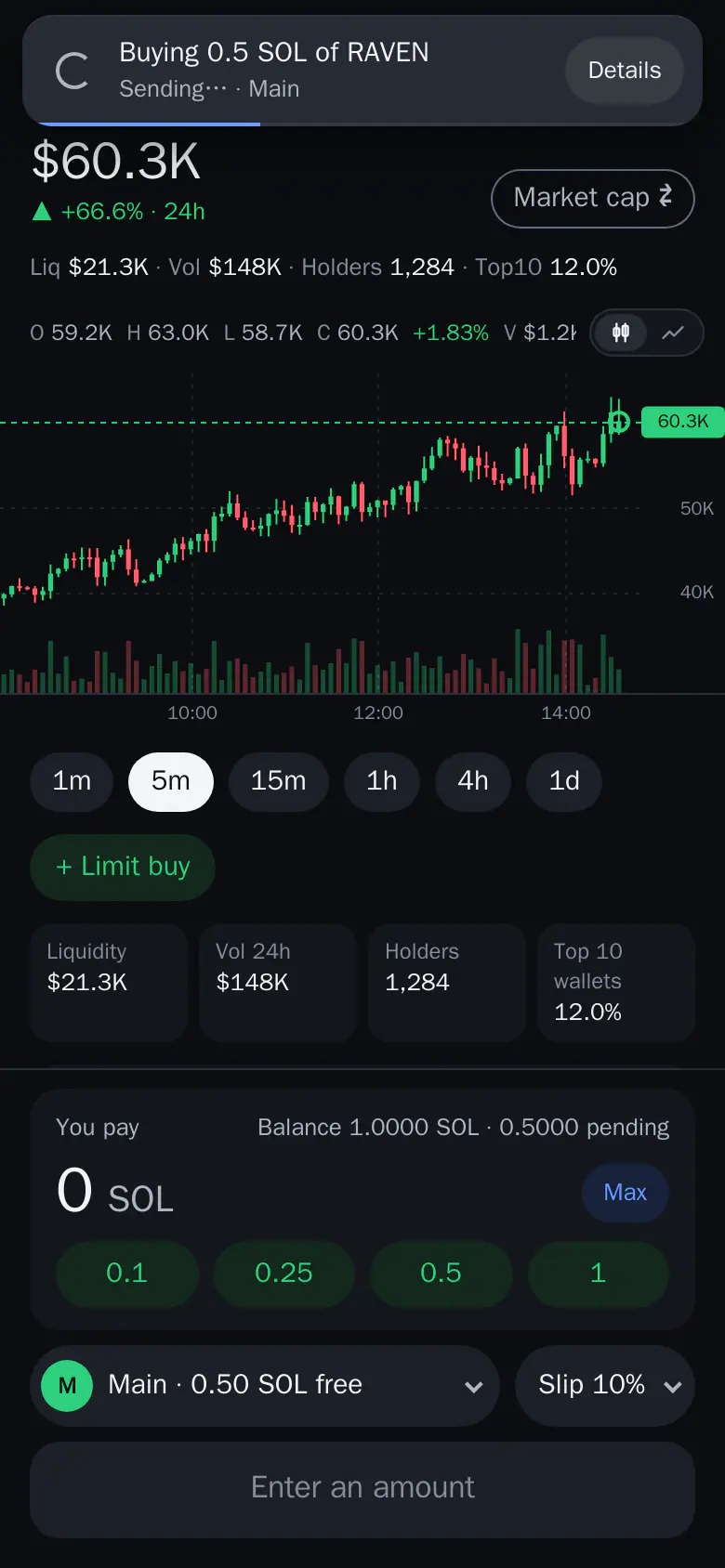
- Tap Buy. The order goes out and a toast follows it.
- Check the result. Details shows what you paid and what you got.
1. Open Thor and create your wallets
Open Thor on Telegram, tap Start and then Open Thor. Accept the Terms and set a PIN (4 to 10 digits), or skip it and set it later in Account. Your Solana wallet and EVM wallet are ready in seconds.
Thor is non-custodial: wallets are created and secured by Privy, a third-party wallet infrastructure provider, and your funds stay in your own wallets. See Create your account.
2. Fund your wallet
- On Home, tap Deposit, pick the wallet and the coin with its network, and send to the address shown.
- Or tap Add on the USD Cash card to convert coins from your wallets, or deposit from outside. USD Cash buys any coin on any supported chain and needs no SOL or ETH for network costs.
A toast tells you when money arrives. See Fund your wallet.
Thor Trading Bot12345- Buy. Opens Search so you can find any coin by address, link or symbol.
- Add. Adds to USD Cash from your own wallets or from outside, minimum $1.
- Deposit. Shows your wallet address and the network to send on.
- Trenches. Live lists of new and trending coins, with scores and risk flags.
- Account. Your rewards, Trading defaults, Orders and automation, and Security.
3. Find a coin
Tap Buy on Home and paste a contract address or a link from pump.fun, DexScreener or Birdeye. With nothing pasted, Search shows your recent coins and what is trending on each chain. Or open Trenches and tap a coin from Trending, Live, Launchpads or DEXs. See Find a token.
4. Check before you buy
The coin sheet shows the chart, liquidity, volume, holders and the Safety row. Tap Safety to read every check. Under your amount, the line shows the coins you get and the price impact, which is how much your own trade moves the price. Read both. See Price impact.
5. Buy, then plan the exit
Tap a preset amount or type your own, check the wallet and slippage, and tap the Buy button. Then protect the position: use + Limit buy or the order buttons on the coin sheet for a take profit and stop loss, or set Auto sell once so every buy gets them. Your position shows under Positions on Home with live profit or loss.
For a longer beginner walkthrough, read how to buy memecoins on Telegram.
What Can I Trade on Telegram?
| What | Where | Notes |
|---|---|---|
| Spot coins | Home, Trenches, Search | Solana, Ethereum, Base, BNB Chain, Robinhood Chain and Arc. One EVM address works on the five EVM chains. |
| Perps | Perps tab | Long or short with leverage on Hyperliquid. Hidden in restricted countries. |
| Prediction markets | Predict tab | Polymarket markets, paid in cash. Hidden in restricted countries. |
Orders and automation come with spot trading: limit buys, take profit, stop loss, trailing stop, Auto buy, Auto sell and copy trading, all under Account → Orders and automation. For swaps between a coin and a dollar coin, use Swap on Home.
For perps, read leverage trading in Telegram. For spot on one chain, see Base or Ethereum.
Where Do Fees Apply When I Trade on Telegram?
| Action | Thor fee |
|---|---|
| Spot buy or sell | 0.5% per trade, 0% with the $100 for 30 days subscription |
| Swap between a coin and a dollar coin (SOL and USDC) | No bot fee |
| Bridge to another chain | 0.1%, none with the subscription |
| Perps | Hyperliquid's fee plus 0.05% per order. TWAP orders carry no Thor fee |
| Predict | Polymarket's fee plus a Thor fee, both shown before you buy. Combos: 1%, taken after the fill |
| Creating a coin with Launch | Free. Normal trade fees apply to its trades |
Network costs, which are what the chain charges, come on top and are shown on the quote. With USD Cash they are paid for you and charged in USDC. See Fees.
What Are the Risks of Trading on Telegram?
Convenience does not lower the risk. Most new coins lose value, some cannot be sold, and leverage multiplies losses. Start small, read the Safety row, set a stop loss and only trade what you can afford to lose. See Trading safely.
Make Your First Trade
Open Thor on Telegram, fund a small amount and follow the five steps. If you want to compare tools first, read what to look for in a Telegram trading bot.
Frequently asked questions
How do I trade crypto on Telegram?
Open Thor on Telegram, tap Open Thor, fund your wallet from Home with Deposit or Add to USD Cash, tap Buy to find a coin, check the Safety row and price impact, then tap the Buy button. A toast follows the trade until it lands.
Should I use the bot chat or the Mini App?
Both share the same account, wallets and settings. The chat is quick for pasting an address and getting a trade card. The Mini App has Home, Trenches, Perps, Predict and Account, the coin sheet and full order tools.
What can I trade on Telegram with Thor?
Spot coins on Solana, Ethereum, Base, BNB Chain, Robinhood Chain and Arc, perps on Hyperliquid, and prediction markets on Polymarket through the Predict tab. Perps and Predict are hidden in restricted countries.
What fees do I pay?
Thor charges 0.5% per spot trade, or 0% with the $100 for 30 days subscription. Bridging costs 0.1%. Perps cost Hyperliquid's fee plus 0.05% per order, and TWAP orders carry no Thor fee. Network costs come on top.
Is trading crypto on Telegram safe?
Thor is non-custodial: wallets are created and secured by Privy, a third-party wallet infrastructure provider, and your funds stay in your own wallets. Trading itself is risky, and you can lose what you put in.
Step-by-step in the Docs
- The Mini App: The five tabs of the Thor app inside Telegram: Home, Trenches, Perps, Predict and Account.
- Quick start in 5 minutes: Open Thor, fund it, find a coin, buy it and protect it in five steps.
- Buy: Buy any coin on any chain from the coin sheet, with the amount, price impact and fees shown first.
- Fees: What Thor charges, what the chain charges, and how to pay 0%.