To sell all tokens on Solana at once, use Thor's Nuke: turn on Nuke all in Settings → Trading settings, tap the Nuke button on Home, choose the wallets, check the list and confirm. Thor then sells every token in the wallets you picked in one go.
It is the emergency exit for when you need out of everything, now. This guide covers how to set it up, when it makes sense, and the safer alternatives for everyday exits.
What Is Nuke All in Thor?
Nuke is a sell-everything button. Instead of opening each position and selling 100% one by one, you pick the wallets you want to clear and Thor sells every token in them at once.
Memecoin traders often hold ten, twenty or more positions across several wallets: a sniper wallet, a copy trade wallet, a main wallet. When the market turns fast, selling them one at a time can take minutes you do not have. Nuke turns that into a single confirm.
| Selling one by one | Nuke | |
|---|---|---|
| Taps needed | Several per token | One flow for all tokens |
| Choose wallets | Switch wallet each time | Tick the wallets you want |
| Partial sells | Yes, any percentage | No, it sells everything |
| Best for | Normal exits | Emergencies |
How to Turn On Nuke All
Nuke is hidden by default, so you cannot hit it by accident. Switch it on once in your settings.
Enable the Nuke Button
- Open Thor on Telegram and open the Mini App.
- Go to Settings → Trading settings.
- Switch on Nuke all.
- A Nuke button now appears on Home.
 Thor Trading Bot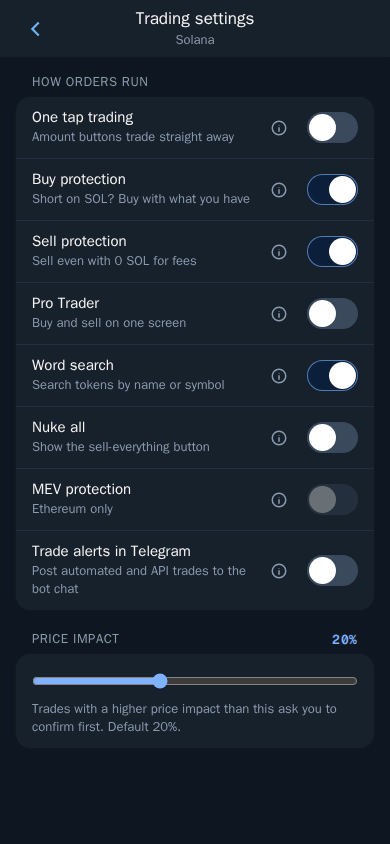
While you are in Trading settings, it is worth checking Sell protection. It lets you sell even when you have no SOL left to pay network fees: Thor covers the fee and takes it back from the sale. In a real emergency, that can be the difference between getting out and being stuck. See Trading settings for every switch on that screen.
How to Sell Everything at Once
Nuke All Positions
- Tap Nuke on Home.
- Choose the wallets to include. Leave any wallet unticked to keep its tokens.
- Check the list of tokens that will be sold.
- Confirm.
Thor Trading Bot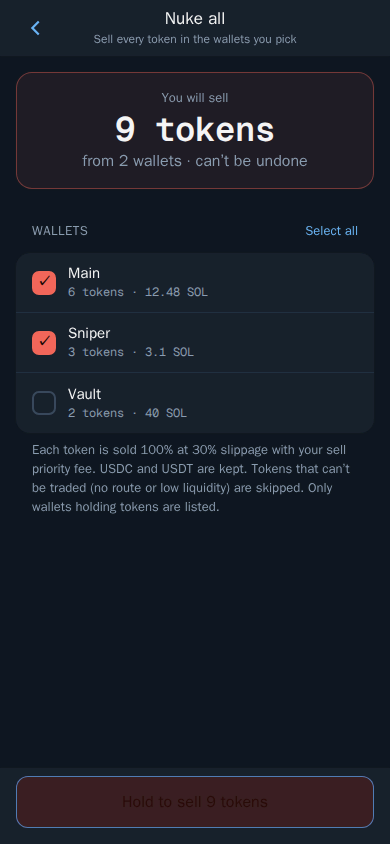
Warning: Nuke cannot be undone. Use it only when you need to exit everything.
Each sale is a normal spot trade and lands on the chain like any other sell. Watch the results come in on the trade status screens or in your Portfolio, under History. See Portfolio and positions.
Nuke With Several Wallets
Thor lets you have up to 10 wallets on the Solana tab, and many traders split them by job: one for sniping, one for copy trading, one for longer holds. Nuke works across all of them at once or only the ones you tick. That makes it easy to flatten your high-risk wallets in a hurry while your long-term bags stay where they are. Before you confirm, double-check which wallets are ticked, because there is no undo. See Wallets for how to create and name wallets so the list is easy to read under pressure.
When a Panic Sell Button Makes Sense
A panic sell button in a crypto bot is a blunt tool, and that is the point. Good reasons to reach for it:
- You think a wallet may be at risk. Sell everything, then move the SOL somewhere safe with Withdraw. If you suspect a leaked key, create a fresh wallet and move funds there too.
- A market-wide crash. When everything is bleeding at once and you want flat exposure.
- You are stepping away. Going offline for a while and you do not want any open memecoin risk.
- Cleaning up after a strategy. You ran a sniping or copy trading session in a dedicated wallet and want to close it all out.
Bad reasons:
- One token dumped and you feel nervous. Sell that one token instead.
- You want to take profit. Use partial sells or take profit orders so you keep some upside.
Alternatives to Selling Everything at Once
Nuke is the last line. Most of the time, a planned exit beats a panic one.
Sell One Position
Open the token, choose Sell and tap a percentage button such as 50% or 100%. You can set your own sell buttons in Settings → Fees, buttons, display. Read How to sell on Pump.fun for the full Sell screen.
Set Exits Before You Need Them
- Take profit and stop loss sell automatically when the price hits your targets. See Take profit and stop loss.
- Trailing stop follows the price up and sells when it drops by a set distance from the peak.
- Auto sell adds your take profit and stop loss to every buy, whether it comes from the bot, the Mini App, the extension, Social Sniper, copy trade, Auto buy or a filled limit buy. Read Pump.fun AutoSell.
With exits in place, you rarely need a nuke at all, because your stops are already working on Thor's servers, even when Telegram is closed.
Clear Out Dust Afterwards
After a nuke, you may still have tokens worth almost nothing, plus empty token accounts. On Solana, each empty token account holds a small refundable deposit. Thor's Burn clears dust and returns that SOL. See How to reclaim SOL rent.
What It Costs to Nuke
Every token Nuke sells is a spot trade. Thor charges a flat 0.5% per spot trade, half the 1% that many Telegram trading bots charge. Network and priority fees are added on top.
If you trade a lot, the Subscription is worth a look: $100 for 30 days cuts Thor's fees on spot trading and bridging to 0% on Solana and every EVM chain. It breaks even at about $20,000 of spot volume in 30 days, and a nuke across a full portfolio counts toward that volume like any other sell. It does not cover perps, predictions, network or third-party fees. Full details are on Fees.
Set It Up Before You Need It
The worst time to look for an emergency button is during the emergency. Open Thor on Telegram, switch on Nuke all in Trading settings now, and you will be one confirm away from flat whenever you need it. Thor also runs as a Mini App and a Chrome extension, see all Thor apps.
Frequently asked questions
How do I sell all my tokens on Solana at once?
In Thor, turn on Nuke all in Settings then Trading settings. A Nuke button appears on Home. Tap it, choose the wallets, check the list of tokens and confirm. Thor sells every token in the wallets you picked.
Can I undo a nuke?
No. Nuke cannot be undone. Once the sells land, the tokens are gone from your wallet and you would have to buy them back at the new price. Use it only when you really need to exit everything.
Why is the Nuke button not showing in Thor?
Nuke all is off by default. Open Settings then Trading settings and switch on Nuke all. The Nuke button then appears on the Home screen.
Can I nuke only one wallet and keep the others?
Yes. When you tap Nuke you choose which wallets to include. Leave a wallet unticked and its tokens are not touched.
Is there a fee to sell everything with Nuke?
Each token is sold as a normal spot trade, so Thor's flat 0.5% spot fee applies to each sale, plus network and priority fees. With a Thor subscription the Thor fee on spot trades is 0%.
Should I use a panic sell button in a crypto bot?
A panic sell button is useful when you need out of everything fast, for example after a wallet compromise scare or a market-wide crash. For normal exits, selling one position at a time or setting take profit and stop loss orders gives you more control.
Step-by-step in the Docs
- Nuke all: Sell everything at once in an emergency.
- Trading settings: Turn trading features on and off.
- Sell: Sell part or all of a position.
- Portfolio and positions: Track everything you hold.