To sell on Pump.fun with a Telegram bot, open the token in Thor, choose Sell, tap a percentage such as 50% or 100%, and confirm. To sell automatically, set a take profit, stop loss or trailing stop, or turn on Auto sell so every buy gets its exits the moment it lands.
Selling is where most Pump.fun trades are won or lost. This guide covers manual sells, automatic exits, the settings that keep sells from failing, and what changes when a coin graduates.
Why Selling on Pump.fun Is Hard
Pump.fun coins can run hard and then drop just as fast. Three things go wrong on the way out:
- Timing. Peaks often happen when you are not watching the chart.
- Emotion. When a coin is up, you wait for more. When it drops, you wait for a bounce.
- Failed sells. Thin liquidity, low slippage or no SOL left for fees can stop a sell when you need it most.
A sell bot fixes the first two by selling at levels you set in advance. The right settings fix the third.
How to Sell on Pump.fun Manually
- Open the token, or tap the position in Portfolio.
- Choose Sell.
- Tap a percentage, for example 50% or 100%, or enter an amount.
- Confirm.
Paste the token address or pump.fun link in the bot chat to open the token, or type /positions to see what you hold. See Sell.
 Thor Trading Bot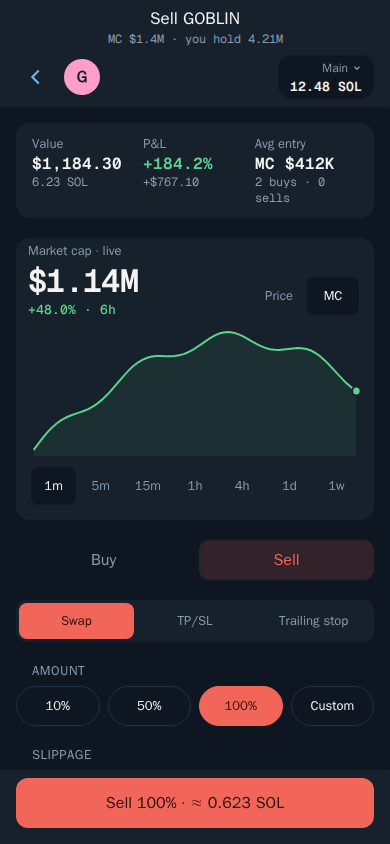
Sell Faster With One Tap
With One tap trading on, tapping a sell percentage sells straight away, with no confirm step. Set your 3 to 5 sell buttons, each a % of your tokens, in Settings → Fees, buttons, display. Pro Trader puts buy and sell side by side on one screen. See One tap trading and Pro Trader.
Warning: With One tap trading on, every tap trades immediately.
Sell on the Pump.fun Website
The Thor Chrome extension adds a buy and sell panel to pump.fun token pages, using your Thor wallets. Extension trades cost 0.25% and show in your Thor portfolio. See the Chrome extension guide.
Pump.fun Sell Bot: Take Profit and Stop Loss
Pump.fun has no take profit or stop loss orders of its own. Thor adds them to any pump.fun coin.
- Open the token and choose Sell, then TP/SL.
- Drag the lines on the chart, or type your targets as a percentage or a price.
- Choose how much to sell at each target.
- Confirm.
Take profit sells when the price rises to your target. Stop loss sells when it falls to your limit. You can set several levels, for example sell 50% at +100% and the rest at +300%.
Thor Trading Bot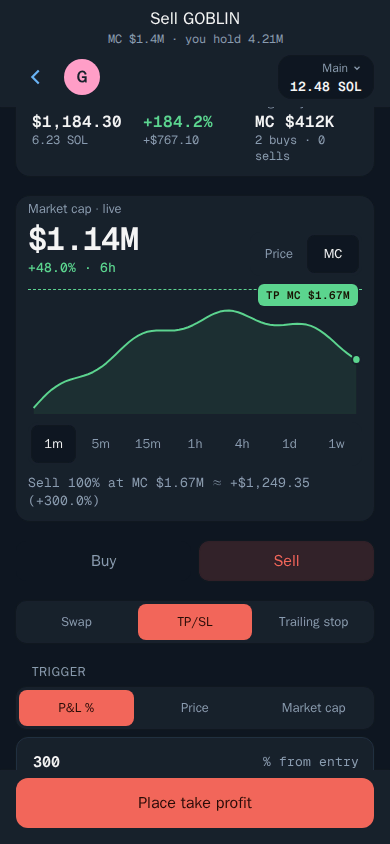
Your targets run on Thor's servers, even when Telegram is closed. See Take profit and stop loss.
Trailing Stop: Sell After the Peak
A trailing stop sells when the price drops by a set distance from its highest point since you set it. As the price rises, the stop rises with it. It never moves down.
- Open the token and choose Sell, then Trailing.
- Set the distance, for example 10%.
- Choose how much to sell and confirm.
Example: you set a 10% trailing stop at $1.00, so it sits at $0.90. The price climbs to $2.00 and your stop moves to $1.80. The price falls to $1.80 and Thor sells.
Thor Trading Bot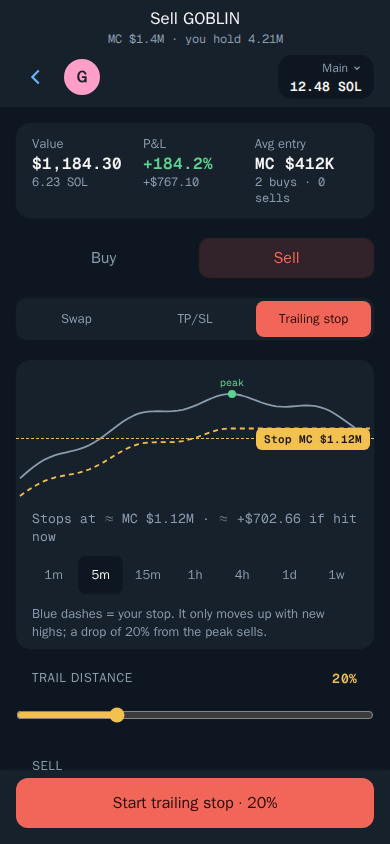
A common Pump.fun setup is to sell part at a fixed take profit and put a trailing stop on the rest, so you bank profit and still catch a bigger run. See Trailing stop.
Note: In very fast moves a stop can fill below your trigger price. A stop limits losses, it does not guarantee an exact exit price.
Auto Sell: Exits on Every Buy
Setting exits by hand on every coin is slow. Auto sell does it for you.
- Open Settings → Auto sell.
- Add your targets, for example sell 50% at +100%, and sell 100% at -30%.
- Turn it on.
Every new buy now gets these orders automatically, measured from that buy. Auto sell applies to every buy, wherever it comes from: the bot, the Mini App, the web extension, Social Sniper, copy trade, Auto buy and filled limit buys.
You can also set targets by market cap instead of percentage, for example sell 50% when the coin reaches $1M. Many Pump.fun traders think in market cap, so this is often easier to plan.
For target ideas and worked examples, read Pump.fun AutoSell: take profit, stop loss and trailing stop.
Manage Your Sell Orders
Open Portfolio, then Orders, or type /limit_order in the bot chat. Filter by All, Manual or Auto sell.
- Tap an order.
- Change the trigger, amount or expiry.
- Save, or use the switch to pause it.
Thor Trading Bot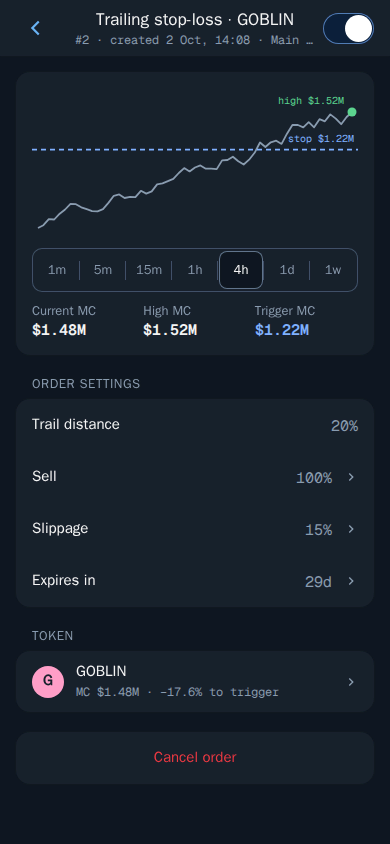
Use Clean up expired or Cancel all orders to tidy up. See Manage your orders.
Settings That Stop Sells From Failing
| Setting | Where | Why it matters |
|---|---|---|
| Sell protection | Settings → Trading settings | Lets you sell even with no SOL left for network fees. Thor covers the fee and takes it back from the sale. |
| Sell slippage | Settings → Fees, buttons, display | Higher slippage helps sells land on fast-moving coins. If the price moves further than allowed, the trade is cancelled. |
| Sell priority fee | Settings → Fees, buttons, display | Turbo is fastest. Set it separately from buys. |
| Price impact | Settings → Trading settings | Trades above the limit ask you to confirm first. The default is 20%. |
| Trade alerts in Telegram | Settings → Trading settings | Chat messages when your orders fill. |
Tip: Turn on Sell protection before you need it. Running out of SOL for fees is one of the most common reasons a memecoin sell fails.
If a trade does fail, Thor tells you why and offers a fix. See Troubleshooting.
Selling a Pump.fun Coin After It Graduates
When a pump.fun coin fills its bonding curve, it graduates and trades in a normal pool such as PumpSwap or Raydium. On the pump.fun site this can feel like the coin moved somewhere else.
In Thor nothing changes for you. Thor routes Solana trades across pump.fun, PumpSwap, Raydium, Meteora, Orca and more, and picks the best route for each sell. Your manual sells, take profits, stop losses, trailing stops and Auto sell orders keep working after graduation.
Graduation is often volatile. If you hold through it, a trailing stop helps you keep gains if the coin dumps after the move.
Emergency Exit: Nuke All
Nuke all sells every token in all or selected wallets at once.
- Turn on Nuke all in Settings → Trading settings. A Nuke button appears on Home.
- Tap Nuke, choose the wallets and check the list.
- Confirm.
Warning: Nuke cannot be undone. Use it only when you need to exit everything.
Fees When You Sell
Thor charges a flat 0.5% per spot trade, half the 1% that many Telegram trading bots charge, and the fee is shown before you confirm. Every sell counts as a trade, so active traders pay the fee on both sides. The subscription, $100 for 30 days, cuts Thor's spot fee to 0% and pays for itself at $20,000 of spot volume in a month. Network, priority and third-party fees still apply. See Fees and the zero fee trading bot guide.
Plan the Exit Before You Buy
Set Auto sell once, and every Pump.fun buy gets its take profit and stop loss the moment it lands. Open Thor on Telegram to set it up. New to the entry side? Read how to buy on Pump.fun, or see all Thor apps.
Frequently asked questions
How do I sell a Pump.fun token on Telegram?
Open the token or your position in Thor, choose Sell, tap a percentage such as 50% or 100% or enter an amount, and confirm. Thor sells on the bonding curve or in the token's new pool if it has graduated.
Why can't I sell my Pump.fun token?
Common reasons are no SOL left for network fees, slippage set too low on a fast-moving coin, or very thin liquidity. Turn on Sell protection so Thor can cover the network fee and take it back from the sale, and raise sell slippage if the price is moving fast.
How do I sell a Pump.fun coin after it graduates?
Sell it the same way as before. Thor routes Solana trades across pump.fun, PumpSwap, Raydium, Meteora, Orca and more, so it finds the pool where the coin trades now. Your open take profit and stop loss orders keep working too.
Is there a Pump.fun sell bot that sells automatically?
Yes. Thor's Auto sell adds your take profit, stop loss and trailing stop orders to every new buy. The orders run on Thor's servers, even when Telegram is closed, and sell when a target is hit.
Can I sell all my memecoins at once?
Yes. Turn on Nuke all in Trading settings and a Nuke button appears on Home. It sells every token in all or selected wallets at once. It cannot be undone, so use it only in an emergency.
Step-by-step in the Docs
- Sell: Sell part or all of a position.
- Take profit and stop loss: Let Thor sell for you at your targets.
- Trailing stop: A stop loss that follows the price up.
- Auto sell: Add take profit and stop loss to every buy.