Here is how to short crypto: you open a short position on a perpetual futures (perps) market: you profit if the price falls and lose if it rises. In Thor you can do it inside Telegram through Hyperliquid by opening Home, then Perps, picking a market such as BTC or SOL, tapping Short, and setting size, leverage and a stop loss before you confirm.
This guide is about the short side specifically: what shorting really means, how to short Bitcoin or Solana step by step, where your stops go, how a short can hedge a memecoin bag, and how to get your USDC back out. For setup and funding, start with the Hyperliquid Telegram bot guide.
What Shorting Crypto Means
On a spot trade you can only make money if the price goes up: you buy, then sell higher. A short flips that. With a perps short, you take the opposite side of the price, so every dollar the price falls is profit and every dollar it rises is loss.
- No coin needed. A perps short is a contract on the price. You post USDC as margin; you never borrow or hold the coin.
- No expiry. Perps have no settlement date, so you can hold a short as long as your margin supports it.
- Funding. Longs and shorts pay each other a small funding payment, shown on each market. Depending on market conditions, a short can pay or receive it.
- Upside risk. A price can only fall to zero, but it can keep rising. That makes a short's potential loss open-ended without a stop loss, and with leverage it ends at liquidation.
Warning: Shorting with leverage is high risk. If the price rises to your liquidation price, the short is closed and you lose the margin in that position. Perps are not available in some countries and regions.
How to Short Bitcoin on Telegram
You need USDC in your perps account first. If you have not added any, open Perps, then Funds (see Add funds to Perps). Then:
- Open the Thor Mini App from Thor on Telegram and go to Home, then Perps.
- Check your account value, available balance and margin used at the top.
- Search the markets at the bottom for BTC and open it.
- Tap Short.
 Thor Trading Bot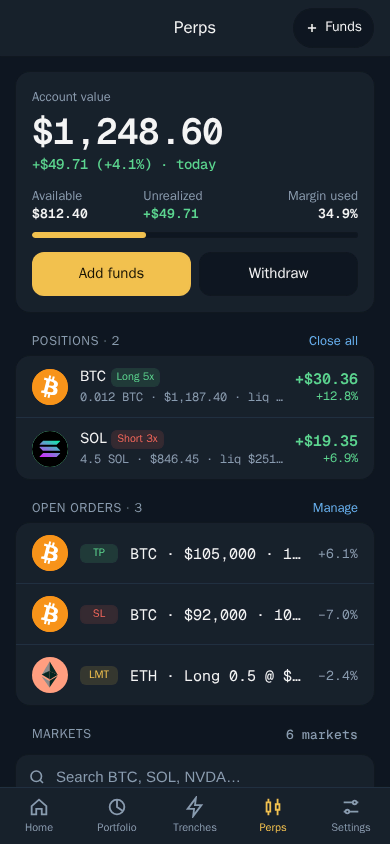
Your open positions show on the Perps home with their side and leverage, for example Short 3x, plus their profit or loss and liquidation price. Open orders, including take profits, stop losses and limit orders, are listed under them.
Setting up the short order
The order ticket is the same for longs and shorts; only the side changes (see Open a perps trade).
- Set the size with the % chips or type your own amount. Size is the full position, not the margin.
- Set the leverage with the slider or chips. Lower leverage puts your liquidation price further away.
- Choose Isolated so only this position's margin is at risk, or Cross to back it with your whole perps balance.
- Turn on Auto close and pick a take profit and stop loss as a % of your margin.
- Leave Reduce only off when opening a new short.
- Tap Review, check the liquidation price and confirm.
Thor Trading Bot
How to Short Solana
Shorting SOL works exactly the same way: open Perps, search for SOL, open the market and tap Short. Before you confirm, look at the market screen for the details that matter on a short:
- Funding per hour, to see whether shorts are currently paying or receiving.
- 24h range, to judge how far SOL has been moving and how much room your stop needs.
- Open interest and volume, as a rough sense of how active the market is.
Solana and other high-beta coins can move fast in both directions. If you are shorting into a sharp move, lower leverage and a wider stop usually beat high leverage and a tight one that gets hit by noise.
Perps Short Position: Everything Works in Reverse
On a short, the levels you know from longs flip sides:
| Long | Short | |
|---|---|---|
| Profits when price | Rises | Falls |
| Take profit sits | Above entry | Below entry |
| Stop loss sits | Below entry | Above entry |
| Liquidation price sits | Below entry | Above entry |
Thor's Auto close sets these as a percentage of your margin, so you do not have to work out which direction to put them. Remember that they trigger on the mark price and close at market, so fills are not guaranteed in fast moves. You can edit the take profit and stop loss on an open position, close all or part of it, or add margin to push the liquidation price further away (see Manage perps positions).
For a deeper look at how leverage sets your liquidation price and when to use isolated or cross margin, read Hyperliquid liquidation explained.
How to Hedge a Memecoin Bag
A hedge is a position that gains when your main holding loses, so a drop hurts less. If you hold a bag of a Solana memecoin and expect a rough few days for the whole market, a short can soften the blow.
The catch: most memecoins have no perps market. Search the Perps markets for your token first. If it is not there, the closest option is usually to short a related market, most often SOL, because Solana memecoins tend to move with SOL in a broad sell-off. That hedge is only partial:
- A memecoin can crash on its own while SOL stays flat, and the short will not help.
- SOL can rise while your memecoin falls, so both sides lose.
- Funding and fees cost money for every day you hold the hedge.
Often the simpler protection is on the spot side itself. Thor's Auto sell, take profit and stop loss on your memecoin position can exit it directly; see Pump.fun autosell, take profit and stop loss. Use a perps hedge when you want to keep the bag but reduce your exposure to the wider market, and size the short to match the part of the bag you want to protect.
How to Withdraw After Closing a Short
Once your short is closed, move the USDC back to your Thor wallet (see Withdraw from Perps).
- Open Perps, then Funds.
- Choose Withdraw.
- Check where it is going under Send to.
- Enter the amount or tap 25%, 50%, 75% or 100%.
- Check the fees and what you receive, then tap Withdraw.
Thor Trading Bot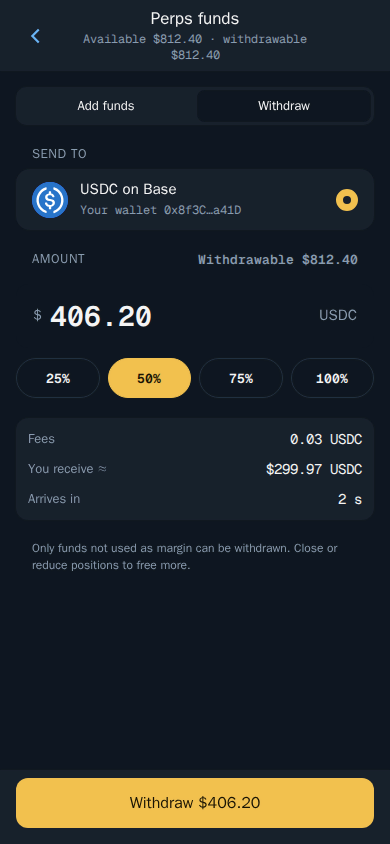
Only funds not used as margin can be withdrawn. Close or reduce positions to free more.
What Shorting Crypto Costs in Thor
Thor charges a 0.05% builder fee per perps trade, on top of Hyperliquid's own fees, and shows it before you confirm. The Thor subscription does not cover perps, and perps trades do not earn cashback or referral rewards. Bridging funds into Perps has no Thor fee.
If you hedge a spot bag, the spot side is where the subscription helps: $100 for 30 days cuts Thor's flat 0.5% fee on spot trades and bridging to 0% on Solana and every EVM chain, breaking even at $20,000 of spot volume in 30 days. That 0.5% is already half the 1% many Telegram trading bots charge. See Fees and Subscription.
Open Your First Short
Start small, use isolated margin and a stop loss, and check the liquidation price on Review every time. When you are ready, open Thor on Telegram, go to Home, then Perps, and pick a market. If you would rather bet on events than prices, see the Polymarket Telegram bot guide.
Frequently asked questions
Can you short crypto on Telegram?
Yes. In Thor you open a short on a perps market through Hyperliquid, inside Telegram. Open Home then Perps, pick a market such as BTC or SOL, choose Short, set size and leverage, then review and confirm.
How do you make money shorting crypto?
A short profits when the price falls. If you short and the price drops, the position gains value and you close it to lock in the profit. If the price rises instead, you lose money.
What is the risk of shorting crypto?
A rising price works against you, and in theory a price can keep rising without limit. With leverage, a short is liquidated if the price rises to your liquidation price, and you lose the margin in that position.
Do I need to own Bitcoin to short it?
No. A perps short is a contract on the price, so you only need USDC as margin in your perps account. You never borrow or hold the coin itself.
Can I short a memecoin?
Only if a perps market exists for it. Most small memecoins do not have one, so a hedge usually means shorting a related market such as SOL, which only partly offsets your bag.
Where do the stop loss and take profit go on a short?
The other way round from a long. Your stop loss sits above your entry and your take profit below it. In Thor, auto close handles that for you based on the side you pick.
Step-by-step in the Docs
- Perps: get started: Trade long or short with leverage.
- Open a perps trade: Pick a market, side, size and leverage.
- Withdraw from Perps: Move USDC back to your Thor wallet.
- Manage perps positions: Close, add margin or change your targets.