To trade with leverage in Telegram, open the Perps tab in the Thor Mini App, add funds, pick a market and tap Long or Short. Set your size and leverage, optionally add a take profit and stop loss, check the liquidation price shown before you place, then place the order. Perps run on Hyperliquid and Thor is not your counterparty.
Leverage multiplies losses as well as gains. You can lose the margin you put into a position, so read the risk section before you trade.
What Is Leverage Trading?
Leverage lets you open a position larger than the money you put in. With 5x leverage, $100 of your own money, called margin, controls a $500 position. If the price moves 1% your way, you gain 5% of your margin. If it moves 1% against you, you lose 5%.
A long profits when the price goes up. A short profits when it goes down. Perps, short for perpetual futures, have no expiry date, so you can hold a position as long as your margin allows. If the price moves against you far enough, the position is liquidated at its liquidation price and you lose the margin. See Hyperliquid leverage and liquidation.
How Do I Open a Long or Short in Telegram?
 Thor Trading Bot

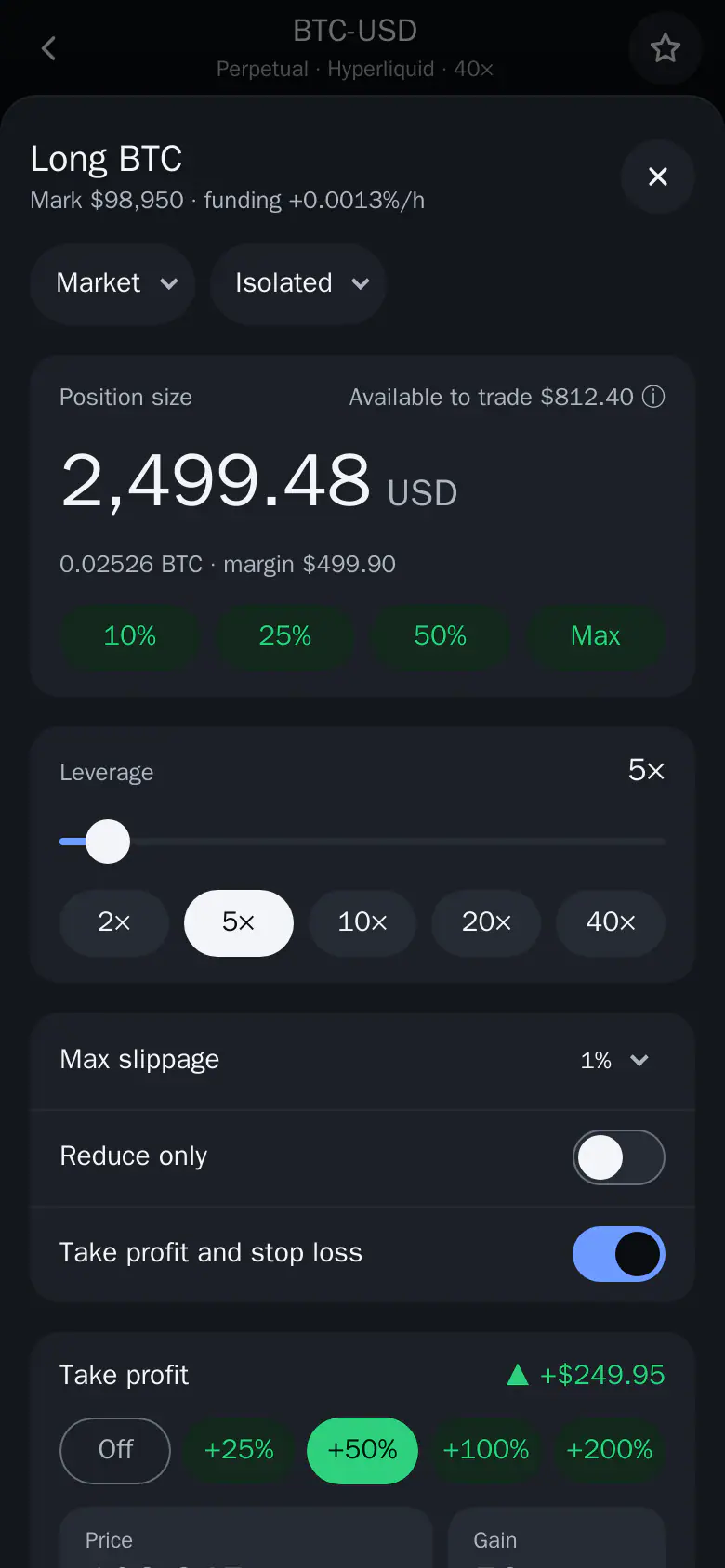
- Tap Long or Short. The order sheet opens over the market.
- Set size and leverage. Pick a size and a leverage, then check liquidation and fees.
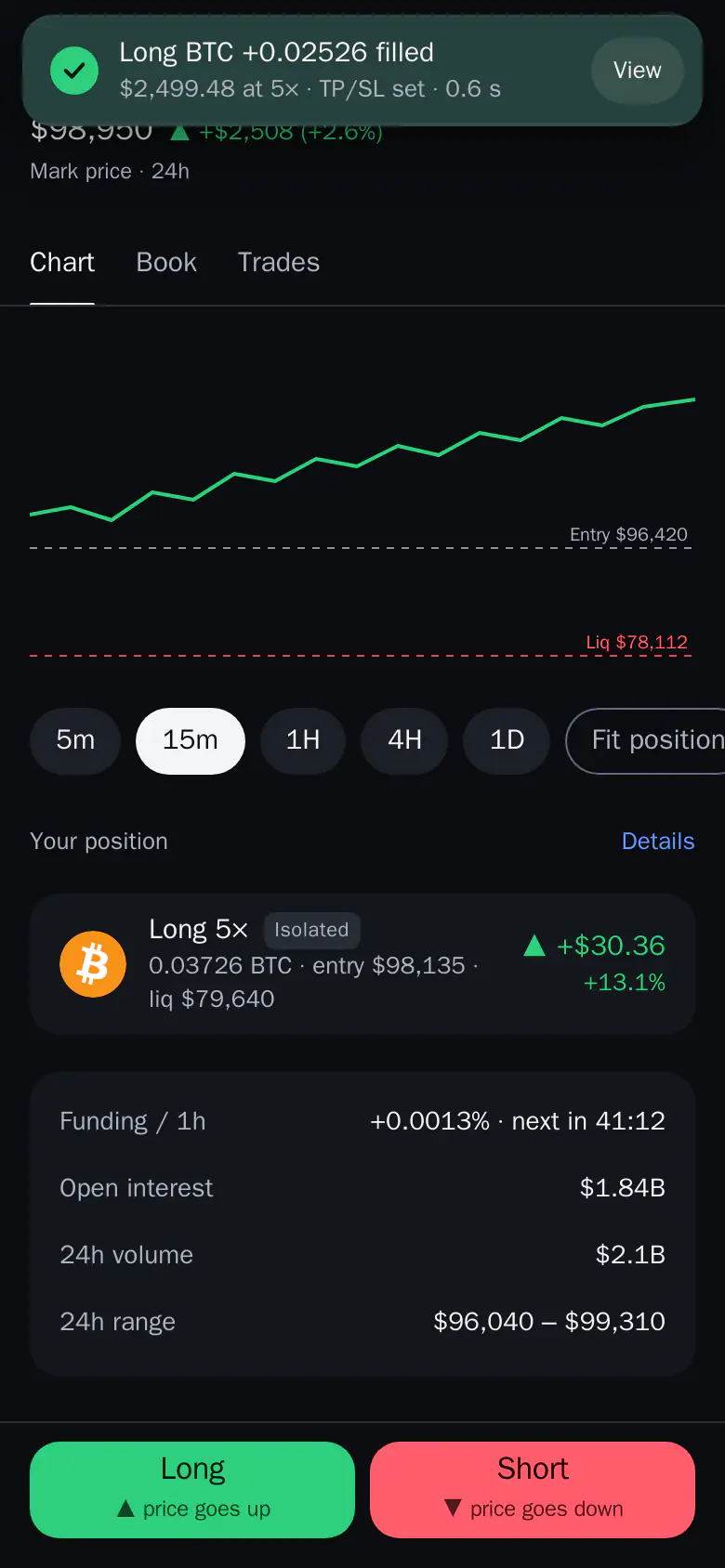
- Follow the fill. A toast shows the order filling, and you stay on the market.
1. Add funds
On the Perps tab, tap Add on the Perps card. It opens Send with your Perps account as the destination, and you can pay from any Thor wallet or from USD Cash. The first deposit needs at least $15 and has a one-time activation. It runs as a toast until it lands. See Fund Perps.
The first time you open Perps you also read the risks, choose your country of residence and confirm that you are not in a restricted region.
2. Pick a market
Search, or use the Crypto, Stocks & more and Favorites tabs. Sort by volume, movers, funding or open interest. The market header shows the mark price and the 24 hour move. The chart shows your entry and liquidation price when you have a position, and you can pinch, drag or scroll to zoom and move back in time.
3. Open the order sheet
Tap Long or Short. The order sheet opens on the market.
- Choose the order type and the margin mode at the top.
- Enter the size, or tap a share of your available funds.
- Set the leverage with the slider or the chips.
- Switch on Take profit and stop loss and pick a level, if you want an exit set for you.
- Check the liquidation price and fees, then place the order.
Thor Trading Bot12345- Market. The order type. Tap to switch to Limit, Trigger, Scale or TWAP.
- Isolated. The margin mode, Isolated or Cross. Tap to choose.
- Max. Uses all the funds available to trade. Max follows the price as it moves.
- 5×. Sets leverage. Higher leverage brings the liquidation price closer to your entry.
- Take profit and stop loss. Adds both exits in the same sheet. Quick chips set them in % of margin.
Liquidation and fees show before you tap the place button, and the button names the order. After you place it you stay on the market and a toast shows it filling, or why it failed. If the order fills but its take profit or stop loss is refused, the toast turns amber.
4. Manage the position
Your position shows unrealized P&L, how far the price can move before liquidation, size, entry, margin and funding. You can edit or remove the take profit and stop loss, add or remove margin (no fee), and close part or all of the position at market or at a limit price. Close all on the Perps home needs a hold to confirm. See Manage positions.
What Order Types Can I Use?
Pick the type with the pill at the top of the order sheet. See Perps order types.
- Market: fills now at the best price, within your max slippage.
- Limit: waits at your price.
- Advanced limit: Post only, Immediate or cancel, or Fill or kill.
- Trigger: a stop or take order that starts when the mark reaches your price, then runs as Market or Limit.
- Scale: spreads your size over 2 to 50 limit orders between two prices.
- TWAP: buys or sells in slices every 30 seconds over 5 minutes to 24 hours.
Reduce only is available on every type. Scale and TWAP have no take profit or stop loss.
What Does Leverage Trading Cost?
Each order costs Hyperliquid's fee plus a 0.05% Thor fee. TWAP orders carry no Thor fee. Deposits and withdrawals show their network cost before you send. Perps trades do not earn cashback or referral rewards.
Funding is paid or received while you hold a position, and the Funding tab in Perps activity shows it over 7, 30 or 90 days.
What Are the Minimums?
The minimum order is Hyperliquid's $10 plus a small buffer, and each order in a Scale must clear it too. The first deposit to Perps is at least $15. Only funds that are not used as margin can be withdrawn.
What Are the Risks of Leverage Trading?
Leverage multiplies gains and losses. A small move against you can cost the whole margin of a position, and at liquidation you lose it. Higher leverage puts the liquidation price closer to your entry.
- Start with low leverage and a small size.
- Check the liquidation price before you place, and set a stop loss.
- Fill or kill is best effort, so a partial fill is still possible.
- Watch your margin. Set a liquidation alert in the bot to be warned when a position gets close.
Only trade what you can afford to lose. Perps are hidden in restricted countries. There you can still close positions, cancel orders and withdraw.
Where Do I Start?
Open Thor on Telegram, go to the Perps tab and add your first $15. For more depth, read Hyperliquid perps with the Thor bot and how to short crypto on Telegram. New to Thor? Start with how to trade crypto on Telegram.
Frequently asked questions
How do I trade with leverage in Telegram?
Open the Perps tab in the Thor Mini App, add funds, pick a market, tap Long or Short, set your size and leverage, and check the liquidation price shown before you place. Perps run on Hyperliquid.
What is the minimum order and deposit?
The minimum order is Hyperliquid's $10 plus a small buffer, and each order in a Scale must clear it too. Your first deposit to Perps needs at least $15 and has a one-time activation.
What fees does Thor charge on perps?
Hyperliquid's fee plus a 0.05% Thor fee per order. TWAP orders carry no Thor fee. Deposits and withdrawals show their network cost before you send. Perps trades do not earn cashback or referral rewards.
Can I lose more than I put in?
You can lose the margin you put into a position. Leverage multiplies gains and losses, and at liquidation you lose the margin for that position. The liquidation price is shown before you place the order.
Why can't I see Perps in the app?
Perps are hidden in restricted countries. In a restricted region you can still close positions, cancel orders and withdraw.
Step-by-step in the Docs
- Perps: get started: Go long or short with leverage on Hyperliquid, inside Telegram.
- Open a perps trade: Pick a market, order type, size and leverage, set TP and SL inline, then place it.
- Perps order types: Market, Limit, Advanced limit, Trigger, Scale and TWAP, and what each one does.