To buy on Pump.fun with a Telegram bot, open Thor on Telegram, deposit SOL, paste the pump.fun link or token address into the chat, tap an amount and confirm. Thor buys the token on the bonding curve or, if it has graduated, in its new pool, and usually lands the trade in under half a second.
That is the short version. Below are the full steps, the settings that matter on fast launches, and the faster ways to buy once you are set up.
Why Use a Telegram Bot to Buy Pump.fun Tokens?
Pump.fun coins move in seconds. A Telegram bot lets you buy from the same app where the coins are called, without connecting a browser wallet or approving every swap in a popup.
Thor adds a few things that matter on new launches:
- Speed. Thor runs its own private Solana node and sends each trade through more than one fast route. Trades usually land in under 0.5 seconds in normal conditions. Speed is never guaranteed when the network is congested.
- One route for every stage. Thor trades on pump.fun, PumpSwap, Raydium, Meteora, Orca and more, and picks the best route for each trade. You do not need to know whether the coin has graduated.
- Exits from the start. With Auto sell on, every buy gets your take profit and stop loss the moment it lands.
How to Buy on Pump.fun: Step by Step
1. Create Your Thor Account
- Open Thor on Telegram and press Start.
- Accept the Terms and choose your language.
- Choose your security mode. Turning on the Security PIN now is recommended.
Thor creates a Solana wallet and an EVM wallet for you in a few seconds. Thor is non-custodial, so your funds stay in your own wallets. See Create your account.
2. Deposit SOL
- Open Deposit from Home and check that the chain at the top is SOL.
- Copy your address or scan the QR code.
- Send SOL from another wallet or an exchange, on the Solana network.
Funds usually arrive within a few seconds. Keep a little SOL for network fees. See Fund your wallet.
 Thor Trading Bot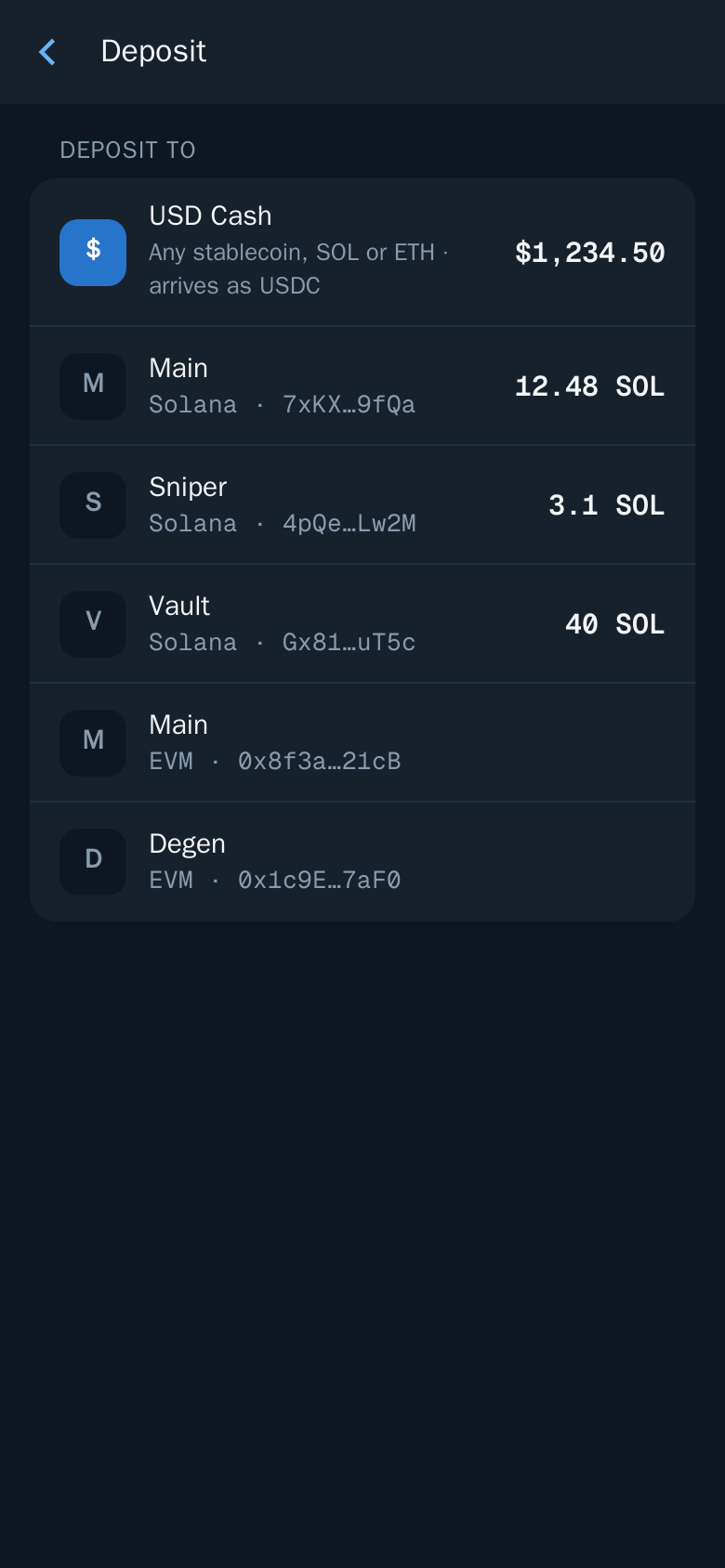
3. Find the Pump.fun Token
Paste the token address into the bot chat. You can also paste a pump.fun link, a DexScreener or Birdeye link, or a block explorer link. In the Mini App, open Search and do the same.
The token page shows the live chart, price, market cap, liquidity, holders and volume. For new launchpad tokens it also shows the bonding curve: how close the coin is to graduating.
4. Buy
- Tap an amount, for example 0.5 SOL, or enter your own in Custom.
- Check what you receive, the price impact and the fee.
- Confirm.
- Follow the trade on the status screen. You also get a message in the chat when it lands.
Thor Trading Bot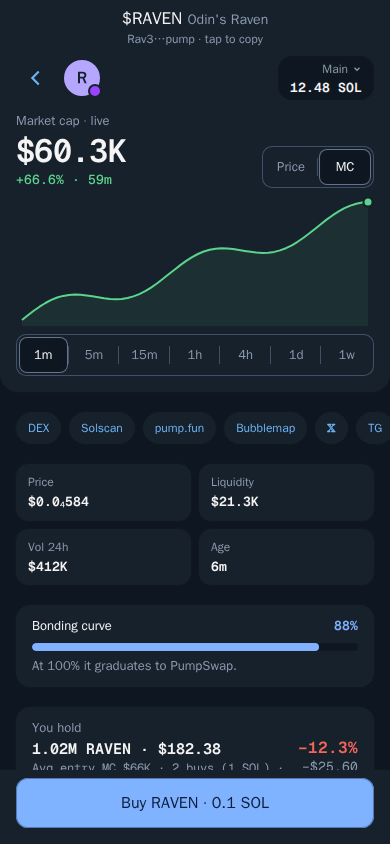
The token is now in Portfolio, with your average entry and live profit or loss. See Buy.
Tip: Before you buy, set up Auto sell in Settings → Auto sell, for example sell 50% at +100% and 100% at -30%. Every buy then gets those orders automatically.
Buying on the Bonding Curve vs After Graduation
A new pump.fun coin starts on a bonding curve, its launch stage. When the curve fills, the coin graduates and trades in a normal pool such as PumpSwap or Raydium.
With Thor you buy the same way at both stages. Paste the address and Thor routes the trade to wherever the coin trades now. This also means your take profit and stop loss keep working if a coin graduates after you bought it.
Graduation is often a volatile moment. If you want to buy a graduated coin only on a pullback, use a limit buy instead of chasing the move (see below).
Settings That Matter for Pump.fun Buys
Set these once in Settings → Fees, buttons, display and Settings → Trading settings. See Slippage and priority fees.
| Setting | What it does on Pump.fun |
|---|---|
| Slippage | How far the price may move before the trade is cancelled. Higher helps buys land on fast coins, lower protects you from bad fills. |
| Priority fee | Turbo is fastest with a higher fee. Standard is cheaper for calmer moments. Set buys and sells separately. |
| Buy buttons | 3 to 5 amounts, in SOL or as a % of your balance. |
| One tap trading | Tapping an amount buys straight away, with no confirm step. |
| Price impact | Trades above this limit ask you to confirm first. The default is 20%. |
| Buy protection | Buys with what you have if your balance is a little short. |
Warning: With One tap trading on, every tap trades immediately. Turn it on only once your buy buttons are set the way you want.
Faster Ways to Buy Pump.fun Tokens
Once you know the basic flow, these tools cut out steps.
Auto Buy: Paste and It Buys
With Auto buy on, sending or forwarding a token address or pump.fun link to the Thor bot chat buys straight away with your default amount and slippage.
- Open Settings → Auto buy and turn it on.
- Set the Default amount and Slippage.
- Add limits if you want, such as Max market cap and Min liquidity.
- Pick one or more Wallets.
Thor Trading Bot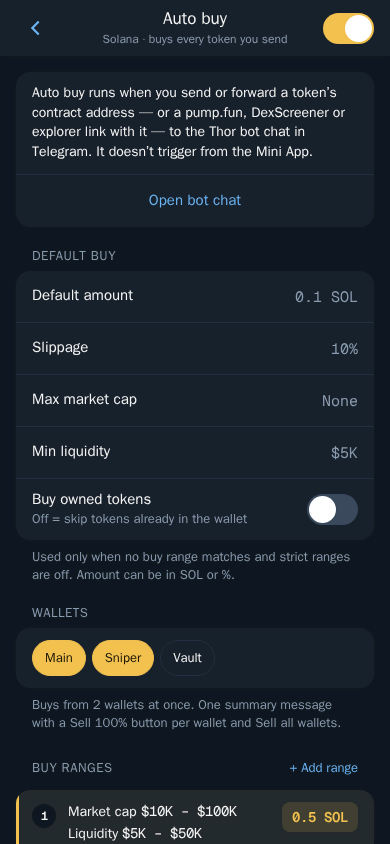
Auto buy runs from the bot chat, not from the Mini App. For a full walkthrough, read How to snipe Solana tokens on Telegram.
Trenches: Buy New Coins From a Live Feed
The Trenches tab in the Mini App is a live feed of new and trending coins with a quality score and warning tags. Choose the New list, set a quick buy amount such as 0.1 SOL, and tap Buy on any coin. Learn to read the scores in the Trenches scanner guide.
Buy When: Limit Buys on Pump.fun Coins
Open the token and choose Buy when to buy at a target % from entry, Price or Market cap. Set it below the current price to buy a dip, or above it to buy only if the coin keeps going. Orders run on Thor's servers even when Telegram is closed. See the Solana limit orders guide.
Buy on the Pump.fun Website With the Extension
The Thor Chrome extension adds a buy and sell panel to token pages on Pump.fun, Axiom and DexScreener. Sign in with Telegram and it uses your Thor wallets. Extension trades cost 0.25% and show in your Thor portfolio. See the Chrome extension guide.
Check Before You Buy
Most new pump.fun coins fail, and many are scams. Before you buy:
- Liquidity: low liquidity means big price swings and hard exits.
- Holders: if a few wallets hold most of the supply, they can dump it.
- Age and volume: very new coins with huge volume can be wash traded.
- Socials: check the website and X account are real and active.
In Trenches, watch for tags such as Bundle share, Dumping, Sell pressure or Thin liquidity. Start small on new coins and set a stop loss right after you buy. See Trading safely.
Warning: No check catches every scam. Only trade what you can afford to lose.
Fees for Buying Pump.fun Tokens
Thor charges a flat 0.5% per spot trade, half the 1% that many Telegram trading bots charge. With the subscription, $100 for 30 days, Thor's fee on spot trades drops to 0%. It pays for itself at $20,000 of spot volume in a month. Network fees, priority fees and third-party fees come on top. See Fees and the zero fee trading bot guide.
Buy Your First Pump.fun Token
Open Thor on Telegram, deposit SOL and paste a pump.fun link to buy. When you are in, plan the exit: read how to sell on Pump.fun, or see all Thor apps.
Frequently asked questions
How do I buy Pump.fun tokens on Telegram?
Start Thor on Telegram, deposit SOL to your Thor wallet, then paste the token address or the pump.fun link into the bot chat. Tap an amount such as 0.5 SOL, check the price impact and fee, and confirm.
Can I buy a Pump.fun token before it graduates?
Yes. Thor trades pump.fun tokens on the bonding curve and after they graduate to a regular pool such as PumpSwap or Raydium. Thor picks the route for you, so you buy the same way at either stage.
How much SOL do I need to buy on Pump.fun?
You need enough SOL for the amount you want to buy plus a little extra for network and priority fees. Many traders start with small amounts on new coins because most launches are very risky.
Why did my Pump.fun buy fail?
The most common reasons are slippage set too low for a fast-moving coin or not enough SOL for fees. Thor tells you why a trade failed and offers a fix. Raising slippage helps trades land but can give a worse price.
What fees do I pay to buy Pump.fun tokens with Thor?
Thor charges 0.5% per spot trade, or 0% with the $100 subscription for 30 days. Network fees, priority fees and third-party fees come on top. Web extension trades cost 0.25%.
Step-by-step in the Docs
- Buy: Buy any token with one tap.
- Find a token: Paste an address, a link or a name to open any token.
- Auto buy: Buy the moment you paste an address in the chat.
- Fund your wallet: Send SOL or another coin to your Thor wallet to start trading.