A Solana portfolio tracker shows what you hold, what each position is worth and how much you have made or lost, and Thor puts all of that inside Telegram. Open Portfolio in the Thor Mini App to see every position with its profit or loss, your open orders and your history, or turn on Live PnL in the bot chat to watch your total update automatically.
Because Thor is also where you trade, your tracker is always in sync with your trades. There is nothing to connect, no spreadsheet to update and no separate site to keep open. This guide walks through each screen and the settings that change how your numbers are counted.
Why Use a Trading Bot as Your Solana Portfolio Tracker
Most memecoin traders end up with a messy wallet: a few real positions, a pile of tiny leftovers and a stream of airdropped spam. A tracker that only reads your wallet may not know what you actually paid for each token.
When you trade through Thor, Thor knows your entries. Each position shows your average entry, your profit or loss and quick sell buttons next to it. Orders, copy trades and Auto sell targets live in the same place, so you can act on what you see without switching apps.
The Home Screen: Your Day at a Glance
The Mini App opens on Home: your balance, top positions, quick actions and markets.
Check Your Balance and Top Positions
- Open the chat with @ThorSolana_bot and tap the menu button to open the Mini App.
- Read the value of your positions and the chart. Switch the time range below it.
- Check your balance, the number of positions and your open orders.
- Scroll to Top positions and tap one to open it.
 Thor Trading Bot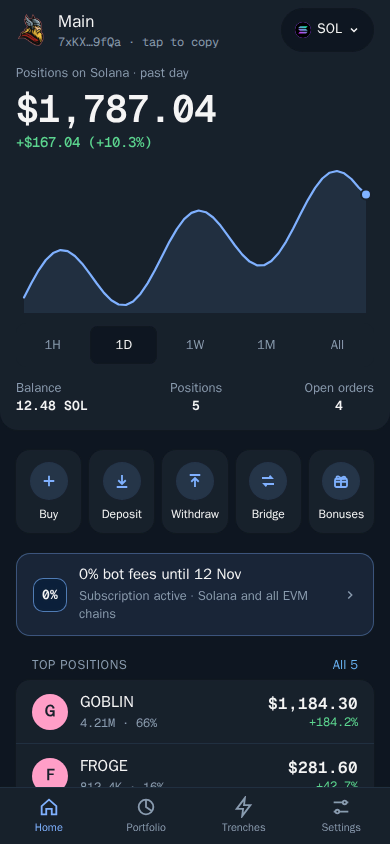
The chain pill at the top, for example SOL, shows the active chain. Tap it to switch chain or wallet.
How to Track Solana PnL in Portfolio
Portfolio is the full view. It shows the value of your positions, how they are split and the profit or loss of each one.
Read Your Portfolio
- Tap Portfolio at the bottom of the Mini App, or type
/positionsin the bot chat. - Pick a chain at the top, or keep All chains.
- Use the tabs: Positions, Orders and History.
- Filter by all tokens, stable coins or dust.
- Sort by value, profit or market cap.
Thor Trading Bot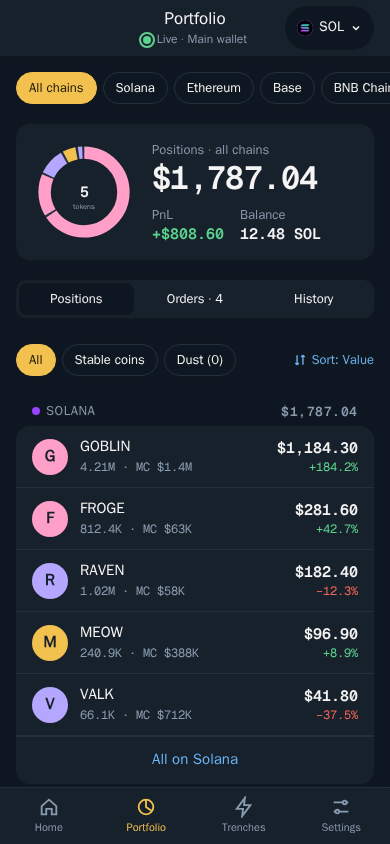
Open a Single Position
Tap a position to see its chart, your entries, your profit or loss and quick sell buttons. This is the fastest way to take profit: check the numbers, then sell a percentage straight from the same screen. To set exits that run while you are offline, use take profit and stop loss or turn on Auto sell.
Choose How PnL Is Counted
Profit and loss can be counted since your first buy with Thor, or overall. Pick the one that matches how you think about your trading. Change it in Settings, then Fees, buttons, display.
| Mode | Best for |
|---|---|
| Since your first buy with Thor | Judging the trades you made with Thor |
| Overall | Seeing the full result on tokens you held before |
Tip: Your PnL is only as useful as the costs behind it. Thor's fee is a flat 0.5% per spot trade, or 0% with the subscription, so you always know what each trade cost.
Live PnL in the Telegram Bot
Prefer the chat? In the bot, Live PnL shows your total profit or loss and every position, and updates automatically. It is handy during a busy session when you want your numbers in front of you while you trade. Tap Stop Live PnL to end it. See PnL cards and Live PnL.
Share a PnL Card
Had a good trade? Share it without showing your whole wallet.
- Open a position.
- Tap Share.
- Show amounts in SOL, in USD or hidden, then share.
Hidden amounts are a good choice for groups, where the percentage is the story and the size is nobody's business.
Trade History in a Telegram Bot: The Activity Log
Positions tell you where you are. Activity tells you how you got there. It is a log of everything on your account: trades, order fills, deposits, withdrawals and security events such as key exports.
Review Your Activity
- Open Activity in the Mini App.
- Use the filters at the top to show only trades, orders, copy trades, bridges or rewards.
- Tap Mark all read once you have caught up.
Thor Trading Bot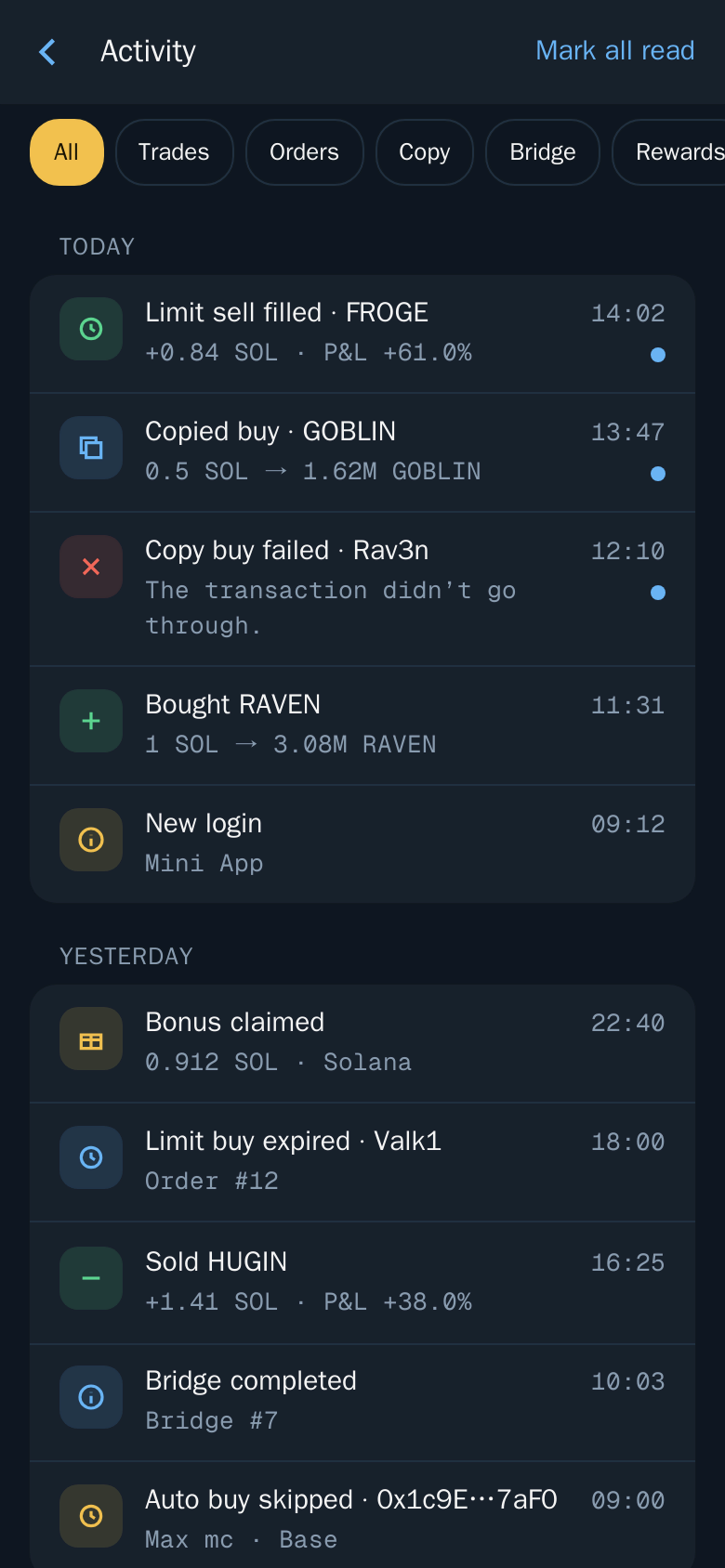
Activity is also the best place to check that nothing unexpected happened on your account. A new login or key export you did not make is a sign to act fast. Read Security PIN and Stay safe.
For notifications as things happen, turn on Trade alerts in Telegram in Trading settings. You will get chat messages for order fills, copy trades and trades from the web extension, each with a button that opens the trade or token in the Mini App. See Trade status and notifications.
Solana Wallet Tracker for Your Own Wallets
Thor tracks the wallets you trade with. You can have up to 10 wallets on each of the Solana and EVM tabs, create new ones or import a wallet you already own with its private key. Tap the chain pill to switch between them. See Wallets.
Want to follow someone else's wallet instead? That is what copy trade is for. Each copy trade has a live feed with its realized P&L, open positions and every copied trade. Read how to find Solana whale wallets to copy.
Keep Your Portfolio Clean
A clean portfolio makes your real numbers easier to read:
- Hide tokens you do not want to see, such as airdropped spam. Show them again at any time. See Activity and hidden tokens.
- Burn dust. Open Burn, pick the tokens worth almost nothing and confirm. On Solana, burning also closes the empty token accounts and returns the small deposit each one held to your wallet. See Burn dust.
Warning: Burning cannot be undone.
Fees You Can See in Your PnL
Every fee comes out of your results, so keep them low. Thor charges a flat 0.5% per spot trade, half the 1% that many Telegram trading bots charge. The subscription costs $100 for 30 days and cuts Thor's bot fees on spot trading and bridging to 0% on Solana and every EVM chain. It breaks even at $20,000 of spot volume in 30 days. Perps, predictions, network and third-party fees are not covered. See Fees.
Start Tracking
Open Thor on Telegram, tap the menu button and open Portfolio. See all Thor apps, and read the Solana limit orders guide to put exits on every position you track.
Frequently asked questions
How do I track my Solana PnL in Telegram?
Open Portfolio in the Thor Mini App to see the profit or loss of every position, or turn on Live PnL in the bot chat to get your total profit or loss and every position in one message that updates automatically.
Can I see my trade history in a Telegram bot?
Yes. Thor's Activity screen is a log of everything on your account, including trades, order fills, deposits, withdrawals and security events. Portfolio also has a History tab.
Does Thor count PnL from my first buy or from all my trades?
You choose. Profit and loss can be counted since your first buy with Thor, or overall. Change it in Settings, then Fees, buttons, display.
Can I hide spam tokens from my Solana portfolio?
Yes. Hide tokens you do not want to see, such as airdropped spam, and show them again at any time. You can also burn dust tokens, which on Solana closes their empty token accounts and returns the small deposit each one held.
How do I share a PnL card?
Open a position and tap Share. Choose whether to show amounts in SOL, in USD or hidden, then share the card.
Step-by-step in the Docs
- Portfolio and positions: Track everything you hold.
- PnL cards and Live PnL: Share your wins and watch your profit live.
- Activity and hidden tokens: See what happened and hide what you do not need.
- Trade status and notifications: Know exactly what happened to every trade.