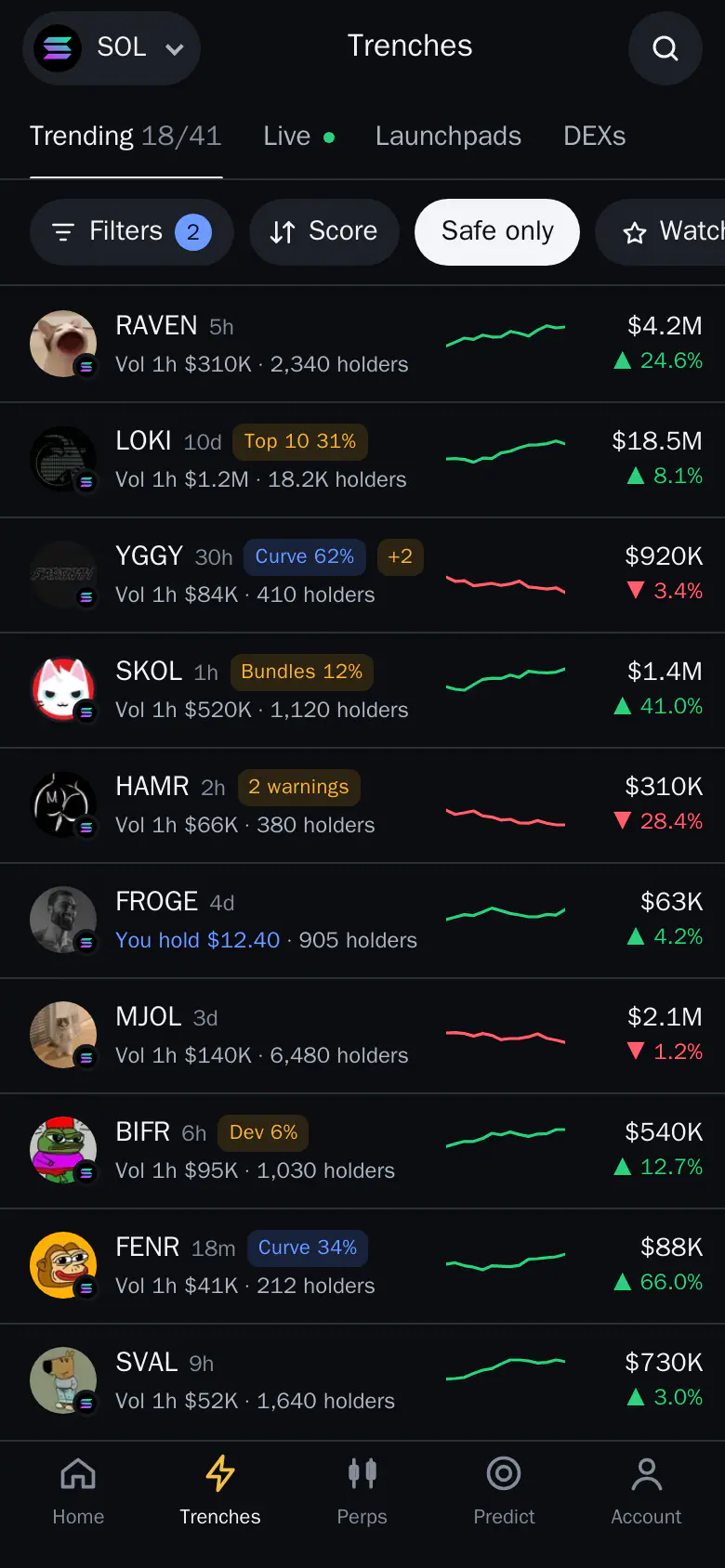
A Solana rug checker helps you answer one question before you buy: can the people behind this token, or a few big holders, dump it on you? Thor answers it inside Telegram. Open any coin and tap the Safety row: it lists every check, worst first, such as freeze authority, bundles, top 10 holders, the dev and liquidity. Trenches adds an automatic score and warning tags, so you can check a coin in seconds before you tap Buy.
New Solana memecoins launch by the thousands, and many are scams. No tool can make a rug impossible, but a quick, consistent check filters out most of the obvious ones. This guide shows what to look for, where Thor shows it and how to protect yourself after you buy.
Is This Token a Rug? The Warning Signs
A rug pull is when the people who control a token take the money and leave. On Solana memecoins it usually looks like one of these:
- Concentrated supply. A few wallets hold most of the tokens. When they sell, the price collapses.
- Bundled launch. The creator buys a big share of the supply in a bundle of wallets at launch, then sells into everyone who buys after.
- Thin liquidity. There is little money in the pool, so even a small sell crashes the price and your own exit is expensive.
- Powers left with the creator. The creator can still freeze your coins or print more of them.
- Fake activity. Very new coins with huge volume can be wash traded to look popular.
- Empty socials. The website or X account is new, inactive or copied.
A good rug check looks at all of these together. One red flag can be noise. Several at once are a pattern.
Solana Token Checker in Thor: What It Shows
Thor builds its checks into the places you already trade, so you do not need a separate site.
| Where | What you see |
|---|---|
| Trenches list | Score, price change, risk flags and a 1 hour chart for each coin |
| Coin sheet, Safety row | Every check, worst first, with what it means and how fresh it is |
| Info and Holders tabs | Market, activity, how the supply is spread, the dev, bundles, snipers and insiders |
| Compare presets | How many coins each preset matches now and how its coins did after they were shown |
| Every quote | Buy and sell tax in dollars, with a warning when the tax is at or above your slippage |
| EVM chains | Token flags plus a simulated buy and sell that blocks honeypots |
On EVM chains such as Ethereum, Base and BNB Chain, Thor also audits each token before you buy: flags such as honeypot, can't sell all, mintable supply, upgradeable proxy, blacklist and hidden owner, plus a simulated buy and sell. If the simulated sell fails, you see Scam risk · trade blocked and Thor won't buy it. Token tax is shown on every quote on every chain; Solana tokens get tax info and the Safety checks, but no block verdict. Read Trading safely.
How to Read the Safety Row
Open any coin from Trenches, Search or your positions. The Safety row sits under the chart and says how many warnings there are. Tap it.
 Thor Trading Bot


- Tap a coin. Any row in Trending, Live, Launchpads or DEXs.
- Tap Safety. The row says how many warnings the coin has.
- Read worst first. A serious finding turns the row red.
Check a Coin Before You Buy
- Open the Trenches tab and tap a coin.
- Tap the Safety row under the chart.
- Read the top lines first: they are the worst findings. A red cross is serious, an amber mark is worth checking, a green tick passed.
- Check each line against its threshold. The line says when a value becomes a warning or serious.
- Then look at the Holders tab, market cap, liquidity and the buys against sells before you buy.
Thor Trading Bot1234- Freeze authority active. The creator can freeze your coins so you cannot sell. A serious finding.
- Bundles 8.0%. Over 5% is a warning, over 15% serious. Bundled buys can be sold all at once.
- Top 10 wallets hold. Over 25% is a warning, over 40% serious.
- Liquidity $21.3K. Under 10% of market cap is a warning: big sells move the price a lot.
The checks turn the warning signs above into numbers. A coin with a high score but one serious line, such as an active freeze authority, still deserves a hard look before you buy.
Every Solana Coin Signal Explained
Each Solana coin in Thor shows who holds it, who is buying and whether the creator can dump or lock it. These are the signals to check:
| Signal | What it tells you | Warning sign |
|---|---|---|
| Freeze and mint authority | Whether the creator can still freeze your coins or print more | Freeze authority active, or mint authority not revoked |
| Top 10 wallets | How much the biggest holders own, with the pool and the curve counted apart | Over 25% is a warning, over 40% serious |
| Dev | What the creator holds, whether they sold and how their past launches went | A big stake, or the dev already selling |
| Bundles | How much supply was bought in bundled buys at launch | Over 5% is a warning, over 15% serious |
| Snipers and insiders | Wallets that bought in the first moments, and early insiders | A big share held by either |
| Liquidity against market cap | How deep the pool is compared with the coin's value | Under 10% of market cap is a warning |
| Buy and sell pressure | Whether buyers or sellers are in control right now | Sells outweighing buys, or sell pressure rising while the price still looks fine |
No single signal decides. A coin with strong buying but a high bundle share and a big insider stake can still be dumped on you. Look for coins where the signals agree.
Thor Trading Bot Thor Trading Bot
 Thor Trading Bot

Bundle Check: Spot Bundled Launches
Bundled buys are several buys that land together, usually from one operator spreading supply across many wallets so it looks like real demand. On a fresh launch, a high bundle share is one of the strongest rug warnings, because those wallets can sell all at once.
In Trenches, look for these tags and flags:
- Bundles and Dev: a large share of the supply came from bundled buys, or the creator holds a lot.
- Dumping and Sell pressure: sellers are in control.
- Thin liquidity: the pool is small, so exits are hard.
Tags such as Strong buying and Fresh launch point the other way. Trenches also flags coins where insiders hold a lot or the top holders own a lot of the supply.
Note: Scores and tags are automatic signals, not advice.
Token Safety Score: How to Read It
Every coin in Trenches gets an automatic quality score from 0 to 100:
- Good: 65 or more.
- OK: 45 or more.
Below 45, be extra careful. The score is a summary, so do not stop at the number. Tap the coin and read the Safety row to see what is behind it.
Use Compare to See What Works
Open Filters in Trenches and tap Compare for a wider view. It shows each preset, such as fresh launches or momentum, with how many coins match it right now and how coins shown under that preset performed afterwards. Past results are not a promise. Tap a preset and Use applies its filters to the list in one tap.
The filters themselves hide coins below your own limits for market cap, liquidity, age, holders and volume, and the Show only chips narrow the list further. Save a setup as your own preset and it follows you to every device.
Compare Presets
- Open the Trenches tab and tap Filters.
- Tap Compare.
- Read each preset: the coins matching now, the share that hit +10% and the median 1 hour move.
- Tap a preset to see its detail, then Use to apply it to your list.
Thor Trading Bot 123
- Fresh launches. Under a day old, real liquidity. Tap to see its detail.
- Momentum. Up 10% or more this hour on buys.
- Done. Closes Compare and goes back to the list.
Thor Trading Bot Thor Trading Bot
Check the Coin Sheet Yourself
Before you buy, open the coin and check four things:
- Liquidity. Low liquidity means big price swings and hard exits.
- Holders. If a few wallets hold most of the supply, they can dump it.
- Age and volume. Very new coins with huge volume can be wash traded.
- Socials. Use the links in the coin's menu to check that the website and X account are real and active.
The coin sheet also shows the bonding curve for new launchpad tokens, so you can see how close a Pump.fun coin is to graduating. For a deeper look at reading the Trenches feed, read the Pump.fun Trenches scanner guide.
Protect Yourself After You Buy
A rug check lowers your risk. It does not remove it. Plan for the coin that looked clean and still dumps:
- Start small on new coins.
- Set a stop loss right after you buy, from the Order sheet on the coin, or turn on Auto sell so every buy gets a take profit and stop loss automatically.
- Keep Price impact protection on. Trades that would move the price more than your limit ask you to review first. The default is 20%. See Protections.
- Use Sell protection. It lets you sell even when you have no SOL left for network costs.
For exit plans on fresh launches, read Pump.fun AutoSell: take profit, stop loss and trailing stop. For account safety, see Stay safe.
Warning: No check catches every scam. Only trade what you can afford to lose.
Low Fees on Every Trade
Thor charges a flat 0.5% per spot trade, half the 1% that many Telegram trading bots charge. With the subscription, $100 for 30 days, Thor's bot fees on spot trading and bridging drop to 0% on Solana and every EVM chain, which breaks even at $20,000 of spot volume in 30 days. See Fees.
Check Before You Buy
Open Thor on Telegram, open Trenches and tap any coin, then its Safety row, to see its checks. Running a Telegram group where people share token links? Add Heimdall, Thor's free anti-scam bot, to keep scammers out.
Frequently asked questions
How do I check if a Solana token is a rug?
Look at liquidity, how the supply is spread across holders, whether many buys were bundled together, whether the creator can freeze or print coins, the token's age against its volume and whether its socials are real. In Thor, open the coin from Trenches and tap the Safety row to see every check, worst first.
What is a bundle check on Solana?
A bundle check looks for many buys that landed together, usually from one operator spreading supply across several wallets. A high bundle share means a few people may control much of the supply and can dump it at once. Thor shows Bundles and snipers in the Safety row and on the Holders tab.
What is a good token safety score in Thor?
Every coin in Trenches gets an automatic score. 65 or more is rated Good and 45 or more is rated OK. The score is a signal, not advice, so always look at the reasons behind it before you buy.
Can a rug checker catch every scam?
No. No check catches every scam. A token can look clean and still be dumped by its creator or top holders. Start small on new coins, set a stop loss right after you buy and only trade what you can afford to lose.
Does Thor check for honeypots on Solana?
The honeypot block, which uses a simulated buy and sell, runs on EVM chains such as Ethereum, Base and BNB Chain. On Solana, the Safety row checks whether the creator can freeze or print coins, the token tax, liquidity against market cap, the top 10 holders, the dev and the bundles, and Trenches adds a quality score and warning tags.
Step-by-step in the Docs
- Trading safely: Your first trade, safely: read the Safety row, check tax and price impact, start small and set a stop.
- Trenches: Live coins on your chain, scored 0 to 100 with risk flags. Tap a coin to open it and buy from its coin sheet.
- Filters and Analyzer: Narrow Trenches with one Filters sheet and ready-made presets, and compare how each preset's coins did.
- The coin sheet: Chart, key numbers, safety, holders, trades and your position for any coin, with Buy and Sell on one sheet.