A trailing stop loss is a sell order that follows the highest price and sells when the price drops by your chosen percentage from that high. As the price rises, your stop rises with it; it never moves down. In Thor, open a coin, tap + Trailing, pick the trail distance, for example 20%, and tap Start trailing stop.
Trailing stops suit crypto and memecoins because the biggest moves are fast and the tops are hard to call. This guide explains how a trailing stop works, how to pick the trail distance, and how to put one on every buy automatically.
How a Trailing Stop Loss Works
A trailing stop keeps track of the highest price since you set it. Your stop sits a fixed percentage below that high.
- You start a 20% trailing stop when the price is $1.00. The stop is at $0.80.
- The price climbs to $2.00. The stop moves up to $1.60.
- The price falls to $1.70. The stop stays at $1.60: it never moves down.
- The price falls to $1.60. Thor sells.
You sold at $1.60 on a coin you bought at $1.00, without watching the chart and without calling the top. If the coin had kept climbing, the stop would have kept climbing with it.
Trailing Stop vs Stop Loss vs Take Profit
| Order | Where it sells | Moves? | Best for |
|---|---|---|---|
| Stop loss | A fixed price below entry | No | Capping a loss |
| Take profit | A fixed price above entry | No | Banking a target you planned |
| Trailing stop | A set % below the highest price | Up only | Riding a run and keeping most of it |
They work well together. A common memecoin setup: sell 50% at a fixed take profit, and put a trailing stop on the rest. See Take profit and stop loss.
How to Set a Trailing Stop in Telegram
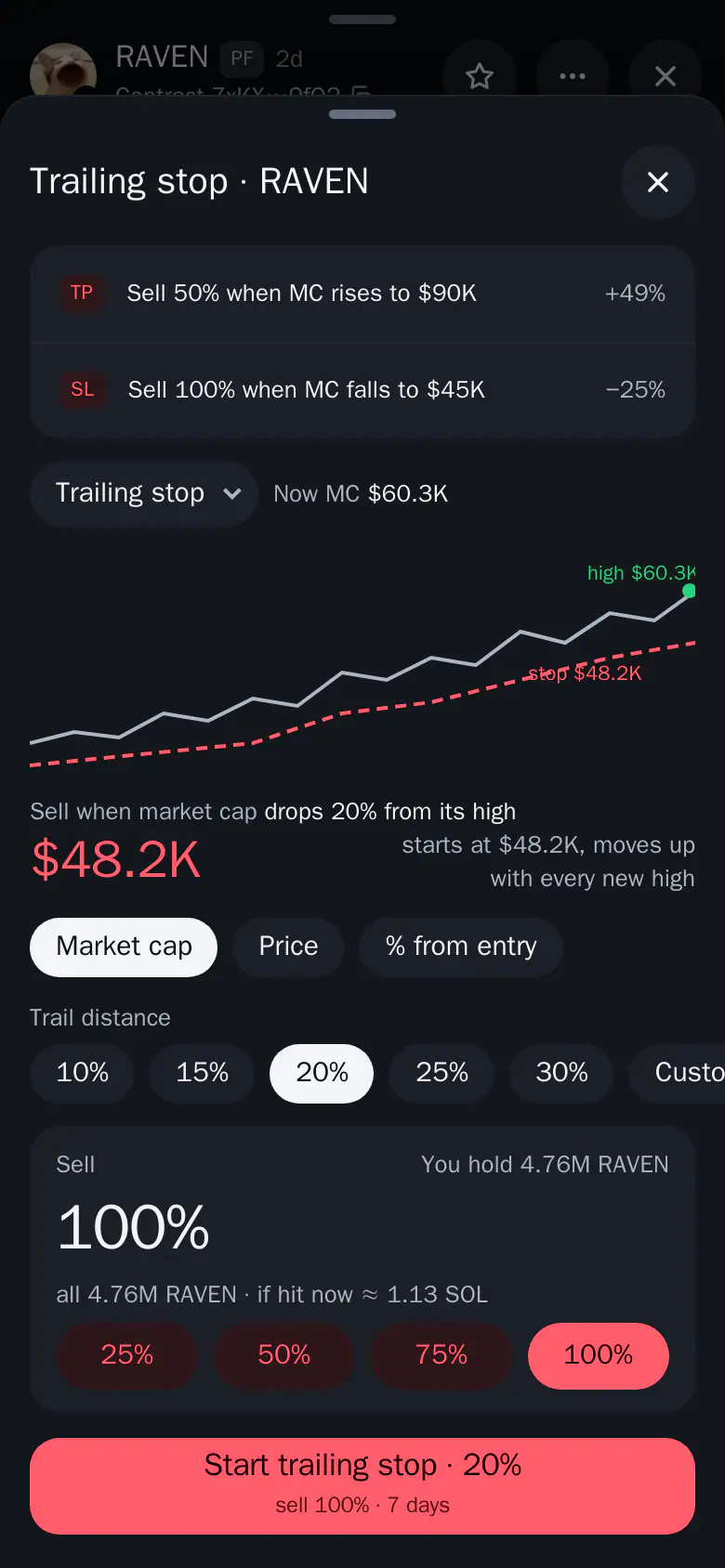
- Open the coin and tap + Trailing under the chart.
- Set the trail distance, for example 20%, or tap Custom.
- Choose how much to sell, from 25% to 100%.
- Choose when the order expires, then tap Start trailing stop.
On the chart, the dashed line is your stop. It only moves up with new highs.
 Thor Trading Bot
 1234
- 20%. How far below the high the stop sits.
- Custom. Type any trail distance.
- 100%. How much of your holding the stop sells.
- Start trailing stop. Starts the stop. It only moves up, never down.
In the bot chat, use TSL on the sell card. Both set the same order, and it keeps running when Telegram is closed. See Trailing stop.
Which Trail Percentage Should You Use?
The trail is a trade-off. Too tight and normal swings sell you early. Too wide and you give back a lot before it fires.
| Trail | Behaviour | Use it when |
|---|---|---|
| 10 to 15% | Sells on the first real pullback | You are already well up and want to lock it in |
| 20 to 30% | Gives the coin room to swing | You hold a runner and want to stay in for a bigger move |
| 40% or more | Rarely fires on noise | Very volatile, early coins, with a size you can afford to lose |
Memecoins often pull back 20% or more in the middle of a run. A 20 to 30% trail is a good starting point for them; larger, slower coins can use a tighter trail.
Tip: Look at the coin's last few pullbacks on the 5m or 15m chart. A trail a bit wider than a normal pullback keeps you in the trend.
Put a Trailing Stop on Every Buy With Auto Sell
Setting a trailing stop by hand on every coin is slow. Auto sell adds it to every new buy, wherever you buy: the bot, the Mini App, limit buys, copy trade and Auto buy.
- Open Account → Orders and automation → Auto sell and turn it on.
- Tap Add rule, then Trailing stop.
- Set the drop from the highest point, for example 25%.
- Pick how much to sell, then tap Add rule.
Thor Trading Bot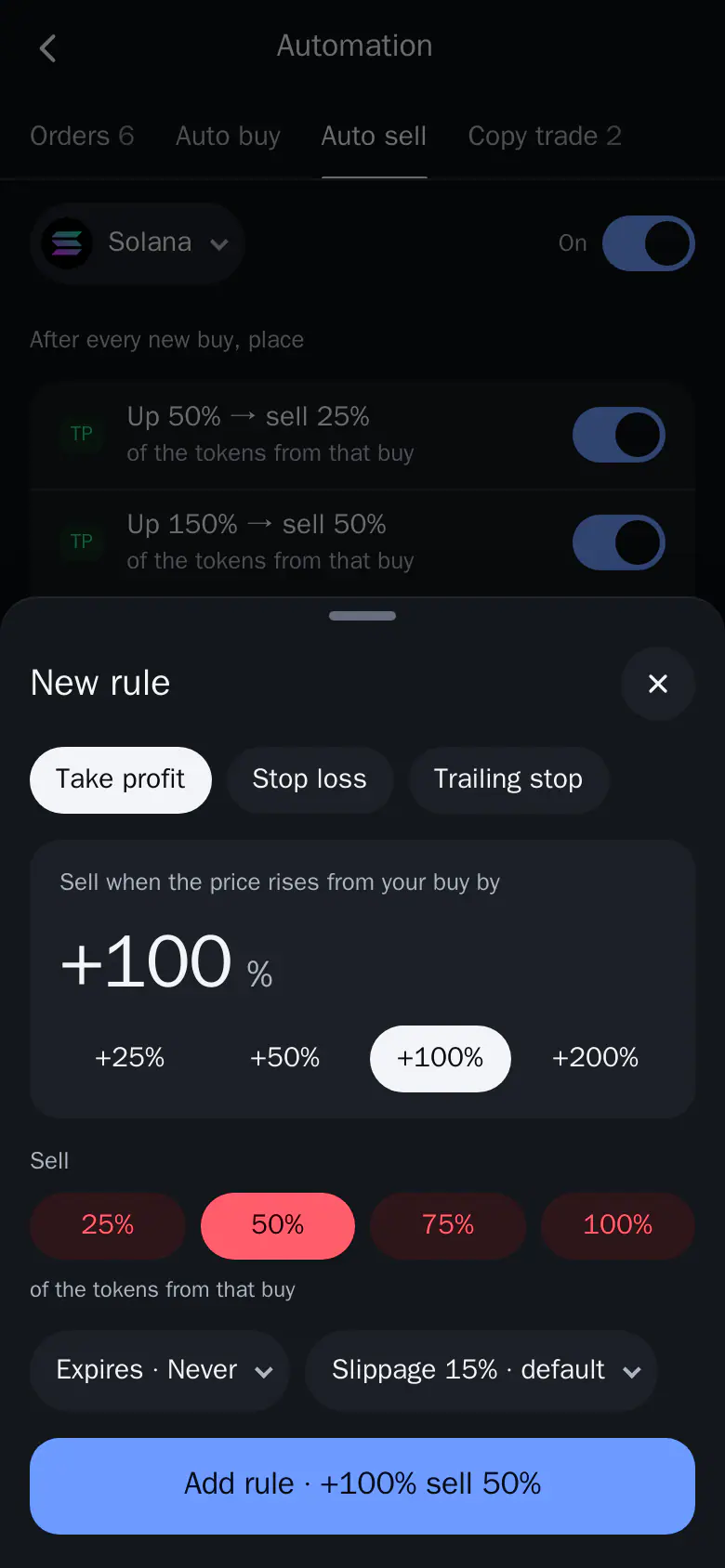 123
- Trailing stop. Follows the highest price and sells on a drop from it.
- 100%. The share of the tokens to sell when the rule fires.
- Add rule. Saves the rule. Every new buy gets it.
Arm the Trailing Stop After a Rise
An Auto sell trailing stop can have an Arm at rise. The stop starts trailing only after the price has gone up that much from your buy, for example +50%. Before that, your stop loss and take profit rules do the work.
An example Auto sell setup for memecoins:
| Rule | Trigger | Sell |
|---|---|---|
| Stop loss | -30% from your buy | 100% |
| Take profit | +100% from your buy | 50% |
| Trailing stop | 25% from the peak, armed at +50% | 100% |
These are examples, not advice. For more setups, read Pump.fun AutoSell: take profit, stop loss and trailing stop.
Manage Your Trailing Stops
Open Home → Orders to see every order. Trailing stop cards show the high so far and the current trigger, so you can see how close the stop is.
- Tap an order to Edit or Cancel order.
- Use the switch on an order to pause it.
- A failed order stays on top with the reason, and Re-arm or Sell now.
When a stop fires while you are on another screen, a green toast appears and the sell is added to Activity. See Manage your orders.
Good to Know
- Fast moves can fill below the stop. On thin memecoins the price can gap through your trigger. A trailing stop limits losses, it does not guarantee an exact exit price.
- Selling everything cancels the coin's orders. A manual 100% sell also cancels the open orders on that coin for that wallet.
- Fees. Each fired stop is a sell: 0.5% per spot trade, or 0% with the subscription. Network costs apply. See Fees.
- Keep SOL for the sell. Turn on Sell protection in Account → Trading defaults, so a stop can still sell when the wallet has no SOL left for network costs.
Set Your First Trailing Stop
Open Thor on Telegram, open a coin you hold and tap + Trailing. To plan the whole exit, read how to sell on Pump.fun or compare Auto sell and limit orders.
Frequently asked questions
What is a trailing stop loss in crypto?
A trailing stop loss is a sell order that follows the highest price since you set it and sells when the price drops by your chosen percentage from that high. As the price rises, the stop rises with it. It never moves down.
What is a good trailing stop percentage for memecoins?
Memecoins swing hard, so a tight trail sells on normal noise. A 20 to 30% trail suits runners: it gives the coin room to move and still keeps most of a big run. Use a tighter trail, such as 10 to 15%, to lock in a gain you already have.
What is the difference between a stop loss and a trailing stop?
A stop loss sits at a fixed price and never moves. A trailing stop moves up with every new high, so it protects profit as well as limiting the loss.
Can a trailing stop sell below my stop price?
Yes. In very fast moves the sell can fill below the stop. A trailing stop limits losses, it does not guarantee an exact exit price.
Does the trailing stop work when Telegram is closed?
Yes. Thor's orders keep running when Telegram is closed and you get a message when one fires.
Can I add a trailing stop to every buy automatically?
Yes. Add a Trailing stop rule in Auto sell and every new buy gets one. An optional Arm at rise makes it start trailing only after the price has gone up that much.
Step-by-step in the Docs
- Trailing stop: A stop loss that follows the highest price and sells when the price drops by your chosen % from that high.
- Take profit and stop loss: Set a take profit or stop loss on the coin sheet to sell part or all of a position at your target.
- Auto sell: Add take profit, stop loss and trailing stop to every new buy, wherever you buy.
- Manage your orders: See every open and past order in one list, then edit, pause or cancel it.