Thor works as an Ethereum trading bot on Telegram: deposit ETH to your Thor EVM wallet, paste a token address in the chat and buy or sell in a tap. On Ethereum you also get a dedicated MEV protection setting, a honeypot and tax check on every token, and orders that keep running when Telegram is closed.
This guide covers the wallet, funding, trading, MEV protection, features, safety and fees on Ethereum.
What You Need for an ETH Trading Bot
When you start Thor on Telegram, it creates a Solana wallet and an EVM wallet in a few seconds. Ethereum uses the EVM wallet.
| What | On Ethereum |
|---|---|
| Wallet | Your Thor EVM wallet |
| Native coin | ETH |
| Address | Same EVM address as on Base, BNB Chain, Robinhood Chain and Arc |
| Where trades happen | EVM venues such as Uniswap |
Your EVM address is the same on every chain, but the balances are separate. ETH on Ethereum mainnet and ETH on Base are different balances.
You can keep up to 10 EVM wallets. Open Wallets, choose the EVM tab, tap one to make it active, or Import a wallet you already own with its private key. See Wallets.
Warning: Anyone with a private key can move the funds in that wallet. Thor will never ask for it. Turn on your Security PIN to protect withdrawals and key export.
How to Fund Your Wallet With ETH
Deposit ETH on Ethereum
- Open Deposit from Home in the Mini App.
- Tap the chain pill at the top and switch to Ethereum.
- Copy your address or scan the QR code.
- Send ETH on the Ethereum network from another wallet or an exchange.
Funds usually arrive within a minute on most EVM chains. See Fund your wallet.
Warning: Exchanges let you withdraw ETH on several networks. Pick Ethereum if you want to trade on Ethereum. Funds sent on the wrong network can be lost.
Bridge SOL to ETH
Already trading on Solana in Thor? Move funds with the Bridge:
- Open Bridge.
- Choose what you send and from which chain, for example SOL on Solana.
- Choose what you receive and on which chain, for example ETH on Ethereum.
- Check the minimum you will receive, the fees and the expected time.
- Confirm and follow the progress on the status screen.
 Thor Trading Bot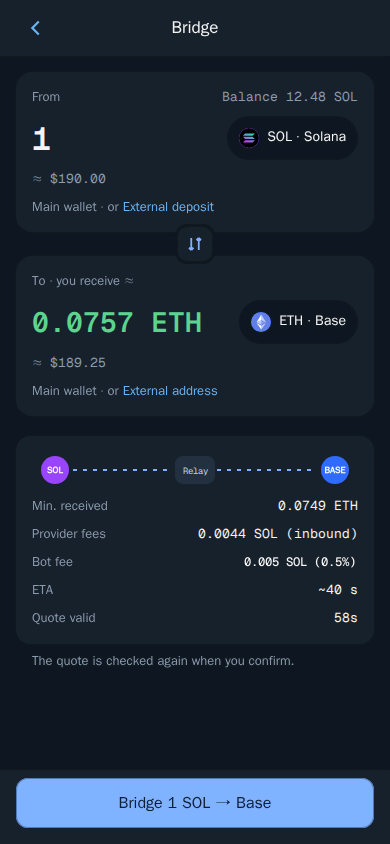
Thor compares several routes and picks the best one. If a quote expires, Thor fetches a new one and rechecks it before sending. Bridge back to Solana the same way.
How to Trade Ethereum Tokens on Telegram
Buy
- Check the chain pill shows Ethereum. The bot and the Mini App always use the same chain.
- Paste the token address into the bot chat, or open Search in the Mini App. DexScreener and block explorer links work too.
- If the token shows on several chains, pick the Ethereum result.
- Tap an amount or enter your own in Custom.
- Check what you receive, the price impact and the fee, then confirm.
Thor Trading Bot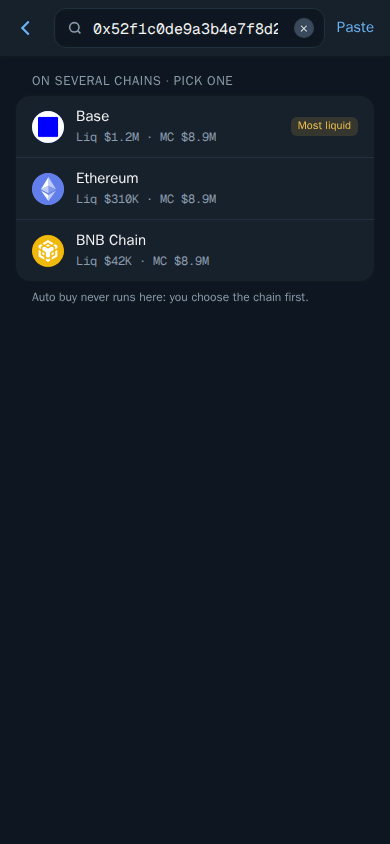
See Buy.
Sell
- Open the token or position and choose Sell.
- Tap a percentage such as 50% or 100%, or enter an amount.
- Confirm.
Tip: Keep enough ETH for the network fee to sell. Ethereum gas can rise sharply when the network is busy.
Limit Orders, TP and SL on Ethereum
Orders run on Thor's servers around the clock:
- TP/SL — choose Sell, then TP/SL, and set one or more targets. See Take profit and stop loss.
- Trailing — a stop that follows the price up. See Trailing stop.
- Buy when — a limit buy by price, market cap or % from entry. See Buy when.
Manage them in Portfolio, then Orders, or type /limit_order in the bot chat.
Thor Trading Bot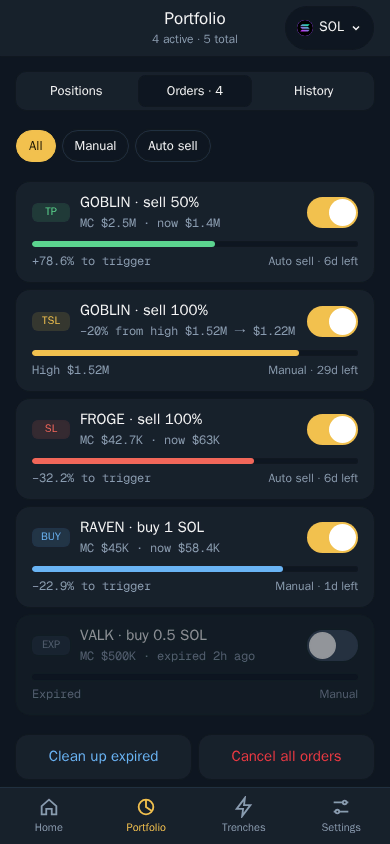
MEV Protection on Ethereum
Front-running, or MEV, is when bots trade just before you to profit from your trade. It is a familiar problem on Ethereum, where pending transactions can be seen before they land.
Thor has a setting just for this. Open Settings → Trading settings and turn on MEV protection. It adds extra front-running protection on Ethereum. See Trading settings.
Good to know:
- MEV-protection tips you choose are charged by the network, not by Thor, and are added on top of the trade.
- Protection reduces front-running but cannot remove it.
- Keep slippage reasonable. Slippage is how far the price may move before the trade is cancelled, and very high slippage leaves more room to be front-run. See Slippage and priority fees.
Which Thor Features Work on Ethereum
| Feature | On Ethereum |
|---|---|
| Buy and sell | Yes |
| Take profit, stop loss, trailing stop, Buy when | Yes |
| MEV protection setting | Yes, Ethereum only |
| Auto sell | Yes, on every new buy |
| Auto buy | Yes, by pasting an address or link in the bot chat |
| Honeypot, tax and permission check | Yes |
| Bridge to and from Solana | Yes |
| Trenches and copy trade | Yes |
The docs describe some features with Solana in mind: the private Solana node behind Thor's sub-second speed, Sell protection for when you have no SOL left, the web extension and the launchpad sources in Trenches. Trenches and copy trade both work on Ethereum.
Auto Buy and Auto Sell on Ethereum
Auto buy buys the moment you send or forward a token address or link to the bot chat. It does not run from the Mini App. Because gas on Ethereum can be high, set a Default amount that makes sense against network fees, and use Min liquidity and Max market cap to skip tokens you do not want. With Auto sell on, every buy gets your take profit and stop loss.
Trading Safely on Ethereum
On EVM chains, Thor runs a security check on each token. It tests whether the token can be sold (honeypot), shows buy and sell tax and flags risky permissions. Trades on clear scams are blocked. You see the results under Security on the token page.
Also check liquidity, holders, age and socials yourself, start small and keep Price impact protection on. It asks you to confirm trades above your limit, 20% by default. See Trading safely and Protections.
Ethereum Trading Bot Fees
Thor charges 0.5% per spot trade on Ethereum, half the 1% that many Telegram trading bots charge. The bridge costs 0.5% of the amount. Network fees, priority fees, MEV-protection tips and third-party fees are added on top. Every fee is shown before you confirm. See Fees.
0% Bot Fees With the Subscription
The Subscription costs $100 for 30 days and drops Thor's fees on spot trading and bridging to 0% on Solana and every EVM chain, Ethereum included.
| Spot volume in 30 days | Pay as you go (0.5%) | With subscription |
|---|---|---|
| $20,000 | $100 | $100 |
| $40,000 | $200 | $100 |
| $100,000 | $500 | $100 |
Break-even is $20,000 of spot volume in 30 days, before counting bridge savings. Pay in SOL, ETH (the chain's own coin) or a stablecoin from Settings → Subscription. It does not cover Perps, Predictions, network fees or third-party fees, and it is non-refundable.
Trade Other Chains With the Same Bot
Your EVM wallet works with the same address on every EVM chain. Switch the chain pill to trade the others:
- Base trading bot on Telegram
- BNB Chain trading bot on Telegram
- Robinhood Chain trading bot
- Arc trading bot with USDC gas
For Solana, see how to copy trade Solana wallets. All chains and venues are in Supported chains and markets.
Start Trading Ethereum on Telegram
Deposit ETH or bridge from Solana, turn on MEV protection and trade. Open Thor on Telegram to get your wallets, or see all Thor apps.
Frequently asked questions
What is the best ETH trading bot on Telegram?
Look for a bot that is non-custodial, checks tokens for honeypots and tax, offers front-running protection and shows every fee before you confirm. Thor does all of that on Ethereum and charges 0.5% per spot trade, or 0% with the subscription.
How do I protect my Ethereum trades from MEV bots?
Open Settings, then Trading settings, and turn on MEV protection. It adds extra front-running protection on Ethereum. Any MEV-protection tips you choose are paid to the network, not to Thor, and no protection removes MEV completely.
Why are Ethereum network fees higher than on Base?
Ethereum mainnet is usually busier than layer 2 networks such as Base, so each transaction costs more gas. Thor shows the full cost before you confirm. For small trades, compare the network fee with your trade size first.
Can I use my MetaMask wallet with Thor on Ethereum?
You can import any EVM wallet you own into Thor by pasting its private key in Wallets. Only do this for a wallet you are comfortable using in Thor, and never share a private key with anyone who asks for it.
How do I bridge SOL to ETH in Thor?
Open Bridge, choose SOL on Solana as what you send and ETH on Ethereum as what you receive, check the minimum received, fees and time, then confirm. The bridge fee is 0.5%, or 0% with the subscription.
Step-by-step in the Docs
- Supported chains and markets: Where you can trade with Thor.
- Trading settings: Turn trading features on and off.
- Fund your wallet: Send SOL or another coin to your Thor wallet to start trading.
- Bridge: Move funds between Solana and EVM chains.