Here is how to buy Base memecoins with a Telegram bot: put ETH on Base in your Thor EVM wallet, switch the chain to Base, find a coin in Trenches or paste its address, check the Security section, then tap an amount to buy. Set Auto sell first, so every buy gets a take profit and stop loss straight away.
The Base trading bot guide covers the basics of trading on Base with Thor: wallets, deposits and the buy and sell buttons. This guide is about memecoins: how to find new tokens on Base, how to vet them quickly, how to size and exit, and which automation to switch on.
Step 1: Get ETH on Base
Base memecoins are bought with ETH on Base, and every buy and sell pays its network fee in ETH. You have two ways in.
 Thor Trading Bot
 Thor Trading Bot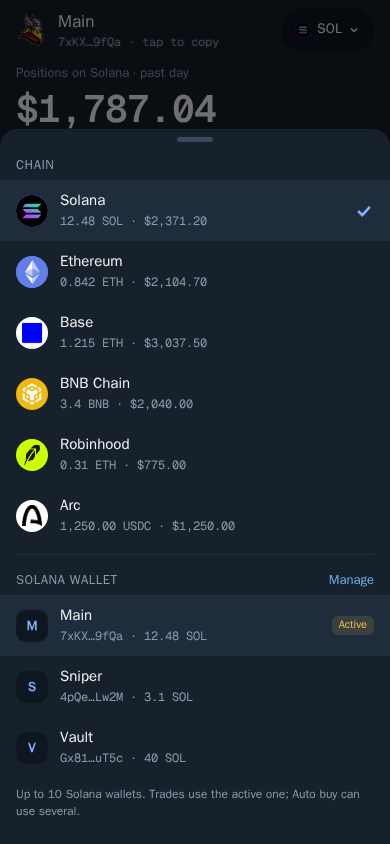
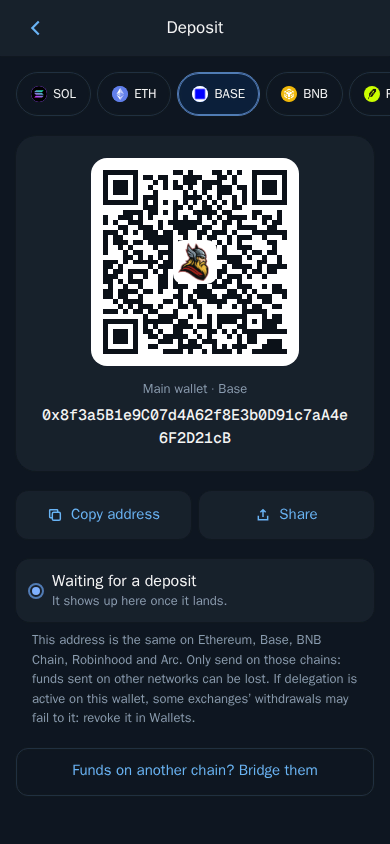
- Deposit. Open Deposit, pick Base at the top and send ETH on the Base network. Funds usually arrive within a minute on most EVM chains. See Fund your wallet.
- Bridge from Solana. Already holding SOL in Thor? Bridge it to ETH on Base in a few taps. The bridge SOL to Base guide walks through the quote, the status screen and the fees.
Tip: Plan your ETH in three parts: what you want to trade, the network fee for each buy, and a reserve for the fees to sell. Running out of ETH while holding a coin that is moving is a bad place to be.
Step 2: Switch the Chain to Base
Tap the chain pill and pick Base. The bot and the Mini App always use the same chain, so switching in one switches both. Your EVM wallet has the same address on Ethereum, Base, BNB Chain, Robinhood Chain and Arc, but the balances are separate per chain.
Step 3: Find New Tokens on Base
Base Trenches
Trenches is a live feed of new and trending coins, ranked by momentum, with a quality score, warning tags and one-tap buy. It works on Base and the other EVM chains.
- Open the Trenches tab.
- Choose a list: Trending, DEXs, New, Top or Live.
- Set your quick buy amount at the top.
- Tap a coin to see more, or tap Buy on it.
Thor Trading Bot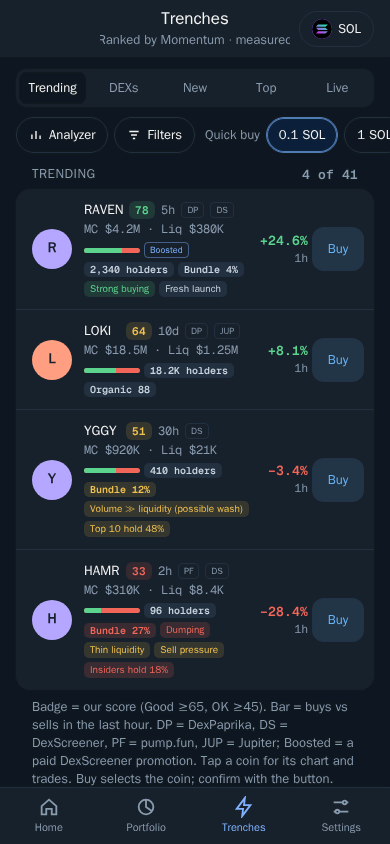
How to read a coin:
- Score. Good is 65 or more, OK is 45 or more.
- Bar. Buys against sells in the last hour.
- Tags. Signals such as Strong buying, Organic, Fresh launch, Bundle share, Dumping, Sell pressure or Thin liquidity.
Use Filters to set ranges for market cap, liquidity, age, holders and volume, and tap Analyzer to see why a coin got its score. See Filters and Analyzer. Scores and tags are automatic signals, not advice.
Paste an Address or Link
Found a coin on X, in a Telegram group or on DexScreener? Paste the token address into the bot chat, or open Search in the Mini App. DexScreener and block explorer links work too, and you can type a name or symbol. See Find a token.
Pick the Base Version
The same address can exist on several EVM chains. When it does, Search lists each chain with its liquidity and market cap, and you pick one. Choose Base, and compare liquidity: a thin copy on another chain is not the coin people are talking about.
Thor Trading Bot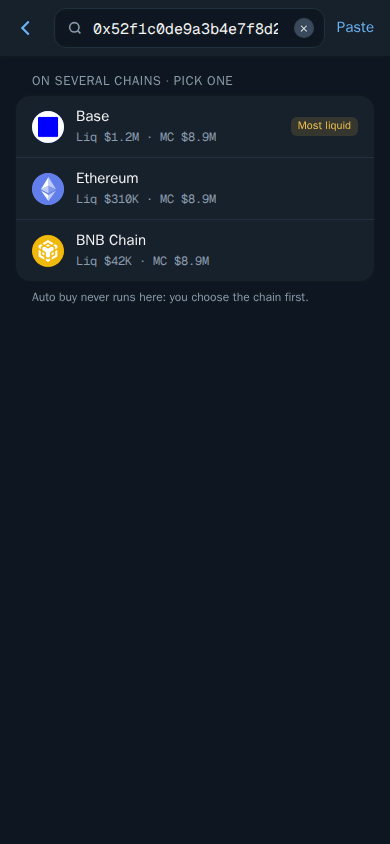
Copy Base Wallets
Copy trade works on Base too. Paste a Target wallet, choose what happens when they buy (Fixed buy, Max buy or Fixed ratio) and when they sell (Copy sells, Auto sell or No sell). You will not get exactly the same prices as the wallet you copy. The copy trading guide explains how to choose wallets, and the steps are the same on Base.
Step 4: Check the Token Before You Buy
On EVM chains, Thor runs a security check on each token. The Security section on the token page shows whether the token can be sold, its buy and sell tax and any risky permissions, and trades on clear scams are blocked.
Then spend thirty seconds on the basics from Trading safely: liquidity, holders, age and volume, and socials. A coin where a few wallets hold most of the supply can be dumped on you. The honeypot checker guide explains each result and what to do with it.
Step 5: Buy the Memecoin
- Open the token.
- Tap an amount or enter your own in Custom.
- Check what you receive, the price impact and the fee, then confirm.
- Follow the trade on the status screen. You also get a message in the chat when it lands.
Aerodrome, Uniswap and Other Base DEXes
You do not choose the DEX. Thor trades on EVM venues such as Uniswap, PancakeSwap and Aerodrome, and before every swap it compares routes and picks the one that gives you the most tokens. See Supported chains and markets.
Settings That Help With Fast Coins
- One tap trading. Amount buttons trade straight away, without the confirm step. See Trading settings.
- Price impact protection. Buys that move the price more than your limit ask you to confirm first. The default is 20%. In thin Base pools, this catches oversized buys. See Protections.
- Buy buttons. Change your amount buttons in Settings → Fees, buttons, display.
- Auto buy. With Auto buy on, sending or forwarding a token address or link to the bot chat buys straight away, with your Default amount, Slippage, and optional Max market cap and Min liquidity limits. It does not run from the Mini App, and it skips the moment where you read the Security section, so use limits.
Step 6: Set Your Exits
Memecoins move fast in both directions. Decide your exit before you buy.
Take Profit and Stop Loss
- Open the token and choose Sell, then TP/SL.
- Pick the trigger: P&L %, Price or Market cap.
- Type your target or drag the line on the chart.
- Place the order.
Thor Trading Bot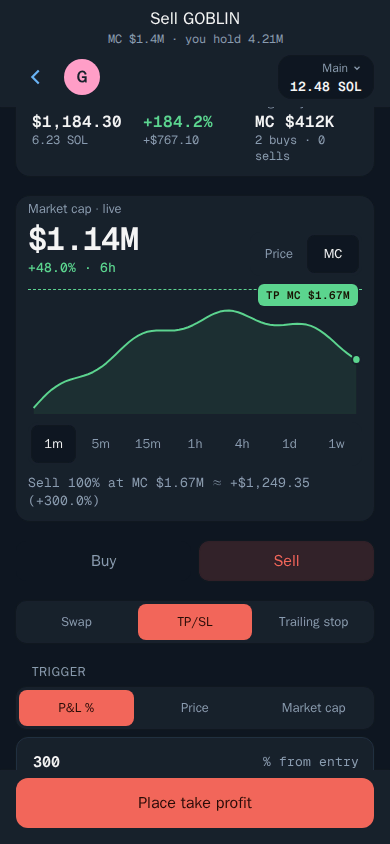
Your orders run on Thor's servers, even when Telegram is closed. Add a Trailing stop to follow a runner up, or a Buy when order to buy a dip. See Take profit and stop loss and Trailing stop.
Auto Sell on Every Buy
Open Settings → Auto sell, add targets such as sell 50% at +100% and sell 100% at -30%, and turn it on. Every buy then gets those orders, whether it came from the bot, the Mini App, Trenches, copy trade, Auto buy or a filled limit buy. You can set targets by market cap too, for example sell 50% when the coin reaches $1M. The auto sell guide has example setups; they work the same on Base.
What It Costs to Trade Base Memecoins
| Cost | Amount |
|---|---|
| Thor fee per spot trade | 0.5%, or 0% with the subscription |
| Bridge from Solana | 0.5%, or 0% with the subscription |
| Base network fees | Paid in ETH, added on top |
| Token tax | Set by the token, shown under Security |
Thor's 0.5% is half the 1% that many Telegram trading bots charge, and cashback starts at 10% of your own fees, paid in SOL or the chain's own coin, rising with your volume. See Rewards and referrals and Fees.
Memecoin trading adds up quickly: a few buys and sells a day, each with a take profit, a stop loss or a partial exit. The Subscription costs $100 for 30 days and cuts Thor's bot fees on spot trading and bridging to 0% on Solana and every EVM chain, including Base. It pays for itself at $20,000 of spot volume in 30 days. It does not cover perps, predictions, network fees or third-party fees, and it is non-refundable. Pay in SOL, ETH or a stablecoin from Settings → Subscription.
Start Buying Base Memecoins
Open Thor on Telegram, fund your EVM wallet with ETH on Base, set Auto sell, and open Trenches. Also trading Solana memecoins? Read the Pump.fun bot strategy guide. Running a Base community? Add Heimdall, Thor's free anti-scam bot for Telegram groups.
Frequently asked questions
What is the easiest way to buy memecoins on Base?
Use a Telegram trading bot. In Thor, send ETH on Base to your EVM wallet, switch the chain to Base, paste the token address or a DexScreener link, tap an amount and confirm. Thor picks the trading route for you.
Do I need a DEX like Aerodrome or Uniswap to buy Base memecoins?
Not directly. Thor trades on EVM venues such as Uniswap, PancakeSwap and Aerodrome and compares routes before every swap to give you the most tokens out, so you do not pick the DEX yourself.
Does Trenches work on Base?
Yes. Trenches and copy trade both work on the EVM chains Thor supports, including Base. Trenches shows new and trending coins ranked by momentum, with a score, warning tags and one-tap buy.
How much ETH do I need to buy a Base memecoin?
Enough for your buy plus the network fee, and a little more left over so you can pay the fee to sell later. Base network fees are paid in ETH. Thor shows the full cost before you confirm.
How do I avoid scam memecoins on Base?
Read the Security section on the token page before buying. On EVM chains Thor tests whether a token can be sold, shows its buy and sell tax and flags risky permissions, and blocks trades on clear scams. Also check liquidity, holders, age and socials.
Step-by-step in the Docs
- Trenches: Find new and trending coins early.
- Trading safely: Spot risky tokens before you buy.
- Auto sell: Add take profit and stop loss to every buy.
- Fund your wallet: Send SOL or another coin to your Thor wallet to start trading.