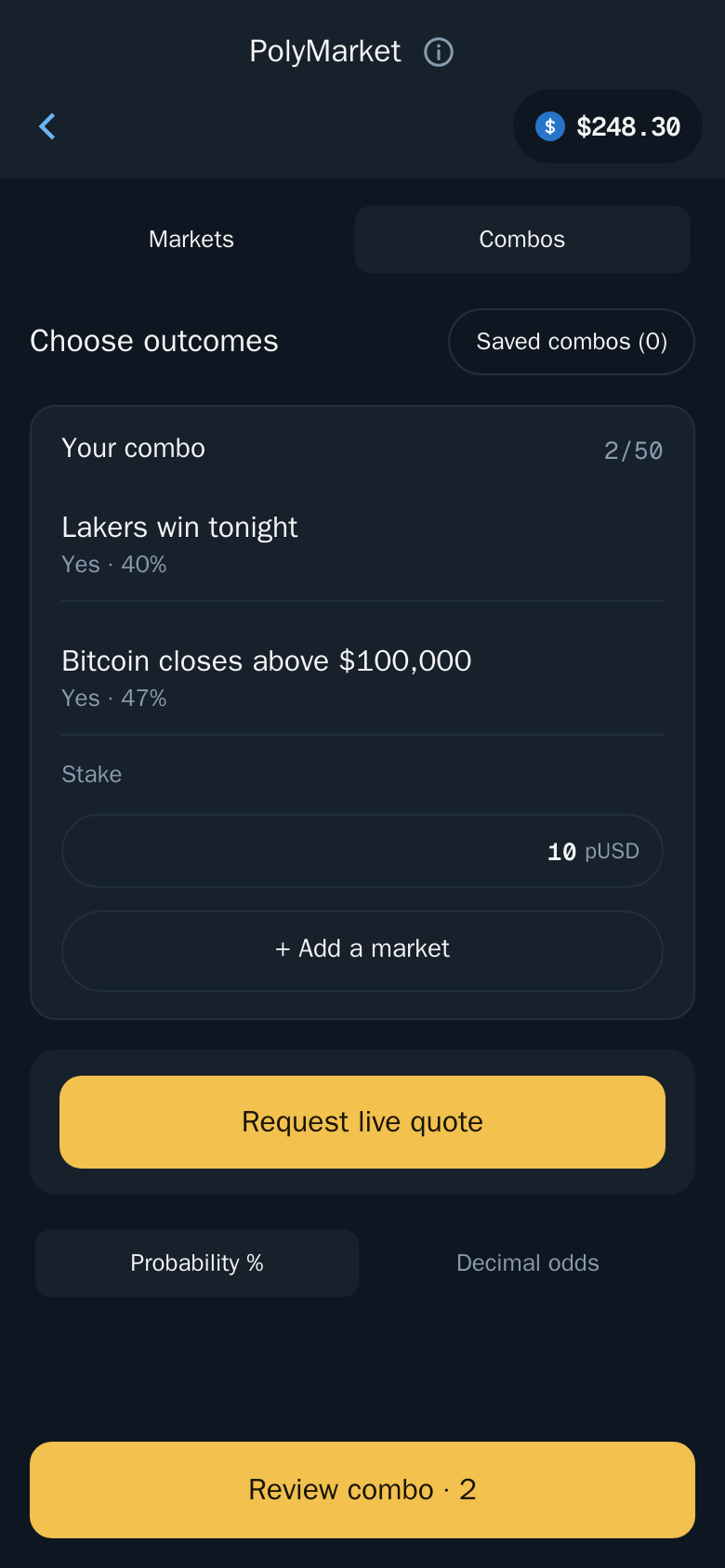
Combos
Join several outcomes into one bet that pays only if all of them win.
"A combo joins several outcomes into one bet: it pays only if all of them win."
Build a combo
- Open PolyMarket and switch from Markets to Combos. On an event you can also tap Combo, or Build a combo.
- Under Choose outcomes, tap + Add a market and pick an outcome.
- Add more markets the same way.
- Tap Review combo to see your picks.
Get a quote and buy
- Set the Maximum spend (pUSD).
- Tap Request live quote.
- Review the quote: Total spend, including fees, the Gross payout if every outcome wins, and when the quote expires.
- Tap Confirm combo purchase.
The quoted payout includes your stake; it is not profit.
Sell or claim
- You can sell your combo shares with Confirm combo sale.
- To claim a winning combo, approve once with Approve Combo redemption. This allows Polymarket's redemption router to redeem your combo positions, and it stays active until you revoke it. Then tap Claim payout. The payout goes to your PolyMarket cash.
Drafts
Tap Saved combos to see combos you built earlier. Drafts are saved on this device. They are not placed bets.
Warning: Every selected outcome must win. One wrong pick and the whole combo pays $0.