The Account tab
What is in the Account tab and where each setting lives.
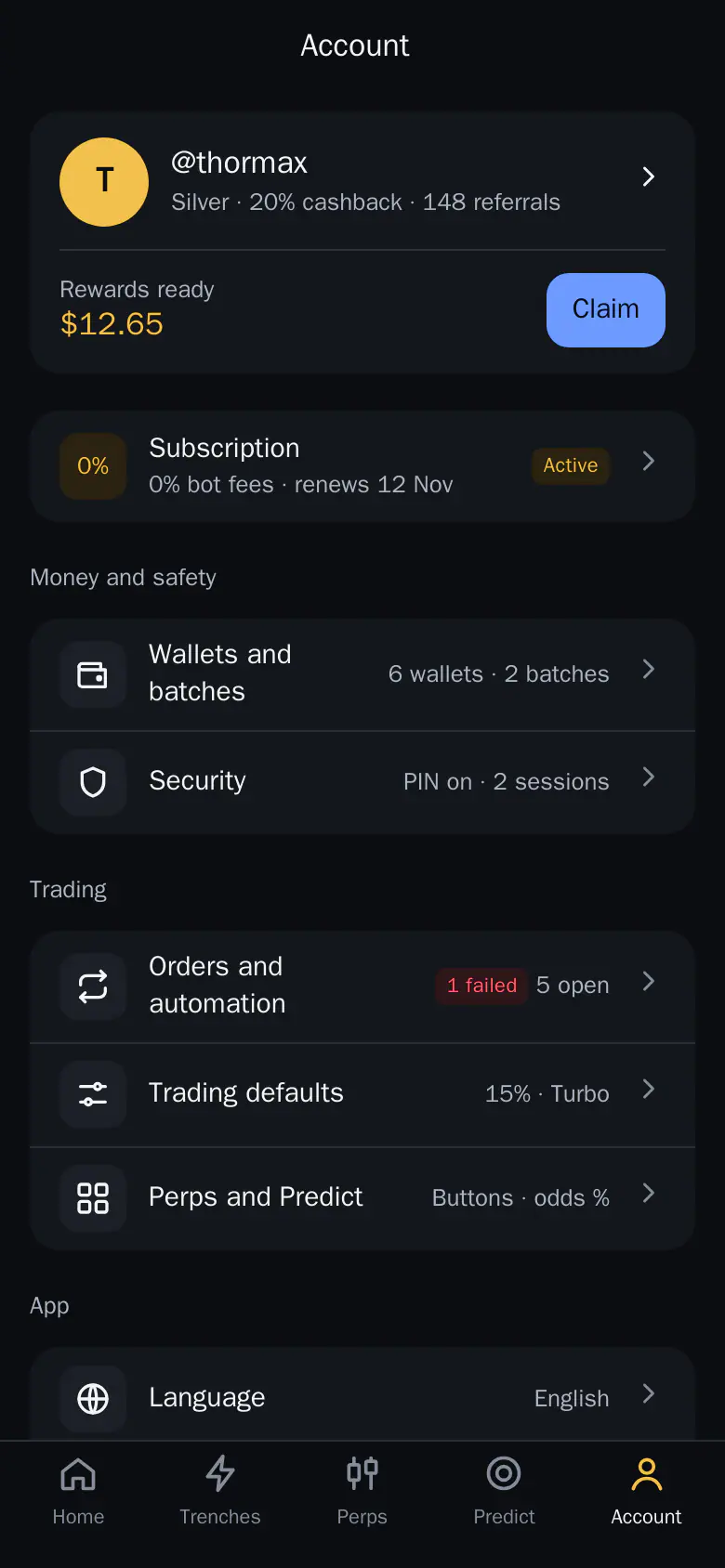
What is in the Thor Account tab? It is the last tab of the Mini App, and the home of your rewards, subscription and settings. Changes save at once and also apply in the Thor bot.
- The top card shows your tier, cashback and rewards ready. Tap Claim to collect them.
- Subscription shows whether 0% bot fees are active.
- Money and safety holds your wallets and Security.
- Trading holds orders, defaults and Perps and Predict settings.
 Thor Trading Bot
 1234
- Claim. Claims every reward that is ready
- Subscription. 0% bot fees on Solana and every EVM chain
- Security. PIN and signed-in sessions
- Trading defaults. Slippage, amounts and safety switches
Sections
- Rewards and tier card, with Claim: see Rewards and referrals and Claim all bonuses.
- Subscription: see Subscription.
- Money and safety: Wallets and batches (see Wallets and Batches) and Security (see Security and PIN).
- Trading: Orders and automation (see Automation hub), Trading defaults (see Trading defaults) and Perps and Predict, where you set quick amounts.
- App: Language and USD Cash hints. See Language, sessions and help.
- In the bot chat: Trade alerts, Message layout and Pro Trader mode.
- Help and feedback: Docs, Community, Support and a feedback form.
Note: Perps and Predict settings are hidden in restricted countries.